



Microsoft Launches Major Overhaul of Its Copilot App for Enterprise and Personal Use
Microsoft has officially unified its previously fragmented Copilot lineup into a single, dedicated application designed to serve both individual users and large-scale enterprise clients. This significant update arrives as the tech giant shifts its focus toward integrating artificial intelligence deeply into the daily workflows of organizations, while still catering to the tens of millions of individuals who pay for Microsoft 365 subscriptions on their own.
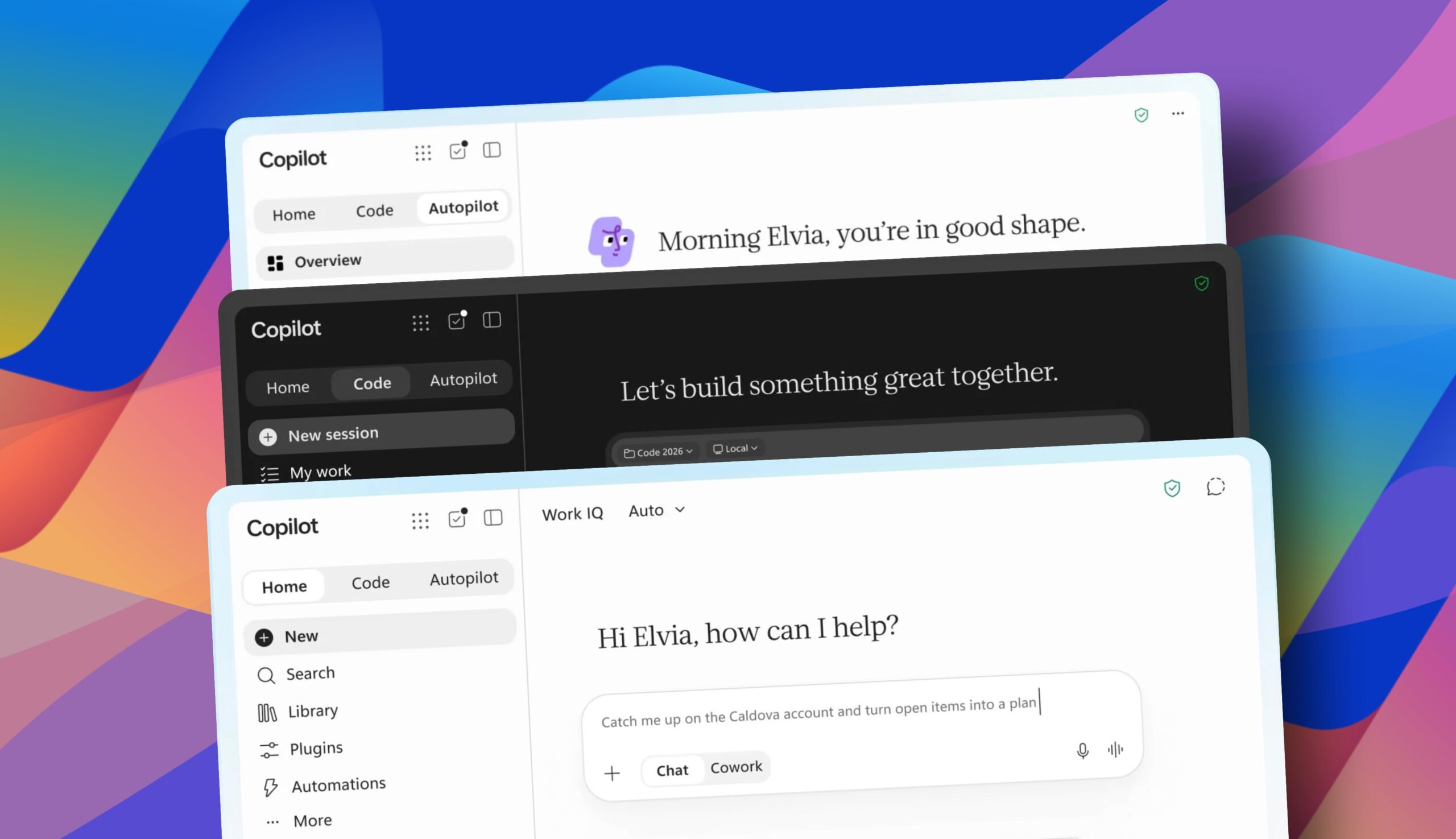
The newly redesigned client features a streamlined interface organized around three core tabs: Home, Code, and Autopilot. Whether a user logs in with a personal account or a corporate work account, the visual experience remains consistent. However, work accounts unlock a crucial advantage: secure, compliant access to sensitive company data stored across Outlook, SharePoint, OneDrive for Business, and Dynamics 365 within Microsoft’s managed cloud environment.
The Home tab merges the traditional chat functionality with more autonomous, task-oriented features. Users can now leverage “Office in Copilot,” which allows them to request the creation of launch plans in Word, budgets in Excel, or presentations in PowerPoint, generating fully editable documents without leaving the application. Microsoft has also teased a “Today view,” offering a proactive command center for mail, calendar, and meetings, though this feature is set to enter private preview later in the fall.
A standout addition is the Code tab, which taps into the underlying technology powering GitHub Copilot. Unlike local AI coding tools, this feature operates within a sandboxed environment hosted entirely inside the Microsoft 365 tenant. This cloud-based architecture is specifically designed to appeal to businesses in highly regulated industries, addressing compliance and governance concerns by keeping proprietary data from being processed on local workstations. The resulting applications—ranging from trackers to automations—are built using the Microsoft Copilot Managed Runtime. The Code feature is currently rolling out to select early adopters, with broader access expected by the end of the year for Microsoft 365 Premium and Pro subscribers.
The Autopilot tab represents Microsoft’s entry into the competitive autonomous agent market. Previously known by a different codename, this feature transforms AI into a “digital teammate.” Equipped with its own memory, computational resources, and dedicated Outlook and Teams accounts, Autopilot operates under the direct oversight of IT administrators. It maintains a complete audit trail and operates continuously without requiring rest, ensuring business processes run uninterrupted.
Regarding the financial side, Microsoft announced that its pricing model is undergoing a major evolution. The new structure relies on two distinct billing methods. A User Subscription License (USL) covers access to chat-based features, standard Office app integrations, and model selection for a fixed monthly fee. However, more advanced capabilities—including agents, Cowork, Code, and Autopilot—require Usage-Based Billing (UBB). To prevent unexpected expenses, UBB services are disabled by default, allowing administrators to establish strict spending policies and limits. Microsoft also introduced a suite of “FinOps for AI” tools under the Agent 365 umbrella, providing administrators with detailed spending reports and enabling end users to track their credit usage directly within the app.
Conclusion
Microsoft’s consolidation of Copilot into a single application marks a definitive pivot toward enterprise-grade AI, prioritizing security, compliance, and integrated workflows over generic consumer chatbots. While the promise of a unified interface is compelling, the shift to usage-based billing for advanced features introduces new financial complexities for IT departments. As organizations navigate this evolving landscape, the true return on investment will ultimately depend on how effectively these tools can automate complex tasks without compromising data governance.
Frequently Asked Questions (FAQ)
Q: What is the main difference between the personal and work versions of the new Copilot app?
A: The user interface remains identical for both, but work accounts provide secure, compliant access to corporate data repositories like Outlook, SharePoint, and OneDrive for Business, whereas personal accounts are limited to individual user data.
Q: How is Microsoft charging for the new Copilot features?
A: The pricing uses a dual model. A fixed monthly User Subscription License (USL) covers chat and basic Office integrations. Advanced features like agents, Code, and Autopilot require Usage-Based Billing (UBB), which is turned off by default and subject to administrator-defined spending limits.
Q: Is the Code tab safe for companies with strict data security requirements?
A: Yes. The Code tab operates within a sandboxed environment hosted securely inside the Microsoft 365 tenant. This architecture ensures that source code and sensitive business data remain within the company’s managed cloud, avoiding the compliance risks associated with local processing.
Q: When will the Autopilot feature be generally available?
A: Autopilot is part of today’s major rollout. It is designed to function as a “digital teammate” that operates continuously, managed by IT with full permissions and audit trails.
Thank you for reading
