



Follow ZDNET: Add us as a preferred source on Google.
ZDNET’s key takeaways
- Claude’s SMB tools include 31 skills.
- The contract review skill is the standout.
- Connectors are useful, but permissions are a concern.
This week, Anthropic unveiled Claude for Small Business, a collection of connectors and skills tailored for small businesses within Claude Cowork. On the surface, it’s a welcome addition, as having ready-made solutions is always a plus for any platform.
Also: How to actually use AI in a small business: 10 lessons from the trenches
However, while exploring these new tools, I discovered one that is exceptionally powerful and deserves your immediate attention.
Lawyer in a box
I’ll share more details about my experience with Claude for Small Business later. For now, I want to highlight the new /review-contract skill and its capabilities, because it’s truly remarkable.
Lina Ochman, Anthropic’s head of US SMB and product-led growth GTM, told ZDNET, “Small businesses deserve the same access to AI that any Fortune 500 company gets. Small businesses make up nearly half the US economy and employ close to half the private-sector workforce, and yet historically, they haven’t been equipped with the right resources, time, and education to effectively learn and use AI. That’s why we’re investing in this community, to help them fully harness AI for their most important work.”
Also: How to learn Claude Code for free with Anthropic’s AI courses – one took me just 20 minutes
This feature leverages AI in a highly practical, powerful, and instantly beneficial way.
First, a bit of setup. You’ll need to be using Claude Cowork within the Claude app, which requires at least the $20-per-month Claude Pro subscription. For this feature alone, the cost is justified.
Inside the Claude app, navigate to Cowork, then select Customize. Click the plus button to explore plugins and choose the small business plugin. Next, in the prompt box, enter /review-contract and upload your contract file. Claude will start processing it.
The entire analysis takes roughly five minutes. To put this to the test, I pulled some sample contracts from my archives. As a habit, I save both contracts I sign and those I reject. These three examples were from vendors I ultimately passed on.
Here’s an excerpt from a window company that provided a quote for window installation when we lived in Florida. Pay attention to the red-flagged items, their clarity, and the accompanying suggestions.
This next one is from a major national fitness chain. Take special note of the observation “Cancellation is deliberately hard,” along with the contract’s confusing date manipulations.
Finally, here’s one from a caregiving service we looked into before my parents passed. Often, when reviewing these types of contracts, you’re under immense pressure and emotional stress—precisely when you’re least equipped to scrutinize an unfair agreement. Companies are aware of this, and as Claude’s breakdown reveals, they exploit it.
Throughout my career, I’ve collaborated with numerous lawyers and reviewed countless contracts. While attorneys have offered their input, I’ve never received feedback from a high-priced lawyer that matched the value and clarity provided by this Claude feature.
Another advantage is the ability to share your findings with the party you’re negotiating with. Those red flags are clearly visible in the chat window. Presenting such a transparent analysis might even lead to concessions from the other side.
Remember, this feature is accessible for as little as $20 through the Claude Pro plan.
Also: I compared how Gemini, ChatGPT, and Claude can analyze videos – this model wins
Of course, the standard AI disclaimers apply. Claude might occasionally misinterpret things. It could dismiss a contract for omitting a trivial clause. You can’t always be certain. But after running /review-contract on multiple contracts, it was consistently accurate.
I don’t say this lightly, but this is an essential, must-have tool that you should be aware of and ready to use whenever needed. You can even subscribe for a single month just to review a contract and then cancel. If you ever enter into any agreement with anyone, you must make this tool part of your process.
The rest of the story
Platform vendors offering solution bundles is nothing new. Providing starter tools simplifies onboarding and helps new users see value quickly. In that sense, Claude for Small Business is fairly standard.
Also: How I used ChatGPT and AI art tools to launch my Etsy business fast
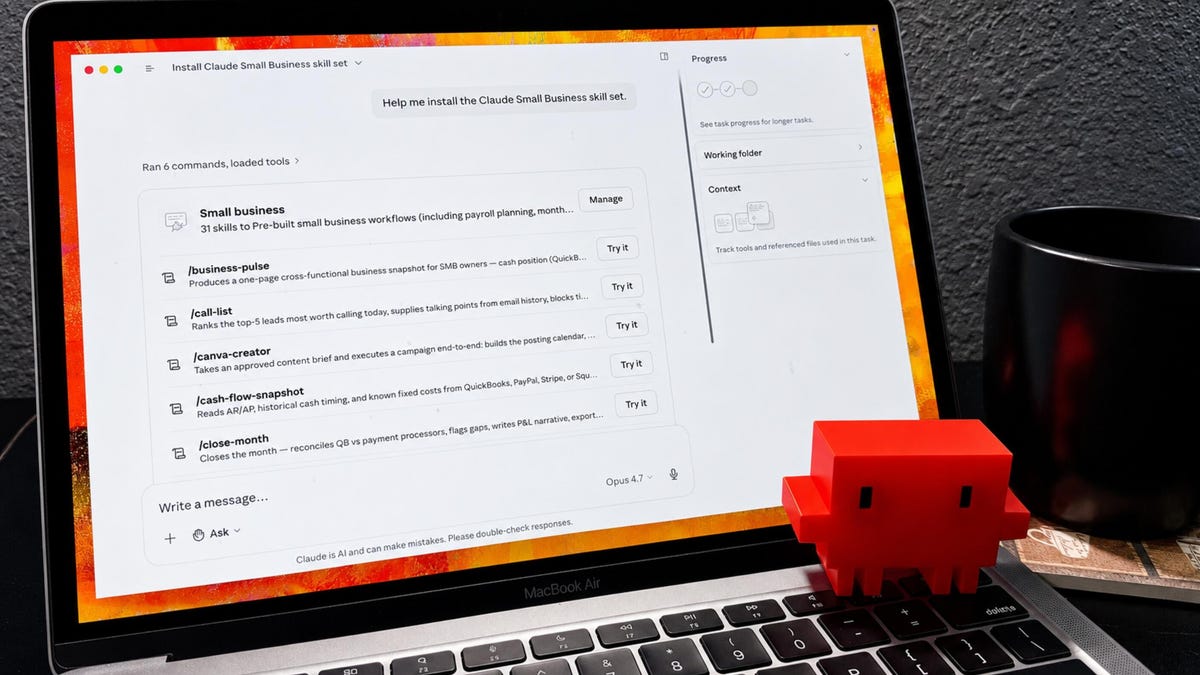
Of course, this is AI, so it goes beyond simple templates. Each offering is a structured AI application, like the /review-contract tool described above. Claude for Small Business features 31 skills that integrate with connectors for apps such as QuickBooks, Mailchimp, and PayPal.
Here are a few examples:
- /business-pulse: A cross-functional overview of your SMB using QuickBooks, PayPal, Stripe/Square, HubSpot, and email context.
- /cash-flow-snapshot: A cash-flow perspective based on QuickBooks AR/AP, PayPal/Stripe/Square timing, and known fixed costs.
- /close-month: Month-end closing using QuickBooks and payment processors, highlighting reconciliation gaps and providing a P&L narrative.
- /invoice-chase: Automated reminders for overdue invoices using QuickBooks and PayPal data, aligned with customer context.
- /margin-analyzer: Analysis of product or service margins using PayPal merchant insights and QuickBooks cost data.
- /plan-payroll: Payroll readiness forecast based on cash position, overdue invoices, and scheduled PayPal reminders.
- /quarterly-review: A comprehensive quarterly business review narrative covering revenue, margin, customer
