



# The Rising Threat of Malicious Calendar Invites: How Cybercriminals Are Hijacking Your Schedule
## Introduction
Imagine opening your calendar one morning and finding a meeting you never agreed to attend. It looks legitimate — a business meeting, a webinar, a vendor check-in. You didn’t send the request, but it’s sitting there, patiently waiting in your schedule. This is the new frontier of cybercrime, and it’s more dangerous than most people realize.
Calendar-based phishing attacks have surged dramatically in recent months, catching individuals and organizations off guard. What was once a niche tactic has evolved into a widespread threat that exploits the very tools we rely on for productivity. Understanding how these attacks work and how to defend against them is no longer optional — it’s essential.
## Understanding the Threat: What Are Calendar-Based Malware Attacks?
At the heart of these attacks lies a file format called ICS, which stands for iCalendar. ICS is a universal standard used to exchange calendar information — meeting details, dates, times, locations, and agendas. It’s the backbone of virtually every calendar application you’ve ever used.
Cybercriminals have learned to weaponize this standard. By sending an ICS file disguised as a legitimate meeting invitation through email, attackers can have that event automatically deposited into your calendar — often without any action on your part. This means the malicious event sits quietly in your schedule, sometimes even after you’ve ignored or deleted the original email message.
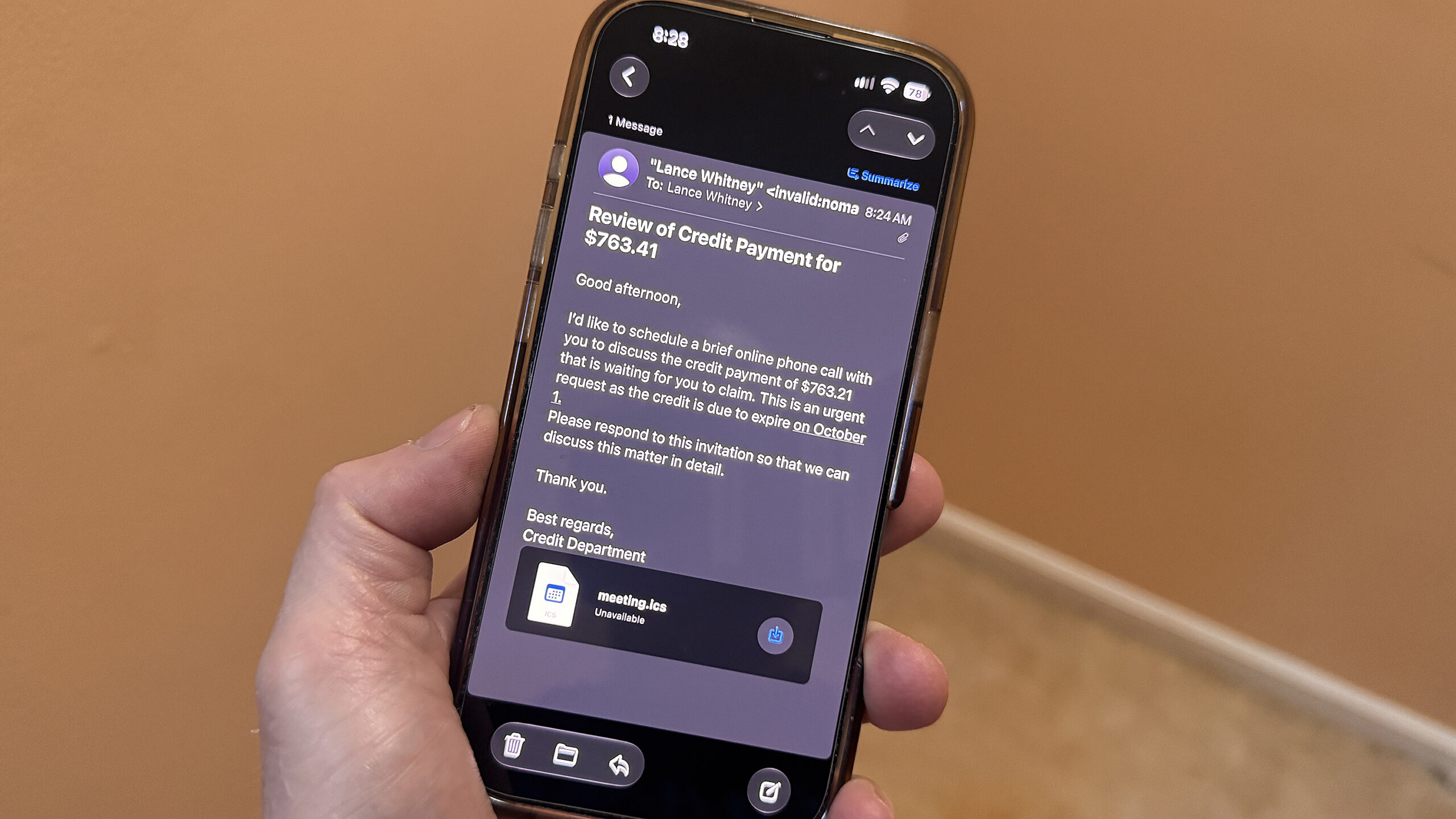
The attack typically unfolds like this: you receive an email that appears to come from a trusted service or a known business contact. The email contains a calendar invite. When your email client processes the message, the invite is added to your calendar automatically. The invite may contain a link, a QR code, or an attachment that, when clicked, downloads malware onto your device.
## Why Are These Attacks So Effective?
Several factors make calendar-based phishing an attractive strategy for cybercriminals.
**Dual exposure.** Unlike a standard email that lands solely in your inbox, a calendar invite exists in two places — your email inbox and your calendar. This doubles the chances that you’ll interact with it at some point.
**Weak calendar defenses.** Most email security systems are designed to filter and block dangerous messages before they reach your inbox. However, calendar entries often bypass these filters entirely. Even if the email is flagged and caught by security software, the calendar event may remain untouched and accessible.
**Trusted platforms.** Many of these attacks are delivered through services like Google Calendar and Microsoft Outlook infrastructure — platforms that users inherently trust. Because these services are widely used in both personal and professional settings, messages routed through them are less likely to trigger spam filters or security alerts.
**Zero cost to attackers.** Attackers can leverage free tiers of legitimate hosting and calendar services to carry out their campaigns. This makes the operation virtually cost-free while offering a high potential return.
**Implied trust.** People tend to view calendar invites as benign, routine items. They’re less suspicious of a calendar entry than they are of a standalone email. This psychological gap is exactly what attackers are banking on.
## A Look at How the Attack Unfolds
One notable campaign observed recently illustrates just how sophisticated these scams have become. The attackers sent out a calendar invite through Google Calendar, pretending to be related to a financial matter — specifically, an alleged credit balance on a past invoice. The lure was designed to tempt recipients into clicking a link to review the supposed credit.
The invite landed in Gmail accounts, meaning it wasn’t blocked by domain-based filtering. The email itself likely passed through most security scanners without raising red flags. Even if the email was eventually caught, the calendar event had already been stored.
When the recipient clicked the link embedded in the calendar entry, they were directed to a free hosting page. From there, they were prompted to download what appeared to be a credit note document. In reality, this triggered the download of an MSI installation file containing malware. The file was configured to abuse a legitimate remote access tool to establish a command-and-control connection, giving the attackers persistent access to the compromised machine.
## How to Protect Yourself
Defending against calendar-based attacks requires a combination of behavioral awareness and technical adjustments. Here’s what you can do.
### Adjust Your Calendar Settings
**For Google Calendar:**
1. Open Google Calendar.
2. Click the gear icon and choose Settings.
3. Navigate to the Event Settings section.
4. Change the “Add invitations to my calendar” option to either “Only if the sender is known” or “When I respond to the invitation in email.” This prevents unknown invites from automatically appearing in your schedule.
**For Microsoft Outlook:**
1. Go to File, then Options, and click Mail.
2. Scroll to the Tracking section and uncheck “Automatically process meeting requests and responses to meeting requests and polls.”
3. Next, navigate to the Calendar section in Outlook Options.
4. Find the “Automatic accept or decline” area.
5. Uncheck “Automatically accept meeting requests and remove canceled meetings.”
6. Click OK twice to save your changes.
### Practice Smart Email Hygiene
– **Scrutinize the sender.** Don’t just look at the display name — examine the actual email address and domain for inconsistencies or unusual characters.
– **Evaluate links carefully.** Treat links in calendar invites the same way you’d treat links in emails. If something looks off, don’t click it — just delete the event.
– **Resist urgency.** Be wary of invites that pressure you to act immediately. Legitimate meeting requests rarely demand instant action, especially when tied to financial matters.
– **Never authenticate through a calendar invite.** No real meeting invitation will ask you to confirm a password or log into an account. Treat any request like this as a red flag.
– **Don’t engage.** Avoid clicking Accept, Decline, or any RSVP button. Even declining confirms to attackers that your email address is active. Instead, report the message as phishing and delete it.
## Frequently Asked Questions
**Q: Can calendar-based attacks infect my phone as well as my computer?**
Yes. These attacks work across all devices that sync with your email and calendar accounts, including smartphones and tablets. If your phone automatically adds calendar invites, it is just as vulnerable as your desktop.
**Q: Will my antivirus software catch these attacks?**
Not always. The initial calendar invite itself is usually harmless text. The danger comes when you interact with the content inside — clicking a link or downloading a file. By the time antivirus software might detect the malicious payload, it could already be too late. Prevention is far more effective than reaction.
**Q: Is it safe to delete a calendar event that I suspect is fake?**
Yes. Deleting the event is the safest course of action. Just make sure you don’t click any links or interact with any content within the event before deleting it.
**Q: Do I need to worry about this if I use a corporate email account?**
Absolutely. Corporate email accounts are frequent targets because they often grant access to sensitive company data and internal networks. Many organizations have fallen victim to calendar-based attacks that started with a single compromised employee.
**Q: Can attackers see if I’ve opened the email or the calendar invite?**
Yes, in many cases. Attackers track open rates and interaction metrics to identify active, responsive targets. This is another reason it’s critical to avoid engaging with suspicious invites in any way — even opening the event details can signal to attackers that your account is in use.
**Q: Are all calendar invites dangerous?**
No. The vast majority of calendar invites are completely legitimate. The key is to stay vigilant, verify the sender, and adjust your settings so that unknown invites don’t automatically land in your calendar.
## Conclusion
Calendar-based phishing represents a significant shift in how cybercriminals approach their targets. By exploiting the trust and automation built into our daily productivity tools, attackers can bypass traditional email defenses and place malicious content directly into our schedules. The dramatic rise in these attacks underscores the importance of proactive defense — from adjusting your calendar settings to maintaining a healthy skepticism toward unexpected meeting invitations.
Staying safe doesn’t require advanced technical knowledge. It starts with awareness and a few simple configuration changes. Take the time today to review your calendar settings, educate your team, and build habits that keep malicious content out of your schedule. In the world of cybersecurity, the best offense is a strong, informed defense.
Thank you for reading
