



# How IoT Explainer Videos Help Businesses Win More Qualified Leads
## The Challenge of Explaining Connected Technology
When a business owner or operations manager lands on a website offering Internet of Things (IoT) solutions, they often face a steep learning curve. Sensors, gateways, cloud platforms, dashboards, and data pipelines can quickly overwhelm someone who is just trying to understand whether a product fits their needs. Dense technical language and walls of specifications tend to push visitors away instead of drawing them in.
A well-crafted explainer video changes that dynamic. Instead of asking the visitor to decode complex systems on their own, the video walks them through a real-world problem and shows how connected technology solves it. In just a minute or two, viewers can go from confusion to curiosity — and that shift is exactly what turns a casual browser into a serious lead.
## Why a Clear Message Drives Better Results
Buyers evaluating IoT solutions don’t need every detail upfront. They need to see themselves in the story. A short video that opens with a relatable challenge — say, equipment downtime on a manufacturing floor or missed alerts from remote facilities — immediately creates relevance. Once the viewer recognizes their own situation, they become much more willing to stick around and learn how the solution works.
The key is simplicity. Focus the video on a single problem and a single outcome. Don’t try to showcase every protocol, every device type, or every integration capability. Pick the most compelling use case and build the narrative around it. When the visitor finishes watching, they should be able to answer one question clearly: “Could this actually help me?”
## Showing the Full Journey With Visuals
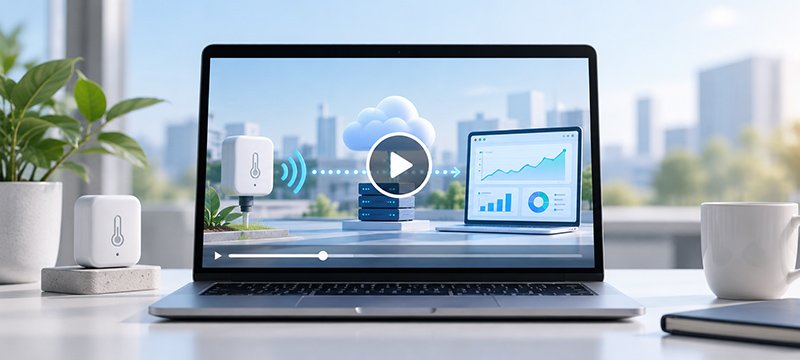
One of the biggest advantages a video has over text is the ability to show motion and flow. IoT systems involve data moving through multiple stages — from a device in the field, through a network, to a platform where it gets analyzed and acted upon. An animation that traces this journey step by step helps viewers understand not just what each component does, but how they all connect.
Interface footage can add further credibility. Showing a real monitoring dashboard, an alert notification, or a device onboarding screen makes the product feel tangible. Viewers can picture themselves using it. Just make sure every visual accurately represents what the product delivers — overpromising in a video will only damage trust later.
## Putting the Video Where It Gets Seen
Placement matters just as much as content. A video tucked at the bottom of a long page may never get watched. Instead, position it where buyers are most likely to have questions: near the hero section, alongside product details, or right before a request-demo form. Surrounding text should tell the visitor exactly what they’re about to watch so they can decide quickly whether it’s relevant.
Call to action matters too. A single, clearly worded prompt — such as “Watch a demo” or “Talk to a solution specialist” — is more effective than multiple competing options. The button or link should appear at the natural moment when the video’s value becomes clear, giving the viewer an immediate next step.
## Measuring What Works
Once a video is live, track the right signals. Watch the start rate, completion rate, and conversion actions like demo requests or consultation bookings. If few people even begin watching, the thumbnail or surrounding copy may need improvement. If many start but few finish, the video might be too technical or too long at the beginning. If viewers finish but don’t take action, the call to action may need to be stronger or better aligned with what the video promised.
These patterns are clues, not final verdicts. Any change should be tested carefully to see if it actually improves results.
—
## Frequently Asked Questions (FAQ)
**Q: How long should an IoT explainer video be?**
A: Two to three minutes is a solid range for most use cases. You want enough time to show the problem, the workflow, and the outcome without losing the viewer’s attention. If the topic is especially technical, aim closer to two minutes and save deeper details for linked resources.
**Q: Should the video use real footage of the product or just animations?**
A: A mix of both is often most effective. Animations work well for showing abstract concepts like data flows and architecture, while real product footage — interface screens, device close-ups — builds credibility and trust.
**Q: Where on the website should I place the video?**
A: Near the top of the page, alongside the headline, is ideal for introducing the solution. You can also place a second video copy on a deeper page where visitors are comparing features or preparing to make a decision.
**Q: How many calls to action should a single IoT explainer video include?**
A: Stick to one. Multiple CTAs split attention and dilute the message. Choose the action you want most viewers to take and make that the sole focus.
**Q: Do I need to update the video after launch?**
A: Yes. Whenever the product changes — new features, updated interfaces, revised workflows — the video should be reviewed and updated to remain accurate. Outdated footage can confuse buyers and undermine credibility.
**Q: Can a short explainer video really compete with detailed technical documentation?**
A: It doesn’t have to compete with documentation — it complements it. The video’s job is to help visitors understand the big picture quickly. Documentation then supports those who want to dig deeper into specifications and integrations.
—
## Conclusion
An IoT explainer video is one of the most efficient ways to bridge the gap between technical complexity and visitor understanding. By focusing on a single buyer problem, using clear visuals to trace the connected workflow, placing the video where questions naturally arise, and tracking how well it performs, a company can turn website visitors into informed, engaged leads. The goal isn’t to explain everything — it’s to make the next step feel obvious and worth taking.
Thank you for reading.
