



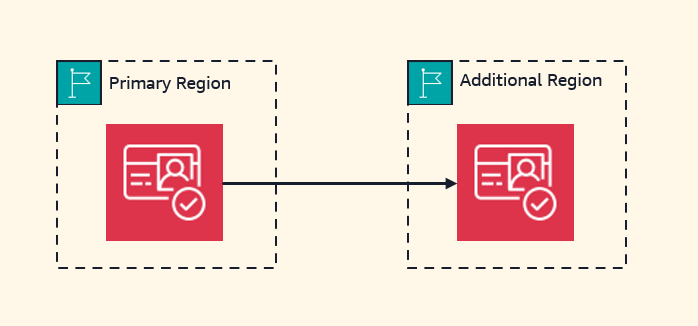
As a developer advocate who works closely with web and mobile app creators, I’ve frequently heard about the challenge of keeping user logins working smoothly if a regional service goes down. Now, with the growing use of AI agents, microservices, automated systems, and service accounts, there’s a similar need for reliable machine-to-machine authentication. Today, I’m thrilled to announce two major enhancements to Amazon Cognito: multi-Region replication for better fault tolerance, and support for customer managed keys for greater control over encryption.
Countless applications depend on Amazon Cognito for handling user logins, machine-to-machine authentication, and user profile management. When designing for high availability, keeping data consistent across multiple AWS Regions has always been essential—but until now, doing so came with serious hurdles. Development teams invested considerable effort building and maintaining custom replication systems to keep configurations in sync across Regions. Manually exporting and importing user data between Regions introduced security vulnerabilities from possible data leaks and created chances for data mismatches. During regional failovers, users faced interruptions such as mandatory password resets and having to log in again. For machine-to-machine communication, teams had to set up new app clients in the backup Region, which required reconfiguring their applications and updating OAuth-protected resources to recognize access tokens from the new regional issuer. All of these obstacles made it tough to keep operations running seamlessly across Regions.
With multi-Region replication, Amazon Cognito automatically keeps a synchronized copy of your user data and machine secrets in a secondary AWS Region you choose. The replication moves in one direction—from your primary Region to the secondary Region. This covers user profiles, login credentials, and pool settings. The secondary Region runs in read-only mode, focused on preserving authentication functionality. Current sessions stay active without interruption.
When you need to shift traffic to the secondary Region, your existing users can keep signing in with their current credentials without any disruption, and users who are already logged in stay authenticated because both Regions accept access tokens issued by either Region. Multi-Region replication works with all authentication methods, including federated sign-in through social identity providers (Amazon, Google, Apple, Facebook), Security Assertion Markup Language (SAML) and OpenID Connect (OIDC) integrations, and API authorization flows. This ensures availability for both end-user applications and machine-to-machine communications in your backend services. While authentication keeps working without interruption, features like new user sign-ups or profile changes are unavailable during failover.
Before setting up multi-Region replication, you need to configure a multi-Region customer managed key stored in AWS Key Management Service (AWS KMS) to encrypt your data at rest. These keys ensure consistent encryption across Regions while letting you manage your own encryption strategy.
How this works in practice
For this demonstration, I begin with an existing Cognito user pool in the us-west-2 (Oregon) Region. I want to set up replication to us-east-1 (Northern Virginia). I also have a customer managed key that’s already replicated in both of these Regions.
Setting up multi-Region replication takes just three steps. The AWS Management Console walks me through each one: configure a custom key for encryption, set up multi-region OIDC endpoints, and enable the replication.
First, I configure a custom AWS KMS key to encrypt the data at rest.

I pick the custom key I previously created. I also update the key policy to grant Amazon Cognito permission to access and use the key. The console displays the correct IAM policy statements I need to add to my key policy.
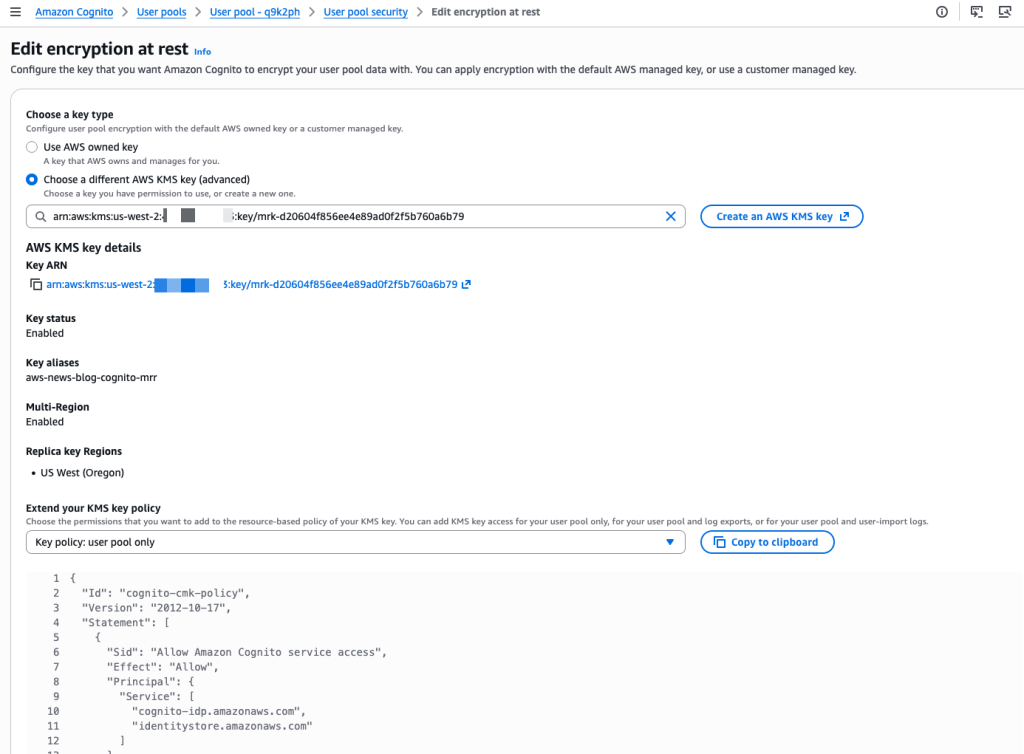
The console confirms once the custom key is selected and properly configured.
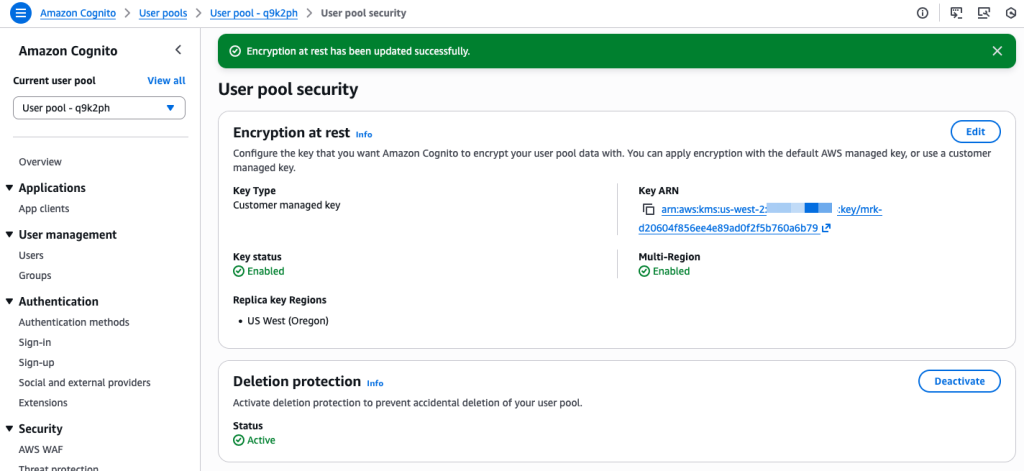
Second, I follow the console prompts to configure the OIDC issuer type. On Step 2 – optional, I select Configure.

I make sure to update my client applications with these new endpoints. This is a mandatory change that will require redeploying server-side applications and submitting updates for mobile apps on the App Store and Google Play. If I skip updating the endpoints, my users will face disruptions because requests to the old endpoints won’t be routed correctly anymore.
On the next screen, I select Updated. I take note of the new URLs. I confirm the changes and choose Change issuer type.
 Finally, I choose the target Region for replication. Only Regions where the custom encryption key is already replicated appear as available options. After selecting the target Region, I click Create.
The service begins preparing the replication. The time required depends on how much data is in the user pool.
Once the replicated user pool is ready, I manually Activate it.
The replication status changes to Active. At this point, the replica is prepared to handle incoming traffic.

Additional configurations
The console provides a helpful checklist of extra setup steps to consider. If you’re using Lambda functions for custom authentication flows or for sending SMS and email notifications, you’ll need to deploy and configure those same resources in the new Region as well.
In the same way, log streaming and AWS WAF settings must be manually configured in the target Region before you begin routing authentication traffic there.
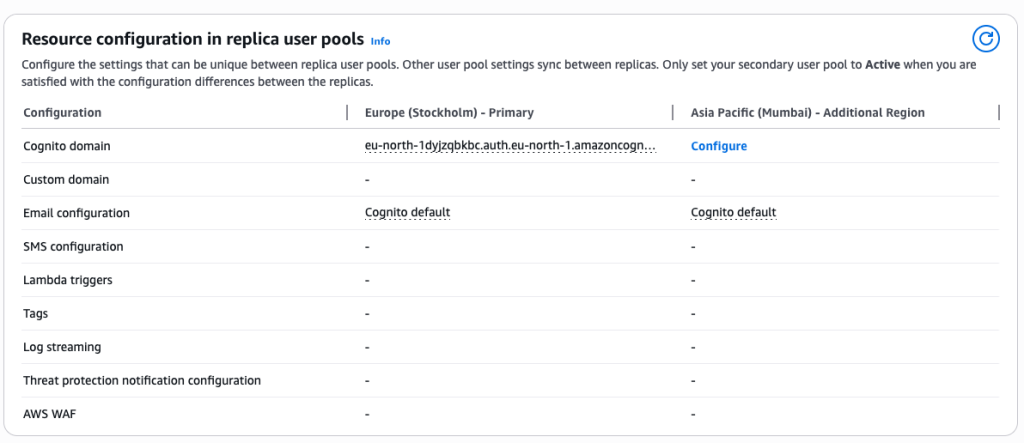
Health checks and failover
Both the primary and secondary regional endpoints stay active and ready to serve your traffic at all times. To keep an eye on system health and handle failovers, you should design a strategy that fits your application’s specific needs and security posture. You can set up health checks to monitor how authentication services are performing in your primary Region and define the conditions that should trigger a failover. These checks might track error rates, latency trends, or specific service alerts.
When your monitoring system detects problems that meet your failover criteria, you can shift traffic to the secondary Region by updating your DNS records. This method gives you full control over the failover process while keeping security intact. It’s a good idea to test your failover strategy during off-peak hours by redirecting a small slice of traffic to confirm that authentication works as expected in the secondary Region.
If you’re using managed login and federation with custom domains, you can also take advantage of the built-in traffic routing feature by supplying an Amazon Route 53 health check ID.
Pricing and availability
Multi-Region replication is available now as an add-on feature for Amazon Cognito customers on the Essentials and Plus tiers. For user authentication, the add-on costs $0.0045 per monthly active user per replica Region for Essentials tier customers and $0.006 per monthly active user per replica Region for Plus tier customers. For machine-to-machine (M2M) authentication, the add-on adds a 30% surcharge on top of the standard volume-based pricing for successful tokens issued. For full pricing details, see Amazon Cognito pricing.
Multi-Region replication is supported in the following Regions: US East (Ohio, N. Virginia), US West (N. California, Oregon), Asia Pacific (Mumbai, Seoul, Singapore, Sydney, Tokyo), Canada (Central), Europe (Frankfurt, Ireland, London, Paris, Stockholm), and South America (São Paulo).
Any of these Regions can serve as either the source or the destination for replication.
Support for customer managed keys is available for the Essentials and Plus tiers. It is offered in the following Regions: US East (Ohio, N. Virginia), US West (N. California, Oregon), Africa (Cape Town), Asia Pacific (Hong Kong, Hyderabad, Jakarta, Malaysia, Melbourne, Mumbai, New Zealand, Osaka, Seoul, Singapore, Sydney, Thailand, Tokyo), Canada (Central), Canada West (Calgary), Europe (Frankfurt, Ireland, London, Milan, Paris, Spain, Stockholm, Zurich), Israel (Tel Aviv), Mexico (Central), South America (São Paulo), and AWS GovCloud (US-East, US-West).
From my discussions with customers, ensuring business continuity during regional incidents while meeting security requirements is a top priority. Multi-Region replication gives you the ability to build more resilient applications without having to manage complex replication logic on your own. The automatic synchronization of user data and configurations cuts down on operational overhead while keeping security strong.
For customers in regulated industries, the new support for customer managed keys offers added control over data encryption. You can now use your own encryption keys to protect user data at rest, which helps you satisfy regulatory requirements in sectors like healthcare and financial services.
To get started with multi-Region replication and customer managed key encryption, head to the Amazon Cognito console or check out the documentation for step-by-step setup instructions. I’m excited to hear how you’ll use this feature to make your application architecture more robust.
— seb
