



**Firefox’s Smart Window Beta: A Deep Dive into Mozilla’s AI-Powered Browser Feature**
Firefox has been on a remarkable journey over the past few years. Once written off by many users, it has steadily clawed its way back into relevance, thanks to thoughtful updates, performance improvements, and a renewed focus on user experience. Among the most recent additions to the Firefox ecosystem is **Smart Window**, an AI-powered tool Mozilla has been quietly developing—and now quietly rolling out in beta. As of late 2024, Firefox users on macOS and Windows can finally try out this feature, which promises to make browsing smarter, more contextual, and more helpful than ever before.
—
### What Is Smart Window?
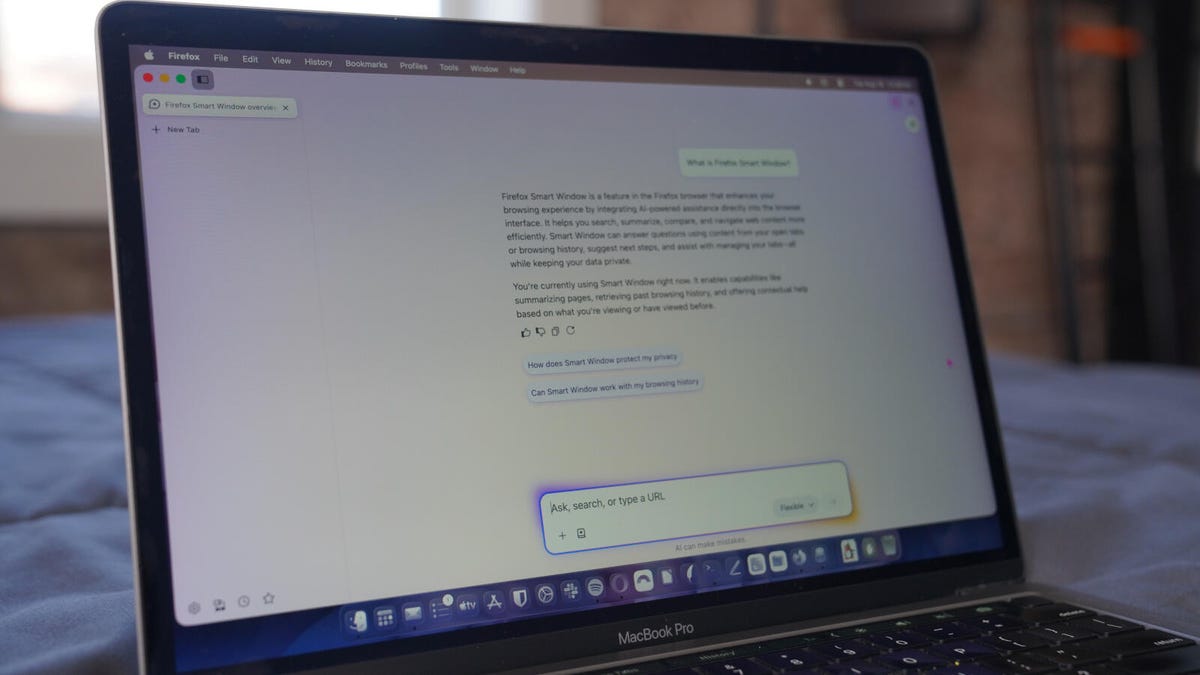
Smart Window is an AI assistant built directly into Firefox. It sits alongside your browsing experience, turning the browser into an intelligent partner for research, tab management, summarization, and general productivity. It leverages large language models (LLMs) to understand context, remember prior interactions, and assist based on real-time browsing data.
One of the biggest selling points is its flexibility. According to Mozilla, Smart Window isn’t just another chatbot—it’s a tool designed to adapt to your workflow. It runs locally when possible, prioritizes privacy, and integrates cleanly into the existing Firefox interface.
—
### Why Smart Window Stands Out
Unlike many AI tools that feel bolted on, Smart Window was built with the browser in mind. Here’s what makes it compelling:
* **Easy On/Off Control:** Enable or disable the feature with a single click.
* **Customizable Start Page:** You can set Smart Window as your default homepage or keep your existing setup.
* **Model Switching:** Choose between three distinct AI models right from the start:
* **Fast** – Powered by Google Gemini 3.1 Flash Lite
* **Flexible** – Alibaba Qwen3-235B-A22B Instruct
* **Personal** – OpenAI GPT-OSS-120B
* **Persistent Memory:** Information shared during past conversations is retained (with your permission), allowing for more coherent, context-aware responses.
* **Lightweight Performance:** Despite its capabilities, Smart Window doesn’t noticeably slow down Firefox.
—
### How It Works
When you install or update to Firefox 153 (on macOS or Windows), you’re greeted with a setup wizard that lets you:
1. Choose your preferred AI model.
2. Decide whether Firefox should use your chat history and browsing data to train the AI.
3. Optionally set Smart Window as your default start page.
Once configured, you’ll see a clean chat interface in Firefox. From there, you can ask questions, summarize articles, request tab organization, and more. A dropdown menu lets you switch models in real time during a conversation, and small icons let you manage memories—either globally or on a per-chat basis.
—
### Smart Window’s Key Features
Smart Window offers more than just Q&A. Its feature set includes:
* **Context-Aware Assistance:** Uses open tabs and browsing history to generate summaries and answers.
* **Tab Management:** Can group, close, or reorganize tabs based on topics or preferences.
* **Search Integration:** Pulls in up-to-date information using your default search engine.
* **Privacy-Centric Design:** Operates locally whenever possible, reducing reliance on cloud processing.
—
### Real-World Testing and Performance
In practical use, Smart Window feels polished and responsive. Mozilla has clearly prioritized user experience, avoiding the lag and confusion that often plague early AI integrations. The inclusion of Memories alone sets it apart—being able to say “remember I was researching AI ethics” and have the AI recall that context minutes later is a game-changer.
That said, it’s still in beta. Linux users will have to wait a bit longer before full availability, as the feature is currently limited to macOS and Windows Nightly builds.
—
### Could Smart Window Bring Users Back to Firefox?
For longtime users who abandoned Firefox in favor of Chrome or Edge, Smart Window might be the nudge they need to return. Combined with recent improvements like vertical tabs, enhanced tracking protection, and a more streamlined UI, Firefox is shaping up better than ever.
The one missing piece for some is **Workspaces**, a tab grouping feature found in browsers like Opera and Vivaldi. Until Mozilla introduces something similar natively, some power users may remain hesitant. But for anyone invested in open-source software and privacy-forward tools, Firefox with Smart Window is hard to ignore.
—
## Frequently Asked Questions (FAQ)
**Q: Which operating systems support Firefox Smart Window?**
A: As of now, Smart Window is available on macOS and Windows. Linux support is pending.
**Q: Is Smart Window free to use?**
A: Yes. Mozilla has described Smart Window as a free, open-featured tool in its beta phase.
**Q: Can I switch between AI models?**
A: Absolutely. You can switch between Fast, Flexible, and Personal models at any time—both during setup and within active chats.
**Q: Does Smart Window store my data?**
A: It can store “Memories” with your permission, but you can enable or disable this on a per-chat basis. Mozilla emphasizes local processing wherever possible.
**Q: Will Smart Window slow down my browser?**
A: According to testing, Smart Window has not led to noticeable performance degradation.
**Q: When will Smart Window be available on Linux?**
A: Mozilla has not announced a timeline, but beta expansion to Linux is expected in the coming months.
—
## Conclusion
Firefox’s Smart Window beta represents a significant step forward for the browser. By blending AI assistance with a privacy-conscious design, Mozilla has created a tool that feels both powerful and practical. While it may not yet replace every feature of dedicated AI apps, its seamless integration into daily browsing is unmatched.
For users on the fence about Firefox, Smart Window could be the deciding factor. And as Mozilla continues to refine the tool—adding features like Workspaces and expanding OS support—the browser’s resurgence looks not just possible, probable. If you’re looking for a smarter way to browse, now might be the perfect time to give Firefox another chance.
