



Building a multimodal recommender system is no simple task, particularly when it must scale effectively, adapt almost instantly, and operate reliably in a cloud environment.
In this article, I share my firsthand experience creating and launching such a system from start to finish, covering everything from preparing data and training models to deploying them in a live production setting.
We will examine the complete pipeline, including retrieval, filtering, scoring, and ranking, along with the infrastructure and critical decisions that make it all function. This includes feature stores, Bloom filters, Kubeflow, near real-time preference adaptation, and a significant performance boost achieved through in-memory feature caching.
This is a detailed read, but if you are developing or scaling recommender systems, you will discover practical strategies here that you can immediately implement in your own work.
Main sections covered in this article
- Overview of the system
- Rationale behind the chosen design
- Key system components
- Data source
- End-to-end training and deployment pipeline
- Ongoing fine-tuning pipeline
- Handling requests across 14 models in NVIDIA Triton Inference Server
- Reducing item feature lookup latency with in-memory caching
- Autoscaling the Triton Inference Server on EKS
- Validating contextual recommendations, Bloom filter filtering, and near real-time recommendation updates (with Demo)
- Limitations and future improvements
- Conclusion
- Resources
Overview of the system
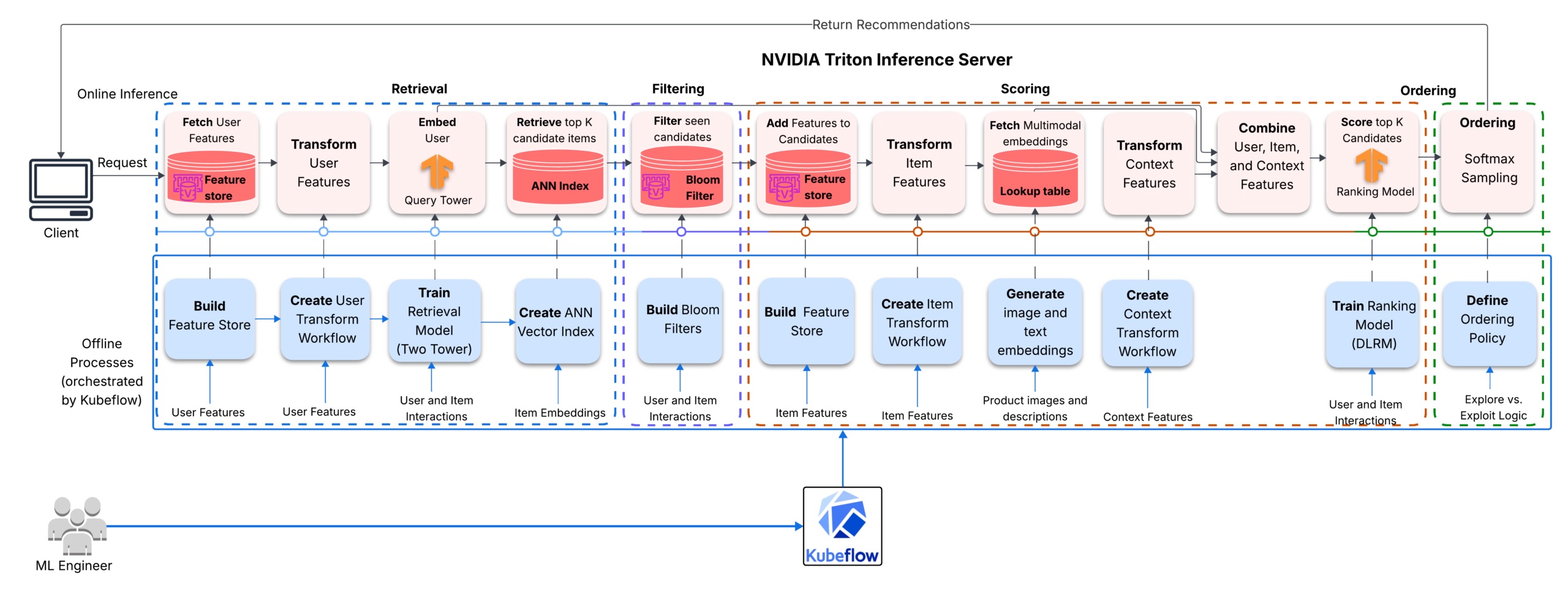
The recommender system operates through four primary stages: a Two-Tower model generates candidate items, a Bloom filter temporarily removes items the user has recently engaged with, a DLRM ranker evaluates the remaining items using user, item, and contextual features, and a final reranking stage organizes and samples from these scores to deliver the ultimate recommendations. The models leverage both tabular collaborative features and precomputed CLIP image embeddings alongside Sentence-BERT text embeddings.
Within the retrieval model, these pretrained embeddings are combined with learned item features in the candidate tower, equipping it with both content-based semantic signals and collaborative signals. The dot product between the query-tower output and candidate-tower output then serves as a learned relevance score within this shared embedding space.
In the DLRM ranker, the pretrained image and text embeddings are incorporated into the dot-product interaction layer. These pairwise interactions are subsequently fed into the top MLP, enabling content-based signals from the pretrained embeddings to enhance the collaborative and contextual signals used for predicting clicks.
Rationale behind the chosen design
The intended use case involves an ecommerce platform that must suggest relevant products the moment users arrive on the homepage. The platform caters to both registered users and anonymous visitors, and user behavior can differ significantly depending on the request context, such as device type, time of day, or day of the week. This means the recommendation service must deliver reasonable cold-start recommendations for new users and must tailor recommendations to the context of each request.
The solution must also be scalable. As more retailers join the platform, the product catalog could expand to millions of items. At that scale, evaluating the entire catalog for every request becomes impractical. A multistage architecture addresses this challenge by employing a lightweight retrieval stage to quickly fetch candidates and a more resource-intensive ranking stage to evaluate those candidates.
Additionally, the recommendation models must stay current with new interactions, yet rebuilding the entire retrieval stack daily is not feasible. To address this, two Kubeflow pipelines are established. The first pipeline orchestrates the preprocessing workflows, trains the models from scratch, constructs the ANN index, and deploys the Triton server along with the models. The second pipeline handles daily fine-tuning, which primarily updates the query tower and the ranker; the models are refreshed with new interaction signals while the item embeddings remain unchanged.
Key system components
All components of the system collaborate to achieve the overarching goal of delivering relevant recommendations quickly and at a reasonable scale.
- Kubeflow Pipelines orchestrates both the complete training workflow and the daily fine-tuning workflow on the Kubernetes-based platform.
- The NVIDIA Merlin stack manages GPU-accelerated feature engineering, preprocessing, and training of retrieval and ranking models. The Triton Inference Server hosts the multistage serving graph as a unified ensemble model.
- FAISS functions as the approximate nearest neighbor index for candidate retrieval.
- Feast oversees user and item features across both training and serving. ElastiCache for Valkey (Redis) supports the online feature store, manages each user’s Bloom filter to enable filtering of previously seen items from recommendation lists, and stores global and category-based item popularity data based on interaction counts. Amazon Athena (with S3 and Glue) supports the offline feature store.
- Amazon Elastic Kubernetes Service (EKS) runs the containerized machine learning workflows and scales compute resources to accommodate shifting workload demands.
Data source
The training data is derived from a modified version of the AWS Retail Demo Store interaction generator. The user pool was expanded to 300,000 users while the product catalog was maintained at 2,465 items, complete with associated images and descriptions. The dataset comprises 13 million interactions spanning 14 days, stored as daily partitioned parquet files (day_00.parquet through day_13.parquet).
End-to-end training and deployment pipeline
Here is the paraphrased version of the article:
The initial Kubeflow pipeline manages the complete workflow: transferring raw data, preparing it for training, training the model, building the FAISS index, and deploying everything to the Triton Inference Server.

Data copy
The pipeline starts by transferring all the resources required by later stages from an S3 bucket to a persistent volume accessible at a local path. This includes interaction logs, feature tables, product images, and pretrained CLIP and Sentence-BERT models.
Preprocessing
During preprocessing, interaction data is joined with user and item feature tables. Three separate NVTabular workflows are then defined and fitted — one handling user features [jump to CODE], another for item features [jump to CODE], and a third for context features [jump to CODE]. These are later combined into a single end-to-end workflow. Keeping the workflows modular simplifies the creation of independent Triton models for feature transformations, each of which can be updated on its own.
A separate preprocessing stage introduces cold-start scenarios during training. For 5% of training rows, the user ID, gender, and top_category fields are swapped with placeholder values, and an additional 5% of device type entries are randomly masked. When the NVTabular workflows process the data, these placeholders are mapped to out-of-vocabulary (OOV) indices.
#MASK some users and context features in train data with 5% probability
ANONYMOUS_USER = -1
OOV_GENDER = -1
OOV_TOP_CATEGORY = -1
OOV_DEVICE = -1

masked_train_dir = os.path.join(input_path, "masked_train")
os.makedirs(masked_train_dir, exist_ok=True)

for i in range(train_days):
    day = cudf.read_parquet(os.path.join(input_path, f"train_day_{i:02d}.parquet"))
    n=len(day)
    user_mask = cupy.random.random(n) < 0.05
    day.loc[user_mask, "user_id"] = ANONYMOUS_USER
    day.loc[user_mask, "gender"] = OOV_GENDER
    day.loc[user_mask, "top_category"] = OOV_TOP_CATEGORY

    device_mask = cupy.random.random(n) < 0.05
    day.loc[device_mask, "device_type"] = OOV_DEVICE
    day.to_parquet(os.path.join(masked_train_dir, f"train_day_{i:02d}.parquet"), index=False)
    del day
    gc.collect()

masked_train_paths = [os.path.join(masked_train_dir, f"train_day_{i:02d}.parquet") for i in range(train_days)]
masked_train_ds = Dataset(masked_train_paths)

full_workflow.transform(masked_train_ds).to_parquet(os.path.join(output_path, "train"))
full_workflow.transform(valid_raw).to_parquet(os.path.join(output_path, "valid"))
To generate multimodal item features, product images are encoded with OpenAI CLIP and product descriptions with Sentence-BERT. Both sets of embeddings are compressed to 64 dimensions using PCA and saved as lookup tables indexed by the NVTabular-transformed item IDs. The average age calculated by the user workflow is stored for later use in the feast_user_lookup model configuration. A further step handles the offline and online feature artifacts — timestamps are appended to user and item features, the results are written to the offline store, and the data is materialized into the online store for real-time serving. In parallel, global and category-level popularity metrics are derived from the interaction data and stored in the Valkey database (db=3).

Training the retrieval model
The Two-Tower model [jump to CODE] is trained using only user and item features, leveraging in-batch negatives and a contrastive loss function. The query tower processes user-side features, while the candidate tower handles item features along with the precomputed image and text embeddings. Figures 5 and 6 detail the NVTabular preprocessing and input block processing steps for each tower.

The model is trained on the first 9 days of interaction data and evaluated on days 10 through 12. Once training is complete, the candidate encoder processes the entire item catalog to generate item embeddings. A custom LookupEmbeddings operator (extending Merlin’s BaseOperator) manages the multimodal embedding lookups as item features are loaded in batches via Merlin’s data loader. These embeddings are then used to construct the FAISS index for approximate nearest-neighbor search. The query encoder is saved independently for use during online inference.

Training the ranking model
The DLRM ranker [jump to CODE] is trained on the same interaction data but with a broader set of features. This includes item features, user features, and request-time context features such as device type along with cyclical time-of-day and day-of-week encodings. The training objective is a binary click label. These context features capture situational influences on user behavior — for example, a person may interact differently with items on a mobile device compared to a desktop, or exhibit varying preferences depending on the time of day or day of the week.

Model preparation and deployment
After both models are trained, the pipeline gathers all the serving artifacts needed by Triton. These consist of the saved query tower, the DLRM ranker, the NVTabular transform models, the FAISS index, and the multimodal item embedding lookup tables. The Triton model repository is pre-structured, so each deployment simply copies the model artifacts into their versioned directory and injects runtime values such as the average
User age (for cold-start default), the retrieval topK, the ranking topK and diversity mode are all specified in the model configuration files.
A Helm chart is used to deploy Triton Inference Server on EKS. The server is launched in explicit mode, and all models are loaded at startup (refer to the launch script below).
# Triton launch script
set -e
MODELS_DIR=${1:-"/model/triton_model_repository"}

echo "Launching Triton Inference Server"
echo "Models directory: $MODELS_DIR"

tritonserver
    --model-repository="$MODELS_DIR"
    --model-control-mode=explicit
    --load-model=nvt_user_transform
    --load-model=nvt_item_transform
    --load-model=nvt_context_transform
    --load-model=multimodal_embedding_lookup
    --load-model=query_tower
    --load-model=faiss_retrieval
    --load-model=dlrm_ranking
    --load-model=item_id_decoder
    --load-model=feast_user_lookup
    --load-model=feast_item_lookup
    --load-model=filter_seen_items
    --load-model=softmax_sampling
    --load-model=context_preprocessor
    --load-model=unroll_features
    --load-model=ensemble_model
Continual fine-tuning pipeline
This Kubeflow pipeline manages daily model updates. It depends on artifacts created by the full training pipeline, so its components access the same persistent volume where those artifacts are stored.

Copy incremental data
At the beginning of each run, the pipeline pulls the most recent interaction data from Amazon S3 along with a smaller replay set of older interactions. Including the replay data gives the fine-tuning process a wider behavioral context and helps prevent the models from overfitting to only the latest patterns.
Preprocess data
This stage combines historical user and item features with the new interaction data, then applies transformations using the NVTabular workflows fitted during the latest full training run.
Fine-tune models
This stage updates both the query tower and the ranker. The Two-Tower model is restored from the previous checkpoint, but the candidate encoder is frozen—only the query tower weights are updated. This lets the model adjust to recent user behavior while keeping the item-side embeddings intact for the existing ANN index. A diagram of the Two-Tower model with frozen layers is available here.
The DLRM ranker is also restored from the previous checkpoint, but all of its parameters are trained using a reduced learning rate and for fewer epochs.
After training finishes, the updated query tower and DLRM ranker are saved to new version directories within the existing Triton model repository.
Promote fine-tuned models
This stage instructs Triton to load the new models. Triton continues serving live requests on the current model versions while loading the new ones in the background. Once the new versions are ready, it seamlessly switches to them.

Processing requests through the 14 models in NVIDIA Triton Inference Server
The model repository holds 14 models across two backends: Python backends handle feature lookups, feature transforms, and filtering; TensorFlow backends power the query tower and the DLRM ranker. An ensemble configuration connects all these models into a directed acyclic graph (DAG) that NVIDIA Triton Inference Server executes.

How context and user features are prepared
Each incoming request includes a user ID and, optionally, a device type and request timestamp. If any context fields are missing, the context_preprocessor fills in default values—for instance, the current server time replaces a missing timestamp, and an OOV sentinel replaces a missing device type. The context workflow then converts the context into a categorified device index and four temporal features (hour sine/cosine, day-of-week sine/cosine).
On the user side, feast_user_lookup retrieves user features from the online feature store (backed by ElastiCache for Valkey). Then nvt_user_transform processes these features using the user workflow before passing them to the query_tower. The query tower generates user embeddings, which faiss_retrieval uses to run a similarity search and return the topK item IDs.
Handling user cold-start
If a user ID is not found in the online feature store, feast_user_lookup falls back to defaults: user_id = -1, age = the training mean, gender = -1, and top_category = -1. The nvt_user_transform maps the user_id, gender, and top_category sentinels to their OOV indices, and converts the mean age into its normalized value and categorified age bucket. The query_tower then generates a user embedding from these transformed features. While faiss_retrieval returns the same popularity-biased candidates for unknown users, the DLRM ranker can still personalize the ranking using available context signals.
Seen-items filtering with a Bloom Filter
The candidate item IDs are checked against a Bloom filter stored in ElastiCache for Valkey. This step can remove a large number of candidates, so over-fetching during retrieval is critical—it ensures the ranker still receives enough candidates to build a meaningful recommendation list.
The surviving item IDs proceed through the item feature pipeline: feast_item_lookup fetches item features from the online feature store, nvt_item_transform processes them using the item workflow, and multimodal_embedding_lookup retrieves the pretrained CLIP (image) and Sentence BERT (text) embeddings for each item.

Here is the paraphrased version of the provided HTML content, keeping the structure intact while making the text clearer and more readable:

Ranking and ordering
The unroll_features model expands user and context features to align with the number of retrieved candidates. The DLRM ranker (dlrm_ranking) then assigns scores to these candidates. In the softmax_sampling step, if DIVERSITY_MODE is turned off, the system selects the topK candidates with the highest scores in descending order. If DIVERSITY_MODE is enabled, it uses weighted sampling without replacement—based on scores—to pick a diverse yet high-performing topK set. Finally, the item_id_decoder converts the ranked candidate IDs (from NVTabular indices) back to their original item IDs, and Triton returns both the selected item IDs and their associated scores.
Reducing item feature lookup latency using in-memory caching
Profiling the server with Triton Performance Analyzer at a retrieval size of 300 showed that feast_item_lookup took 195 ms—about 52% of total request latency at concurrency=1. Under higher load, queuing time surged from 36 ms (at concurrency=1) to 988 ms (at concurrency=4), limiting throughput to just 2.9 inferences per second, no matter how many concurrent requests were made.

The main bottleneck was feast_item_lookup retrieving features for 300 candidates from Feast’s online store on every request. To fix this, Feast calls were replaced with an in-process NumPy array cache. During initialization, all item features are fetched once from Feast and stored as NumPy arrays indexed by item ID. Subsequent requests then read directly from memory instead of making network calls. This change reduced feast_item_lookup latency by approximately 99.7%, cut end-to-end latency by 54% (at concurrency=1), and boosted throughput by 310% (at concurrency=4). The only downside is that cached features only update when Triton restarts—but for catalogs with mostly static item attributes, this is acceptable.

After this optimization, the three NVTabular transformation models—nvt_user_transform (72 ms), nvt_item_transform (41 ms), and nvt_context_transform (39 ms)—accounted for roughly 88% of the remaining latency. Further model improvements are planned for a future release.
Autoscaling the Triton Inference Server on EKS
In this project, the Triton Inference Server scales automatically using Kubernetes Horizontal Pod Autoscaler (HPA), driven by a custom metric: the average time (in milliseconds) each request spends waiting in the queue over the past 30 seconds. When this latency exceeds the target threshold, HPA increases the number of Triton pod replicas. If no GPU node has capacity to host the new pod, Karpenter automatically provisions a new GPU node and adds it to the cluster. Once the node is ready, the Kubernetes scheduler assigns the Triton pod to it, and the load balancer begins routing traffic to the new instance.

Testing contextual recommendations, Bloom filter filtering, and near real-time recommendation updates
To validate the system, diversity mode was disabled during testing to isolate its impact from other factors like context types, Bloom filter filtering, and shifts in user preferences.
Testing contextual recommendations
To test contextual recommendations, various request types were used—some with only a user ID, others combining user ID with contextual signals such as device type and timestamp. Results showed that recommendations for unknown users change based on context. For example, a cold-start user receives different ranked item lists depending on their device and the time of request. For existing users, context had a smaller effect: the overall ranking stayed mostly consistent across contexts, though the confidence scores varied slightly.
Testing Bloom filter seen-items filtering
To verify that the Bloom filter correctly excludes previously seen items, several items from the Recommended for You carousel were clicked. These items were then omitted from future recommendations. To prevent unintended shifts in inferred user preferences—which could interfere with the Bloom filter test—clicked items were chosen from different categories.
In the demonstration video, items like Decadent Chocolate Dream Cake and Vintage Explorer’s Canvas Backpack are shown being excluded from the next set of recommendations for User 12345678 after being clicked.
Testing near real-time recommendation updates
To test near real-time updates for existing users, the process begins by fetching initial recommendations to capture the user’s current preference profile. Next, the user clicks several items all from the same category—such as only Accessories, only Furniture, or only Groceries—and waits about five seconds for the system to process the interactions. Repeated engagement with items in a single category can shift the user’s inferred preference if that
The category differs from the user’s current top_category. The top_category feature reflects the most frequent category among items a user has engaged with over the past 24 hours, and it gets updated after every interaction. On the following request, the model can prioritize items from that newly indicated interest category and display them among the top recommendations.
In the video showcasing live recommendation updates, we observe User 1003‘s top recommendations shift from Accessories to Home Decor (and furniture) because of repeated engagement with items in the Furniture category.
Keep in mind, though, that the top_category feature serves as a rough estimate of short-term interest, included to illustrate the system’s capacity to respond to user behavior in real time. For more sophisticated short-term interest modeling, the next version of this project would swap the static query tower with a session-based transformer encoder.
Limitations and Future Work
In the present architecture, request-side context—such as device type and timestamp-derived features—is utilized only by the ranker. This was a design decision to keep retrieval straightforward, since incorporating context during retrieval would demand computing extra features while generating candidates. However, if request context affects which items should be retrieved, relevant candidates might be excluded before the ranker ever evaluates them.
A future improvement would be to incorporate request-side context features into the query tower, making both retrieval and ranking context-aware. Another avenue is to substitute the current query tower with a session encoder, which would more accurately capture short-term user behavior than the existing behavioral feature approximation (i.e., top_category).
Conclusion
This post outlined a multistage multimodal recommender system designed for an ecommerce scenario, deployed on Amazon EKS. The system integrates Two-Tower candidate retrieval, context-aware DLRM ranking, and a score-based diversity ranking. It leverages tabular user and item features, multimodal embeddings derived from product images and text descriptions, and contextual information.
Cold-start challenges are tackled through feature masking during training, which compels the models to depend on a learned OOV embedding and context signals when the user is new or unidentified. This ensures anonymous and new users receive recommendations tailored to their device type and the timing of their request, rather than a generic fallback list. Bloom filters stop previously viewed items from reappearing across repeated sessions, and in-memory caching of item features helped eliminate the latency bottleneck at the item feature lookup stage. Additionally, real-time adaptation of the system to evolving behavioral signals is showcased through the top_category feature.
On the MLOps front, two Kubeflow pipelines oversee the system lifecycle: one for full training and deployment, and another for daily fine-tuning of the query tower and ranker without reconstructing the item embedding index. Karpenter and Kubernetes HPA manage compute scaling in response to request traffic.
The system exemplifies a production-grade recommender system where a retrieval stage optimized for speed and recall is paired with a ranking stage optimized for precision, supported by an infrastructure layer designed to keep models current without requiring full retraining every cycle. The complete code is available in this repository: MustaphaU/multistage-recommender-system-on-kubernetes
I hope you found this insightful! I welcome your questions.
Resources
- Mustapha Unubi Momoh, Multistage Multimodal Recommender System on Kubernetes, GitHub repository. Available:
- Even Oldridge and Karl Byleen-Higley, “Recommender Systems, Not Just Recommender Models,” NVIDIA Merlin (Medium), Apr. 2022. Available:
- Radek Osmulski, “Exploring Production-Ready Recommender Systems with Merlin,” NVIDIA Merlin (Medium), Jul. 2022. Available:
- Jacopo Tagliabue, Hugo Bowne-Anderson, Ronay Ak, Gabriel de Souza Moreira, and Sara Rabhi, “NVIDIA Merlin Meets the MLOps Ecosystem: Building a Production-Ready RecSys Pipeline on Cloud,” NVIDIA Merlin (Medium), Feb. 2023. Available:
- Benedikt Schifferer, “Solving the Cold-Start Problem Using Two-Tower Neural Networks for NVIDIA’s E-Mail Recommender Systems,” NVIDIA Merlin (Medium), Jan. 2023. Available:
- Ziyou “Eugene” Yan, “System Design for Recommendations and Search,” eugeneyan.com, Jun. 2021. Available:
- Haoran Yuan and Alejandro A. Hernandez, “User Cold Start Problem in Recommendation Systems: A Systematic Review,” IEEE Access, vol. 11, pp. 136958–136977, 2023. Available:
- Justin Wortz and Justin Totten, “Scaling Deep Retrieval with TensorFlow Recommenders and Vertex AI Matching Engine,” Google Cloud Blog, Apr. 19, 2023. Available:
- Sam Partee, Tyler Hutcherson, and Nathan Stephens, “Offline to Online: Feature Storage for Real-time Recommendation Systems with NVIDIA Merlin,” NVIDIA Technical Blog, Mar. 1, 2023. Available:
