



Below is a stand‑alone article built from the provided content, now organized with an introduction, a FAQ section, and a conclusion.
—
# Building an Advanced Multimodal RAG Pipeline with NVIDIA NeMo Retriever
In this guide, we walk through the end‑to‑end construction of an advanced multimodal retrieval‑augmented generation (RAG) pipeline using **NVIDIA NeMo Retriever**. The workflow is designed to run in a lightweight environment (such as Google Colab) without requiring a GPU or API keys for the initial steps. We cover offline PDF text extraction, multimodal ingestion via hosted NVIDIA NIM endpoints, vector storage in LanceDB, dense retrieval, vision‑language reranking, metadata‑filtered search, and grounded answer generation with inline citations. The pipeline concludes with a recall‑at‑k evaluation to validate retrieval quality across text, tables, charts, and infographics.
—
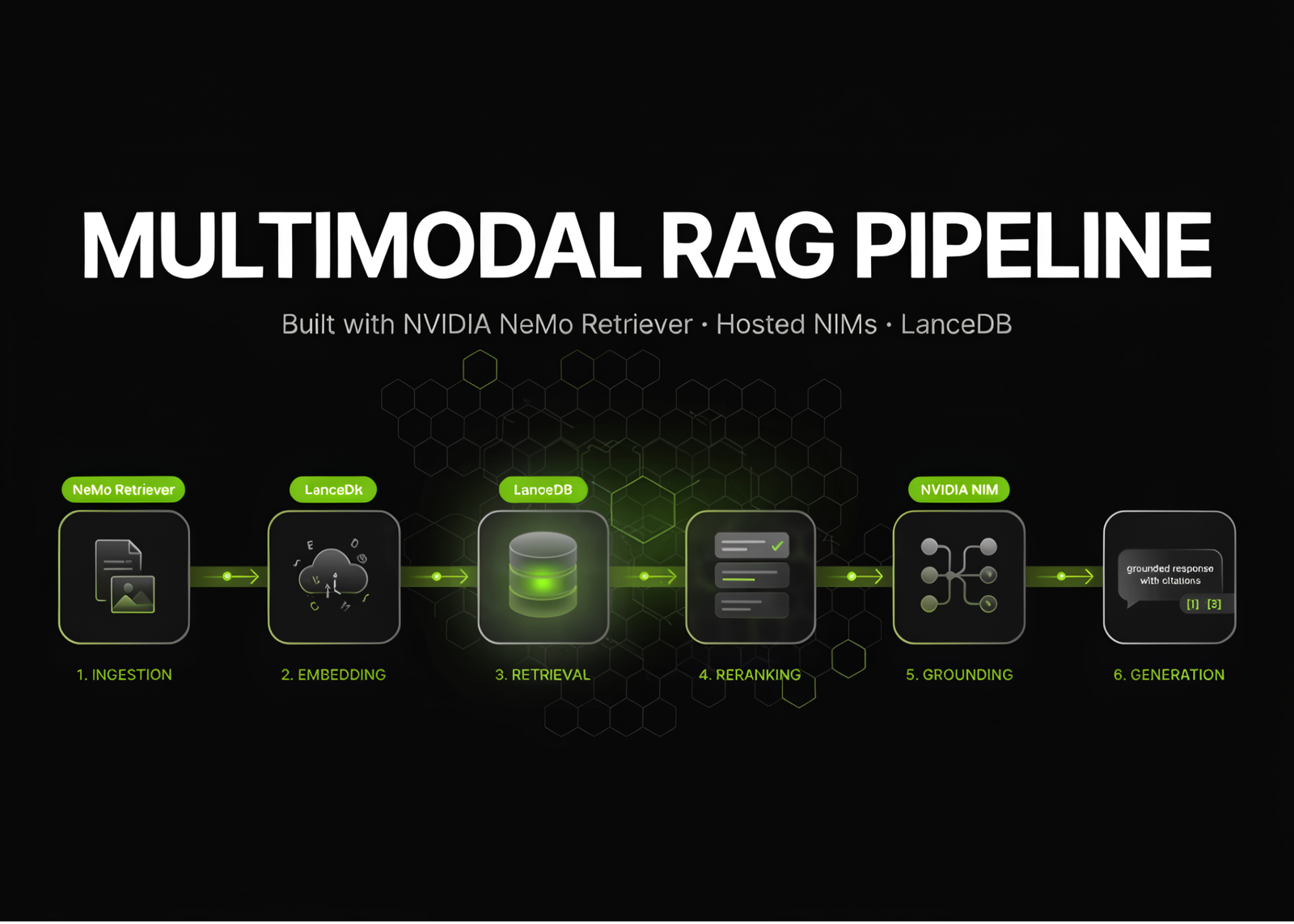
## Pipeline Overview
The system coordinates several stages:
1. **Environment setup and offline extraction** – Install dependencies, configure Python 3.12, and extract raw text from PDFs using a CPU‑based PDFium engine.
2. **Multimodal ingestion with hosted NIMs** – Use NVIDIA’s hosted inference endpoints for layout detection, OCR, table and infographic extraction, and embedding generation.
3. **Vector storage and indexing** – Store processed content and embeddings in LanceDB with IVF‑HNSW‑SQ indexing.
4. **Dense retrieval and reranking** – Query the vector index and apply vision‑language reranking to improve semantic relevance.
5. **Filtered retrieval** – Apply metadata‑based filters (e.g., text patterns) to narrow results.
6. **RAG answer generation** – Combine retrieved context with a hosted language model to produce grounded answers and citations.
7. **Evaluation** – Measure recall at k for expected answers.
—
## 1. Environment Setup and Offline Extraction
We begin by ensuring a Python 3.12 runtime (required by NeMo Retriever). The key packages are installed in the environment, and a sample multimodal PDF is downloaded.
“`python
import sys, os, subprocess
assert sys.version_info[:2] == (3, 12), “nemo-retriever requires Python 3.12”
def sh(cmd):
subprocess.run(cmd, shell=True, check=False)
try:
import nemo_retriever
except ImportError:
sh(“pip install -q –ignore-installed PyJWT nemo-retriever openai”)
import nemo_retriever
from nemo_retriever import create_ingestor
“`
Using the `pdfium` method, we perform CPU‑based text extraction:
“`python
DOC = “multimodal_test.pdf”
offline = (
create_ingestor(run_mode=”inprocess”, allow_no_gpu=True)
.files([DOC])
.extract(
extract_text=True,
extract_tables=False,
extract_charts=False,
extract_images=False,
extract_infographics=False,
use_page_elements=False,
method=”pdfium”,
)
)
df_offline = offline.ingest()
“`
This step produces a dataframe with extracted text per page, which we inspect and preview.
—
## 2. Multimodal Ingestion with Hosted NVIDIA NIM Endpoints
When an NVIDIA API key is available, we extend the pipeline with hosted NIM endpoints for richer multimodal processing. These include layout detection, OCR, table structure recognition, graphic element extraction, embedding generation, and reranking.
“`python
# Configure endpoints and model names
PAGE_ELEMENTS_URL = “…”
OCR_URL = “…”
TABLE_STRUCT_URL = “…”
GRAPHIC_ELEM_URL = “…”
EMBED_URL = “…”
RERANK_URL = “…”
CHAT_URL = “…”
EMBED_MODEL = “nvidia/llama-nemotron-embed-1b-v2”
RERANK_MODEL = “nvidia/llama-nemotron-rerank-vl-1b-v2”
LLM_MODEL = “nvidia/llama-3.3-nemotron-super-49b-v1.5″
# Build and run the multimodal ingestion pipeline
ing = (
create_ingestor(run_mode=”inprocess”, allow_no_gpu=True, error_policy=”collect”)
.files(DOCS)
.extract(
extract_text=True,
extract_tables=True,
extract_charts=True,
extract_infographics=True,
method=”pdfium”,
dpi=200,
table_output_format=”markdown”,
page_elements_invoke_url=PAGE_ELEMENTS_URL,
ocr_invoke_url=OCR_URL,
table_structure_invoke_url=TABLE_STRUCT_URL,
graphic_elements_invoke_url=GRAPHIC_ELEM_URL,
api_key=API_KEY,
split_config={“text”: {“max_tokens”: 512, “overlap_tokens”: 64}},
)
.dedup(content_hash=True, bbox_iou=True, iou_threshold=0.45)
.embed(
embedding_endpoint=EMBED_URL,
embed_model_name=EMBED_MODEL,
api_key=API_KEY,
input_type=”passage”,
inference_batch_size=16,
)
.vdb_upload(
vdb_op=”lancedb”,
vdb_kwargs={
“uri”: “./lancedb”,
“table_name”: “colab_demo”,
“overwrite”: True,
“create_index”: True,
“index_type”: “IVF_HNSW_SQ”,
“metric”: “l2”,
},
)
)
df = ing.ingest(show_progress=True)
“`
This stage produces a richly annotated dataset containing text, tables, charts, and images, indexed for fast semantic search.
—
## 3. Inspection and Markdown Conversion
We inspect extracted multimodal elements and convert the data into human‑readable Markdown:
“`python
for col in [“tables”, “charts”, “infographics”]:
if col in df.columns:
print(f”{col}: {(df[col].apply(lambda v: len(v) if isinstance(v, list) else 0).sum())} items”)
pages = to_markdown_by_page(df)
full_md = to_markdown(df)
with open(“extracted.md”, “w”) as f:
f.write(full_md)
“`
The Markdown outputs make it easy to review content and serve as retrieval targets.
—
## 4. Dense Retrieval
We configure a retriever that searches the LanceDB vector index using dense embeddings:
“`python
retriever = Retriever(
run_mode=”service”,
top_k=5,
rerank=False,
vdb_kwargs={“uri”: “./lancedb”, “table_name”: “colab_demo”},
embed_kwargs={
“embedding_endpoint”: EMBED_URL,
“model_name”: EMBED_MODEL,
“api_key”: API_KEY,
“input_type”: “query”,
},
)
“`
Queries return the most relevant document chunks, along with similarity scores and page numbers.
—
## 5. Vision‑Language Reranking and Filtered Retrieval
To improve ranking quality, we enable vision‑language reranking:
“`python
reranking = Retriever(
run_mode=”service”,
top_k=5,
rerank=True,
vdb_kwargs={“uri”: “./lancedb”, “table_name”: “colab_demo”},
embed_kwargs={…},
rerank_kwargs={
“model_name”: RERANK_MODEL,
“api_key”: API_KEY,
“refine_factor”: 4,
},
)
“`
We also demonstrate metadata‑based filtering to narrow results by text patterns:
“`python
hits = retriever.query(“gadget costs”, top_k=5, vdb_kwargs={“where”: “text LIKE ‘%Cost%'”})
“`
The LanceDB table is inspected to confirm storage size and content.
—
## 6. RAG Answer Generation with Grounded Citations
Using a hosted Nemotron language model, we generate answers grounded solely in the retrieved context:
“`python
from openai import OpenAI
client = OpenAI(base_url=CHAT_URL, api_key=API_KEY)
def rag(question, k=5):
hits = retriever.query(question, top_k=k)
ctx = []
for i, h in enumerate(hits, 1):
meta = h.get(“metadata”)
page = (meta or {}).get(“page_number”, “?”)
ctx.append(f”[{i}] (page {page})n{h.get(‘text’,”)}”)
prompt = textwrap.dedent(f”””
Answer using ONLY the context below. Cite sources as [1], [2], etc.
Context:
{chr(10).join(ctx)}
Question: {question}
“””)
resp = client.chat.completions.create(
model=LLM_MODEL,
messages=[{“role”: “user”, “content”: prompt}],
temperature=0.0,
)
return resp.choices[0].message.content, hits
“`
Each answer includes inline citations tied to page numbers and source text.
—
## 7. Recall‑at‑k Evaluation
We validate retrieval effectiveness with a small gold‑standard set:
“`python
GOLD = [
(“which animal is jumping onto a laptop”, “Cat”),
(“what does the chart show”, “Gadgets”),
(“which animal is at the beach”, “Giraffe”),
]
K = 5
hit_lists = retriever.queries([q for q, _ in GOLD], top_k=K)
recall = sum(
any(exp.lower() in str(h.get(“text”, “”)).lower() for h in hits)
for (_, exp), hits in zip(GOLD, hit_lists)
) / len(GOLD)
print(f”recall@{K} = {recall:.2f}”)
“`
This provides a simple but meaningful metric of retrieval quality.
—
## Frequently Asked Questions (FAQ)
**Q: Do I need a GPU or NVIDIA API key to run the entire pipeline?**
A: No. The initial text extraction step runs entirely on CPU and does not require a GPU or API key. A key is only needed for the hosted multimodal NIM endpoints and embedding/generation services.
**Q: Which PDF formats are supported?**
A: The pipeline uses PDFium via NeMo Retriever, which supports standard text‑based PDFs. Scanned PDFs require OCR, which is available through the hosted NIM endpoints when an API key is provided.
**Q: Can I run this entirely offline?**
A: Yes, you can run extraction, embedding‑free retrieval, and local vector storage offline. However, multimodal extraction, dense embeddings, reranking, and LLM generation require access to hosted NVIDIA NIM endpoints and an API key.
**Q: How does deduplication work in the ingest pipeline?**
A: Deduplication uses both content hashing and bounding‑box IoU to remove redundant or highly overlapping document chunks.
**Q: What vector database is used, and can I switch to another?**
A: LanceDB is used by default. While the code is tailored for LanceDB, the retriever can be adapted to other vector stores by modifying the `vdb_kwargs` and upload logic.
**Q: How are citations generated in the RAG answers?**
A: Citations are generated by referencing the `[index]` and page number metadata attached to each retrieved chunk, ensuring answers remain traceable to source content.
—
## Conclusion
This tutorial demonstrates how to build a complete multimodal RAG system using NVIDIA NeMo Retriever. By combining offline CPU extraction, hosted multimodal NIMs, vector storage in LanceDB, and vision‑language reranking, we transform structured and unstructured PDF content into a searchable, citation‑aware knowledge base. The resulting pipeline supports grounded question answering across text, tables, charts, and infographics while remaining lightweight and flexible. With recall‑at‑k evaluation and robust metadata filtering, this framework provides a solid foundation for document intelligence applications that scale from single documents to large corpora.
**Artifacts produced:**
– `./lancedb` – Vector database with indexed document content
– `./extracted.md` – Full document exported as Markdown
With this foundation, you can extend the pipeline for enterprise search, knowledge base construction, or domain‑specific question answering systems.
