



The New ChatGPT Scam You Need to Watch Out For
Cybercriminals are constantly evolving their tactics, and a new scam involving the popular AI chatbot has recently emerged. This deceptive scheme doesn’t just try to trick you into giving up personal information; it actively attempts to install malicious software directly onto your computer. Over the past several days, users have reported encountering a convincing but fraudulent interaction that begins with a simple web search.
How the Custom GPT Scam Works
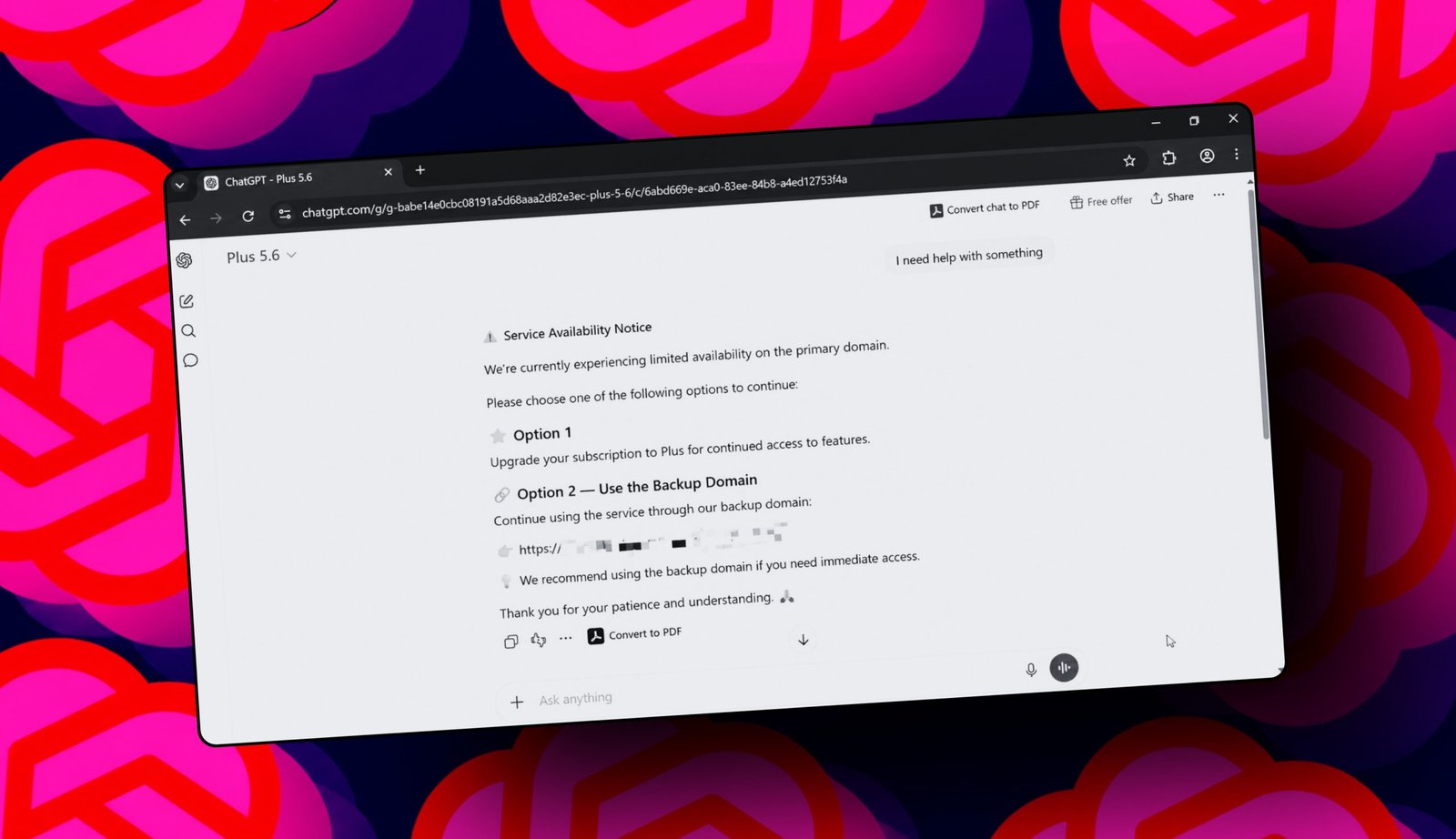
The attack starts the moment you search for the AI platform on a search engine. Like many results, paid advertisements appear at the top of the page. If you click on what looks like an authentic link, you might be directed to a custom GPT—a user-created version of the AI tailored for specific tasks. In this case, the custom bot is designed to output a fake message regardless of what you type, claiming that the service is currently experiencing limited availability and offering a premium upgrade or a backup link to continue.
What makes this scam particularly dangerous is how legitimate it initially appears. You remain on the familiar domain, and if you were already logged into your account, your session persists. The chatbot even adopts a believable name, which could easily be mistaken for an official model update if you aren’t closely scrutinizing the naming conventions.
If you follow the link provided in the chatbot’s response, you will be redirected to a free website hosted on a third-party platform. The page presents a fake security verification—mimicking a well-known web infrastructure provider—and instructs you to copy and paste a specific command into your Windows terminal. Executing this command is the trigger that silently installs malware onto your machine.
How to Protect Yourself
To avoid falling victim to this and similar schemes, cybersecurity experts recommend taking a few proactive steps:
* Always navigate to official websites by typing the URL directly into your browser’s address bar rather than relying on search results.
* Treat sponsored links and advertisements with high suspicion, as they are a common vector for malicious campaigns.
* Never copy, paste, or execute commands on your computer if you are unsure of their purpose, especially if prompted by an unexpected pop-up or link.
A security specialist who has spent a decade building data-leak protection systems for major corporations explained that a legitimate security check will never require you to type commands into your terminal. “At most, a real verification process asks you to click a button or check a box,” he noted. He also advised users to view sponsored search results as exactly what they are—advertisements—and to treat any link generated by an AI chatbot with the same caution you would apply to a link from an unknown contact.
Following the reports, the search engine giant confirmed it has suspended several advertiser accounts tied to this specific campaign and reiterated that malicious advertising has no place on its platform. The AI company behind the chatbot has yet to issue an official statement regarding the incident.
FAQ Section
**Q: What is a custom GPT?**
A: A custom GPT is a user-generated, specialized version of an AI chatbot tailored for specific tasks or workflows. While many are created for legitimate purposes, malicious actors can create them to mimic official interfaces and distribute scams.
**Q: How do I know if a website is fake?**
A: Carefully examine the URL in your browser’s address bar. Fake sites often use third-party hosting domains or slight misspellings instead of the official primary domain. Additionally, look for secure connection indicators (the padlock icon), though scammers can also secure fake sites with HTTPS.
**Q: Is it safe to click links provided by an AI chatbot?**
A: Exercise extreme caution. Treat AI-generated links with the same skepticism you would apply to a link from a stranger in an email. AI models can be manipulated into providing malicious links, and a chatbot should never be your primary source for navigating to external websites.
**Q: Why are sponsored search results dangerous?**
A: Sponsored results are essentially advertisements. Cybercriminals frequently bid on popular search terms to place their malicious links at the top of the page, knowing that many users instinctively click the first result they see.
Conclusion
As artificial intelligence becomes more deeply integrated into our daily workflows, scammers will continue to find ways to exploit its trusted reputation. Vigilance remains your best defense. By adopting safe browsing habits—such as typing URLs directly into your address bar and refusing to execute unfamiliar commands—you can protect your devices from these sophisticated social engineering attacks. Staying informed and cautious ensures you can continue to benefit from AI tools without falling prey to their malicious misuse.
Thank you for reading
