



# Building an AI-Powered Learning System: Practical Strategies for Mastering New Skills Faster
**The modern learner faces a paradox: more information is available than ever before, yet turning that information into lasting knowledge feels harder than ever.** Whether you’re picking up a new programming language, diving into a unfamiliar domain for professional growth, or simply exploring a personal passion, the gap between curiosity and competence can feel overwhelming. Artificial intelligence, when used thoughtfully, can serve as a powerful accelerator — not by doing the learning for you, but by removing the friction that keeps so many people from starting and sustaining their growth.
This article walks through a complete framework for designing an AI-augmented learning workflow that covers everything from initial exploration to long-term retention.
—
## Why Traditional Learning Methods Fall Short
Most people approach new topics by reading articles, bookmarking resources, and hoping that passive exposure leads to understanding. The reality is that without structure and repetition, the majority of what we read is forgotten within days. Research on the forgetting curve shows that we can lose up to 70% of newly acquired information within the first 24 hours if we don’t actively revisit it.
The problem isn’t motivation or intelligence — it’s the absence of a reliable system that converts scattered curiosity into organized, repeatable progress. This is exactly where AI tools can make a transformative difference.
—
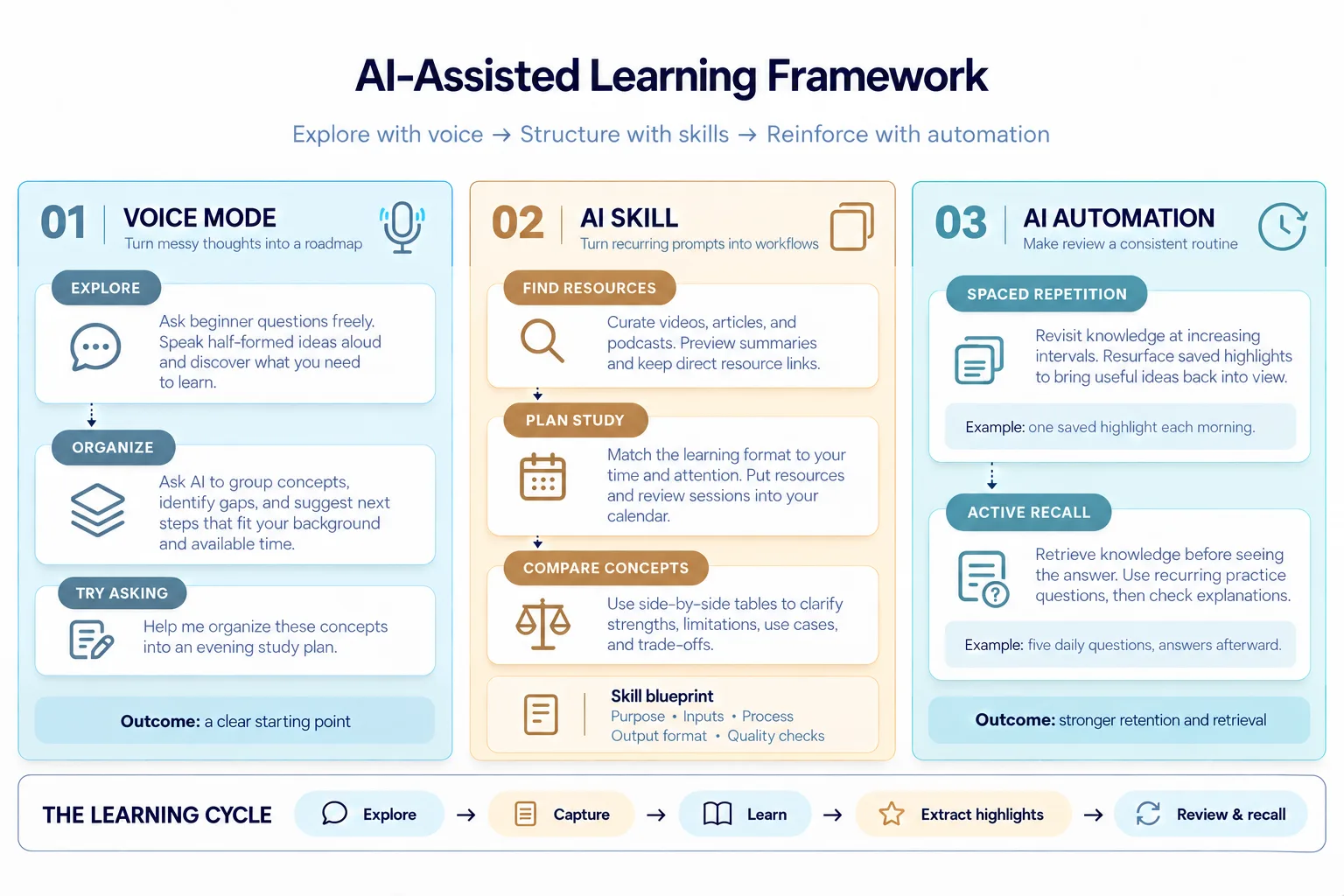
## Phase One: Voice-Driven Exploration
### Breaking Through the “Unknown Unknowns” Barrier
When you first encounter a new subject, the hardest part isn’t finding information — it’s knowing what questions to ask. Beginners often don’t even realize how many foundational concepts they’re missing. This is sometimes called the “unknown unknowns” phase, and it’s where traditional learning methods feel most inadequate.
Speaking your thoughts aloud to an AI assistant, rather than typing carefully structured questions, mimics the way humans naturally think. It removes the pressure of using correct terminology or organizing ideas perfectly. A quick voice message during a morning walk or while cooking dinner can surface ideas you didn’t know you had and help you identify the specific areas where your knowledge gaps lie.
### From Rambling to Roadmap
Consider this scenario: you’ve decided to learn about building mobile applications, but you have no idea what the fundamental building blocks are. Instead of searching through dozens of “beginner’s guides,” you simply talk to your AI assistant and let it guide you.
> **You:** “I’ve never built an app before. Where do I even start? What do I need to understand first?”
> **AI:** “Every application has core components — a user-facing interface, the logic that processes actions behind the scenes, a place to store and retrieve data, connections to external services through APIs, and a deployment pipeline to make it accessible to users. Let’s explore each of these areas.”
This conversational entry point turns vague curiosity into a structured starting point. Once you’ve identified the broad areas you need to cover, you can ask the AI to organize these topics into a personalized learning path — factoring in your available time, preferred learning style, and any prior experience you bring to the table.
> **You:** “Can you put together a study plan that I can follow during evenings over the next three weeks? I have some background in data analysis but no coding experience.”
The AI can then produce a tailored schedule that bridges your existing knowledge with the new skills you need, making the learning journey feel less daunting and more achievable.
### Why Voice Works Better Than Typing for Exploration
There’s a psychological difference between speaking and writing. When you speak, you think more fluidly and associate ideas more naturally. Typing often forces premature structuring — you’re editing as you go, which can stifle creative exploration. Voice mode allows you to dump your half-formed thoughts without judgment, letting the AI piece together a coherent picture from your raw input.
—
## Phase Two: Creating Reusable AI Workflows for Daily Learning
### The Power of Consistent Prompts
As you begin using AI for learning, you’ll notice that many of your requests follow a familiar pattern. You’re constantly asking for resource recommendations, study schedules, or comparisons between related ideas. Instead of re-explaining what you need each time, you can codify these patterns into reusable workflows that AI assistants can execute on demand.
Most modern AI platforms support the creation of custom instructions or “skills” — essentially, pre-defined templates that know your preferences and deliver consistent, well-structured responses every time you invoke them.
### Essential Learning Workflows to Automate
**1. Resource Discovery Workflow**
Rather than spending hours searching YouTube, blogs, and podcast platforms for high-quality learning materials, create a workflow that aggregates and curates recommendations for you. This workflow should accept a topic as input and return a structured list of the best videos, articles, podcasts, and courses — complete with direct links that open in the appropriate apps.
The real magic happens when this workflow is tailored to your habits. Maybe you prefer audio content for your commute and video tutorials for focused weekend study sessions. A well-designed workflow respects these preferences and surfaces the right format for the right context.
**2. Study Scheduling Workflow**
A curated list of resources is useless if it just sits in your inbox or bookmark folder. An effective scheduling workflow takes your collection of learning materials and distributes them across your calendar, respecting your existing commitments and energy levels throughout the day.
This workflow can categorize your materials by type — audio for low-focus activities like commuting or exercising, written articles for deep-focus evening sessions, and hands-on tutorials for dedicated practice blocks. By automating the scheduling process, you eliminate the decision fatigue of “when should I study what?” and replace it with a clear, actionable plan.
**3. Concept Comparison Workflow**
One of the most powerful learning techniques is comparing related but distinct concepts side by side. When learning about data processing tools, for example, it’s easy to confuse frameworks that sound similar but serve fundamentally different purposes.
A comparison workflow takes two or more related concepts and generates a detailed table that highlights their strengths, weaknesses, ideal use cases, implementation approaches, and key trade-offs. This moves your understanding beyond surface-level definitions and into practical, decision-ready knowledge — helping you choose the right tool or approach for a given situation.
—
## Phase Three: Automation for Long-Term Retention
### Spaced Repetition Without the Manual Effort
Spaced repetition is one of the most evidence-backed techniques for moving information from short-term memory into long-term retention. The principle is simple: review material at strategically increasing intervals — first after a day, then after three days, then a week, then two weeks — to reinforce neural pathways before the forgetting curve erodes your memory.
AI automation can handle this entire process for you. By connecting your AI assistant to a knowledge management system that stores your reading highlights, notes, and key takeaways, you can receive a daily curated digest of the most important things you’ve recently learned. One day you might see a highlight from a podcast you listened to last week; another day, a passage from an article you bookmarked weeks ago. This creates a self-sustaining loop of review that requires zero manual effort.
The result is that your saved articles and notes stop becoming a graveyard of good intentions and instead become an active part of your daily learning rhythm.
### Active Recall Through AI-Generated Practice
Reading and highlighting are passive activities. True mastery comes from the ability to retrieve information when you need it — a skill known as active recall. The gap between “I understand this when I read it” and “I can apply this under pressure” is where most learners plateau.
AI automation can bridge this gap by generating personalized quiz questions at regular intervals. Instead of hunting for practice tests or flashcards, your AI assistant can deliver a short daily assessment tailored to whatever topic you’re currently studying. You attempt the questions first, then review the correct answers and explanations — reinforcing the retrieval process that builds durable memory.
For example, if you’re preparing for a professional certification exam, your AI can generate five new questions each day drawn from the exam syllabus, present them all at once so you can test yourself, and then reveal the answers with concise explanations afterward. Over weeks, this turns passive reading into an active, engaging practice that dramatically improves your retention and confidence.
### The Combined Effect
When spaced repetition and active recall work together through automation, you create a learning ecosystem that compounds over time. New material enters the system, gets surfaced for review at optimal intervals, and gets tested through practice questions — ensuring that what you learn today remains accessible months from now.
—
## Putting It All Together: A Complete Learning Architecture
Here’s what a fully integrated AI-assisted learning workflow looks like in practice:
1. **Start with voice exploration** — Use spoken conversations to map out what you don’t yet know and organize your learning path.
2. **Activate resource and scheduling workflows** — Let reusable AI skills automatically discover and calendar your learning materials in formats that suit your lifestyle.
3. **Use comparison workflows** — Clarify confusing concepts by generating structured side-by-side analyses whenever you encounter related ideas.
4. **Enable daily review automation** — Receive a rotating stream of highlights from your reading and practice questions from your current study topics without lifting a finger.
5. **Iterate and refine** — Periodically adjust your workflows as your goals, interests, and schedule evolve.
The key insight is that none of these steps require you to become an AI expert or spend hours configuring complex systems. Each component can be set up once and then runs in the background, turning the chaotic process of self-directed learning into a reliable, repeatable habit.
—
## FAQ
### Is using AI for learning considered “cheating” or a shortcut?
No. AI serves as a thinking partner and organizational tool — it doesn’t replace the cognitive effort of actually learning. You still need to engage with the material, think critically, and practice applying what you’ve learned. AI simply removes the barriers that prevent people from starting and maintaining a consistent learning habit, such as decision fatigue, information overload, and the overwhelming feeling of not knowing where to begin.
### Do I need a paid AI subscription to build these workflows?
Many of these techniques work with free-tier AI assistants and readily available automation tools. Voice mode is available in most modern AI apps at no additional cost. Reusable skills can be created with simple text instructions. Scheduling automations can leverage free integrations with calendar apps. While premium features offer additional convenience, the core principles are accessible at any budget.
### How do I avoid becoming dependent on AI and losing my ability to think independently?
The goal should always be to use AI as a scaffold, not a crutch. Think of it like training wheels on a bicycle — they help you get moving and build confidence, but eventually you ride on your own. Set boundaries for yourself: use AI to organize and surface information, but force yourself to summarize what you’ve learned in your own words, explain concepts to someone else, or apply them to real problems without AI assistance.
### Can these workflows work for non-technical subjects like history or literature?
Absolutely. The framework is entirely domain-agnostic. Voice exploration works for any topic where you feel lost at the beginning. Resource discovery workflows can pull from history podcasts, literature analyses, and documentary sources just as easily as technical content. Comparison workflows can distinguish between historical periods, literary movements, or philosophical schools. And active recall questions work for memorizing dates, understanding narrative arcs, or analyzing thematic elements.
### How long does it take to set up these workflows?
The initial setup can take anywhere from 30 minutes to a couple of hours, depending on how many workflows you want to create and how customized you want them. The beauty of the system is that once configured, it requires minimal ongoing maintenance. You can start with a single workflow — such as the resource discovery skill — and gradually add more as you become comfortable.
### What tools do I need to get started?
At minimum, you need an AI assistant that supports voice input and custom instructions (most mainstream platforms now do), a way to save and organize your highlights (such as a bookmarking app or knowledge management tool), and a calendar app for scheduling. Beyond that, integrations like MCP (Model Context Protocol) servers can add powerful capabilities, but they are optional for getting started.
—
## Conclusion
Learning has always been a challenge, but the modern information landscape has made it both easier to access knowledge and harder to retain it. The solution isn’t to consume more — it’s to build a smarter system for engaging with what you learn.
AI tools, when designed as part of a deliberate workflow, transform the learning process from a sporadic, overwhelming endeavor into a structured, sustainable practice. Voice-driven exploration lowers the barrier to entry. Reusable skills bring consistency and efficiency to daily study habits. Automation ensures that spaced repetition and active recall happen without requiring willpower or manual effort.
The ultimate goal isn’t to outsource thinking to a machine — it’s to create the conditions where your own curiosity, effort, and reflection can flourish with less friction. By standing on the shoulders of intelligent tools, you can reach further, learn faster, and retain more than ever before.
Start with one workflow. Master it. Then add the next. Over time, these individual pieces will compound into a learning system that serves you across every new topic, skill, or challenge you take on.
Thank you for reading
