




# Introduction
Most people concentrate on crafting SQL that “functions correctly,” but hardly anyone verifies whether it will continue functioning properly the next day. Even a single additional row, a modified assumption, or a code reorganization can cause a query to fail without any obvious indication. This guide presents an end-to-end process for handling SQL the way software engineers do: keeping it under version control, testing it thoroughly, and setting up automated checks. We’ll work through an actual Amazon interview challenge that asks you to identify customers who spent the most each day. Afterward, we’ll transform the SQL into a testable module, establish what the output should look like, and configure automated tests using continuous integration and continuous deployment pipelines.
# Step 1: Solving an Interview-Style SQL Challenge
// Understanding the Problem

This Amazon interview challenge asks you to identify customers whose combined order totals were the highest on any given day, within a specific date window.
// Examining the Tables
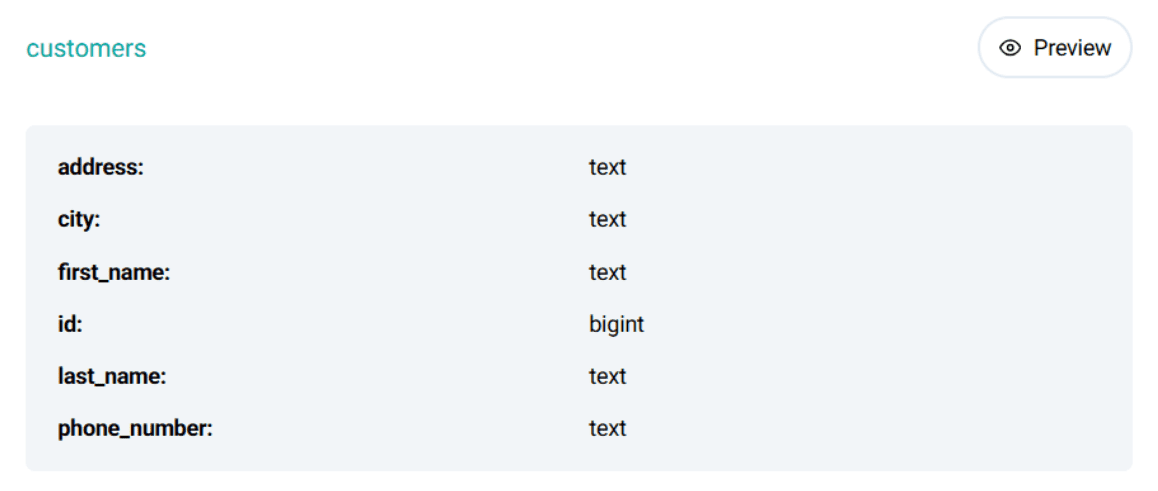
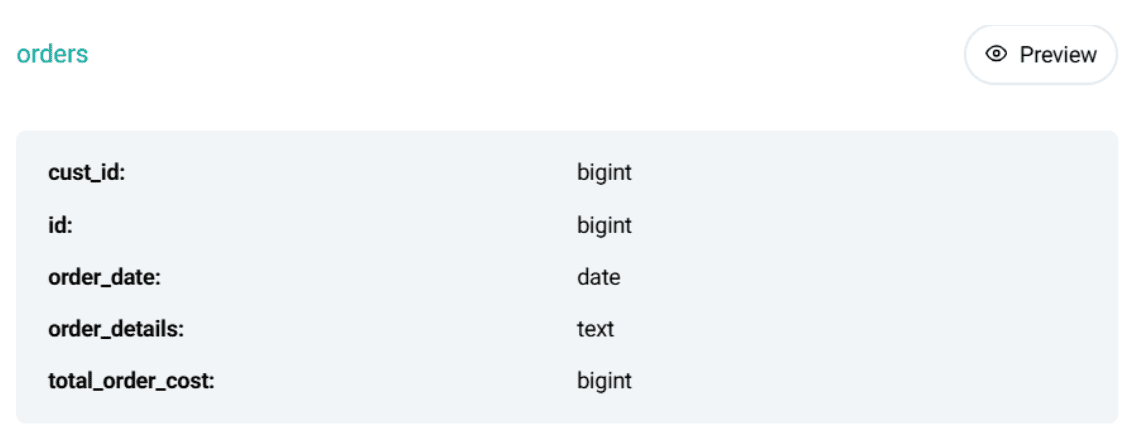
The project involves two relational data tables: customers and orders.
Structure of the customers table:
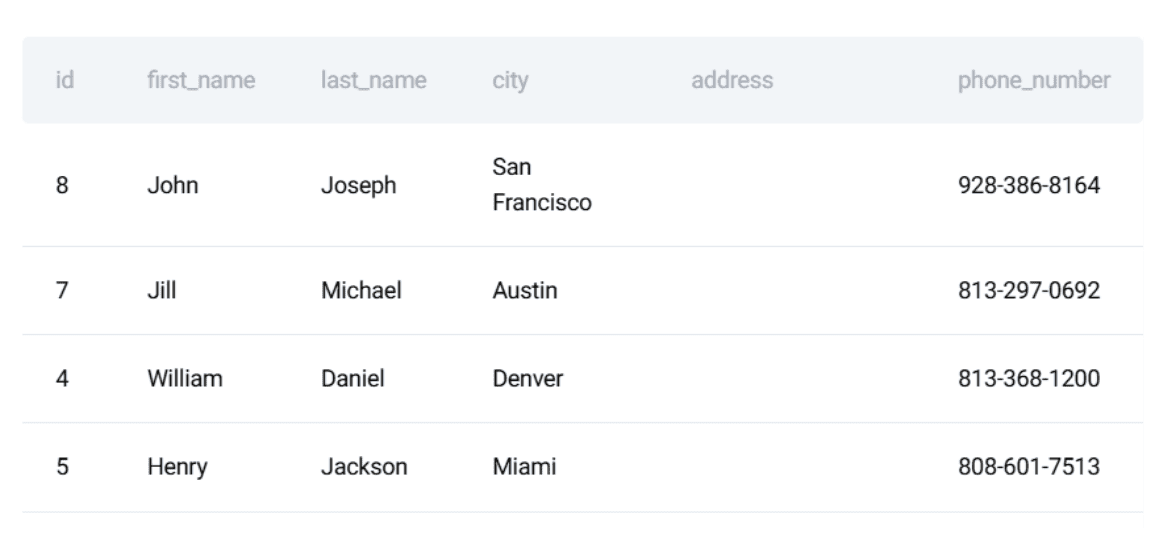
Sample data from this table:
Structure of the orders table:
Sample data from this table:
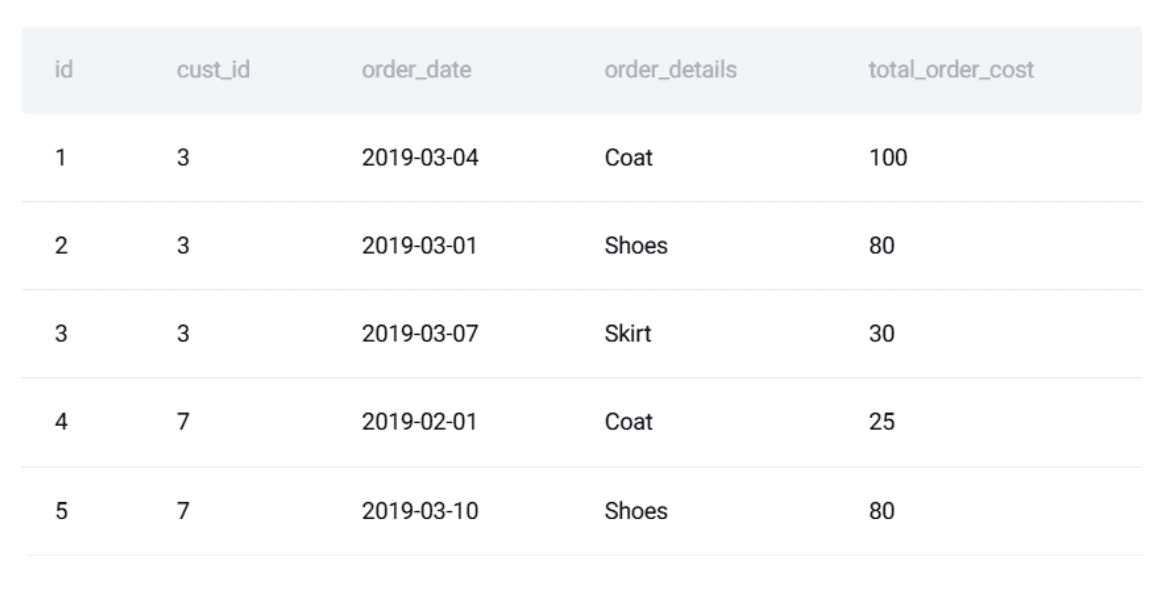
This example is ideal for demonstrating how SQL development should follow software engineering practices: ensuring query accuracy, long-term stability, and resistance to unexpected breakage.
// Writing the SQL Solution
The approach involves three logical stages:
- Calculate each customer’s daily order total
- Rank customers according to their spending per day
- Output only the highest spender for each date
Here is the complete PostgreSQL implementation:
WITH customer_daily_totals AS (
  SELECT
    o.cust_id,
    o.order_date,
    SUM(o.total_order_cost) AS total_daily_cost
  FROM orders o
  WHERE o.order_date BETWEEN '2019-02-01' AND '2019-05-01'
  GROUP BY o.cust_id, o.order_date
),
ranked_daily_totals AS (
  SELECT
    cust_id,
    order_date,
    total_daily_cost,
    RANK() OVER (
      PARTITION BY order_date
      ORDER BY total_daily_cost DESC
    ) AS rnk
  FROM customer_daily_totals
)
SELECT
  c.first_name,
  rdt.order_date,
  rdt.total_daily_cost AS max_cost
FROM ranked_daily_totals rdt
JOIN customers c ON rdt.cust_id = c.id
WHERE rdt.rnk = 1
ORDER BY rdt.order_date;
// Defining the Expected Output
Here is what the result should look like:
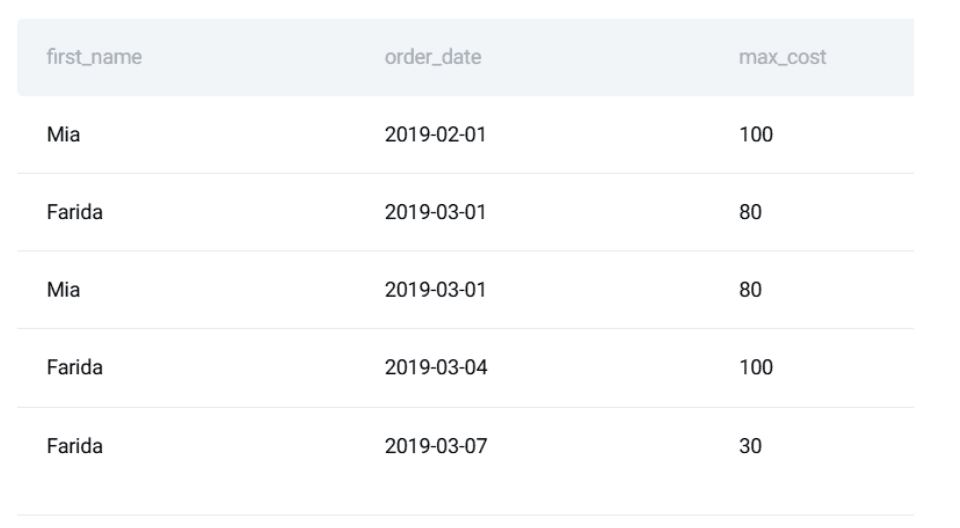
At this point, most people consider the task done.
# Step 2: Ensuring SQL Reliability with Unit Tests
SQL code is more fragile than many realize. A shifted default setting, an altered column name, or swapping a data source can trigger bugs that go unnoticed. Testing shields you from these pitfalls. We will cover three key stages: wrapping the logic in a function, outlining the expected output, and building a unit test suite.
// Turning the Query into a Reusable Function
To validate the SQL, we start by embedding it inside a Python function using a testing framework like unittest. First, we specify the query we intend to evaluate:
    query = """
        WITH customer_daily_totals AS (
          SELECT
            o.cust_id,
            o.order_date,
            SUM(o.total_order_cost) AS total_daily_cost
          FROM orders o
          WHERE o.order_date BETWEEN '2019-02-01' AND '2019-05-01'
          GROUP BY o.cust_id, o.order_date
        ),
        ranked_daily_totals AS (
          SELECT
            cust_id,
            order_date,
            total_daily_cost,
            RANK() OVER (
              PARTITION BY order_date
              ORDER BY total_daily_cost DESC
            ) AS rnk
          FROM customer_daily_totals
        )
        SELECT
          c.first_name,
          rdt.order_date,
          rdt.total_daily_cost AS max_cost
        FROM ranked_daily_totals rdt
        JOIN customers c ON rdt.cust_id = c.id
        WHERE rdt.rnk = 1
        ORDER BY rdt.order_date;
    """
// Setting Up Test Data and Expected Results
Next, we need to prepare a controlled dataset with known values for testing purposes.
test_customers = [
    (15, "Mia"),
    (7, "Jill"),
    (3, "Farida")
]

test_orders = [
    (1, 3, "2019-03-04", 100),
    (2, 3, "2019-03-01", 80),
    (4, 7, "2019-02-01", 25),
    (6, 15, "2019-02-01", 100)
]
We then define what the results should be:
expected = [
    ("Mia", "2019-02-01", 100),
    ("Farida", "2019-03-01", 80),
    ("Farida", "2019-03-04", 100)
]
Why go through this effort? Because setting expected results establishes a reliable benchmark.
// Writing SQL Unit Tests
Now we have a defined query, sample test inputs, and anticipated outputs. We can proceed to write an actual unit test. The concept is straightforward:
- Set up a temporary, in-memory database
- Populate it with the controlled test data
- Run the SQL query
- Verify that the results match the predefined expectations

Python’s built-in unittest framework works well because it lets us minimize dependencies while maintaining structure and consistency. We begin by setting up an in-memory SQLite database:
conn = sqlite3.connect(":memory:")
cursor = conn.cursor()
Using :memory: guarantees that:
- each test runs in a completely isolated environment
- no outside factors can influence the outcome
- the database disappears once the test completes
Next, we define only the tables needed for the query:
CREATE TABLE customers (...)
CREATE TABLE orders (...)
Even if the query references just a few columns, the schema should reflect a real-world production table. This avoids the false assurance that comes from overly simple schemas. After that, we load the predefined test data we established earlier:
cursor.executemany("INSERT INTO customers VALUES (?, ?, ?, ?, ?, ?)", test_customers)
cursor.executemany("INSERT INTO orders VALUES (?, ?, ?, ?, ?)", test_orders)
conn.commit()
At this stage, the database holds a predictable, controlled dataset — a requirement for any worthwhile test. Before executing the query, we fetch and display the tables with Pandas:
customers_df = pd.read_sql("SELECT id, first_name, last_name, city FROM customers", conn)
orders_df = pd.read_sql("SELECT * FROM orders", conn)
This step isn’t strictly necessary for automated execution, but it proves extremely helpful while writing and troubleshooting code. When a test fails, being able to glance at the raw input data saves far more time than guessing at SQL logic, since it shows you exactly what the code is working with at each stage. Now we execute the target query:
result = pd.read_sql(query, conn)
Loading the output into a DataFrame offers:
- organized access to rows and columns
- straightforward comparison with expected results
- clear, readable display for troubleshooting
After that, we validate each row individually. The assertion logic compares every field from the query output with the known expected result:
all_correct = True

if len(result) != len(expected):
    all_correct = False
The first validation ensures the query returns the exact number of rows anticipated. If the counts don’t align, we know records are either missing or duplicated. Then we walk through the expected results and compare each row against the actual output:
for i, (fname, lname, date, cost) in enumerate(expected):
    if i < len(result):
        actual = result.iloc[i]
        if not (
            actual["first_name"] == fname
            and actual["last_name"] == lname
            and actual["order_date"] == date
            and actual["max_cost"] == cost
        ):
            all_correct = False
Each row is verified against all key fields:
- customer’s name
- date of the order
- total daily spending
If even one value deviates, the row is flagged as incorrect. At the end, we print a concise summary showing whether the test succeeded or failed:
if all_correct and len(result) == len(expected):
    print("ALL TESTS PASSED")
else:
    print("SOME TESTS FAILED")
The database connection is then closed:
If everything passes successfully, the terminal displays:
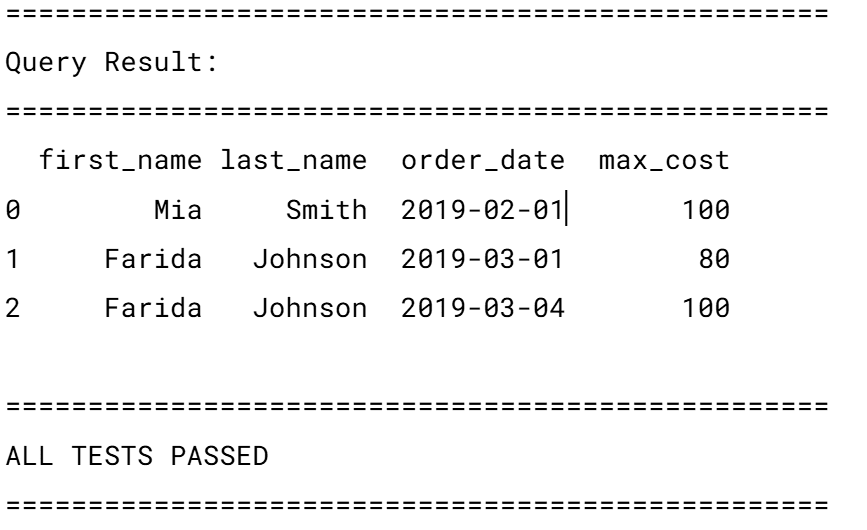
This approach comes with a few notable assumptions:
- rows follow a fixed order (
ORDER BY order_date) - all values must match exactly
- no allowance for ties or multiple top customers per day
The complete, ready-to-use script is available below.
# Step 3: Automating SQL Tests with Continuous Integration and Continuous Deployment
A test suite is only valuable if it executes reliably on every run. We leverage CI/CD pipelines to trigger tests automatically whenever someone modifies the code.
// Organizing the Project
A basic repository setup might look like this:
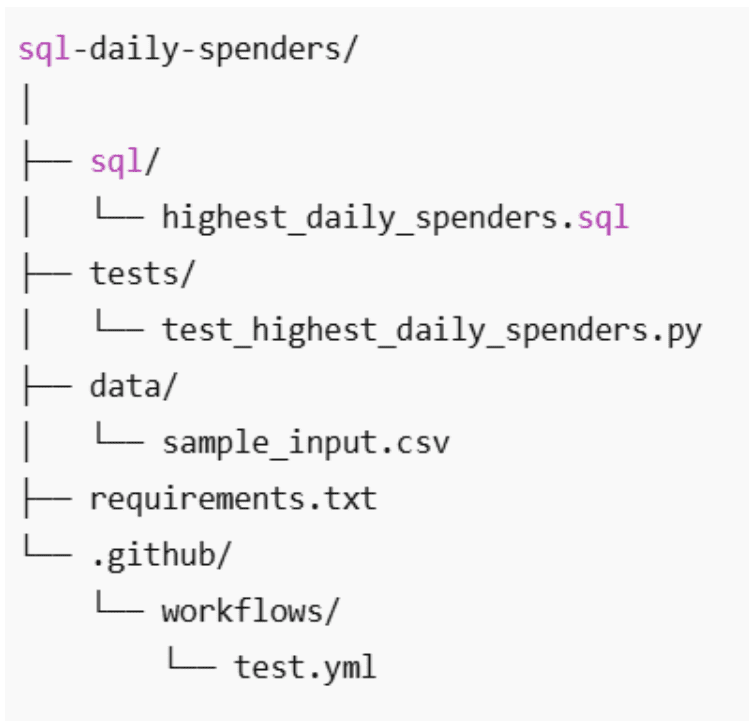
// Creating the GitHub Actions Workflow
The next move is to make these tests execute on their own whenever the code is updated. For this, we turn to GitHub Actions. It lets us set up a CI pipeline that runs SQL tests on every push or pull request.
Create the workflow file: Inside your repo, set up the directory structure .github/workflows/ if it isn’t there already. Inside, add a new file named test_sql.yml. The filename isn’t critical — GitHub only recognizes the .github/workflows/ folder. Name it whatever you like, but test_sql.yml keeps things descriptive.
Define when the workflow should trigger: Here’s the full workflow file:
name: Run SQL Tests

on:
  push:
    branches: [ "main" ]
  pull_request:
    branches: [ "main" ]
This block specifies the trigger conditions:
- every push made to the main branch
- every pull request opened against main
In practical terms, this means:
- direct pushes to main will fire off the tests
- creating or updating a pull request will do the same
This catches SQL regressions before they make it into the codebase.
Define the test job: Next, we set up a job named test:
jobs:
  test:
    runs-on: ubuntu-latest
This instructs GitHubto:
- provision a brand-new Linux environment
- execute every test case within that isolated environment
Every workflow execution begins with a pristine environment, effectively eliminating “it works on my machine” inconsistencies.
// Defining the Workflow Steps
Next, we lay out the specific operations the runner should carry out:
- name: Checkout repository
  uses: actions/checkout@v4
This action pulls your repository’s source code into the runner, making your SQL files and test scripts accessible.
- name: Set up Python
  uses: actions/setup-python@v5
  with:
    python-version: "3.10"
This provisions Python 3.10, guaranteeing a uniform runtime experience across every execution.
- name: Install dependencies
  run: |
    python -m pip install --upgrade pip
    pip install -r requirements.txt
This installs every Python dependency () listed in
- name: Run unit tests
  run: python -m unittest discover
Lastly, this command:
- automatically locates all test files
- executes every SQL test housed in the
tests/directory - marks the workflow as failed if any single test does not pass
The complete workflow configuration is available here.
Executing the workflow: There’s no need to trigger this file by hand. Once committed:
- merging changes into the main branch activates the workflow
- creating a pull request also activates the workflow
You can monitor the outcomes directly through GitHub by visiting your repository’s Actions tab.

Each execution clearly indicates whether your SQL tests succeeded or failed.
# Step 4: Automating Data Quality Assurance
Unit tests verify that your logic still produces the correct results, while CI ensures these tests are run on every change. However, in real-world data pipelines, the input data itself can introduce failures: delayed records, improperly formatted dates, missing foreign keys, and unexpected duplicates can cause query failures long before the SQL logic is ever evaluated. This is where automated data quality checks come into play. Testing and versioning provide a safety net for code modifications; data quality automation extends that safety net to guard the data itself, catching downstream issues before they compromise your results.
// Why Data Quality Checks Are Essential for SQL Pipelines
In our interview-style problem, the following data issues could cause the query to return incorrect results:
- A customer’s first name is no longer unique.
- an order is recorded with a negative cost.
- dates fall outside the expected time window.
- daily aggregations contain duplicate entries for the same customer and date.
- a customer ID in the orders table has no corresponding entry in the customers table.

Without automated validation, these problems can silently produce misleading results. Since SQL doesn’t throw obvious errors in many of these situations, issues propagate unnoticed. Automated data quality checks surface these anomalies early and halt the pipeline before it processes corrupted or incomplete data.
// Transforming Data Assumptions into Automated Rules
Every SQL query operates on a set of assumptions about the data it consumes. The challenge is that these assumptions are seldom documented and almost never validated. In our daily spenders query, accuracy depends not just on the SQL logic but also on the structure and validity of the underlying data. Rather than relying on those assumptions blindly, you can encode them as automated data quality rules. The approach is straightforward:
- formulate each assumption as a SQL validation query
- run those validations automatically
- raise an error immediately if any assumption is broken
First names should be unique: Our query joins on customer ID but exposes first_name as the displayed identifier. If first names are no longer unique, the output becomes ambiguous.
SELECT first_name, COUNT(*)
FROM customers
GROUP BY first_name
HAVING COUNT(*) > 1;
Any rows returned by this query signal a broken assumption.
Order costs must not be negative: Negative order amounts typically point to data ingestion or upstream transformation errors.
SELECT *
FROM orders
WHERE total_order_cost < 0;
Even one such record can invalidate financial calculations.
Order dates must be present and within a reasonable range: Missing or far-future dates often reveal synchronization or parsing issues.
SELECT *
FROM orders
WHERE order_date IS NULL
   OR order_date < '2010-01-01'
   OR order_date > CURRENT_DATE;
This protects the query from unknowingly incorporating bad temporal data.
Every order must reference an existing customer: If an order points to a customer that doesn’t exist, the join will silently omit rows.
SELECT o.*
FROM orders o
LEFT JOIN customers c ON c.id = o.cust_id
WHERE c.id IS NULL;
This validation ensures referential integrity before any analytical logic executes.
// Encoding Rules as an Automated Validation Function
Rather than executing these checks by hand each time, you can bundle them into a single Python function that raises a failure as soon as any rule is violated.
import pandas as pd
def run_data_quality_checks(conn):
checks = {
"Duplicate first names": """
SELECT first_name
FROM customers
GROUP BY first_name
HAVING COUNT(*) > 1;
""",
"Negative order costs": """
SELECT *
FROM orders
WHERE total_order_cost < 0;
""",
"Invalid order dates": """
SELECT *
FROM orders
WHERE order_date IS NULL
OR order_date < '2010-01-01'
OR order_date > CURRENT_DATE;
""",
"Orders without customers": """
SELECT o.*
FROM orders o
LEFT JOIN customers
To find orders that don’t correspond to any customer (i.e., where the customer ID is missing or invalid), the query selects all records from the orders table and attempts to match them with customers. If no matching customer exists, the result includes those orphaned orders:
SELECT o.*
FROM orders AS o
LEFT JOIN customers AS c ON o.customer_id = c.id
WHERE c.id IS NULL;
Here’s what each part does:
- LEFT JOIN: Keeps all rows from the
orders table, even if there's no match in customers. - WHERE c.id IS NULL: Filters to only those orders where a customer record doesn’t exist.
This identifies orphan data—records that refer to non-existent entities—common in data quality checks.
After defining such queries, they’re grouped into reusable check rules and executed programmatically. For example, these rules can be run automatically in Python and integrated directly into your workflow:
checks = {"orphaned_orders": query}"
for rule_name, query in checks.items():
result = pd.read_sql(query, conn)
if not result.empty:
raise ValueError(f"Data quality issue found: {rule_name}")
print("All data quality checks passed.")
Each rule runs like a mini-test: if it finds problematic rows, the process fails immediately with a clear message. If everything is clean, you get confirmation that all rules passed.
Because this runs within Python, it fits naturally into your existing CI/CD pipeline—for instance, GitHub Actions already supports this with:
- name: Run unit tests
run: python -m unittest discover
The CI system will stop the build whenever:
- The data quality function is imported or called during testing.
- An exception is raised due to a failed rule.
At this point, your SQL logic isn’t just functional—it’s robust, automated, and integrated into engineering best practices.
Key Takeaways
Getting the right result from a query is only the beginning. In real-world environments, you also need guarantees that your queries remain reliable over time.
Use these practices together to keep your data pipeline trustworthy:
- Clear, correct SQL solutions
- Reusable check functions
- Automated unit-style tests for data
- Integration with CI tools
Correctness matters—but long-term reliability matters more.
Nate Rosidi is a data scientist and product strategy lead. He teaches analytics as an adjunct professor and founded StrataScratch—a platform that helps data professionals practice real interview questions from top tech companies. His writing covers career trends, interview prep, hands-on data projects, and deep dives into SQL.
