



**Use a Digital Twin to Explore Automation Before Committing Capital**
Manufacturers across all sectors recognize the value of automation in addressing labor shortages, boosting throughput and product quality, minimizing waste, and ensuring operational consistency. However, the sheer number of available technologies—robots, grippers, sensors, and layout options—can make the first investment overwhelming. Questions around robot size, floor space, return on investment, integration, and vendor dependency often lead to hesitation, particularly in an uncertain economic climate.
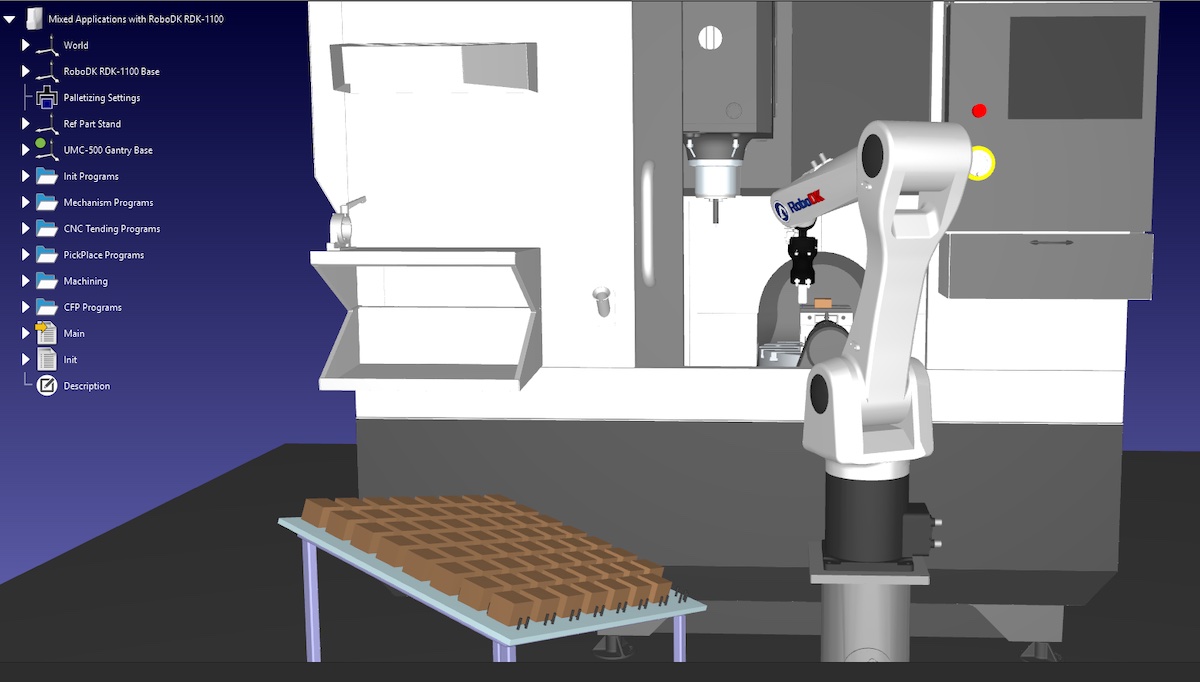
Instead of rushing into a physical trial, manufacturers can begin with a virtual one. Digital twin software enables businesses to build a dynamic, virtual model of a complete robotic system. This model goes beyond static drawings or spreadsheets by allowing teams to test and refine their concepts in a risk-free environment before any hardware is purchased or installed.
A virtual model can include the robot, end-of-arm tooling, fixtures, conveyors, sensors, operators, and surrounding equipment. With this tool, teams can verify whether a robot can reach all necessary positions, test different trajectories, estimate cycle times, identify potential collisions, and assess operator access and maintenance requirements. Application-specific templates can also provide a head start for teams that know the task but are unsure of the ideal hardware or layout.
This early exploration helps transform vague ideas or stalled projects into informed decisions without tying up capital or floor space. Whether the concept is handed to an integrator or developed in-house, the virtual model serves as a common visual and technical foundation.
***
### A Digital Twin Can Model Robot Functions
A digital twin serves as a virtual replica of a robotic cell, offering a realistic view of how the system will operate. Unlike static plans, a dynamic model shows how the robot, end effector, and surrounding equipment will interact in practice.
Teams can use the model to verify reach, test toolpaths, estimate cycle times, identify collision risks, and evaluate safety and workflow considerations. For businesses exploring automation for the first time, application templates can help narrow down the best robot, gripper, and layout based on a specific task. Because this testing happens in software, there is no need for immediate capital expenditure or physical reconfiguration.
This approach allows manufacturers to move from uncertainty to a concrete, testable concept without committing to hardware, a final layout, or a single supplier.
***
### Simulation Can Reveal Real-World Details
What appears simple in a brochure or video can present hidden challenges once modeled in a virtual environment. For example, a robot tasked with loading a CNC machine may seem straightforward—pick a part, wait for machining, and unload—but the simulation often reveals inefficiencies.
The model might show that chuck cycles or part settling times create unexpected idle periods. Teams may discover that certain grippers are unsuitable for the part geometry or that a dual-grip setup would improve throughput. The software can also highlight layout constraints, collision risks, safety concerns, and workflow issues. These insights apply not only to machine tending but also to welding, pick-and-place, palletizing, trimming, dispensing, inspection, robotic machining, and teleoperation.
With offline programming and automatic code generation, the virtual model becomes a bridge from concept to deployment, aligning robot motion, cell design, and final execution.
***
### What to Look for in Digital Twin Software
Not all digital twin platforms are the same. For businesses new to automation, the right software should offer a broad library of robots, end effectors, fixtures, conveyors, sensors, safety devices, and surrounding machinery. This variety makes it easier to compare configurations and avoid being locked into a single vendor.
Key capabilities to look for include collision checking, reachability analysis, robot calibration, offline programming, automatic code generation, and motion planning. For applications such as robotic machining, the software should support CAD-based workflows, toolpath generation, collision detection, and multi-axis coordination.
Usability is also critical. While enterprise platforms can be powerful, first-time adopters need a tool that accelerates the journey from uncertainty to a testable concept without unnecessary complexity.
***
### Improve Conversations with Integrators
Digital twins do not replace system integrators—they enhance them. Many integrators already use simulation and offline programming tools to develop concepts, compare robot brands, validate reach, generate code, manage safety, and communicate proposals more clearly.
When manufacturers come prepared with insights from a virtual model, they can engage in more focused and productive discussions. This leads to more accurate quotes, shorter planning cycles, and fewer misunderstandings.
Manufacturers do not need to solve every automation question in advance. However, starting with a virtual model instead of a blank page, a static sketch, or a preferred robot brand provides a solid foundation. In a climate where capital decisions are under careful review, digital twins allow companies to explore, test, and refine their automation plans before investing in hardware, space, or final system designs.
Ultimately, digital twins are valuable not only for experienced robotics teams but also for manufacturers taking their first steps toward automation. They offer a practical way to reduce risk and increase confidence in automation decisions.
Thank you for reading
