



## The Lenovo Yoga Mini Gen 11: Compact Design Meets Smart Innovation
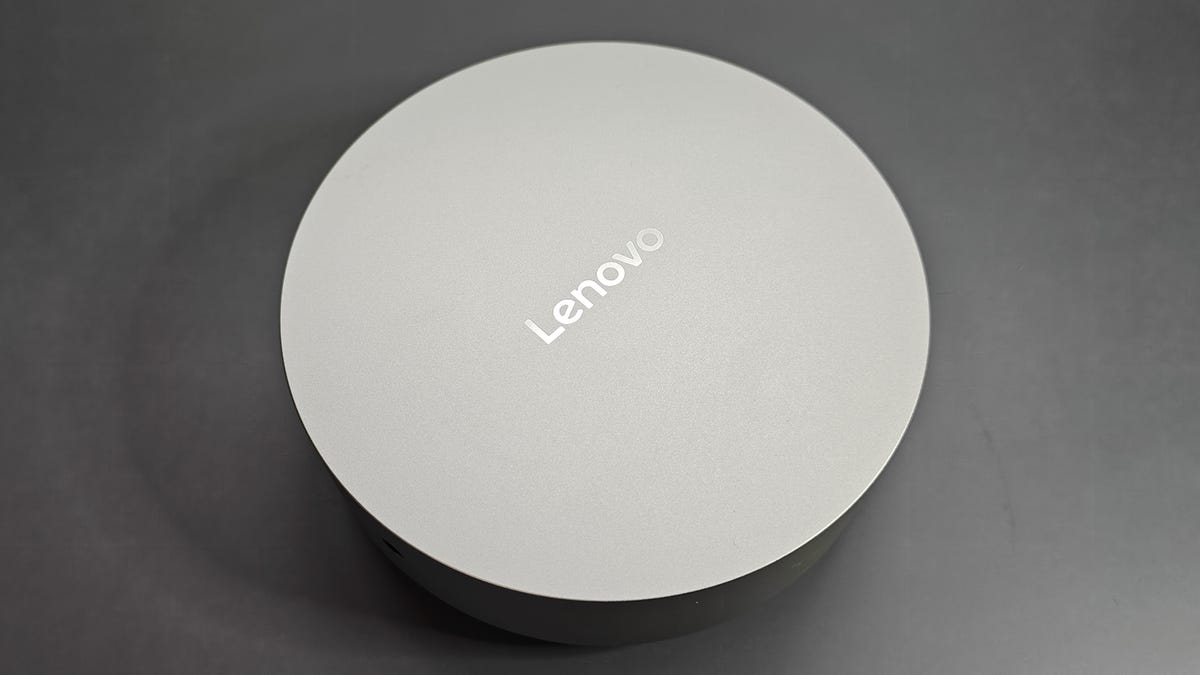
The image above is not an Apple Mac Mini or even the Satechi CubeDock. It’s Lenovo’s new compact PC, the Yoga Mini Gen 11, featuring a round form factor and some unique features. It’s definitely one of the smaller PCs I’ve tested, with respectable hardware designed for everyday, mainstream use. Its design is interesting: the aluminum exterior helps dissipate heat effectively, allowing the system to maintain high performance for extended periods. Plus, its diminutive size makes it ideal for cramped workspaces, but comes with its own set of challenges, as well.
What’s particularly interesting, however, is its set of features I’ve never seen on a mini PC before. Its this combination of hardware and software that helps the 11th-Gen Yoga Mini carve out its own identity in a crowded market — even if it’s not a performance powerhouse.
### Specs and Design
**Specifications:**
| Specification | Lenovo Yoga Mini Gen 11 |
|—————|————————|
| Processor | Intel Core Ultra 5 325 |
| RAM | 16GB |
| Storage | 512GB |
| Ports (Rear) | Thunderbolt 4 with Power Delivery, USB-C with Power Delivery & DisplayPort, USB-C with DisplayPort, USB-A, HDMI 2.1, RJ 45 Ethernet |
| Ports (Side) | Thunderbolt 4 with Power Delivery, Headphone/mic combo |
| Connectivity | Wi-Fi 7, Bluetooth 6 |
| Dimensions/Weight | 1.91 x 5.12 x 5.12 inches / 1.32 lbs |
I couldn’t get over how compact this PC was during testing. To put its size into perspective, it is the same size as the Soundcore Space One Pro when folded, a pair of headphones lauded for their ability to shrink. It only weighs 1.32 pounds, so it’s easy to move between home and office.
Lenovo also gave it a decent selection of ports. As you can see in the specs table above, the PC has multiple USB-C inputs, including two supporting Thunderbolt 4, one HDMI 2.1 video output, and an Ethernet port for wired internet. That’s enough connectivity to support multiple peripherals without needing a docking station.

*The Yoga Mini shown next to the Soundcore Space One Pro headphones.*
The downside to this port array is cable management. Because the Yoga Mini is circular, the ports point in different directions. As a result, connected cables sprawl out, creating a tangle of wires. Your Ethernet and power adapter go off to the right, while your headphone jack and keyboard cable go off to the left.
Around the base is an LED ring. That is Adaptive Lighting, one of the PC’s signature features. It activates in response to certain stimuli. For example, if you receive a notification, it will softly pulse. If you’re playing music, the light will flicker in time with the audio. On top of the PC is a touchpad. Tapping it once toggles Adaptive Lighting, while a double-tap triggers Voice Chat mode.
The touch panel, as well as the light, can be configured to activate connected apps via the AI Turbo Engine, a customization app with a refreshingly simple interface. Neither of these are ground-breaking features, but they do give the desktop a bit of personality that most competing systems don’t offer.

*The round shape means cables go in different directions.*
Perhaps the most interesting feature is Intel’s Wi-Fi Sensing. Inside the PC is a special sensor that can detect disturbances in nearby Wi-Fi signals caused by people approaching. When it recognizes your presence, it automatically wakes up, illuminates the Adaptive Lighting Ring, and lets you sign in. At least, that’s how it’s supposed to work in theory. In practice, I found Wi-Fi Sensing inconsistent. Sometimes the Yoga Mini woke the moment I got close, other times it remained asleep until I pressed the power button, and on a few occasions, it woke up in the middle of the night. Granted, my workspace is a bit cluttered. Perhaps all the different devices on it may have messed with the sensor, but regardless of the cause, I couldn’t reasonably rely on it.
### Performance
As you can see in the specs table above, my review unit was not exactly a powerhouse. It ran on an Intel Core Ultra 5 325 processor with 16GB of RAM, which won’t break any performance records, but did allow it to excel as a productivity machine. During testing, the PC earned a top single score of 2,363 and a top multi-core score of 11,371 on the Geekbench 7 testing program. These numbers indicate strong everyday performance, responsive multitasking, and fast app launches. My hands-on experience reflected those findings, as most programs installed in mere seconds, and the system woke from sleep almost instantly.
The Yoga Mini had no trouble handling my typical workload, which often includes dozens of Chrome tabs, Spotify running in the background, Microsoft Office apps, and high-resolution YouTube livestreams playing simultaneously. Both the Intel processor and 16GB of RAM worked perfectly in unison to keep everything feeling seamless. I even played Genshin Impact through Google Play Games with minimal slowdown.
Hardware may be solid overall, though it has its limits. The Yoga Mini isn’t built for complex 3D projects or professional video editing. It also trails behind some competing mini PCs, including Lenovo’s own IdeaCentre Mini X, which offers more raw processing power. Still, numbers aren’t everything. For everyday productivity, the 11th-Gen Yoga Mini provides a highly polished experience at an affordable price.
### ZDNET’s Buying Advice
Normally, my review unit of the Lenovo Yoga Mini Gen 11 retails for $1,000, but at the time of this writing, it’s currently on sale for $750 at Best Buy. I think that’s a fair price for what you’re getting. If your workflow demands more horsepower, Best Buy also offers a version of the Yoga Mini with an Intel Core Ultra X7 processor, 32GB of RAM, and a 1TB SSD for $1,490.
Best desktops deals of the week
Deals are selected by the CNET Group commerce team, and may be unrelated to this article.
—
## FAQ
**What makes the Lenovo Yoga Mini Gen 11 different from other mini PCs?**
The Yoga Mini Gen 11 stands out with its unique circular design, Adaptive Lighting features, and Intel Wi-Fi Sensing technology. Its aluminum exterior aids in heat dissipation, and it offers a surprisingly robust port selection for its size, making it both stylish and functional for everyday use.
**How is the performance of the Yoga Mini Gen 11?**
The Yoga Mini Gen 11 is powered by an Intel Core Ultra 5 325 processor and 16GB of RAM. This configuration provides strong everyday performance, handling multitasking, app launches, and media consumption efficiently. It is well-suited for productivity but not intended for heavy-duty gaming or professional video editing.
**What are the main drawbacks of this device?**
The main drawbacks include awkward cable management due to the circular shape and port orientation, as well as inconsistent performance with the Wi-Fi Sensing feature. Some users may also find the touch panel and Adaptive Lighting more of a novelty than a essential feature.
**Is the Yoga Mini Gen 11 portable?**
Yes, the Yoga Mini Gen 11 is highly portable, weighing only 1.32 pounds and measuring just over 1.9 inches thick. This makes it easy to carry between home, office, or while traveling.
**Where can I purchase the Lenovo Yoga Mini Gen 11?**
The Lenovo Yoga Mini Gen 11 can be purchased through major retailers such as Best Buy, often at competitive prices, especially during sales events.
—
## Conclusion
The Lenovo Yoga Mini Gen 11 is an impressive compact PC that combines a distinctive design with practical features. Its portability, adaptive lighting, and solid performance for everyday tasks make it an excellent choice for users seeking a space-saving and visually appealing computing solution. While it may not satisfy power users or those needing specialized performance, it delivers great value for mainstream productivity and multimedia use. If you’re in the market for a small but capable desktop, the Yoga Mini Gen 11 is certainly worth considering.
