



# PEEP: The Chromium-Based Post-Exploitation Malware Disguised as a Bookmarks Extension
## What Is PEEP?
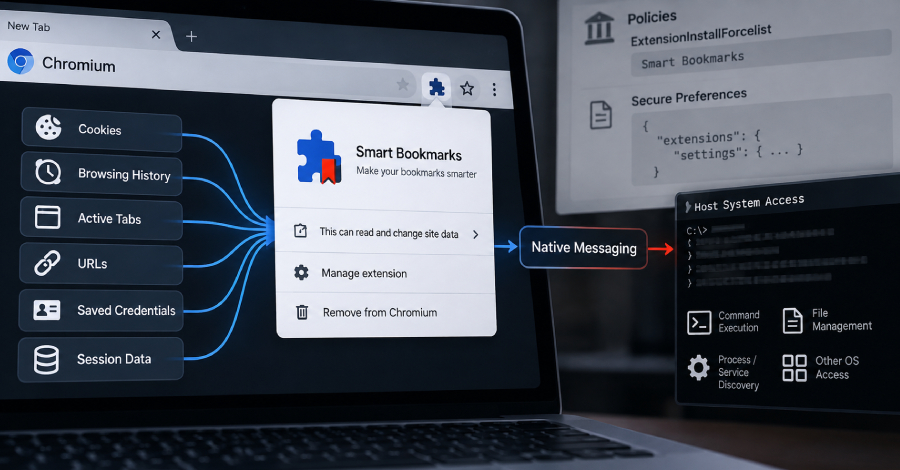
Security analysts have uncovered a sophisticated malware framework that operates as a rogue browser extension targeting Chromium-based web browsers such as Google Chrome and Microsoft Edge. The malicious toolkit, internally referred to as PEEP, disguises itself as a harmless “Smart Bookmarks” extension and operates as a persistent backdoor capable of stealing sensitive data, executing remote commands, and hijacking user sessions.
Unlike traditional malware that seeks an initial entry point into a system, PEEP is classified as a post-compromise tool — meaning it must already be deployed on a machine that has been previously breached through another vulnerability or attack vector. This makes it a secondary-stage threat that leverages existing access to establish long-term persistence within a victim’s browsing environment.
## How the Malware Works
The core of the attack begins with the installer, which injects the malicious extension directly into the user’s Chrome or Edge profile. To avoid triggering any built-in integrity checks, the attacker forges the Secure Preferences file — a configuration file that Chromium uses to validate the legitimacy of installed extensions. By manipulating this file, the malware ensures that the rogue extension is automatically enabled every time the browser launches, without any user interaction or consent.
Once activated, the extension begins a rapid communication cycle with its command-and-control infrastructure, checking for new instructions every 30 seconds over unencrypted HTTP connections. This beacon mechanism allows the operator to issue commands in real time, from harvesting browsing data to deploying additional payloads.
## Capabilities of the Extension
The PEEP extension is far more than a simple data harvester. Its full suite of capabilities includes:
– **Data exfiltration** — silently collecting browsing history, active tab metadata, session cookies, public IP addresses, locale settings, and timezone information.
– **Credential theft** — extracting stored login credentials and session tokens from the browser’s profile.
– **Remote command execution** — leveraging a native-messaging host binary to run shell commands at the operating system level.
– **Session hijacking** — taking over active user sessions on websites by injecting malicious JavaScript into web pages.
– **File management and process discovery** — listing running processes, services, and files on the compromised machine.
– **Screenshot capture** — capturing the contents of the user’s active browser window.
The inclusion of a native-messaging bridge is particularly significant because it allows the malware to break out of the browser’s sandboxed environment and interact directly with the host operating system, transforming a browser-level threat into a full system compromise tool.
## Persistence and Evasion Techniques
PEEP employs multiple layers of persistence to ensure it remains on the infected system even after browser restarts or system updates. These include:
– **Secure Preferences tampering** — modifying Chromium’s integrity validation so the extension is treated as a legitimate, auto-enabled component.
– **Enterprise policy abuse** — leveraging Chrome’s `ExtensionInstallForcelist` or `ExtensionSettings` group policies, which are commonly used by organizations to deploy approved extensions, to silently push the malicious add-on.
– **Sideloading** — bypassing the Chrome Web Store entirely by enabling Developer Mode and manually registering the extension.
– **ScriptCache fallback** — using a secondary mechanism to re-inject the extension if it is removed or disabled.
The installation process also relies on two PowerShell scripts that automate the enabling of Developer Mode and the patching of the Secure Preferences file. A third script handles the removal of the extension from the uninstall registry, relocates the malicious CRX file to a hidden directory, and registers it through a custom external manifest before restarting the browser.
## Linux Variant and Cross-Platform Reach
Further analysis has uncovered a Python-based script designed for Linux environments, suggesting that the threat actor behind PEEP has extended their campaign beyond Windows machines. This Linux version replicates the same core functionality, including Secure Preferences manipulation and native-messaging host integration, indicating a deliberate effort to maximize the toolkit’s reach across different operating systems.
## Command-and-Control Infrastructure
The malware communicates with a C2 server hosted at the domain `xfjcc[.]fun` (resolving to IP address `206.237.30[.]232`). The communication endpoints include routes for registration, heartbeat telemetry, task assignment, result exfiltration, extension updates, and a login portal for the operator’s control panel hosted on port 5001. The `/health` endpoint revealed 34 registered agent entries, 10 active sessions, and 507 data records at the time of discovery — though it remains unclear how many of these represent genuine infected machines versus test deployments.
## Possible Attribution and Development Context
Several Chinese-language strings and references have been found within the PEEP source code, pointing toward a Chinese-speaking threat actor as the likely developer. Notably, references to “Authorized CTF” usage were identified, which suggests the attacker may have framed the malware development as a sanctioned red-team exercise to bypass internal safety guardrails within AI-assisted development tools.
PEEP is built on the foundation of an open-source browser exploitation framework called RedExt, which has been linked to earlier campaigns such as GlassWorm. However, PEEP significantly extends RedExt’s capabilities by adding dedicated installation routines, a native host bridge, update channels, heartbeat telemetry, and a much broader command set.
—
## Frequently Asked Questions (FAQ)
**Q1: How does PEEP get onto a user’s computer?**
PEEP does not have its own initial access vector. It requires that the attacker already has administrative access or code execution on the target machine through a separate exploit or phishing attack. Once access is gained, the installer deploys the malicious extension directly into the browser profile.
**Q2: Can PEEP be detected by antivirus software?**
Because PEEP operates inside the signed browser process and manipulates Chromium’s own configuration files rather than dropping standalone executables, it can evade many traditional signature-based detection methods. Advanced endpoint detection and response (EDR) solutions and browser integrity monitoring tools are better suited to identifying this type of threat.
**Q3: Is PEEP available on the Chrome Web Store?**
No. The extension is not listed on the Chrome Web Store or any official extension marketplace. It is delivered through sideloading, enterprise policy abuse, and manual installation techniques to avoid store-based vetting.
**Q4: Which browsers are affected?**
PEEP targets Chromium-based browsers, specifically Google Chrome and Microsoft Edge. Other browsers built on the Chromium engine, such as Brave and Opera, may also be vulnerable.
**Q5: Can PEEP steal passwords saved in the browser?**
Yes. The extension is capable of harvesting browsing artifacts, session cookies, and credentials stored within the browser’s profile, allowing the attacker to gain unauthorized access to the victim’s online accounts.
**Q6: Is there a version of PEEP for Linux?**
Yes. A Python script called `patch_secure_prefs_linux.py` has been identified, indicating that the operators of PEEP have adapted their toolkit to target Linux-based systems as well.
**Q7: Who is behind the PEEP campaign?**
The activity remains unattributed with certainty, but Chinese-language artifacts found in the source code strongly suggest a Chinese-speaking threat actor. References to Authorized CTF use may indicate the attacker is operating within an organized red-team or intelligence context.
**Q8: How can users protect themselves from PEEP?**
Users should regularly review their installed browser extensions, avoid enabling Developer Mode unnecessarily, and ensure that enterprise policies on extension installation are properly configured and monitored. Organizations should also deploy endpoint detection tools capable of monitoring browser integrity and profile modifications.
—
## Conclusion
PEEP represents a significant evolution in browser-based post-exploitation tactics. By combining forged configuration tampering, native-messaging host execution, and a comprehensive command-and-control infrastructure, the toolkit transforms a routine web browser into a powerful espionage and remote-access platform. Its foundation on an existing open-source framework demonstrates how readily available red-team tools can be repurposed into potent threats when deployed by malicious actors. As Chromium-based browsers continue to dominate the market, the importance of integrity monitoring, extension auditing, and robust endpoint defense has never been more critical. Organizations and individual users alike must remain vigilant against sideloaded extensions and unusual modifications to browser configuration files.
Thank you for reading
