



# How NVIDIA’s Personal AI Router Is Solving the Local Multi-Agent Bottleneck
## The Problem: One User Request, Dozens of Competing Calls
Modern AI workflows rarely look like a single conversation anymore. A lead agent breaks a complex task into smaller subtasks, each of which spawns its own independent call to a local model. What begins as one user prompt can quickly balloon into a storm of parallel inference requests — all directed at the same machine, all fighting for the same limited execution slots.
The result is a familiar frustration: the queue on one workstation grows longer while other capable hardware sitting on the same network remains completely idle. Whether that hardware is a desktop workstation, a laptop, or an NVIDIA DGX Spark, it sits there with unused capacity while a single engine handles everything sequentially.
This is the exact inefficiency that NVIDIA set out to address with its newest tool for the local AI ecosystem.
## Introducing the NVIDIA Personal AI Router
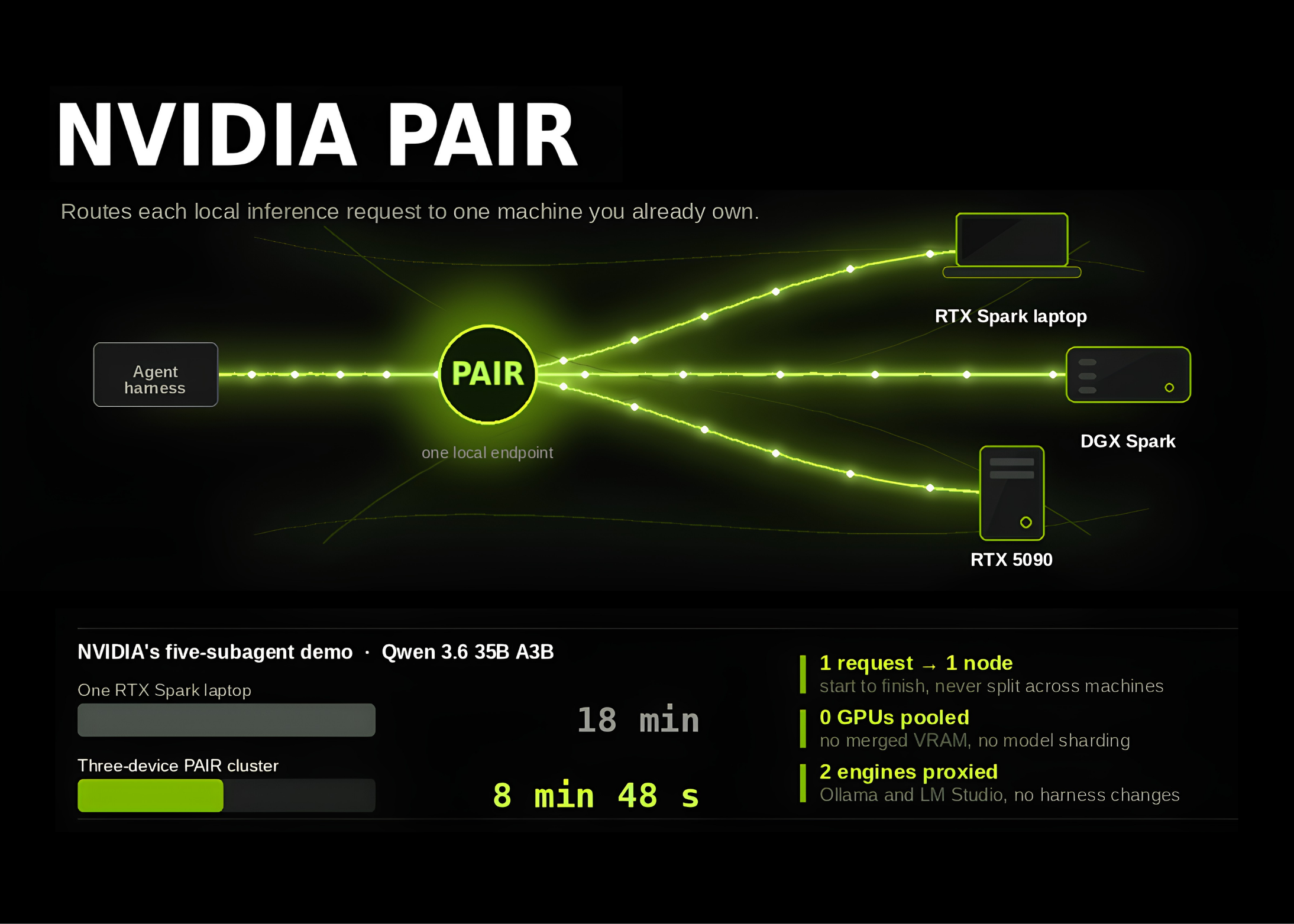
NVIDIA’s Personal AI Router, commonly referred to as PAIR, is a virtual inference router designed to sit on a home or small office network and intelligently distribute incoming inference requests across multiple machines. It does not replace any existing inference engine. Tools like Ollama and LM Studio continue to handle the actual model execution on whatever node PAIR selects. PAIR simply acts as a smart traffic director, sitting between the requesting agent and the engines that run the models.
PAIR is already available to the public as a beta release (version 0.1.1). It provides signed installers for Windows, macOS, and Linux, and the full source code is publicly accessible on GitHub under the Apache 2.0 license. All communication happens over the local network, meaning an internet connection is only needed when downloading new models — not for routine inference operations.
## No New API, No Migration Hassle
One of the most deliberate design choices behind PAIR is that it introduces no cluster-specific API. Instead, it proxies the exact same Ollama-compatible and LM Studio-compatible interfaces that agents and workflows already use. PAIR takes over the default port that each engine listens on, so there is no need to reconfigure how your agents talk to the model layer. If a particular harness listens on a non-standard port, PAIR’s engine settings allow the proxy port to be configured manually. The router also exposes OpenAI-compatible proxy endpoints for broader compatibility.
The practical consequence is straightforward: existing agent frameworks and harnesses require zero code changes. The agent decides what work needs to be done. PAIR independently decides where that work gets executed.
## How Nodes Find Each Other and Establish Trust
Discovery on the local network is handled through mDNS, which allows PAIR to automatically detect compatible machines without manual configuration. When automatic discovery encounters an issue — for example, across subnets or with certain router setups — any node can be added manually by entering its IP address.
Trust between machines is established through a simple six-digit PIN handshake. The inviting machine displays a PIN, and the invited machine requires that PIN to be entered before communication is allowed. Until this pairing process is complete, all node-to-node traffic remains completely blocked. Once paired, all traffic between nodes is encrypted using mutual TLS (mTLS) with automatically generated certificates, ensuring that model requests and data stay secure within the local network.
PAIR can also handle engine installation and model downloads on paired systems, significantly reducing the manual setup effort required to build a multi-node inference cluster.
## The Scheduler: Five Signals, One Decision
At the heart of PAIR is a scheduling system that evaluates each incoming request against five distinct signals before selecting a destination node:
1. **Online and ready status** — Is the node reachable and responsive?
2. **Engine availability** — Is a supported inference engine enabled on that node?
3. **Model presence** — Is the exact model requested available locally on that node?
4. **Current job load** — How many active jobs is the node already handling?
5. **GPU utilization** — How heavily is the GPU currently being used?
PAIR only considers a node eligible for a request if the required engine is active and the exact requested model tag is present on that machine. Different machines in the cluster can hold entirely different model collections, and PAIR routes accordingly. Loading the same model tag across multiple machines simply expands the pool of eligible destinations.
This is workload-level concurrency, and the boundary is unambiguous. Each individual request is assigned to exactly one eligible node, where it executes from start to finish on that single machine. PAIR does not pool GPU memory, does not merge multiple GPUs into one logical accelerator, and does not split a single inference request across multiple machines.
## What This Means for Local AI Deployments
For teams and individuals running multi-agent AI pipelines on local hardware, the implications are significant. The bottleneck that previously capped throughput to the capacity of a single machine is now distributed across every paired device on the network. A setup that might have queued dozens of requests sequentially on one RTX 5090 can now route those same requests across a desktop workstation, a DGX Spark, and a Mac laptop simultaneously — each running the model it is best suited for.
The entire system runs locally with no cloud dependency, no external API costs, and no changes to existing agent codebases. It is a transparent layer that multiplies the effective throughput of a local AI cluster without introducing any new complexity into the application layer.
## Frequently Asked Questions
**What hardware do I need to use PAIR?**
Any machine running Ollama or LM Studio on a local network can participate. NVIDIA’s blog post highlights configurations including a desktop with an RTX 5090, a DGX Spark, and a MacBook with Apple Silicon, but any combination of compatible machines will work.
**Does PAIR require an internet connection?**
No, for routine inference operations everything runs on the local network. An internet connection is only necessary when downloading new models to any of the paired machines.
**Can I use PAIR without modifying my existing agent code?**
Yes. Because PAIR proxies the existing Ollama, LM Studio, and OpenAI-compatible interfaces on the same endpoints your agents already use, no code changes are required on the agent side.
**Does PAIR split a single model inference request across multiple GPUs?**
No. Each inference request is handled entirely on one node from start to finish. PAIR does not pool VRAM or shard requests across machines. It distributes multiple independent requests across the cluster.
**Is my data safe between nodes?**
Yes. All inter-node communication is secured with mutual TLS using automatically generated certificates. Pairing requires explicit PIN confirmation, and no traffic is allowed between nodes until that handshake is completed.
**Is PAIR free to use?**
The source code is open source under the Apache 2.0 license, and the public beta is available at no cost.
## Conclusion
NVIDIA’s Personal AI Router addresses one of the most persistent inefficiencies in local AI deployment: the mismatch between multi-agent demand and single-machine supply. By intelligently distributing inference requests across all available hardware on a network, PAIR turns a collection of individual machines into a cohesive, shared inference cluster — without requiring any changes to existing workflows, APIs, or agent architectures. As local AI continues to mature and multi-agent systems become the norm for complex tasks, tools like PAIR represent a practical and accessible bridge to making full use of the hardware already sitting on your desk and your network.
Thank you for reading
