



**The New Siri: Why iOS 27’s AI Finally Makes Voice Assistants Worth Using**
For years, voice assistants have been a source of frustration for many users. Whether it was mishearing commands, failing to recognize context, or simply offering web search results instead of direct answers, the promise of a truly helpful digital companion often fell short. Apple’s Siri, in particular, has been the subject of much anticipation and, at times, disappointment. However, with the arrival of iOS 27, that narrative is set to change. Apple has unveiled a completely reimagined Siri powered by advanced AI, transforming it from a mere novelty into a reliable and intelligent assistant. The release of the first public beta offers users a glimpse into the future of voice interaction, one that finally delivers on the long-standing promise of a helpful, hands-free partner.
### The Evolution of a Voice Assistant
Early iterations of Siri were groundbreaking in their time, introducing the concept of a digital assistant that could respond to voice commands. Yet, as user expectations grew, it became clear that the technology was not keeping pace. Common issues included a lack of contextual understanding, an inability to follow multi-step instructions, and a frustrating tendency to default to a search engine when faced with a complex query. This created a cycle of hope and disillusionment for many Apple users who relied on their devices for daily tasks. With iOS 27, Apple has broken this cycle. The new Siri is built on a foundation of large language models and generative AI, giving it a level of intelligence and reliability that was previously unimaginable. This shift moves Siri from being a simple voice command tool to a proactive, conversational agent capable of understanding and executing complex requests.
### Seven Reasons to Embrace the New Siri
The improvements in the new Siri are not just incremental; they are transformative. From a more intuitive visual interface to seamless integration across Apple’s ecosystem, the changes are designed to make interactions more natural and efficient. Users will notice immediate differences in how the assistant handles requests, provides information, and interacts with other apps. This new version is engineered to be less intrusive and more focused, offering precise answers without unnecessary chit-chat. Here are seven key reasons why this update marks a significant leap forward for voice assistant technology.
**1. A Modern and Intuitive Visual Design**
One of the first things users will notice is the redesigned interface. Instead of the traditional glowing ring that dominated the screen, the new Siri appears as a clean, unobtrusive bubble at the top of the display. This subtle change not only looks more modern but also serves a functional purpose. It clearly indicates that Siri is active without overwhelming the user’s view. This minimalist approach ensures that the focus remains on the task at hand, whether that is getting directions, setting a reminder, or searching for information. The new design is a deliberate move to make the assistant feel less like a robotic tool and more like a natural part of the user interface.
**2. Unmatched Reliability in Real-World Scenarios**
Perhaps the most significant improvement is the dramatic increase in reliability. Previous versions of Siri often struggled in environments with background noise or when the user was multitasking. The new AI-driven architecture allows Siri to process audio and context with greater accuracy. For instance, when using CarPlay, the assistant can now reliably pull contact names from your address book and automatically find the corresponding location. In the past, the same command would often result in a list of web searches, forcing the user to manually clarify their intent. This enhanced reliability extends to everyday use, making Siri a dependable tool for navigation, messaging, and information retrieval, even when you’re on the go.
**3. A Refreshing Approach to Conversation**
Unlike competing AI assistants that tend to be overly verbose, the new Siri is designed to be concise and efficient. While chatbots like ChatGPT or Copilot may engage in lengthy, sometimes tangential discussions, Siri AI gets straight to the point. This “less is more” approach is a welcome change for users who value speed and efficiency. Whether you are asking for the weather or a complex question about a document, Siri provides a direct answer without unnecessary follow-up questions or conversational filler. This streamlined interaction model respects the user’s time and makes the assistant feel like a true helper rather than a conversational partner.
**4. A Dedicated Application for Enhanced Control**
iOS 27 introduces a dedicated Siri application, placing the assistant’s capabilities directly at the user’s fingertips. This app allows for both voice and typed input, providing flexibility in how you interact with the AI. The application also features a conversation history, allowing users to review previous queries and responses easily. Furthermore, these conversations are synchronized across all Apple devices, creating a seamless experience whether you are using your iPhone, iPad, or Mac. This integration ensures that your digital assistant is always up to date and aware of your recent activities.
**5. Visual Intelligence Directly in the Camera**
The integration of Siri into the Camera app is a brilliant implementation of contextual awareness. By activating Siri while using the Camera, users can ask the assistant to describe objects, people, or text within their field of view. This leverages Apple’s existing Visual Intelligence technology, making it immediately accessible without navigating through different menus. It transforms the camera from a simple recording device into an intelligent tool that can provide instant information about the world around you, whether you are traveling in a new city or trying to identify a product in a store.
**6. On-Screen Awareness for Seamless Interaction**
The new Siri possesses on-screen awareness, allowing it to interact with the content currently displayed on your device. This means you can ask Siri to perform actions related to what you are currently viewing. For example, if you are browsing a map, you can ask Siri for directions to a nearby restaurant, and it will pull up the route directly within the Maps app. This contextual interaction eliminates the need to manually switch between apps or copy and paste information, creating a fluid and intuitive user experience.
**7. Effortless File Management**
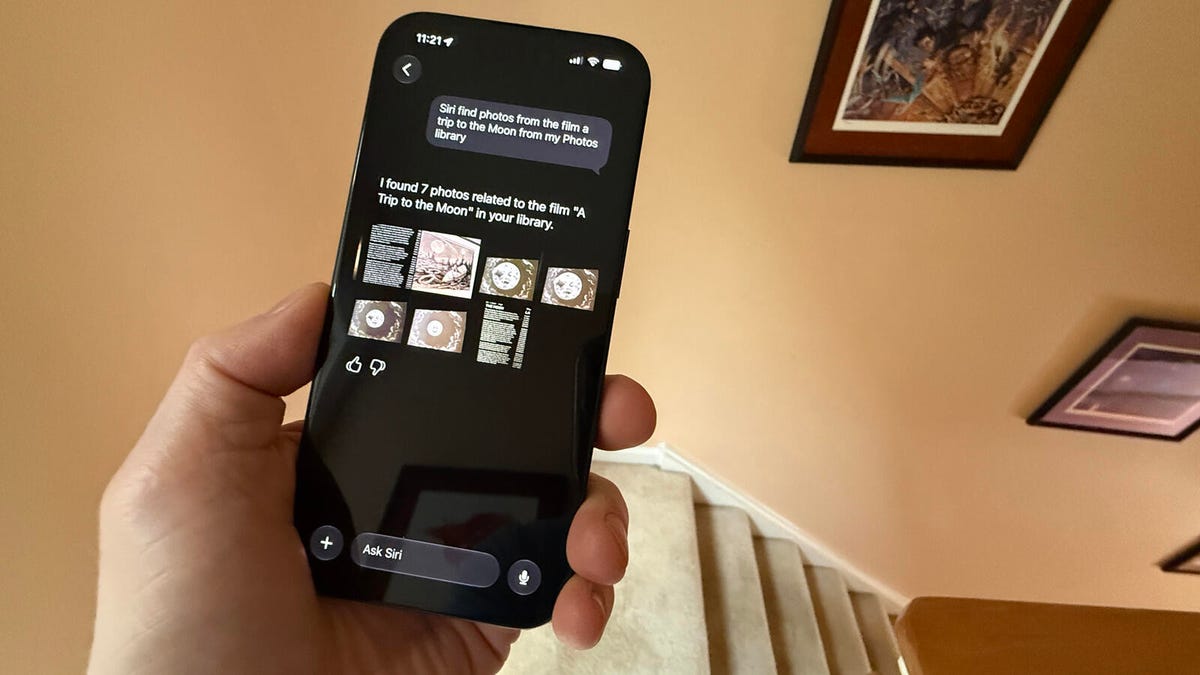
Finding specific files on a mobile device can often be a tedious process. The new Siri simplifies this task significantly by allowing users to search for documents, photos, videos, and music using natural language. Need to find a specific presentation from last month or a video from a recent trip? Simply ask Siri, and the assistant will locate the file for you instantly. This powerful search capability extends across your entire library, saving you time and frustration.
### Getting Started with iOS 27
For users eager to experience these advancements, the process is straightforward. The public beta is available now for all supported devices. To install it, navigate to Settings, select General, tap Software Update, and then choose the iOS 27 Public Beta option. It is important to note that the full capabilities of Siri AI require specific hardware. To utilize the advanced features, users will need an iPhone 15 Pro or Pro Max, any iPhone 16 model, or any iPhone 17 model. While the developer beta required a waitlist, the public beta is open to anyone with a compatible device, allowing for immediate exploration of the new features.
### FAQ
**Q: When will the final version of iOS 27 be released?**
A: The final, stable release of iOS 27 is scheduled for September 2024. This will coincide with the launch of new iPhone models, allowing users to experience the operating system on the latest hardware.
**Q: Which iPhones are compatible with Siri AI?**
A: To access the full suite of Siri AI features, you will need an iPhone 15 Pro or Pro Max, an iPhone 16, or an iPhone 17. These devices have the necessary processing power to handle the advanced AI computations.
**Q: Can I install the public beta on my primary phone?**
A: It is generally recommended to install public betas on a secondary device. Since this is the first public beta, there may be bugs and unforeseen issues. Using a test device, such as an iPhone 15 Pro, is advisable to avoid potential disruptions to your daily workflow.
**Q: Is there a waitlist for the new Siri features?**
A: No. With the public beta of iOS 27, you can enable and use the new Siri AI immediately. There is no need to sign up for a waitlist as was required for the developer beta.
**Q: What makes the new Siri different from previous versions?**
A: The new Siri is fundamentally different because it is powered by generative AI and large language models. This gives it the ability to understand context, follow complex instructions, and perform multi-step tasks. It is not just answering questions; it is acting as a true digital assistant that can interact with your phone’s operating system and apps intelligently.
### Conclusion
iOS 27 represents a monumental shift in the capabilities of Apple’s voice assistant. By addressing the core frustrations of past iterations, the new Siri AI delivers on the promise of a truly useful digital companion. Its combination of cutting-edge technology, intuitive design, and seamless integration across Apple’s ecosystem sets a new standard for voice interaction. While the public beta serves as a precursor to the final release, it already showcases a level of sophistication and reliability that has been years in the making. As we move closer to the official launch in September, the excitement surrounding this update is palpable. For anyone who has ever been let down by their voice assistant, iOS 27 is not just an upgrade; it is a revolution.
