



These documents were designed to be processed by machines. Think old hotel invoices, bank statements, payslips, loan applications, medical bills, customs forms, court filings, and work orders.
Most businesses rely on a mix of free tools and paid APIs to digitize these documents. If you need structured output, services like Textract Structured can cost around $65 per 1,000 pages.
In recent years, however, a wave of new solutions has emerged: compact open-source vision models built specifically for OCR, general-purpose vision-language models, and document parsing platforms like LlamaParse. These advances are reshaping what’s achievable and how much it costs.
This felt like the right moment to run my own experiment, putting several of these tools to the test against documents of varying complexity.
I gathered 93 documents representing the kinds of material companies typically process with OCR—handwritten notes, tables, legacy financial records, scanned invoices, receipts, charts, old newspapers, and tax forms—then ran each one through 14 different engines.
The goal was to evaluate two things: how well each engine recovered text and how effectively it preserved table structure.
The central question I wanted to answer: is it really necessary to spend $65 per 1,000 structured pages, or can you cut that cost dramatically? And do specialized models actually outperform general-purpose ones?
Experiments like this always surface some surprising findings, which I’ll discuss as well. But to address that core question, I’ll walk you through what OCR is (feel free to skip if you’re already familiar), the economics behind it, the test setup, key results, and what else I discovered along the way.
Note: I did not evaluate full field extraction, since that’s difficult to compare consistently across fourteen different engines.
TL;DR
No single OCR engine is the best at everything. OCR is fundamentally a routing problem.
For clean, high-volume documents, Tesseract remains tough to beat—it’s free and fast. For mixed production documents, Gemini Flash emerged as the strongest all-around performer in this test. For tables, Mistral OCR appeared to be the more affordable structured option.
The smaller specialist models performed well within their area of expertise but struggled more on documents outside their training scope. So for high-stakes or particularly messy documents, it makes sense to escalate to a larger, more capable model.
The key economic takeaway: don’t pay premium prices for structured OCR when the document doesn’t require it. Classify your documents, test engines on your own data, and route based on cost, accuracy, structure needs, and how much error you can tolerate.
Benchmarks are helpful for initial exploration, but they won’t tell you what works best on your specific documents.
Walk me through the OCR landscape
OCR (Optical Character Recognition) is the technology that allows a machine to convert an image into readable text. The concept is straightforward, and for simpler documents it’s largely a solved problem—but it gets tricky when things become more human in nature.
To give you a quick sense of how it works: traditional OCR locates text on a page, breaks it into individual characters, and matches each one against a library of known shapes. Tesseract has been doing this since the 1980s.
Modern OCR, however—including newer versions of Tesseract—typically uses a neural network that examines the entire page at once and outputs the document as text. So if your document is a clean PDF or a high-quality scan using a standard font, OCR is mostly a solved problem.
It stops being solved the moment things get messier: photographed receipts, handwritten notes, unusual graphs and charts, dense financial tables, or scanned tax forms and loan applications.
Companies need this done well for obvious reasons, since every downstream system depends on it. The better OCR performs, the more paperwork becomes something a system can reason over rather than something a person has to read manually.
There’s also the reality that if you feed AI systems poorly parsed documents, everything downstream becomes hard to trust.
I’m very focused on economics, so this space grabbed my attention once I saw how much investment is flowing into it. The Intelligent Document Processing (IDP) market is projected to grow to somewhere between $20 billion and $90 billion by the early 2030s, depending on which analyst you consult.
This growth is likely fueled by companies spending $15–25 per invoice on manual handling costs.
And because I stay close to the tech world, I’ve watched a wave of specialized small OCR models launch over the past year (mostly from Chinese developers), now being adopted by developers everywhere.

That raises the question I wanted to investigate: can these small open-source models actually handle the work that expensive APIs charge for, or should we also be looking at general-purpose vision models to handle OCR?
Feel free to skip the next section if you’d rather get straight to the results. I need to cover the test setup first.
The documents, the engines, and the metrics
This experiment boils down to three things: which engines we tested, what documents we used, and how we determined the winner.
For the engines, I wanted a lineup that represented all the categories I discussed—old and new, open and closed, local and cloud-based, specialized and general-purpose.
Tesseract served as the classical baseline. It runs locally and is very fast. I then added two document-parsing pipelines: Docling and Marker. Docling is slower but runs on CPU; Marker is open-weight but requires a GPU to run quickly, which factors into the cost analysis later.
For the new wave of specialized open OCR models, I selected GLM-OCR, PaddleOCR-VL, DeepSeek-OCR, and MinerU 2.5 (a borderline case—it’s really a pipeline with a VLM inside). I chose them from OpenDataLab’s OmniDocBench leaderboard, where they ranked first, second, fourth, and fifth.
I hosted them on Modal and served the applicable ones with vLLM, using batching to speed things up. I included the scale-up time when measuring latency later.
I also included one closed, purpose-built model: Mistral OCR, which I’d heard promising things about.
On the open side, I used Qwen3-VL (8B, from Alibaba), also hosted on Modal with the rest.
I’ll paraphrase the article to make it easier to read and understand while keeping the HTML structure intact.
Here is the paraphrased version:
These outperformed the smaller models in nearly every category. It’s worth noting that I used a basic, straightforward prompt to test them, not the highly-tuned, optimized setup they may have been built to use, so they might not have shown their full potential.
For the general-purpose, closed-source models, I chose Gemini Flash 3.1 Lite (currently ranked first on the IDP Leaderboard, which is the western equivalent based on OmniDocBench v1.5) and Claude Sonnet 4.6, ranked sixth.
For cloud-based document processing services: LlamaParse and AWS Textract, tested in both its plain text and its structured modes. Structured Textract is capable of far more than what I actually tested. I only evaluated its text-level accuracy overall and its table extraction abilities compared against eight competing engines.
Now let’s look at the documents. I selected seventeen kinds of documents spanning easy, medium, and hard difficulty levels. Ninety-three files in total.
The easy category consisted of material that OCR technology has largely mastered years ago: clean invoices and receipts. The medium tier was drawn mostly from the OmniAI OCR Benchmark dataset and included bank statements, medical notes, photographed receipts, shipping documents, and tax forms.
The hard category was deliberately chosen to push the limits: charts, fillable forms, handwritten notes, oddly scanned financial tables, legal documents, newspapers, and old legacy reports.
Some of the documents were truly challenging — like the legacy scanned documents shown below. I included them out of pure curiosity, to see if any engine could handle them well.

Some of these images came paired with gold-standard ground truth, and some didn’t. And even the ground truth that existed wasn’t always reliable — some files were labeled correctly, others weren’t. That’s why we should also quickly discuss the evaluation metrics.
Because every engine outputs different formatting and markup, standard scoring approaches didn’t quite work here. You could consider using Precision and Recall for something like this.
Precision checks how many words in the OCR output actually match the ground truth, while Recall measures how many of the ground truth words were successfully captured by the output.
However, Precision would unfairly penalize engines that produce markdown structure not reflected in the ground truth. And sometimes the ground truth itself omitted labels entirely, which would also unfairly drag down an engine’s score. Recall counts words correctly but gets thrown off by frequency mismatches.
So I introduced a third metric called Coverage. It simply measures how much of the ground truth content can be found somewhere in the engine’s output, regardless of where or how it appears. It’s not a perfect measure, but it gives a good sense of whether an engine captured most of what mattered — without punishing it for shortcomings that are really the ground truth’s fault, not the engine’s.
For documents that had no gold ground truth at all, I resorted to using an LLM judge as a fallback, built on Gemini 3 Pro. And as anyone who’s used one of these judges knows, the results can be unpredictable.
What the experiment revealed
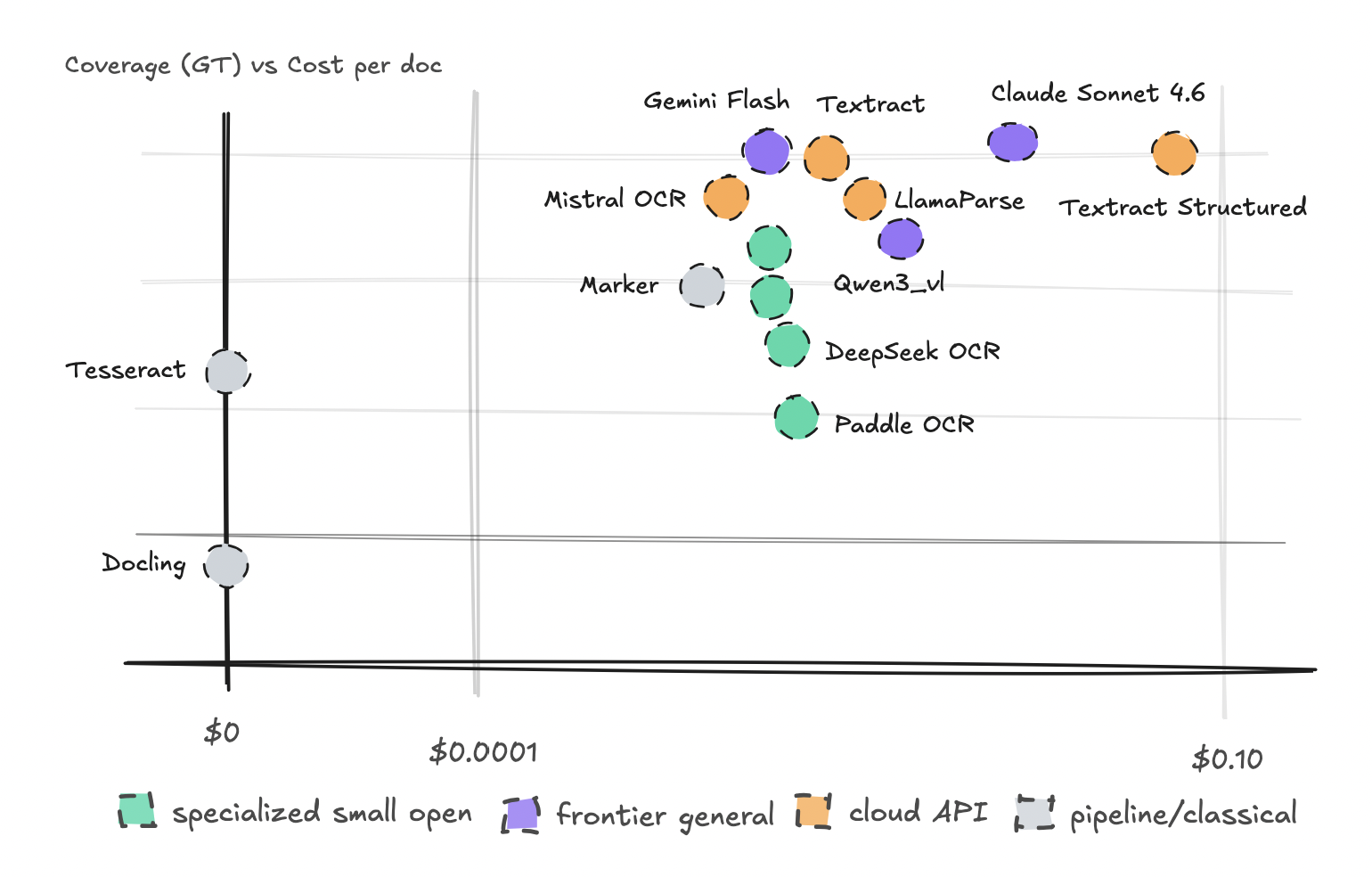
I plotted every document against the Coverage metric to create a scatter chart, and simultaneously tracked processing speed (latency) on a separate chart. What a broad overview chart can’t convey, though, is that each engine failed for different reasons.
The bubble chart showed most engines clustered in the upper-middle range, with two outliers on either end.

Gemini Flash and Textract Text performed exceptionally well across the board, with just a few edge cases. The specialized models all scored below the general-purpose models and specialized APIs. Sonnet achieved the highest marks overall but came with a noticeably steeper price tag.
This result may not be surprising, given that the test set was highly unconventional. Some of the specialized models likely hadn’t encountered many of these document types during training. Additionally, this test used exclusively English documents, and most of these smaller models originated from Chinese developers.
When we also charted latency, some models turned out to be considerably slower, but again, most fell somewhere in the middle.

The standout outliers here were: Tesseract, Claude Sonnet 4.6, and Docling. Tesseract was dramatically faster than every other engine. For straightforward documents, it should be your first choice.
These charts summarize performance across all documents, but I also broke down the results by document type and difficulty level.
Starting with the easy documents: every engine handled invoices well, with Tesseract standing out in particular. Receipts gave everyone a bit more trouble.

Docling was the clear outlier on the downside, struggling across many of the categories — even the easy ones.
When I dug into Docling’s failures, I found garbled outputs like Ifjointreturn instead of “joint return,” and worse, character strings like City,wrostffielfouaveaoreignadresalcomletacesb. DeepSeek also missed critical details on these, such as invoice numbers and dates, which is why its score sits at the bottom.
The same pattern holds in the medium difficulty category, though this is where PaddleOCR began to noticeably deteriorate on specific types: bank statements, shipping documents, and tax forms. Tax forms were tough for everyone, but PaddleOCR and Docling ended up at the bottom of the rankings.
Textract was the top-performing engine across many of the medium-difficulty types, along with Claude Sonnet 4.6 and Mistral OCR.
On the harder document types, Gemini Flash began to pull ahead, surpassing Textract on forms and handwritten notes and matching it on other categories. It performed impressively well across the board. Tesseract and Docling broke down badly on handwritten content, and forms were a serious challenge for them as well.
Virtually none of the specialized models managed to hold up on these harder documents — with one exception: financial tables, where they managed to keep pace.
For documents lacking any ground truth (newspapers, legal papers, reports, and some scanned legacy documents), we relied on an LLM judge for scoring. These are genuinely difficult documents, so it’s no surprise that virtually every engine struggled with the reports and newspapers.
The exception was Gemini Flash, which performed reasonably well across every category. Mistral OCR also handled newspapers effectively. Gemini Flash came out on top across the board when judged by the LLM. That said, since we used Gemini Pro itself as the judge, takeBefore wrapping up, I also pitted eight different engines against Textract Structured to see how they handled financial tables, specifically extracting HTML tables. I used Textract Structured’s output as the “ground truth” for TEDS (Tree Edit Distance Similarity) and scored Claude Sonnet 4.6, LlamaParse, Mistral OCR, Gemini Flash, Marker, MinerU, DeepSeek-OCR, and Docling against it.
Mistral OCR, LlamaParse, and Sonnet performed exceptionally well while being significantly more affordable. I also ran the results through an LLM judge, and the same three came out on top (even before considering Textract Structured), though I’d want to refine that test further before fully trusting its conclusions.
Now, let’s discuss the costs of scaling this up and what makes sense in different scenarios.
## When Does What Make Sense
Let’s break down the costs of scaling with these engines and then determine which one to choose based on your specific documents.
First, the cost of using these engines varies dramatically, as you’ve seen. It’s often helpful to look at the cost not just for a single document, but for thousands or even millions.
We’re self-hosting on Modal, so these costs reflect actual usage there. You could run them locally, but my computer couldn’t handle it, and I didn’t want to attempt it.
If you were to use just one engine for both easy and hard documents, you’d likely end up with a much higher bill than necessary. Using Textract Structured for documents that don’t require it would cost you $6.5k per 100k docs.
I wonder how many companies take the easy route here and opt for expensive options for both easy and hard documents, leaving a lot of money on the table.
The key takeaway is that there’s no single best engine for every use case. It depends on document type, privacy requirements, table structure, failure tolerance, cost, and other factors.
For the documents we have here, Gemini Flash 3.1-Lite is the clear winner. This was evident from the leaderboards. Mistral OCR performed well on structured tables while remaining affordable. Claude Sonnet 4.6 also did very well, but it’s comparatively slow and expensive.
Docling is extremely slow on my laptop. I’m sure there are ways to speed it up, but it also failed in ways that make it inherently unstable (though this was still a small test).
The specialized OCR models were a bit of a headache, especially on English documents. I noticed output errors in Chinese that I’ll cover shortly, so I wonder if that’s part of the issue.
Textract is a stable choice, but the structured version offers almost no additional text accuracy. If you’re paying that premium for structured output, make sure you actually use it. I’m guessing it’s a pretty good business model for them.
So, in general, for this very small test: for clean, high-volume print, just use Tesseract. For general heterogeneous production, go with Gemini Flash. For a cost floor with table structure, test Mistral OCR. For high-stakes documents, route to Sonnet or a larger model.
Since everyone performed well in different ways, you’ll need to contact me for specifics. But if you need to go private, it may be worth looking into fine-tuning a model on your documents. Alternatively, use a small specialized model and escalate on failures.
Let me quickly mention some things that stood out after conducting this experiment.
## Other Things I Should Mention
A few things emerged from this that are worth highlighting individually.
First, if you want to understand how a model or engine will perform on your documents, the only way is to test on those documents. You can’t rely on benchmarks to tell you. This was the number one insight from this experiment. OCR usefulness depends on your own document mix, layouts, languages, scans, tables, handwriting, and failure tolerance.
Don’t pay for structure if you don’t need it. I wonder how many people are using certain APIs or models for reasons they can’t justify. Map the cost to understand what you’re losing by not using the correct engine for your documents.
The specialist models, as mentioned before, have sharp boundaries. This is obvious—they can be excellent within their training distribution but fail outside of it. This is where the general models will win.
If you want to fine-tune, it may help, but only if the stream is stable. It will also fail if it’s constantly introduced to new document classes.
Lastly, the failure modes told us more than the averages.
PaddleOCR had repetition loops, column merging, and fell back into Chinese textbook template text like `书名:___` repeated hundreds of times. Docling had character errors, word merging, and column misalignment all stacking together.
DeepSeek OCR had chart blindness and empty outputs on some documents. Tesseract did fine on clean documents (as mentioned) but failed on photos and handwriting altogether, outputting garbage.
## Caveats to Consider
Before we wrap up, let me cover how this test is ultimately imperfect by addressing the issues in the ground truth, the metrics used, and the sample size.
I covered this in one of the sections above, but the ground truth differs between documents depending on the dataset where they were found. In general, tokenization artifacts can make correct OCR look worse than it is.
Most engines have different formats—some return plain text, some markdown, some HTML/rich markdown—and it’s hard to generalize across all of them.
We’re using Coverage, along with some other metrics, but these aren’t perfect. Coverage won’t penalize the engine if it outputs too much text or if the structure is off. Though I did find that for the engines that failed, they did so at the start or midway through rather than at the end.
This means it’s useful for ranking but not a perfect way to score.
LLM judges are not neutral truth. I’ve covered this in the past, but they are biased and very prompt-sensitive.
Then I just need to say that this test is interesting but not that large. The sample size is way too small to use this as a factual study. But I don’t fully trust these metrics or the judge, so it was the only way for me to double-check the results on my own without this turning into a year-long project.
So, this test is useful for direction and getting a sense of what works. But for understanding your use case, you need to run it through with your specific documents.
Lastly, latency and reproducibility are unstable. Serverless cold starts make timing noisy, and API models can silently change over time, so exact reproduction is hard.
—
Like always with these articles, it takes quite a bit to do an experiment like this. But I don’t just do it for content; I do it because I’m genuinely curious.
What it looks like, though, is that OCR seems to be a routing problem, and perhaps an evaluation problem. Classify your documents and run them through several engines, then try to build a decent router and validator in your pipeline to escalate failures and log the costs.
If you need to get the full results from this experiment or you want me to run it through your documents, get in touch.
You can follow my writing on Medium, my website, or connect with me via LinkedIn.
❤
All datasets used in this benchmark are publicly available and sourced from HuggingFace. Licenses include MIT, CC-BY-4.0, and fair-use frameworks (UCSF Industry Documents Library) covering research, scholarship, and education. No source documents are reproduced—datasets were used solely as evaluation inputs to measure OCR engine performance.
