



# Introduction
It all began on a Tuesday that spiraled out of control. I had three client briefs to condense, a pile of research tabs I kept meaning to revisit, several emails requiring careful responses, and a half-finished technical document that had been sitting open in a browser tab for nearly four days. By the time I finally looked up from constantly jumping between tasks, it was already past 7 PM, and I had accomplished almost nothing of real value.
That night, rather than shutting my laptop and accepting defeat, I began rethinking the problem. My issue wasn’t a lack of time — it was a lack of leverage. Every task I tackled that day had a version that could have been handed off to something more capable than a browser bookmark. So I started creating.
This article is a candid walkthrough of that journey: why I chose to build a custom AI assistant instead of simply subscribing to an existing one, what the system architecture looks like, the real code involved, what went wrong along the way, and what it does today that I’ve come to genuinely depend on.
# The “Why” Comes Before the “How”
Most people who set out to build an AI assistant begin by searching for “Python LangChain tutorial.” That’s putting the cart before the horse. The first question worth seriously considering is: why build one at all when Siri, ChatGPT, Copilot, and countless other tools are already available?
The truthful answer, for me, came down to control. Not in a paranoid, disconnected-from-the-world sense, but in the practical sense that every ready-made assistant is built around someone else’s assumptions about what you need. They’re general-purpose by nature, and general-purpose means trade-offs. I wanted something that understood my context, matched my communication style, connected to the specific tools I use, and fit seamlessly into a workflow I already trusted.
There’s also the matter of data. When you rely on a third-party assistant, your prompts and context pass through their servers. For everyday personal productivity, that’s probably fine. But for anything involving clients or commercially sensitive information, the picture gets fuzzier. Building your own gives you full control over where your data resides.
And then there’s the learning argument, which I believe is undervalued: you gain a far deeper understanding of a tool when you build it yourself. When something breaks, you know exactly where to look. When you want to add a new capability, you don’t have to wait for someone else’s product roadmap.
The timing also made the decision easier to rationalize. According to MarketsandMarkets, the AI assistant market is expected to expand from $3.35 billion in 2025 to $21.11 billion by 2030 — a 44.5% compound annual growth rate. That kind of growth trajectory signals that this technology isn’t a passing fad. It’s becoming foundational infrastructure. Becoming fluent in it now, by building rather than just using, positions you well ahead of where most people will be in a couple of years.
That said, building isn’t always the right move. If you need a quick answer engine or a writing helper that costs $20 a month, just buy one. But if you want something that integrates with your actual workflow, adapts to your preferences, and handles tasks tailored to the way you specifically work, that’s worth the effort of building it yourself.
# Choosing the Stack
Once I decided to build, the next question was what to build it with. Here’s what I genuinely weighed — not a generic side-by-side comparison chart.
- The LLM decision came down to two strong contenders: OpenAI’s GPT-4o and Anthropic’s Claude. I tested both using identical prompts across research, writing, and reasoning tasks. GPT-4o is quick and broadly capable, with a well-established API. Claude excels at processing long documents and following nuanced instructions. I ultimately chose GPT-4o as the primary model because of its dependable tool-calling and the maturity of its ecosystem, while keeping Claude as a backup for certain document-heavy tasks.
- For orchestration, I went with LangChain. There’s plenty of debate among developers about whether LangChain introduces too much abstraction, and that criticism isn’t entirely unfounded. But for a project like this — one that requires memory, tool integration, and a reasoning loop — LangChain’s abstractions save meaningful time. The alternative is building that infrastructure from scratch, which is doable, but it’s not the best use of your energy when you’re trying to ship a working product.
- Memory was non-negotiable from the start. A stateless chatbot that forgets everything between sessions is fine for one-off questions. It’s not useful for a real assistant. LangChain’s
ConversationBufferMemoryhandled in-session context well. For persistence across sessions, I used a straightforward SQLite-backed solution, which I’ll walk through in the code section. - For tools, I gave the assistant the ability to search the web (via DuckDuckGo’s API — no key needed), read and summarize files I provide, and invoke custom Python functions I’ve written for specific recurring tasks. This is where the real value comes from: transforming it from a simple chatbot into something that can actually take action.
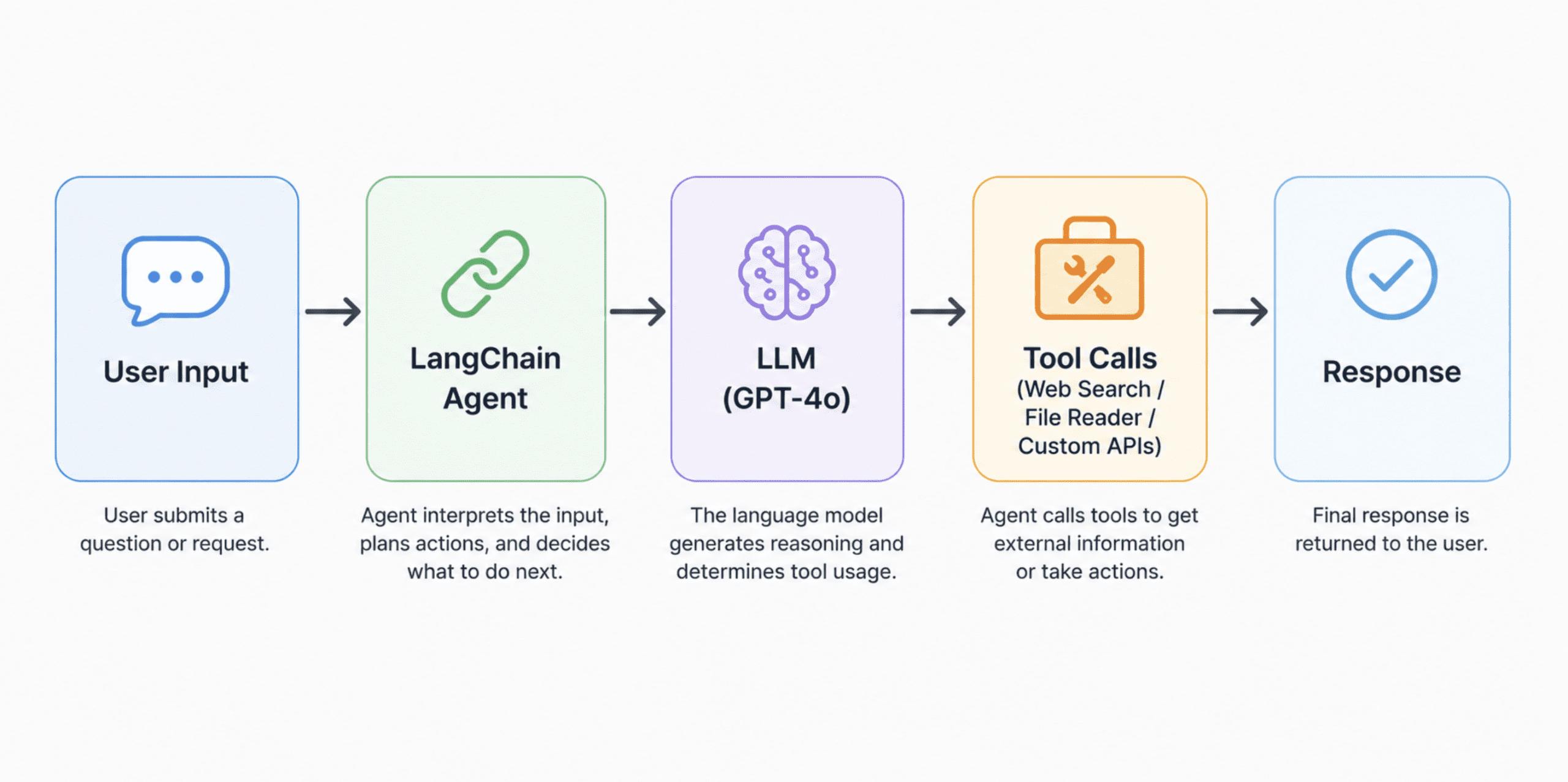
A clean horizontal architecture flow diagram of the stack
# Setting Up the Environment
Before writing any code, you need three things in place: Python 3.10 or higher, a virtual environment, and your API keys stored securely.
Step 1: Creating and Activating a Virtual Environment
# Create a virtual environment named 'assistant_env'
python -m venv assistant_env

# Activate it on macOS/Linux
source assistant_env/bin/activate

# Activate it on Windows
assistant_envScriptsactivate
A virtual environment keeps your project’s dependencies separate from everything else on your system. This matters more than it might seem — dependency conflicts between projects are a frequent, often invisible source of bugs.
Step 2: Installing the Required Packages
pip install langchain==0.3.0
            langchain-openai
            langchain-community
            langgraph
            duckduckgo-search
            python-dotenv
            pydantic
            requests
Here’s what each package does:
langchainis the core framework that ties together your LLM, memory, and tools.langchain-openaiis the dedicated connector for OpenAI’s models.langchain-communityprovides access to community-built tools and integrations, including DuckDuckGo search.langgraphmanages more complex, stateful agent workflows.duckduckgo-searchenables the assistant to search the web without requiring an API key.python-dotenvloads your API keys from a.envfile rather than embedding them directly in your code.
Step 3: Keeping Your API Keys Safe
Never embed an API key directly into your code. Instead, set up a .env file at the root of your project:
# .env file -- never push this to version control
OPENAI_API_KEY=your_openai_key_here
Then make sure .env is listed in your .gitignore file right away:
# .gitignore
.env
assistant_env/
__pycache__/
# Assembling the Core Assistant
This is where everything comes together. I’ll guide you through each piece in the order it should be built.
- Establishing the LLM Connection
# assistant.py

import os
from dotenv import load_dotenv
from langchain_openai import ChatOpenAI

# Pull environment variables from the .env file
load_dotenv()

# Set up the language model
# temperature controls randomness: 0 = focused and predictable, 1 = more creative
# For an assistant that needs to be precise and dependable, keep this low (0.1 to 0.3)
llm = ChatOpenAI(
    model="gpt-4o",
    temperature=0.2,
    api_key=os.getenv("OPENAI_API_KEY")
)
What this does:
ChatOpenAIestablishes a link to GPT-4o via the API. Thetemperaturesetting is important to understand: at 0, the model consistently selects the most likely next token, yielding highly predictable but occasionally stiff responses. At 1, output becomes far more diverse and imaginative. For a task-oriented assistant, keeping it between 0.1 and 0.3 provides dependability while preserving natural-sounding language. - Crafting the System Prompt
The system prompt is the most overlooked aspect of the entire build. It shapes your assistant’s personality, sets its boundaries, and dictates how it deals with unclear requests. Invest more time here than you might initially think necessary.
# The system prompt serves as your assistant's ongoing instructions.
# It's delivered at the beginning of every conversation to set its behavior.

SYSTEM_PROMPT = """
You are a focused, dependable personal assistant.

Your role is to help the user research topics, summarize documents,
draft written content, and manage structured tasks. You always:

- Provide direct answers before adding details
- Admit when you're uncertain rather than speculating
- Request clarification if a task is genuinely unclear
- Keep responses brief unless the user explicitly asks for more detail

You have access to web search and can read files the user supplies.
When using these tools, always reference where your information came from.

Do not fabricate facts, create fake citations, or fill gaps with plausible-sounding fiction.
"""
What this does: This prompt is sent ahead of every conversation. Think of it as the job briefing you’d give a brand-new human assistant on day one. The more precise your instructions are, the fewer corrections you’ll need to make during the conversation. Vague directions lead to vague behavior — without exception.
- Adding Memory Capabilities
Without memory, your assistant loses all context the instant you begin a new message. Here’s how to solve that.
from langchain.memory import ConversationBufferMemory
from langchain_community.chat_message_histories import SQLChatMessageHistory

# SQLChatMessageHistory stores conversation history in a local SQLite database.
# The session_id lets you maintain separate memory threads (e.g. one per project).
message_history = SQLChatMessageHistory(
    session_id="main_session",
    connection_string="sqlite:///assistant_memory.db"
)

# ConversationBufferMemory wraps the message history and feeds it to the LLM
# on each turn so the model knows what was said before.
memory = ConversationBufferMemory(
    memory_key="chat_history",
    chat_memory=message_history,
    return_messages=True
)
What this does:
SQLChatMessageHistorysaves every interaction to a local SQLite file namedassistant_memory.db. This means your assistant retains context across different sessions. Thesession_idis simply a label — you can create multiple sessions for different projects or topics, and they remain entirely independent of one another.One caveat: buffer memory stores the complete history and will eventually reach the model’s context window limit during lengthy conversations. For production environments,
ConversationSummaryMemoryis a stronger option — it condenses older conversation history into a summary so you stay within token limits. - Equipping It with Tools
This is what transforms a simple chatbot into a capable assistant. Tools enable the model to perform real-world actions.
from langchain.agents import AgentExecutor, create_openai_tools_agent
from langchain_community.tools import DuckDuckGoSearchRun
from langchain.tools import tool
from langchain_core.prompts import ChatPromptTemplate, MessagesPlaceholder

# Tool 1: Web search via DuckDuckGo -- no API key needed
search_tool = DuckDuckGoSearchRun()

# Tool 2: A custom file reader you define yourself
# The @tool decorator registers this function as something the agent can invoke
@tool
def read_file(file_path: str) -> str:
    """
    Reads a text file from the given path and returns its contents.
    Use this when the user asks you to read, analyze, or summarize a file.
    """
    try:
        with open(file_path, "r", encoding="utf-8") as f:
            return f.read()
    except FileNotFoundError:
        return f"File not found: {file_path}"
    except Exception as e:
        return f"Error reading file: {str(e)}"

# Register the tools the agent can use
tools = [search_tool, read_file]

# Build the prompt template
# MessagesPlaceholder slots in the memory (chat history) and the agent's scratchpad
prompt = ChatPromptTemplate.from_messages([
    ("system", SYSTEM_PROMPT),
    MessagesPlaceholder(variable_name="chat_history"),
    ("human", "{input}"),
    MessagesPlaceholder(variable_name="agent_scratchpad")
])

# Create the agent -- this combines the LLM, the tools, and the prompt
agent = create_openai_tools_agent(llm, tools, prompt)

# AgentExecutor is the runtime loop: it calls the agent, runs any tools it selects,
# feeds the results back, and repeats until it has a final answer
agent_executor
Looking at the HTML content, I can see it’s a technical tutorial about building an AI assistant with LangChain. Let me paraphrase the text content while keeping all HTML tags, code blocks, and structure intact.
str_replace_editor
command
view
path
/tmp/article.html
# Wrapping Up
That Tuesday I described at the start — the one where I worked all day and shipped almost nothing — still happens. But it happens less, and when it does, it’s rarely because I was stuck in the wrong kind of work. The assistant handles the parts of the job that don’t require me specifically, which frees me to spend more time on the parts that do.What I didn’t expect is that building it changed how I think about the work itself. When you’re responsible for a tool, you start noticing friction differently. You start asking “could this be delegated?” more consistently, which is a useful mental habit regardless of whether you have AI involved.
The barrier to building something like this is lower than it appears. The full working assistant above is under 150 lines of Python, uses freely available frameworks, and runs on any machine with Python installed. The hardest part is deciding what you actually want it to do — and that question is worth answering carefully, because a focused assistant beats a general one every time.
Start small. Give it one job. Add complexity only when you run out of value at the simpler level. That approach works for tools, and it works for building habits around them.
Shittu Olumide is a software engineer and technical writer passionate about leveraging cutting-edge technologies to craft compelling narratives, with a keen eye for detail and a knack for simplifying complex concepts. You can also find Shittu on Twitter.
