



We’re excited to introduce Amazon Bedrock Managed Knowledge Base — a powerful new feature that lets developers create enterprise-level generative AI applications using their own data in just a few minutes. For organizations developing agentic AI solutions, having secure, dependable, and current access to company-wide data is essential for delivering precise, speedy, and reliable results. Managed Knowledge Base removes the hassle of setting up and maintaining retrieval-augmented generation (RAG) pipelines, so developers can concentrate on achieving business goals instead of dealing with infrastructure.
When building knowledge bases for their agents, developers currently encounter three major obstacles:
- Linking to enterprise data – Company knowledge is scattered across various systems, each with its own content formats, access permissions, and file types. Creating and maintaining individual connectors for every source increases complexity and delays progress.
- Improving RAG precision – The best methods for retrieval-augmented generation are constantly changing. Developers must test various parsing techniques, chunking methods, embedding models, and agentic retrieval strategies to extract accurate information from their data.
- Scaling infrastructure – Companies need to handle massive knowledge bases containing millions of documents or manage thousands of smaller ones across different teams. Either scenario demands dependable infrastructure, security measures, and cost management.
These hurdles force developers to repeatedly tackle repetitive tasks rather than dedicating their energy to building applications.
Amazon Bedrock Managed Knowledge Base solves these problems by consolidating the various infrastructure pieces developers normally have to build and manage on their own — storage, retrieval, embeddings, re-ranking, and foundation model selection — into one streamlined managed service. By default, the service automatically chooses and handles an embeddings model, re-ranker model, and foundation model for you, so you can get started quickly without having to select or maintain any of them yourself. Building on this managed foundation, three key innovations further enhance usability and precision:
- Built-in data connectors – Six ready-made ingestion connectors that directly pull enterprise data and permissions from SaaS applications, removing the burden developers face when handling application-specific needs. At launch, supported sources include Amazon S3, SharePoint, Confluence, Web Crawler, Google Drive, and OneDrive.
- Smart Parsing – Various content types and sources call for different approaches to ensure accurate retrieval. Smart Parsing takes care of this complexity on its own, choosing the most suitable parsing strategy for each data type and connector to deliver the best possible accuracy for your agents.
- Agentic Retriever – Designed for complex queries that need multi-step, multi-source retrieval within a single knowledge base or across several knowledge bases. Agentic Retriever automatically determines user intent and gathers relevant information from institutional knowledge spread across different data sources and formats.
With just a few lines of code, Amazon Bedrock Managed Knowledge Base automatically handles and scales the complete RAG pipeline that drives your enterprise knowledge agents. For agent developers, it’s available as a pre-built target type in Amazon Bedrock AgentCore Gateway, cutting integration down to a few lines of code, automatically generating role-based permissions, and offering observability and evaluation metrics through the AgentCore Observability dashboard.
Getting started with Amazon Bedrock Managed Knowledge Base
Setting up a Managed Knowledge Base is simple. Go to the Amazon Bedrock AgentCore console or the Amazon Bedrock console, open the Knowledge Bases page, and select Create Managed KB. The process is identical in both consoles. You’ll notice that Unstructured Vector Store KB is now offered as the recommended choice, along with the other knowledge base types you may already know:
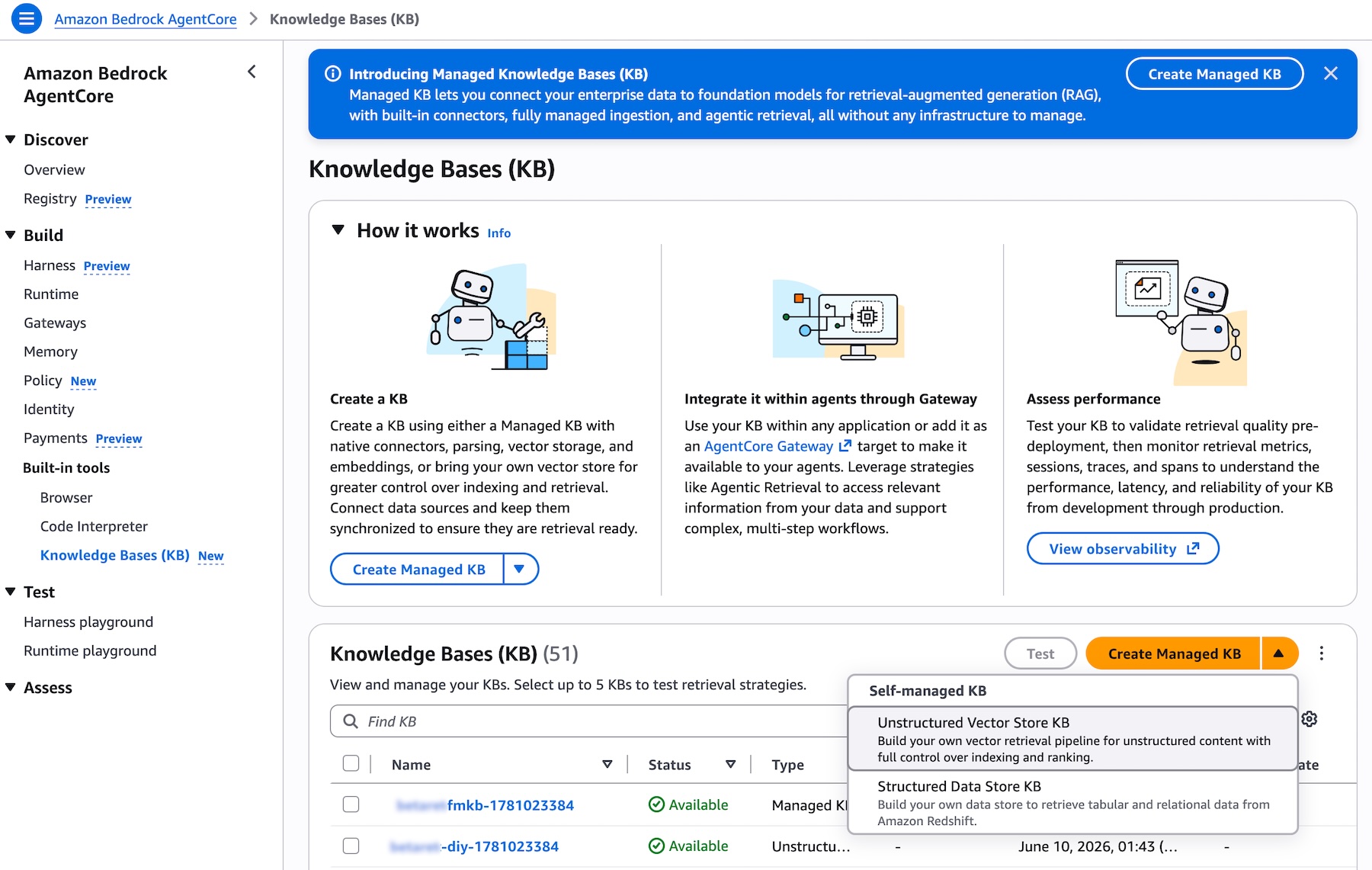
Picture 1 – Knowledge Bases list page in the Amazon Bedrock AgentCore console displaying the Type column with various KB types and the Create Managed KB button
When setting up a new Knowledge Base, you can link to your enterprise data sources by picking from the available connectors in the dropdown menu. AWS Identity and Access Management (IAM) roles are generated automatically, and you can adjust these permissions if necessary:
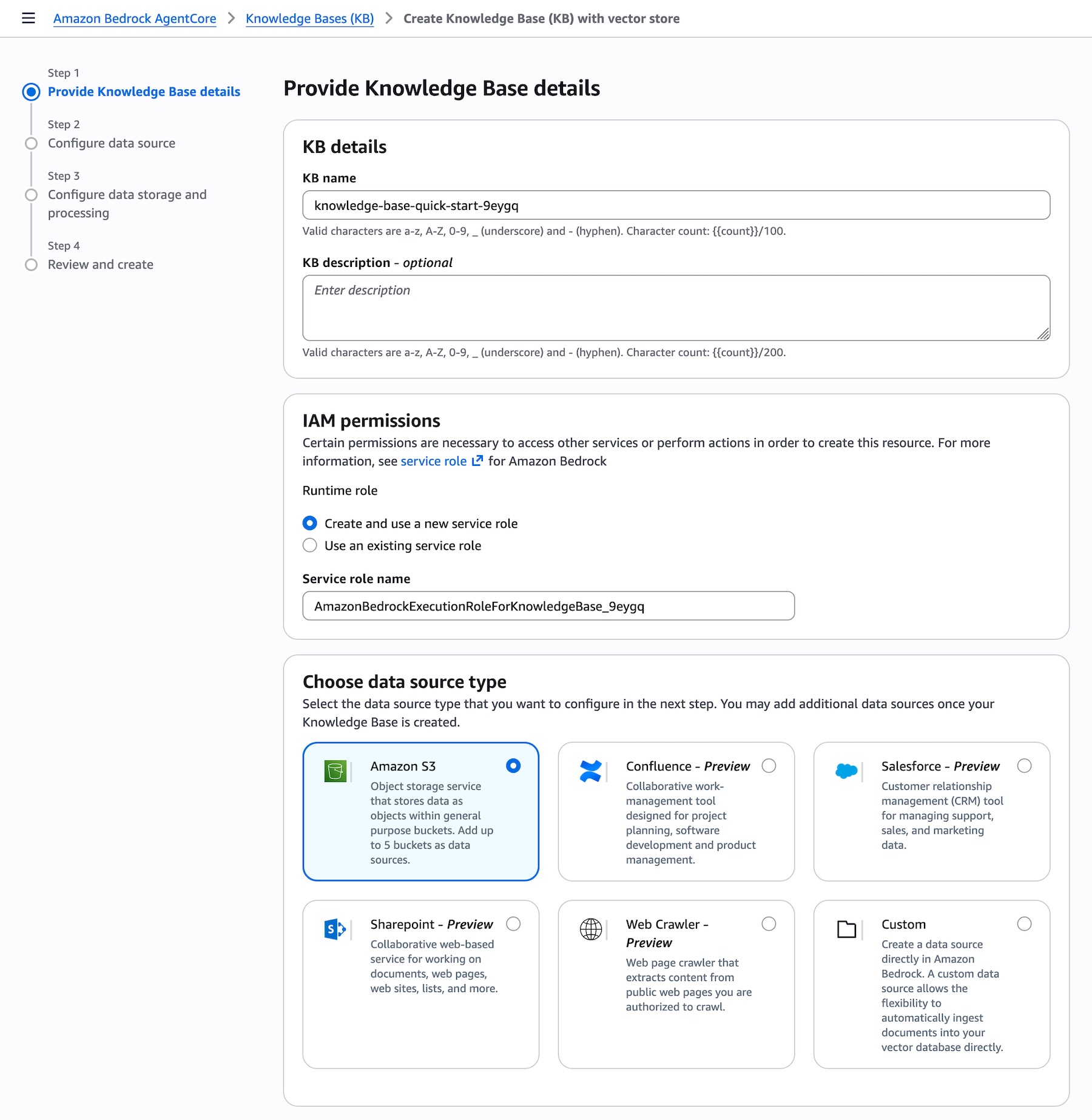
Picture 2 – Create Knowledge Base page showing the Data source dropdown expanded with all supported connectors: Amazon S3, Confluence, Custom, Google Drive, One Drive, SharePoint, and Web Crawler
A set of optimized defaults will be provided, enabling you to build your knowledge base in just a few clicks. After the data syncs, you can connect the knowledge base to your agent or use it as a tool for your foundation model and begin querying.
Smart Parsing for precise data ingestion
One of the biggest challenges in creating knowledge bases is getting diverse data types ready for accurate retrieval. Once you direct Managed Knowledge Base to your data sources, Smart Parsing automatically identifies the best parsing strategy for each data type and connector — no additional setup needed.
Smart Parsing brings together multiple techniques:
- Connector-specific data models – Tailored handling for each data source. For instance, the Web Crawler connector maintains HTML structure including embedded images and tables, making sure rich content isn’t lost during ingestion. SharePoint connectors preserve document hierarchy and the relationships between files.
- Multimodal processing – Automatic recognition and handling of different content types within documents. The system detects bounding boxes in documents, then sends them to foundation models for data extraction, captioning, and scene description in video files.
- Optimized chunking – Smart Parsing uses foundation models to understand document structure and extract
meaningful content, ensuring that complex documents with mixed formats are properly indexed. Intelligent defaults strike a balance between retrieval accuracy and performance depending on document type and content structure, while advanced users can tailor chunking strategies to suit their needs.
This automated approach removes the need for weeks of trial and error typically required to reach production-grade retrieval accuracy, while still offering the flexibility to customize when necessary.
Using Agentic Retriever for complex queries
Once your data has been ingested, you can begin querying your knowledge base. Generative AI applications often have difficulty with complex user queries that demand reasoning, recursive multi-step retrieval, and intermediate evaluation of results. Imagine a user posing two related questions: “What is the cloud infrastructure budget for the ML platform team?” and “Does our expense policy permit prepaying annual commitments?” A single retrieval pass might surface documents about the ML platform team but fail to link the budget details with the expense policy required to fully address the question.
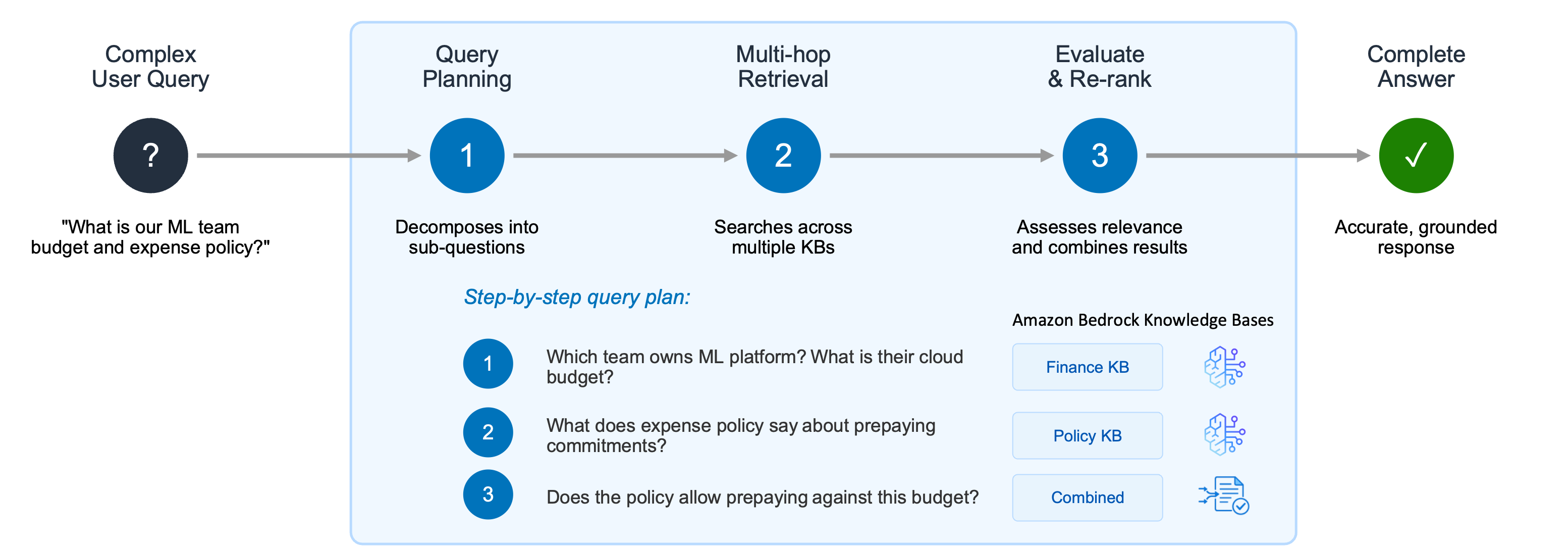
Picture 3 – Agentic Retriever breaks down complex user queries into a structured, step-by-step plan, carrying out multi-hop retrieval across multiple knowledge bases and synthesizing results to produce accurate, well-grounded responses
Agentic Retriever addresses this by constructing a step-by-step query plan: 1. Which team is responsible for the ML platform, and what is their cloud infrastructure budget? 2. What does the expense policy state about prepaying annual commitments? 3. Does the policy permit the ML platform team to make prepayments against this budget?
The system carries out multi-hop retrieval and reasoning at each stage, and once it has collected enough relevant passages, it halts the search process and returns the top results. By abstracting away the complexity of building a separate multi-hop reasoning pipeline, this method significantly boosts accuracy for complex queries while allowing developers to concentrate on their agentic search applications rather than orchestration logic.
You can try Agentic Retriever directly from the test panel of your knowledge base in the Amazon Bedrock AgentCore console. Choose Agentic retrieval only as the retrieval type to allow the system to automatically plan and execute multi-step queries across your knowledge bases:
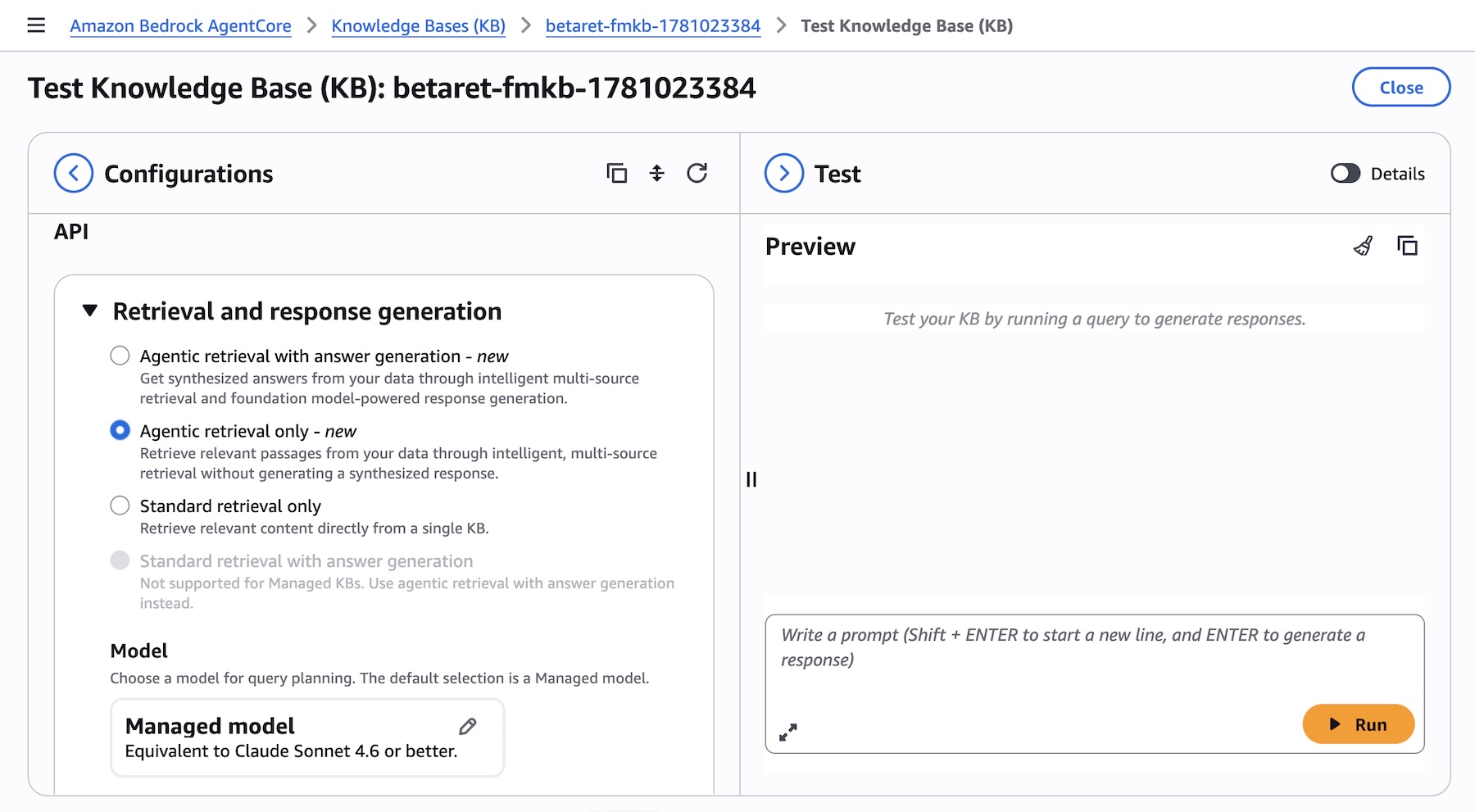
Picture 4 – Test Knowledge Base panel displaying Agentic retrieval with answer generation selected as the retrieval type, along with model selection and maximum agentic iterations options
Enabling MCP with Bedrock AgentCore
Amazon Bedrock Managed Knowledge Base integrates seamlessly with AgentCore Gateway as a native target type. This integration removes the need for manual setup and delivers built-in observability, policy enforcement, and automatic permission management.
You can go to the Amazon Bedrock AgentCore console or SDK and create a new AgentCore Gateway or pick an existing one. When adding targets to your gateway, you will see Knowledge Base listed as a new pre-built target type alongside other options such as MCP server, Lambda ARN, REST API, and additional integrations. Simply choose your knowledge base ID to expose it through the gateway:
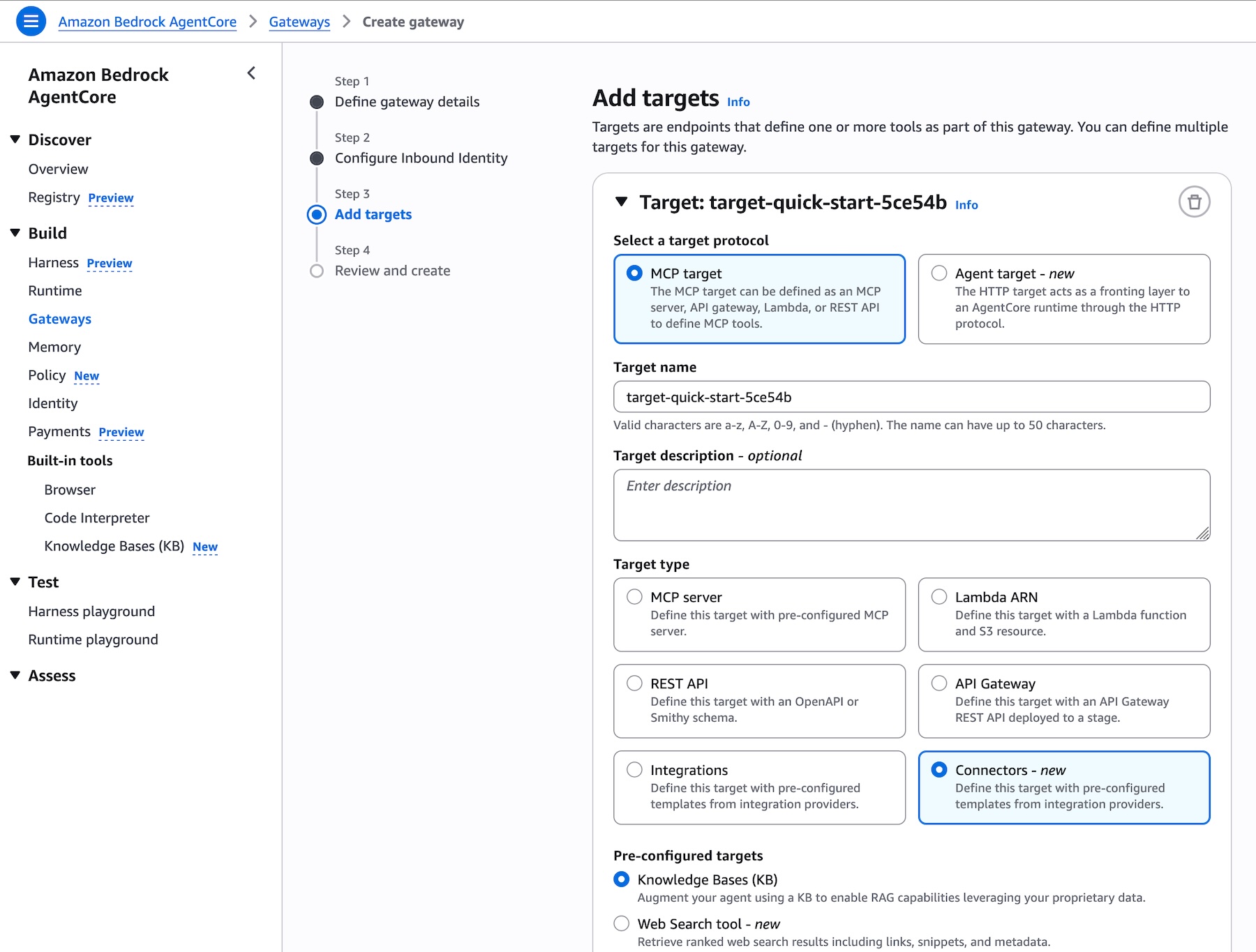
Picture 5 – Add targets page in AgentCore Gateway displaying Knowledge Base as a new pre-built target type, with the knowledge base ID selector and runtime retrieval mode options
Add targets page in AgentCore Gateway displaying Knowledge Base as a new pre-built target type, with the knowledge base ID selector and runtime retrieval mode options
Gateway exposes the standard Model Context Protocol (MCP), so knowledge base tools are automatically discovered by clients from any MCP-compatible framework, including Strands Agents, LangChain, CrewAI, LlamaIndex, and LangGraph. No custom integration code is needed.
Model choice and flexibility
Amazon Bedrock Managed Knowledge Base preserves the flexibility that developers expect from Amazon Bedrock. Every foundation model available on Bedrock can power the generation step, and developers can choose from different embedding and re-ranking models to optimize retrieval for their particular use case, enabling teams to fine-tune accuracy and cost-performance without altering infrastructure.
Unlike managed solutions that lock you into specific model providers, Amazon Bedrock Managed Knowledge Base decouples infrastructure management (connectors, parsing, storage, retrieval orchestration) from model selection. This means you can:
- Leverage the latest models – Adopt the newest embedding, re-ranking, and foundation models as they become available to improve accuracy, latency, and cost for your application without rebuilding your RAG pipeline.
- Optimize for price-performance – Select smaller, faster models for straightforward queries and more capable models for complex reasoning tasks, all within the same knowledge base infrastructure.
- Use Bedrock embedding models – While Smart Parsing supplies optimized defaults, you can configure Bedrock embedding models when your domain demands specialized semantic understanding.
- Maintain consistency with existing applications – If you’re already using Bedrock Knowledge Bases APIs (
Retrieve,StartIngest,StopIngest,IngestKnowledgeBaseDocuments), Managed Knowledge Base uses the same APIs, so migration requires no code changes—just point to the new knowledge base ID.
This approach ensures you can dedicate your time to your generative AI application without sacrificing the ability to switch models as requirements evolve or new model capabilities emerge.
Get started today
Amazon Bedrock Managed Knowledge Base is available today in the US East (N. Virginia), US West (Oregon), Asia Pacific (Sydney, Tokyo), Europe (Dublin, Frankfurt, London), and AWS GovCloud (US-West) Regions. For regional availability and future roadmap, visit AWS Capabilities by Region.
With Bedrock Managed Knowledge Base, you pay only for what you use with no upfront commitments. Pricing is based on two dimensions: the size of indexed data stored and the number of retrievals performed (on-demand). For detailed pricing information, visit the Amazon Bedrock pricing page. Bedrock is also part of the AWS Free Tier that new AWS customers can use to get started at no cost and explore key AWS services.
These capabilities work with any open source framework such as CrewAI, LangGraph, LlamaIndex, and Strands Agents, and with any foundation model. Bedrock services can be used together or independently, and you can get started using your preferred AI-assisted development environment with the AgentCore open source MCP server.
To learn more and get started quickly, visit the Bedrock Knowledge Bases Developer Guide.
Daniel Abib
