



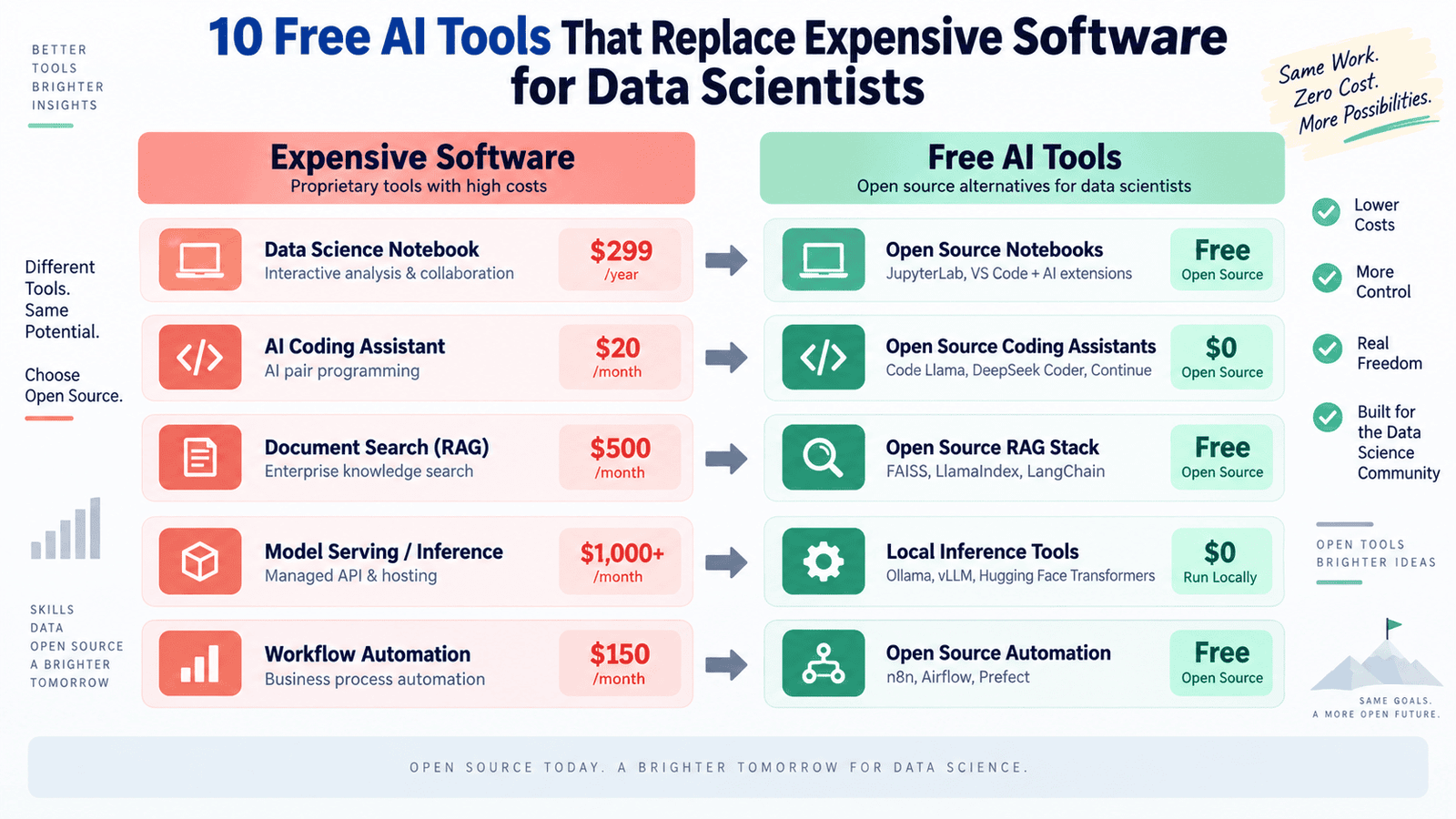
# The Complete Guide to Building a Zero-Cost Data Science Stack with Free AI Tools
## Why Your Data Science Budget Doesn’t Have to Be Massive
For years, data science teams have been forced into expensive software ecosystems. A single license for an automated machine learning platform can cost more than an entry-level data scientist’s annual salary. Commercial business intelligence tools charge per user, and cloud-hosted language model APIs have no spending cap — usage grows and so does the invoice, month after month.
But something has shifted in the landscape. The open-source community has produced a wave of mature, powerful tools that rival or even surpass their commercial counterparts. These tools run on local hardware, respect data privacy by design, and — most importantly — cost absolutely nothing to use.
Whether you’re a solo practitioner, a startup team, or part of a large enterprise looking to reduce software spend, this guide walks you through ten free tools that collectively replace every layer of an expensive data science stack.
—
## The Full Replacement Stack
### 1. Run Language Models Locally with Ollama and Open WebUI
Cloud-based language model APIs like those offered by OpenAI and Anthropic charge per token, creating unpredictable costs for teams that run continuous text extraction, summarization, or classification workloads. A single pipeline can generate thousands of dollars in monthly fees with no fixed ceiling.
Ollama solves this entirely. It lets you download and execute open-weight models — including DeepSeek-R1, Llama 3.3, Mistral, and Phi-4 — directly on your own hardware. There are no API keys to manage, no rate limits to worry about, and no data that ever leaves your machine. For data scientists running document processing or synthetic data generation pipelines, removing per-token billing means those workloads can run indefinitely without any financial pressure.
Open WebUI layers a browser-based chat interface on top of Ollama, giving you an experience comparable to ChatGPT or Claude. Multi-turn conversations, file uploads, and model switching all work seamlessly through the interface. Non-technical stakeholders can interact with local models using a familiar interface, and because everything runs locally, sensitive documents never touch an external server. This setup eliminates compliance bottlenecks around proprietary data, making it ideal for regulated industries and teams handling confidential client information.
### 2. Keep Your Code Private with Tabby
AI-assisted coding tools like GitHub Copilot Business ($19/user/month) and Tabnine ($59/user/month) offer compelling productivity gains. But they come with a significant caveat: your code and its surrounding context are sent to external servers for processing. For teams working with proprietary algorithms, regulated datasets, or client code under strict confidentiality agreements, this creates a real compliance liability.
Tabby is a self-hosted coding assistant that provides context-aware code completion inside VS Code, JetBrains IDEs, and Vim/NeoVim. It runs entirely on your own infrastructure, integrates directly with Ollama for model management, and sends nothing outside your environment. There is no telemetry, no external API calls, and no data egress to worry about.
What sets Tabby apart from both its free and paid competitors is its ability to learn from your specific codebase. It supports repository-level context indexing, meaning it can be trained on your team’s internal libraries, coding conventions, and architectural patterns. The completions it produces reflect your organization’s unique style in ways that generic cloud-based tools simply cannot replicate at the individual team level.
### 3. Skip the Enterprise AutoML Price Tag with AutoGluon
Automated machine learning platforms like DataRobot and H2O Driverless AI carry enterprise license fees that typically range from $50,000 to $250,000 or more per year, depending on usage and negotiated terms. These platforms automate model selection, feature engineering, and hyperparameter tuning — but at a steep price.
AutoGluon, originally developed by Amazon Web Services and released as a fully open-source project, delivers a comparable automated ML experience at zero cost. It handles the full ML lifecycle across tabular data, text, images, and multimodal datasets. Its pipeline manages preprocessing, feature engineering, model selection, hyperparameter optimization, and ensemble stacking with minimal user intervention.
On standard AutoML benchmarks, AutoGluon consistently ranks among the top performers, often outperforming manually tuned pipelines in both accuracy and speed. The key practical advantage is that everything runs inside your own Python environment. There is no data upload to a cloud platform, no per-row pricing, and no dataset size limitation beyond your local compute capacity. Teams can run aggressive hyperparameter searches, generate multiple model variants, and iterate continuously without monitoring a billing dashboard.
### 4. Perform Natural Language Data Exploration with PandasAI
Tools like ThoughtSpot (starting at $25–$50/user/month) and Alteryx Designer (approximately $5,000/year per license) have built entire business models around letting non-technical users query data through natural language. PandasAI offers a remarkably similar capability without the licensing cost.
PandasAI adds a natural language query layer directly on top of Pandas DataFrames. Instead of writing filtering, grouping, or plotting code manually, you describe what you need in plain English, and PandasAI translates your request into the corresponding Pandas or Matplotlib operations. This is especially powerful during exploratory data analysis, where verbally describing a chart or aggregation and then refining the generated code is often faster than writing it from scratch.
For domain experts and business analysts who don’t code, PandasAI removes the Python barrier entirely. They can interrogate datasets, generate summaries, and filter data on their own without waiting on engineering support. The tool also runs local models through Ollama, so the entire natural language processing layer can operate completely offline with no query data sent to external services.
### 5. Build a Private Knowledge Base with AnythingLLM
Enterprise RAG (retrieval-augmented generation) platforms and internal knowledge base tools can cost anywhere from $500 to several thousand dollars per month, depending on document volume and the number of users accessing the system. AnythingLLM replicates this functionality entirely locally.
AnythingLLM is a full-stack RAG application that ingests local files — PDFs, code repositories, websites, structured data — and turns them into a queryable AI knowledge base. Setup is straightforward: point the application at a folder of documents, and it automatically handles chunking, embedding, vector storage, and retrieval. The resulting interface lets you ask questions against your own data with source citations, making it easy to verify where each answer originates.
Data science teams can use this to build conversational search over internal documentation, research papers, historical reports, and codebase READMEs. The entire pipeline runs on local infrastructure, keeping all data under your control with no cloud dependency and no ongoing subscription fee.
### 6. Annotate Computer Vision Datasets Automatically with Autodistill
Manual data annotation is one of the most time-consuming and expensive steps in building a computer vision pipeline. Platforms like Scale AI and Labelbox charge per labeled item or per seat, and large annotation projects can easily reach tens of thousands of dollars in cost.
Autodistill eliminates manual annotation for many common use cases. It leverages large foundation models — specifically Grounding DINO and the Segment Anything Model — to automatically generate labels for CV datasets without any human annotators. You simply define the classes you want to detect in natural language, and Autodistill uses zero-shot detection models to label your images accordingly.
The labeled output then feeds into a distillation process where a smaller, faster custom model is trained specifically for your deployment environment. The entire workflow runs from unlabeled images to a production-ready model without a single annotation platform subscription. For common object classes, the annotation quality is high enough for most production scenarios, with human review reserved for edge cases where the foundation model shows uncertainty.
### 7. Create Interactive Visualizations with PyGWalker
Tableau Creator costs roughly $75 per user per month, and Power BI Premium runs $24 per user per month. For teams that primarily use these tools for exploratory data analysis and internal reporting rather than publishing enterprise dashboards, PyGWalker provides a compelling alternative.
PyGWalker converts any Pandas or Polars DataFrame into an interactive drag-and-drop visual exploration interface that lives directly inside a Jupyter notebook. Its interaction model mirrors Tableau’s familiar paradigm: drag fields onto axes, switch chart types, apply filters, and layer dimensions — all without writing a single line of visualization code.
The biggest advantage of PyGWalker over standalone BI tools is integration. Visualizations are created in the same notebook where data is processed, eliminating export steps, data connection configuration, and the maintenance burden of a separate application. Everything is immediately reproducible. The tool also supports AI-driven natural language chart generation, which further reduces the friction between analysis and visualization.
### 8. Track Experiments and Models with MLflow
Weights & Biases Team plans start at $25 per user per month, with enterprise pricing negotiated separately at significantly higher tiers. MLflow is the open-source standard for ML experiment tracking, model registry management, and deployment.
MLflow logs parameters, metrics, artifacts, and model versions across every training run. Its browser-based UI lets you compare experiments side by side, visualize learning curves, and move models through staging and production environments with a clear audit trail. In recent releases, MLflow has expanded its capabilities to include LLM-specific tracking — capturing prompt versions, response quality scores, and token usage alongside traditional ML metrics. This makes it a single pane of glass for teams building both predictive models and LLM-based applications.
As a self-hosted tool, all experiment data remains within your own infrastructure. There is no per-seat cost, no data sent to an external platform, and no features locked behind premium tiers. For teams handling sensitive training data, this local execution model provides both cost savings and peace of mind.
### 9. Run High-Performance Analytics Locally with DuckDB
Small to mid-sized data teams using Snowflake or BigQuery routinely spend between $500 and $2,000 or more per month on compute and storage for analytics workloads. DuckDB replaces this with an in-process analytical database that runs SQL queries directly against Parquet files, CSVs, JSON, and Pandas DataFrames — without ever loading data into a server or cloud platform.
For datasets under approximately 100GB, DuckDB’s query performance is competitive with managed cloud data warehouses, and it runs entirely on local hardware with zero infrastructure to configure. The workflow impact is significant: instead of uploading data to a cloud warehouse, writing queries against a remote server, and paying for compute time, you query files directly from your filesystem at comparable speeds with lower latency and no network round-trip.
DuckDB integrates natively with Pandas and Polars, so results return as DataFrames and slot directly into existing analysis pipelines. For teams whose cloud warehouse usage is primarily exploratory analytics and model feature generation rather than multi-user reporting infrastructure, DuckDB handles the workload at zero cost with better performance characteristics.
### 10. Monitor LLM Applications with Langfuse
LangSmith Plus plans start at $39 per seat, and enterprise plans are priced separately. Langfuse is an open-source LLM observability and evaluation platform that provides a comprehensive alternative.
Langfuse captures detailed traces of every LLM call in your application — including the full prompt, the model’s response, token counts, latency measurements, and cost estimates — and organizes them into a structured debugging interface. Teams can score outputs, tag failures, run evaluation datasets against different prompt versions, and monitor production applications for quality regressions over time.
For data scientists building LLM-based pipelines, observability is often the missing piece. When a pipeline produces inconsistent outputs, debugging is nearly impossible without visibility into what each model call actually received and returned. Langfuse provides that visibility in a self-hosted environment with integrations for LangChain, LlamaIndex, and direct API calls. The platform deploys via Docker in minutes, giving teams production-grade LLM monitoring on their own infrastructure without per-trace pricing or managed platform commitments.
—
## FAQ
**Q: Do these tools really match the quality of their paid equivalents?**
A: For most professional workflows, yes. The open-source alternatives discussed here have matured significantly and now perform at state-of-the-art levels across their respective categories. In some cases — such as AutoGluon on tabular benchmarks or Autodistill for common CV tasks — the free tools match or exceed the performance of their commercial counterparts. The trade-offs are typically in ease of setup and polished user experience rather than raw capability.
**Q: What hardware do I need to run these tools?**
A: It depends on the tool and model size. Ollama benefits from a machine with at least 16GB of RAM and a GPU with 8GB+ of VRAM for smoother model performance, though CPU-only operation is supported. Most other tools — Tabby, AutoGluon, PandasAI, AnythingLLM, Autodistill, PyGWalker, MLflow, DuckDB, and Langfuse — run well on standard development machines with 16–32GB of RAM. For large datasets in DuckDB or large annotation datasets in Autodistill, more RAM and storage will improve performance.
**Q: Are these tools truly free, or are there hidden costs?**
A: All ten tools are open-source and free to use. The primary cost is your time during initial setup and configuration. Some tools, like AnythingLLM and Langfuse, offer cloud-hosted paid tiers for teams that prefer managed deployments, but those are optional — the core functionality remains free and self-hosted. Hardware costs are the only unavoidable expense, and most teams already have suitable machines.
**Q: Can I use all ten tools together in a single workflow?**
A: Absolutely. These tools are designed to be interoperable. You can run Ollama locally, use it as the backend for Tabby, Open WebUI, PandasAI, AnythingLLM, and PyGWalker, track your experiments with MLflow, query data with DuckDB, annotate CV datasets with Autodistill, and monitor your LLM pipelines with Langfuse — all without any data leaving your machine or any recurring software fees.
**Q: What about security and compliance?**
A: Because all ten tools run locally or on your own private infrastructure, they inherently support stronger data governance. No data is transmitted to third-party servers, which simplifies compliance with regulations like GDPR, HIPAA, and SOC 2. This is a significant advantage over cloud-based alternatives, where data residency and processing location can become complex compliance issues.
**Q: How long does it take to set up a replacement stack?**
A: The initial setup for all ten tools typically takes anywhere from a few hours to a couple of days, depending on your familiarity with command-line tools and containerized deployments. Most tools have straightforward installation processes with well-maintained documentation. Starting with the single highest-cost item in your current software budget is the most practical approach — get one replacement running and stable before moving on to the next.
—
## Conclusion
The ten tools outlined in this guide tackle the two primary barriers that constrain data science teams: budget and data sovereignty. By running inference, annotation, analytics, experiment tracking, visual exploration, RAG, and LLM observability on local infrastructure, you eliminate recurring licensing fees entirely and ensure that sensitive data never leaves your environment.
The honest trade-off is the upfront investment in configuration. Commercial platforms absorb setup complexity in exchange for subscription payments, whereas open-source tools ask you to handle that work directly. For most of the tools covered here, the configuration overhead is measured in hours rather than days, and the long-term financial and operational savings far outweigh the initial effort.
A practical path forward is to identify the single largest line item in your current data science software budget, replace that tool first, and stabilize the new setup before tackling the next one. Within a single quarter, a fully open-source data science stack is entirely achievable — with no meaningful loss in capability and dramatically lower total cost of ownership.
Thank you for reading
