



# How Desktop AI Platforms Prevent Malicious Code from Hijacking Your Local Workflows
Local AI offers privacy and control, but it introduces unique risks when downloading open-source models from external repositories. Because these workflows depend on third-party code libraries and model files, a single compromised file can expose your entire system. For instance, a recent incident involved a malicious data-stealing script hidden within a highly popular model-sharing platform. The attackers disguised their repository to mimic a trusted release, and the malicious file was downloaded over 240,000 times before being caught. This highlights why automated security checks at the point of execution are essential for local AI environments.
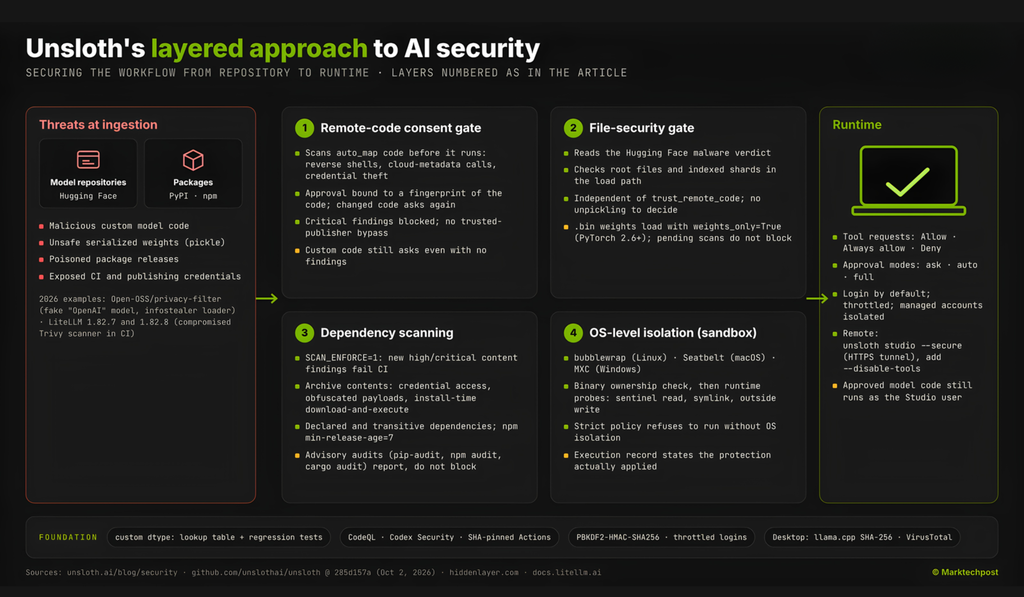
To combat these threats, modern desktop applications for model management employ a layered security architecture. Rather than relying solely on manual reviews or single-point checks, a robust local AI environment implements a multi-stage verification process. When a workflow transitions from simply downloading a model to actually executing its code, the system engages a sequence of four distinct security gates. These checks act as a safety net, working alongside traditional controls like network restrictions and pinned credentials without replacing them.
## 1. Verification by Fingerprint, Not by Name
Trusting a repository simply because it shares the same name as a legitimate project is a dangerous practice. If a repository’s code is modified after initial approval, the old consent becomes invalid. Modern platforms solve this by generating a cryptographic fingerprint of the scanned code. Every time a workflow loads, the system re-evaluates the current code against this fingerprint. If the code has changed—even slightly—the system demands fresh user consent before proceeding. Furthermore, the scanner actively hunts for dangerous behaviors like establishing reverse shells, accessing cloud metadata endpoints, or exfiltrating credentials. Even first-party repositories are not given blanket exemptions; they are subject to the same rigorous scrutiny, ensuring that static patterns cannot bypass the gate.
## 2. Inspecting Weight Files Before Execution
Malicious code doesn’t always rely on Python scripts. Compromised serialized model weights, such as unsafe pickle files, can execute harmful payloads upon loading. To counter this, the application treats weight files as a separate security boundary. It cross-references the model repository with malware scanning results and blocks any flagged files from entering the deserialization path during loading. This check operates independently of remote-code trust settings, ensuring that even if a model is approved to run code, a compromised weight file will still be halted. While fewer than one percent of repositories typically contain security issues, this layered approach ensures robust protection for the user.
## 3. Inspecting the Dependencies
A seemingly innocent library can become a threat when its dependencies are poisoned. High-profile compromises have shown that advisory-based detection is often too slow, as malicious releases can occur before any security advisory is issued. Therefore, the platform deploys package-content scanners that look directly inside downloaded archives. These scanners search for obfuscated payloads, unauthorized credential access, and installation-time download-and-execute behaviors. Strict policies are enforced: npm installations reject packages published within the last seven days, CI pipelines fail if unreviewed packages attempt to execute scripts, and lockfiles are mandatory. A comprehensive audit suite, including static analysis and signature verification, runs continuously alongside these checks to catch anomalies early.
## 4. Proving the Sandbox is Secure
Installing a sandboxing tool is just the first step; it doesn’t guarantee that the sandbox is functioning correctly. The system actively probes the sandbox’s boundaries to verify isolation. On Linux, it checks the system ownership of the sandbox binary and tests whether sandboxed code can escape the workspace by reading host sentinel files or following symlinks to restricted areas. It confirms that while legitimate workspace operations remain functional, the code cannot write outside its designated directory or access the host kernel directly. Users can also configure their isolation strictness, choosing between modes that ask for approval or automatically block dangerous actions when isolation is unavailable.
## Managed Accounts and Infrastructure Hardening
The desktop application supports multi-user environments where each user’s data remains isolated. In managed accounts, API keys are encrypted and never exposed to the end user, and repository code execution can be entirely disabled for certain roles. On the backend, the platform utilizes read-only repository permissions, commit-pinned build actions, and restricted outbound network allowlists to ensure that the development and release pipeline itself is airtight. Prebuilt binary files are verified against SHA-256 hashes, and desktop releases undergo rigorous virus scanning before distribution to ensure no known threats slip through.
## Key Takeaways
– Code approvals are bound to cryptographic fingerprints, requiring re-consent for any changes.
– Malware detections in model repositories block associated weight files independently of code trust settings.
– OS-level sandbox boundaries are actively probed to confirm isolation before execution.
– Dependencies are scanned for malicious behavior, with strict rules blocking recent or unreviewed packages.
– Desktop environments support multi-user isolation and encrypted credential storage by default.
—
## Frequently Asked Questions
**Q: Why is local AI security different from cloud AI security?**
A: When using cloud AI, the provider manages the runtime environment and code execution on their secure servers. In local AI, the user’s machine runs the code directly. This means a malicious open-source file can access local files, network credentials, and system resources immediately if not checked properly.
**Q: What happens if a security scanner cannot access a repository to check it?**
A: If the system cannot retrieve remote code to perform its verification, the load process is blocked by default. The system prioritizes safety over convenience, ensuring that unverified code does not run unexpectedly.
**Q: Are these security checks a replacement for existing antivirus software?**
A: No, they are designed to complement existing controls. While the platform adds runtime and dependency-specific checks, users can maintain traditional advisory scans, network limits, and scoped credentials alongside the platform’s protections for a defense-in-depth strategy.
**Q: Do these protections automatically secure a notebook that imports the platform’s standalone library?**
A: No, several of these protections belong specifically to the desktop application and its integrated development environment. A standalone library that is imported into an external notebook does not automatically inherit these layered runtime checks.
—
## Conclusion
As local AI continues to evolve, the integration of these automated, multi-layered security checkpoints becomes paramount. By verifying code integrity through cryptographic fingerprints, isolating dangerous weight files, rigorously auditing dependencies, and testing sandbox boundaries, users can leverage the power of open-source models without exposing their systems to unnecessary risk. These proactive measures transform local AI from a potentially vulnerable setup into a robust, secure, and privacy-respecting workflow. Thank you for reading
