



# Malicious Kernel Driver Disguised as a Legitimate Authenticator Tool Bypasses Antivirus to Steal Browser Passwords and Crypto Wallets
## A Sophisticated Supply-Chain-Style Attack Exploits Trusted Digital Signatures to Disable Security Software
Cybersecurity researchers have uncovered a campaign in which threat actors created a counterfeit authentication application installer hosted on a code repository platform, leveraging a malicious kernel-mode driver to systematically disable antivirus and endpoint protection tools before exfiltrating sensitive credentials from victim machines.
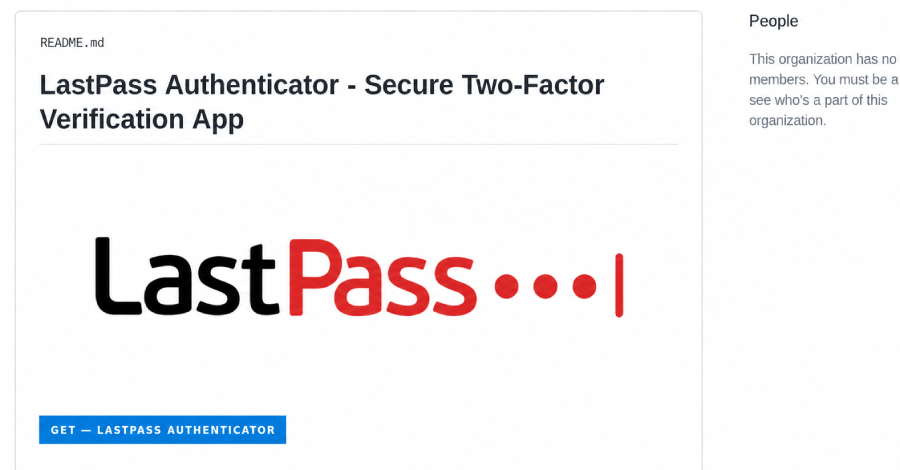
The scheme centers on a fake download page designed to impersonate a well-known multi-factor authentication product. The fraudulent page ranks prominently in search engine results when users look for legitimate downloads, making it a highly effective lure for unsuspecting visitors.
—
## How the Attack Unfolds
When a user clicks the download button on the counterfeit page, they are routed through several intermediary pages hosted on a code repository before reaching an attacker-controlled server. That server delivers a large ZIP archive — one variant measured 148 MB and another 127.9 MB — deliberately padded with junk files to evade automated scanners that enforce file-size limits.
Inside the archive sits a renamed copy of a genuine Microsoft debugging utility placed alongside a malicious dynamic-link library file. When the fake installer is executed, Windows loads the attacker’s DLL from the same directory through a technique known as DLL side-loading. This triggers a chain of escalating privilege requests that ultimately reaches the highest access level on a Windows system, allowing the attacker to install a kernel driver as a background system service.
—
## The Kernel Driver: Disabling Defenses from Below
The malicious driver operates at the kernel level, which is the foundational layer of the operating system where traditional antivirus and endpoint detection tools cannot monitor or intervene. The researchers named this driver **Alinubx.sys**, and it carries a predefined list of 145 antivirus and security process names. Every security process it detects running on the machine is forcibly terminated from kernel space, rendering user-mode protection tools blind and powerless to stop the follow-on malicious activity.
The driver carries a valid digital signature issued through **Microsoft’s Hardware Compatibility Publisher chain**, with a signing date stretching back to March 2023 — well before this campaign was launched. Because the signature comes from a legitimate attestation pipeline, the driver passes standard trust checks and was absent from Microsoft’s vulnerable driver blocklist at the time of discovery.
> “A digitally signed driver that passes Microsoft’s attestation pipeline is not inherently safe — it simply proves the driver went through a trust process, not that it was reviewed for malicious intent,” the researchers noted.
Although the driver’s code also contains capabilities to hide files, inject into other processes, and reroute web traffic, those features require a configuration file the attackers did not deploy in this instance. However, the process-killing functionality alone was sufficient to enable the theft of a wide range of sensitive data.
—
## What the Attackers Stole
With security software neutralized, the password-stealing component — identified as a tool called **Rapuncel** — swept the compromised machine and collected:
– Saved passwords from over two dozen web browsers, including Chrome and Edge
– Cryptocurrency wallet files stored on the system
– Active login sessions for Discord, Steam, and Telegram
– Contents of the Windows Credential Manager
– Files with names containing keywords like “password,” “seed,” or “recovery”
For browsers that use Google’s app-bound encryption — designed specifically to resist this type of attack — the stealer injects code directly into the browser process and asks the browser’s own legitimate service to decrypt the stored passwords. The harvested data is then packaged into a ZIP file and transmitted to the attacker’s server.
—
## Why Traditional Security Tools Failed to Catch It
The attack’s ability to fly under the radar stems from two clever evasions.
**First**, the driver is a modified version of **CcProtect.sys**, a legitimate driver from a Chinese disk-encryption product called CnCrypt that is already documented on security watchlists as a known process killer. The malicious version shares the exact same product name, version number, and submitter information as the original — the only changes are the filename and the file description. That simple alteration produced an entirely new file hash, which dropped antivirus detections from seven out of approximately 70 engines flagging the known original to **zero detections** on VirusTotal.
**Second**, Microsoft’s vulnerable driver blocklist — which has been active by default since the Windows 11 2022 update — operates by matching known file hashes. Because the original CnCrypt driver was never on the blocklist, the renamed copy wasn’t either. The blocklist has no mechanism to catch recompiled or simply renamed variants, leaving the driver free to load and execute.
Researchers reported the driver to Microsoft on August 19, and Microsoft responded that the behavior does not meet its definition of a security vulnerability because the driver is not a Microsoft-signed component, directing the researchers to a separate submission channel for driver blocklist consideration.
—
## Indicators of Compromise for Defenders
Security teams are advised to hunt not for a specific filename — since the operators can and will change it — but for the broader behavioral and lineage patterns associated with this campaign. Key indicators to monitor include:
| Indicator Type | What to Look For |
|—|—|
| **Service Name** | A service created as `NvFsFilter` |
| **Driver File** | A driver file written to `C:WindowsSystem32driversnvfsflt64.sys` |
| **Signing Details** | A driver signed by “Henan Dafeng Software” or containing “CnCrypt” in its metadata |
| **Device Path** | The path `.Alinubx` appearing in system logs |
| **Behavioral Pattern** | A driver load event immediately followed by the termination of security processes |
The exact driver file has been added to the LOLDrivers community catalog for hash-based detection, though as noted above, this approach shares the same limitation — a renamed or recompiled driver will produce a new hash that the catalog will not yet recognize.
—
## If You Suspect You Ran the Malicious Installer
Organizations and individuals who believe they may have executed this fake installer should take the following steps immediately:
1. **Assume all stored passwords on the affected machine are compromised**, including browser-saved credentials, cryptocurrency wallets, and session tokens for messaging and gaming platforms.
2. **Change every affected password from a separate, clean device** — do not use the compromised machine, as it may still be under attacker control.
3. **Review account activity logs** across all impacted services for any actions you did not perform.
4. **Do not rely on antivirus tools installed on the compromised machine** to clean it, as the driver persists across reboots and will re-terminate those tools each time.
5. **Treat the machine as a kernel-level compromise.** Where possible, conduct a kernel-level forensic investigation or rebuild the system entirely.
—
## Broader Context: A Growing Trend of Repository-Based Delivery
The fake LastPass page was one of many lures deployed by the attacker infrastructure, which hosted impersonation pages for at least 40 different brands. A near-identical counterfeit page targeting macOS users was also identified, though it was removed before researchers could fully analyze it.
This style of attack is far from isolated. In March, researchers documented a similar strain of information-stealing malware distributed through fake repositories on the same code platform. In July, a separate investigation identified nearly 300 such repositories used to spread the same family of stealers.
The loader used in this campaign was assessed with high confidence to have been built using **Cruciferra**, a commercially available crypter tool whose default kill list also targets 145 security processes and whose driver component is modular and interchangeable. The stealer itself was assessed with moderate confidence as a derivative of an earlier information-stealing family rather than a direct copy.
The total number of victims affected by this campaign remains unknown, and no specific victim count has been disclosed by the investigating teams.
—
## Frequently Asked Questions
**Q: How can I tell if I downloaded the fake installer instead of the real one?**
A: The genuine authenticator application is distributed exclusively through the official product website and authorized app stores — not through code repository platforms or third-party download pages. If you obtained it from a GitHub repository, it is not legitimate.
**Q: Will resetting my passwords on the same compromised machine help?**
A: No. The driver remains loaded on the machine and will reactivate after every reboot, potentially capturing new credentials as you enter them. Password changes should be made from an unrelated, trusted device.
**Q: Why doesn’t Microsoft’s driver blocklist catch this?**
A: The blocklist works by matching specific file hashes. When attackers rename a file or recompile it, the hash changes, and the blocklist no longer recognizes it. This is a known limitation of hash-based blocking approaches.
**Q: Can antivirus software detect the stealer itself once the driver is loaded?**
A: Once the kernel driver has terminated security processes, antivirus tools on that machine are effectively blind. The stealer operates unimpeded during this window. This is precisely why defense-in-depth and behavioral monitoring at the kernel level are critical.
**Q: Is my cryptocurrency at risk if my wallet files were stolen?**
A: Yes. If unencrypted wallet files or seed phrases were accessible on the compromised machine, funds could be at risk. You should move assets to a new wallet and revoke any exposed recovery phrases immediately.
**Q: What should organizations do to protect against similar attacks?**
A: Organizations should monitor for suspicious driver loads, particularly those with unusual signing details or behavior patterns such as mass process termination. Endpoint detection and response solutions with kernel-level visibility are recommended, along with restricting code repository download permissions for end users.
—
## Conclusion
This campaign demonstrates the evolving sophistication of modern cyber threats, where attackers exploit trusted digital infrastructure — legitimate code signing certificates and widely used developer platforms — to deliver attacks that bypass conventional security layers. By operating at the kernel level and terminating defenses before any payload executes, the attackers created a near-undetectable pipeline for credential theft.
The episode underscores the importance of verifying software provenance, maintaining kernel-level visibility, and adopting a zero-trust approach to downloaded software. As these repository-based delivery methods become increasingly common, both individual users and enterprise security teams must remain vigilant against the lure of convenient downloads from seemingly authoritative sources.
Organizations should proactively hunt for the behavioral indicators outlined above, and individuals who suspect they may have been affected should treat the compromise as serious and act accordingly.
Thank you for reading
