



# Mastering Local AI: A Developer’s Guide to Productive Small Language Model Workflows in 2ộ26
## Introduction
Running a small language model on your own machine is one thing. Making it genuinely useful inside a real development workflow — one that handles context, tool access, and fast iteration — is quite another. The gap between a model that responds in a terminal window and a complete local setup that actually improves your daily work comes down almost entirely to tooling. Fortunately, the local AI ecosystem has matured rapidly, and by 2026 there are robust, production-ready options at every layer of the stack for a wide range of hardware configurations and project requirements.
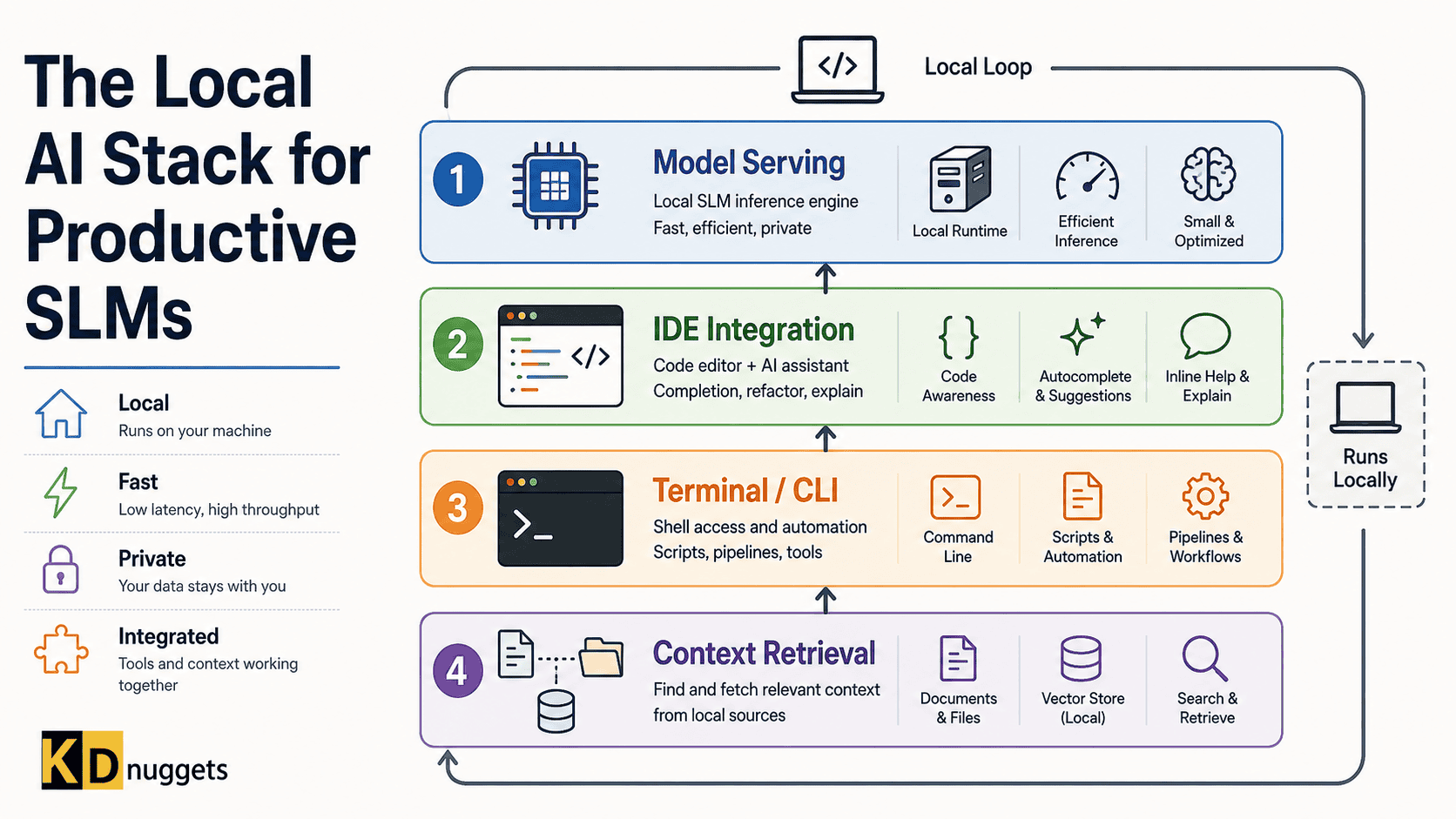
This guide organizes the local AI ecosystem into four distinct layers, each with a focused purpose. Rather than prescribing a single all-in-one setup, it maps the major options available at each layer, helping you make informed decisions based on your hardware, your workflow style, and what kind of project you are building. For the purposes of this guide, “small language models” refers to open-weight models in the 1B to 14B parameter range — models that run meaningfully on consumer hardware with 8–24 GB of VRAM or on Apple Silicon machines with unified memory architecture.
—
## Layer 1: The Engine Room — Local Model Serving
Everything else in your stack is built on top of this layer. The model serving layer is responsible for running open-weight models on your hardware, managing inference requests, and exposing a callable interface that the rest of your tools depend on. The central trade-off is between setup simplicity and fine-grained control.
### Ollama
Ollama has become the most popular choice for individual developers and with good reason. It operates as a lightweight background service, automatically detects available hardware and manages memory allocation, and exposes a REST API that most higher-level tools already know how to communicate with. Installation requires almost no configuration — you download, install, and run. A local server is up in minutes. For developers new to the space, starting with a structured walkthrough of Ollama’s fundamentals, including integration with Python and agentic frameworks, is an excellent first step. The trade-off is that Ollama hides much of the performance-tuning complexity, which becomes relevant once you scale beyond a single-developer environment or need concurrent access from multiple tools.
### LM Studio
LM Studio takes a more graphical approach. It is a full desktop application for discovering, downloading, and running open-weight models directly from model repositories on Hugging Face, offering a visual interface for side-by-side evaluation. It can also function as a drop-in replacement for commercial API endpoints, smoothing the transition for developers accustomed to the cloud-first model. Its limitation is that it is less suited for headless, background-only deployments where you want a lean, service-oriented architecture running invisibly on a server.
### llama.cpp and vLLM
Moving further along the control spectrum, **llama.cpp** is fundamental — it is the actual inference engine underneath tools like Ollama. Using it directly gives you granular control over quantization methods, compilation targets (including CPU-only and edge deployment scenarios), and cross-platform execution. The trade-off is a steep learning curve and manual configuration. For a team that needs precise compilation control or for hardening models for edge devices, llama.cpp is the right choice.
**vLLM** sits on the opposite end of the spectrum, designed as a high-throughput serving engine. It uses a technique called PagedAttention and continuous batching to handle concurrent requests efficiently. It is not meant for individual experimentation but rather for teams that need to serve models at volume — for example, operating a department-wide local model endpoint. It offers a completely different performance profile than Ollama.
For most developers building their first local setup, Ollama remains the right entry point. Its simplicity removes friction from experimentation, letting you focus on your end goal rather than infrastructure troubleshooting.
—
## Layer 2: The Editor Interface — Where Code Meets Context
Once you have a local serving layer, the next step is connecting the model to where you actually write code. For most developers, that is an IDE. This level of the stack bridges the gap between model outputs and your daily development experience. The distinction between an autocomplete helper and a full agent is significant.
### Cline
Cline is an agent embedded directly in VS Code that doesn’t just suggest code — it plans, proposes, and executes. You can describe a task, and Cline will generate a plan of action, edit files, run terminal commands, and iterate based on feedback. Its sticking point is the “Plan/Act” workflow, where the model proposes a strategy but waits for explicit approval before making any changes, keeping you in the driving seat.
It also connects to the **Model Context Protocol (MCP)**, which allows it to pull in external tools like databases or APIs when tackling complex problems. It is fully model-agnostic and works with a local Ollama endpoint seamlessly. With over five million installs and strong community adoption, Cline is arguably the most popular open-source coding agent for local workflows today.
The caveat of resource consumption must be considered. Because agentic tools consume context windows exhaustively, running a 7B-parameter model on consumer hardware while automating multi-file refactors can strain memory. Selecting a model with a context window large enough for your specific use case is as critical as selecting the tool itself.
### Cursor and Alternatives
Cursor now offers heavier integration following its recent acquisition of Continue.dev, combining lightweight autocomplete with agentic features. However, Cursor is a commercial product with cloud dependencies. If your priority is complete offline capability or open-source tooling, the ecosystem provides options like **Kilo Code**, which is a community TLDR continuation of the earlier codebase supporting lighter-weight usage patterns inside VS Code or JetBrains.
A final note: Continue.dev, once a staple in many local AI setups, was acquired in mid-2026 and has since been discontinued. The standalone product is read-only and no longer maintained. Cline is the recommended successor for developers needing local, model-agnostic agent capabilities without cloud dependency.
—
## Layer 3: The Terminal Layer — Repo-Wide Automation
Some workflows are too large for the IDE. For instance, refactoring across hundreds of files, running headless pipelines, or integrating calls into a CI/CD system demands a command-line operator. This layer handles out-of-IDE tasks with full autonomy.
### Aider
Aider is AI assistance designed to operate inside the terminal with Git exposure at its core. It makes precise multi-page edits and commits its changes with clear, structured messages directly from the model. It tracks exactly what was altered and why, providing an accountability layer missing in manual AI workflows. The operating requirement is comfortable terminal usage; people who love the CLI will find it indispensable for version-controlled, structured work.
### OpenCode
The fastest-growing CLI agent, crossing 165,000 GitHub stars, OpenCode is written in Go for rapid, low-overhead execution. It manages file reads, shell runs, and LSP integrations, wrapping the entire feedback loop of code-generation without a visual interface. Headless execution is a key feature here — it can run in pipelines and automation without needing an interactive surface.
Its only real constraint is stability. As a framework growing fast, OpenCode can introduce breaking changes between releases.
### Claude Code
Claude Code from Anthropic offers deep reasoning and top-tier multi-file refact abilities in a terminal setting. It can accept arguments pointing to a local Ollama endpoint, staying relevant for a local setup. However, complete data privacy requires attention. Claude Code needs an internet connection for authentication, even when consuming local models for the actual inference, meaning it is never fully offline.
For teams where data isolation is a non-negotiable constraint, Aider and OpenCode are preferable choices. They achieve model-agnostic terminal workflows for styles and use cases while remaining connected to the organization’s needs holistically.
—
## Layer 4: The Context Layer — Local Memory and Retrieval
The previous layer handles simple automation. This layer supplies context and intelligence. When the creative output can only reflect the context window size, the model needs to find relevant information throughout a codebase containing thousands of files. The retrieval layer solves, providing the right snippets alongside your query if done correctly.
### Vector Databases
These tools store text as mathematical embeddings and fetch them by semantic similarity instead of keywords. This is the core of local retrieval-augmented generation (RAG), enabling a system that is context-aware rather than just prompt-responsive.
#### Embedded Options: LanceDB and Chroma
Run locally without setup, these databases persist on local storage, suitable for single-developer projects or small teams. They handle document Q&A tools and codebase assistants for clients who don’t need heavy schema requirements for horizontal scaling. If you are building a local assistant without server complexity thresholds, an option like Chroma will be sufficient for getting started quickly.
#### Standalone Options: Qdrant and pgvector
Larger datasets and multiple users indexing the same knowledge base require consistency. Qdrant handles massive vector collections efficiently with native embedding-space search. pgvector adds retrieval vectors to a Postgres instance if you want to keep everything within a relational system you already operate. They both avoid introducing yet another database daemon by piggybacking on existing infrastructure.
Teams with larger plans for multi-user or high-mounted datasets will require the standalone options over simple embedded stacks.
—
## Assembling Your Stack
With all four layers defined, you are ready for assembly. A focused local stack for one developer looks like:
| Role | Tool |
|——|——|
| Model serving | Ollama |
| IDE | Cline |
| Terminal | Aider or OpenCode |
| RAG Memory | Chroma or LanceDB |
Swapping happens freely because each layer is independent. Move from Ollama to vLLM for concurrency. Promote from Chroma to Qdrant as your dataset grows. Upgrade from a laptop service file-based approach to detachable editing.
Aim for the configuration that matches the team, not the industry trend, making sure each layer solves problems without unnecessary duplication. Performance means iterating faster without debugging infrastructure.
For provider-level tuning guides, or configuring context windows, temperature adjustment, and model-level parsing for the prototype from production, researching settings directly beforehand streamlines the deployment process significantly.
—
## FAQ
**Q1: Do I need a specialized GPU to run small language models locally?**
Consumer-grade GPUs with 8GB+ VRAM can run models up to 7B parameters, while Apple Silicon with unified memory can host models up to 14B, depending on the size you intend to deploy.
**Q2: What is the difference between editing and agentic modes?**
An agent prompts autonomously; editors staple code suggestions.
A: Autonomy separates.
**Q: How many layers are in the guide?**
Four total — this guide Chains only tools interlocking deployment stacks you, relying services.
