



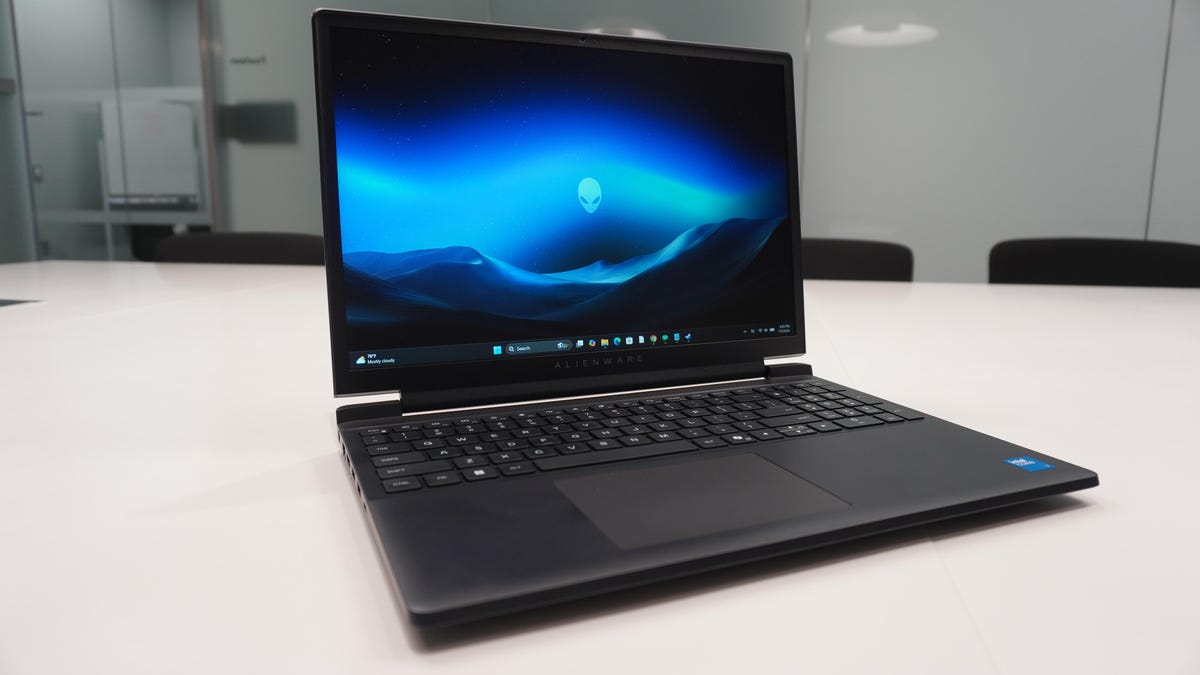
## Alienware 15 Review: A Budget-Friendly Entry into the Alienware Ecosystem
### Pros and Cons
When I first heard about a budget-friendly Alienware laptop, I was beyond excited. I was expecting a distinctly Alienware product at an approachable price point, with reasonable trade-offs like a lower-end GPU, less RAM, and an entry-level but high-performing CPU. However, it turns out balancing hardware, build, and features is not exactly easy in this market.
The **Alienware 15** walks this line with its own set of trade-offs—whether or not they’re worth it is up for debate.
#### Pros:
– **Excellent build quality.**
– **Good gaming performance.**
#### Cons:
– **Not much cheaper than other entry-level Alienware products.**
– **Unimpressive display.**
– **Connectivity quirks.**
—
### Build and Hardware
The Alienware 15 starts with either an AMD Ryzen 5 220 or Intel Core 5 210H “Raptor Lake” processor on the low end. My review unit housed a 10-core Intel Core 7 240H—a CPU from 2022—which is certainly capable but a bit less snappy than Intel’s newer processors tested this year.
Graphics options include an Nvidia GeForce RTX 4050, scaling up to a 5050 and 5060—common budget gaming options also found in Dell’s Alienware 16. However, the GPU in the Alienware 15 is only designed for an 85W TDP, lower than its 115W potential. For comparison, the Lenovo LOQ 15, a competing budget gaming laptop, offers the same GPU but supports 115W, has a better display, and costs less.
The full-size keyboard feels better than expected, with 1.3mm of key travel and satisfying snappiness. The trackpad is small, left-aligned, and perfectly functional if not premium.
Physically, the Alienware 15 has a minimalist build almost identical to the Aurora 16 but features ports on the sides instead of the back. The chassis has very little flex, though it doesn’t pass the one-finger test. While it feels premium for an all-plastic build, the display is underwhelming—a 15.3-inch WUXGA panel with 300 nits brightness and a 165Hz refresh rate, but only 62.5% of the sRGB color gamut.
—
### Battery and Gaming Performance
During testing, I encountered hardware issues when connecting to docking stations and external monitors. The Thunderbolt 3 cable caused a Windows BSoD and eventually bricked the system—likely a faulty cable. The left-side USB-C supports 10Gbps data transfer with DisplayPort 1.4 and 100W power delivery, but the right-side USB-C lacks these features. The 70Wh battery lasts about 5.5 hours with everyday tasks and under two hours while gaming.
Despite these issues, gaming performance is solid—on par with competitors. Demanding titles like “Battlefield 6” are playable with toned-down graphics, while older games like “No Man’s Sky” and “Hogwarts Legacy” perform well. The main drawbacks are the display and down-firing speakers, which lack vibrance and depth.
—
### ZDNET’s Buying Advice
Budget gaming laptops today are not cheap, and this sector has been heavily affected by the “beefy hardware on a budget” challenge. The Alienware 15 delivers solid build quality and respectable performance, but its value proposition hinges on cost versus features.
While competitive in price, alternatives like the Lenovo LOQ 15 or MSI Katana 15 HX offer better specs. Additionally, Dell’s own Alienware Aurora 16 frequently goes on sale, providing superior hardware for the same or lower price.
—
### FAQ
**What processor options are available in the Alienware 15?**
The Alienware 15 offers AMD Ryzen 5 220 or Intel Core 5 210H “Raptor Lake” processors on the low end, with configurations scaling up to an Intel Core 7 240H.
**What graphics options does the Alienware 15 support?**
It supports Nvidia GeForce RTX 4050, RTX 5050, and RTX 5060 GPUs, all with 16GB or 32GB of RAM.
**What are the main drawbacks of the Alienware 15?**
The key cons include its premium price relative to entry-level products, an unimpressive display with limited color gamut, and connectivity quirks.
**How is the battery life on the Alienware 15?**
The laptop offers about 5.5 hours of everyday use and less than two hours of gaming on battery.
**Is the Alienware 15 good for gaming?**
Yes, it delivers solid gaming performance and can handle demanding titles with adjusted settings, though it falls short in display quality.
—
### Conclusion
The Alienware 15 successfully positions itself as an accessible entry point into the Alienware ecosystem, offering robust build quality and gaming performance. However, its value is tempered by a higher price point and a display that doesn’t match its class. For buyers, alternatives like the Lenovo LOQ 15 or MSI Katana 15 HX may present better overall value, especially when Dell’s own Aurora series goes on sale. If you’re loyal to the Alienware brand and prioritize performance over display quality, the Alienware 15 remains a viable option in the budget gaming laptop market.
