



# Introduction
Creating synthetic Internet of Things (IoT) sensor data can be a practical solution when real-world data is hard to collect at scale. But effective simulation goes beyond producing random numbers — it demands a structured timeline, device-specific details, and the ability to mirror natural environmental trends such as seasonal changes. Mimesis is a powerful open-source library for generating fake data, and when paired with a bit of mathematical modeling, it becomes a robust tool for building realistic datasets. This article walks you through the entire process.
In the steps that follow, I’ll guide you through generating a full year of daily temperature readings that follow a natural seasonal pattern — along with device metadata — all built using open-source Python tools.
# Step-by-Step Guide
We’ll use three core Python libraries to construct our year-long IoT sensor dataset: mimesis for synthetic data creation, pandas for structuring the time series, and NumPy for mathematical operations to simulate seasonal behavior.
Keep in mind that real IoT time series data is typically linked to a specific device. To replicate this, we’ll use Mimesis’s Generic provider class to build a realistic hardware profile — essentially our “virtual sensor.” This step happens before we generate any actual readings:
import pandas as pd
import numpy as np
from mimesis import Generic
from mimesis.locales import Locale

# Initialize a generic provider for English locale
g = Generic(locale=Locale.EN, seed=101)

# Create static metadata for our simulated IoT device
device_profile = {
    'device_id': g.cryptographic.uuid(),
    'location': g.address.city(),
    'firmware_version': g.development.version(),
    'ip_address': g.internet.ip_v4()
}

print(f"Tracking Device: {device_profile['device_id']} located in {device_profile['location']}")
Notice that device_profile is a dictionary holding our simulated sensor’s metadata: unique ID, city, firmware version, and IP address. The output will resemble:
Tracking Device: e88b7591-31db-4e32-98dc-b35f94c662cd located in ParagouldBefore generating the time series, let’s define a formula to model the seasonal temperature pattern across the year. As you might expect, a sine wave is ideal for capturing this cyclical behavior, so our equation will be based on one:
[
T(t) = T_{text{base}} + A cdot sinleft(frac{2pi (t – phi)}{365}right) + epsilon
]
In this formula, (T(t)) represents the temperature on day (t), where (t) ranges from 1 to 365. The other terms define the sine wave’s properties, and crucially, (epsilon) is random noise generated by Mimesis — without it, the curve would be too smooth and unrealistic, since real temperature data includes daily variations.
Next, we loop through each day of the year to build the time series. pandas manages the data structure, while mimesis.numeric adds both environmental noise and simulated network latency — a typical feature in IoT systems. These values are layered on top of the mathematical baseline. NumPy handles the sine function computation.
# 1. Define mathematical constants for daily temperature simulation
T_base = 15.0       # Base temperature in Celsius
A = 12.0            # Annual temperature swing of ±12 degrees
phase_shift = 80    # Adjusts the sine wave so peak occurs in summer

# 2. Generate the 365-day date range starting January 1, 2026
dates = pd.date_range(start="2026-01-01", periods=365, freq='D')

readings = []

# 3. Iterate over each day and compute the reading
for day_index, current_date in enumerate(dates):

    # Compute the seasonal baseline for this day
    seasonal_temp = T_base + A * np.sin(2 * np.pi * (day_index - phase_shift) / 365)

    # Add random sensor noise using Mimesis (e.g., between -2.0 and 2.0 degrees)
    sensor_noise = g.numeric.float_number(start=-2.0, end=2.0, precision=2)

    # Final recorded temperature
    final_temp = round(seasonal_temp + sensor_noise, 2)

    # Assemble the daily record, combining static metadata with dynamic Mimesis values
    readings.append({
        'timestamp': current_date,
        'device_id': device_profile['device_id'],
        'location': device_profile['location'],
        'temperature_c': final_temp,
        'latency_ms': g.numeric.integer_number(start=12, end=145)       # Simulate daily network latency
    })

# Convert to a DataFrame for analysis
df = pd.DataFrame(readings)
As shown, Mimesis is used twice per daily entry: once for sensor noise and once for latency, which simulates daily network performance fluctuations.
Now let’s inspect the generated IoT time series and confirm the seasonal trend we aimed to replicate:
print("--- January (Winter) Readings ---")
print(df[['timestamp', 'temperature_c', 'latency_ms']].head(3))

print("n--- July (Summer) Readings ---")
print(df[['timestamp', 'temperature_c', 'latency_ms']].iloc[180:183])
Output:
--- January (Winter) Readings ---
   timestamp  temperature_c  latency_ms
0 2026-01-01           3.54          61
1 2026-01-02           4.90         103
2 2026-01-03           3.18         140

--- July (Summer) Readings ---
     timestamp  temperature_c  latency_ms
180 2026-06-30          28.84         116
181 2026-07-01          25.81          62
182 2026-07-02          26.08          97
For a clearer picture, try visualizing the data:
import matplotlib.pyplot as plt

plt.figure(figsize=(12, 6))
plt.plot(df['timestamp'], df['temperature_c'])
plt.xlabel('Date')
plt.ylabel('Temperature (°C)')
plt.title('Daily Temperature Throughout the Year')
plt.grid(True)
plt.tight_layout()
plt.show()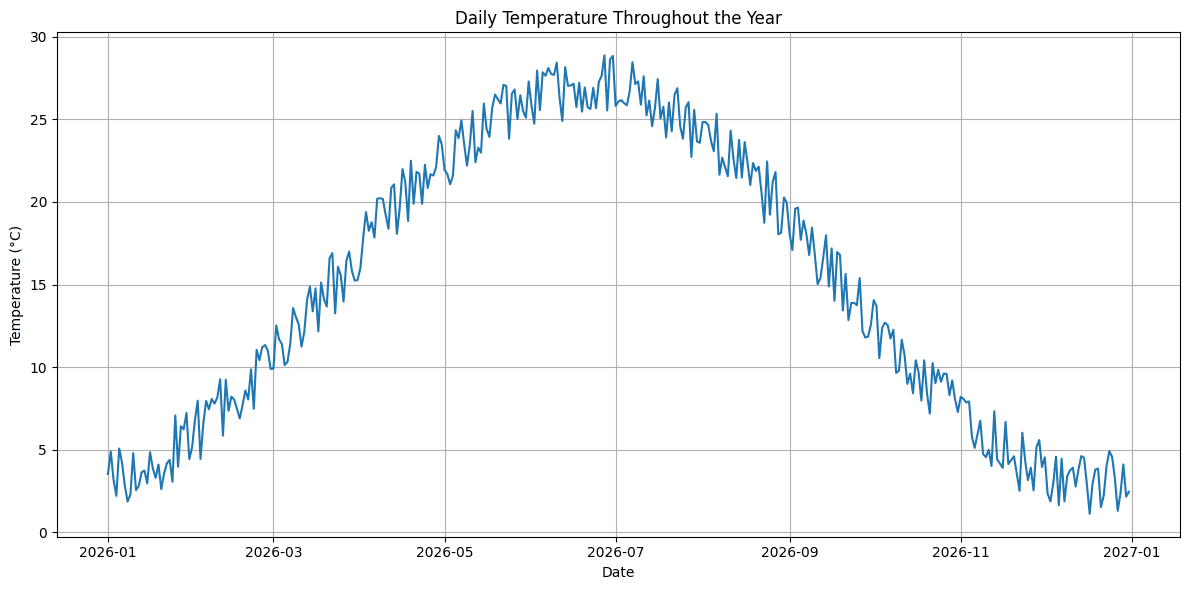
Great job making it this far!
# Final Remarks
In this article, we demonstrated how to combine Mimesis with pandas and NumPy to generate realistic synthetic IoT time series data. Specifically, we built a year-long dataset of daily temperature readings from a simulated IoT sensor, complete with device metadata, random noise to reflect natural temperature variability, and network latency. This data can be used by forecasting models or dashboard tools to analyze seasonal trends, sensor behavior, and more.
Iván Palomares Carrascosa is a leader, writer, speaker, and adviser in AI, machine learning, deep learning & LLMs. He trains and guides others in harnessing AI in the real world.
