




Every gateway comes with a set of built-in policies. Authentication. Rate limiting. Request routing. Prompt guards. These handle most scenarios. But what about the ones they don’t address?
What if you need to add a custom header based on a database lookup? What if you need to transform a request body in a way no existing filter supports? What if your business has unique logic that no off-the-shelf gateway can anticipate?
You build your own extension.
This article walks through exactly how to do that using agentgateway, Envoy, and Rust. In this tutorial, you’ll learn how to:
- Build a custom Envoy dynamic module in Rust
- Package it into a production-ready Docker image
- Deploy it to Kubernetes with kgateway and agentgateway
- Test the entire stack with a mock LLM endpoint
What you’ll need: Basic familiarity with Kubernetes, Docker, and command-line tools. No prior Rust experience required — I’ll explain the key parts as we go.
Time to complete: About 30-45 minutes.
Cost: Zero. Everything runs locally.
Architecture overview
Before diving into code, let’s understand what we’re building.
The lab routes a request through four layers:
- A curl client sends a POST request
agentgateway-proxy(Envoy) receives it- A custom Rust module transforms the request
httpbun(a mock LLM) returns a fake response
curl → agentgateway-proxy → Rust Module (.so) → httpbun (mock LLM) → responseHere’s the complete architecture:
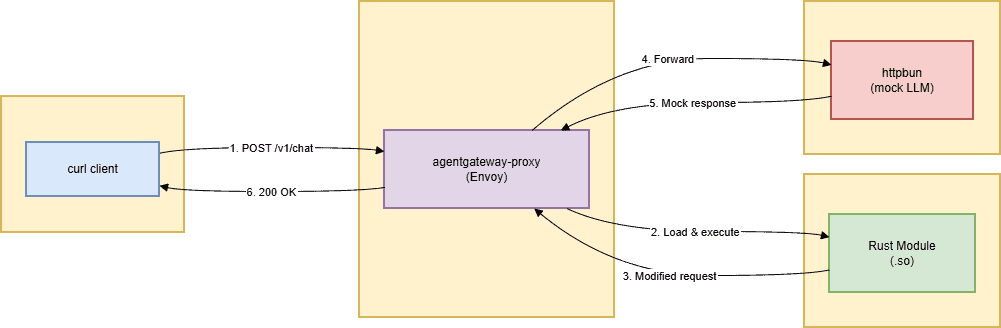
Everything runs locally on your laptop using kind (Kubernetes in Docker). No cloud costs. No API keys. The Rust module can be replaced with any transformation logic you need — the lab just shows the mechanism.
The stack
Here’s what each tool does:
| Tool | Purpose |
| kind | Creates a local Kubernetes cluster on your laptop |
| kgateway + agentgateway | Control plane that manages Envoy and handles Gateway API resources |
| Envoy | The proxy that sits between your client and backend, processing every request |
| Rust | Your custom transformation code, compiled into a shared library that Envoy loads at runtime |
| httpbun | A mock LLM that returns fake responses (no API key required) |
Everything is open source. Everything runs locally. You don’t need to spend a dime to follow along.
Before you start
Make sure you have these tools installed:
- Docker (latest) – Runs containers, including your Kubernetes cluster and the Envoy proxy
- kind (v0.20+) – Creates a local Kubernetes cluster
- kubectl (v1.27+) – Talks to your Kubernetes cluster
- Helm (v3.10+) – Installs kgateway and agentgateway packages
- Rust (1.85+) – Builds the Rust module (optional; you can build inside Docker)
Create your cluster:
kind create cluster --name ai-gateway-labThis command spins up a local Kubernetes cluster. All your gateway components will run inside it, isolated from your main system.
Part 1: The Rust module
The Rust code is split into two crates. Think of crates as folders that each contain a small library:
- rustformations – The main Envoy filter that contains your transformation logic
- transformations – A helper library that provides Jinja templating and shared transformation traits
Project Structure
rust/
├── rustformations/
│ ├── Cargo.toml
│ └── src/
│ ├── lib.rs # Registers the filter with Envoy
│ └── http_simple_mutations.rs # Your actual transformation logic
└── transformations/
├── Cargo.toml
└── src/
├── lib.rs # Defines transformation traits
└── jinja.rs # Jinja templating for dynamic transformations
The Cargo.toml file
Every Rust project has a Cargo.toml file. It lists dependencies and build instructions. Here’s what ours looks like:
[package]
name = "rustformations"
version = "0.1.0"
edition = "2021"

[dependencies]
# The Envoy SDK – tells Rust how to talk to Envoy's C ABI
envoy-proxy-dynamic-modules-rust-sdk = { path = "../patched-envoy-sdk/..." }

# Serialization – for parsing JSON requests and responses
serde = { version = "1.0", features = ["derive"] }
serde_json = "1.0"

# Templating – for dynamic prompt transformations
minijinja = { version = "2.12.0", features = ["loader"] }

# Our helper library
transformations = { path = "../transformations" }

# Error handling and shared state
anyhow = "1.0.100"
once_cell = "1.21.3"

[lib]
name = "rust_module"
path = "src/lib.rs"
crate-type = ["cdylib"]   # Creates a .so file that Envoy can load
Key dependencies explained:
crate-type = ["cdylib"]– This is the most important line. It tells Rust to compile your code into a C-compatible shared library (.so file). Envoy can load this file at runtime without restarting.envoy-proxy-dynamic-modules-rust-sdk– The official SDK thatenvoy– Provides bindings between Rust and Envoy’s C API.minijinja– A templating engine that enables dynamic prompt transformation using templates.serde– Converts JSON requests into Rust structs and vice versa.
The transformation trait
In Rust, a “trait” acts as a contract. It specifies that any type implementing this trait must provide these specific functions.
pub trait TransformationOps {
    // Append a new header to the request (adds if header already exists)
    fn add_request_header(&mut self, key: &str, value: &[u8]) -> bool;

    // Set a header (replaces existing value if present)
    fn set_request_header(&mut self, key: &str, value: &[u8]) -> bool;

    // Completely remove a header
    fn remove_request_header(&mut self, key: &str) -> bool;

    // Same operations for response headers
    fn add_response_header(&mut self, key: &str, value: &[u8]) -> bool;
    fn set_response_header(&mut self, key: &str, value: &[u8]) -> bool;
    fn remove_response_header(&mut self, key: &str) -> bool;

    // Parse request body as JSON for reading and modification
    fn parse_request_json_body(&mut self) -> Result;

    // Retrieve raw request body as bytes
    fn get_request_body(&mut self) -> Vec;
    // ... additional methods for streaming bodies, responses, etc.
}
How it works: When Envoy invokes your Rust module, it provides access to request headers, request body, response headers, and response body at various stages of the request lifecycle. You have full read, modify, and replace capabilities.
For a basic filter, you don’t need to implement every method. Begin with the headers you want to modify and expand as needed.
Part 2: The Docker image
We need to bundle Envoy with our Rust module into a single Docker image. This Dockerfile employs a multi-stage build to minimize the final image size.
# Stage 1: Compile the Rust module
FROM rust:1.85 AS builder
WORKDIR /build

# Install clang – required for compiling C bindings for the Envoy SDK
RUN apt-get update && apt-get install -y clang

# Copy all Rust source code into the container
COPY rustformations/ ./rustformations/
COPY transformations/ ./transformations/
COPY patched-envoy-sdk/ ./patched-envoy-sdk/

# Build the Rust module in release mode (optimized, without debug symbols)
WORKDIR /build/rustformations
RUN cargo build --release

# Stage 2: Final Envoy image
FROM envoyproxy/envoy:v1.36.4

# Install CA certificates – Envoy requires these for HTTPS backend validation
RUN apt-get update && apt-get install -y ca-certificates && rm -rf /var/lib/apt/lists/*

# Copy the envoyinit wrapper binary (manages Envoy startup)
COPY envoyinit-linux-amd64 /usr/local/bin/envoyinit
RUN chmod +x /usr/local/bin/envoyinit

# Copy the compiled Rust module from the builder stage
COPY --from=builder /build/rustformations/target/release/librust_module.so /usr/local/lib/

# Copy the entrypoint script (determines how to launch Envoy)
COPY docker-entrypoint.sh /
RUN chmod +x /docker-entrypoint.sh

# Configure Envoy to locate dynamic modules
ENV ENVOY_DYNAMIC_MODULES_SEARCH_PATH=/usr/local/lib

# Execute as non-root user for security
USER 10101

ENTRYPOINT ["/docker-entrypoint.sh"]
Purpose of each stage:
- Stage 1 (builder) – Compiles your Rust code using a larger image with Rust and build tools, producing the .so file.
- Stage 2 (runtime) – Contains only Envoy and your compiled .so file, keeping the final image compact (319MB).
Build the image:
docker build -f Dockerfile.rust85 -t envoy-wrapper:test .This generates a Docker image named envoy-wrapper:test containing Envoy along with your custom Rust module. You can deploy this image on any platform that supports Docker.
Part 3: Deploying to Kubernetes
Now we’ll deploy everything to your local Kubernetes cluster.
- Install Gateway API CRDs
kubectl apply -fInstall
Purpose: Installs Custom Resource Definitions (CRDs) for Gateway API, enabling you to define Gateways, HTTPRoutes, and other routing resources within Kubernetes.
2. Install kgateway (Control Plane)
helm upgrade -i kgateway-crds oci://cr.kgateway.dev/kgateway-dev/charts/kgateway-crds
  --create-namespace --namespace kgateway-system
  --version v2.2.1

helm upgrade -i kgateway oci://cr.kgateway.dev/kgateway-dev/charts/kgateway
  --namespace kgateway-system
  --version v2.2.1
Purpose: Deploys kgateway, the control plane, to your cluster. It operates in the kgateway-system namespace and manages Envoy instances.
3. Install agentgateway (AI Data Plane)
helm upgrade -i agentgateway-crds oci://cr.agentgateway.dev/charts/agentgateway-crds
  --create-namespace --namespace agentgateway-system
  --version v1.1.0

helm upgrade -i agentgateway oci://cr.agentgateway.dev/charts/agentgateway
  --namespace agentgateway-system
  --version v1.1.0
Purpose: Deploys agentgateway, the AI-focused data plane that complements kgateway. This component handles AI traffic processing.
4. Deploy httpbun (Mock LLM)
kubectl apply -f - <Purpose: Deploys httpbun – a simulated OpenAI-compatible LLM listening on port 3090 that returns mock responses without requiring an API key.
5. Create the AgentgatewayBackend
kubectl apply -f - <Purpose: Registers the LLM backend with agentgateway, indicating it’s available at the specified address using the OpenAI API format.
6. Create the Gateway and HTTPRoute
kubectl apply -f - <Purpose:
- Gateway – Establishes an entry point
- Listens on port 80 for incoming traffic.
- HTTPRoute – Directs requests that match /v1/chat/completions to the httpbun backend.
Part 4: Verifying everything works
- Set up port-forwarding for the gateway
kubectl port-forward -n agentgateway-system svc/agentgateway-proxy 8082:80What this does: Redirects traffic from port 8082 on your local machine to the gateway pod inside the Kubernetes cluster. This allows you to test from your laptop as though you were accessing it externally.
2. Send a test request
Open a new terminal and run:
curl -X POST
  -H "Content-Type: application/json"
  -d '{"model":"gpt-4","messages":[{"role":"user","content":"Hello"}]}'
3. Expected response
{
  "choices": [{
    "message": {
      "content": "This is a mock chat response from httpbun."
    }
  }]
}
If you receive this response, everything is working correctly:
- The Rust module loaded without issues
- The gateway directed the request properly
- The mock LLM returned a response
Troubleshooting common issues
Problem 1: Rust version mismatch
Error:
text
error: feature `edition2024` is required
Cause: Some Rust crates need newer compiler features. Your Rust version is outdated.
Fix: Update Rust in your Dockerfile from 1.75 to 1.85 or later.
Problem 2: Missing ABI Symbol
Error:
text
undefined symbol: envoy_dynamic_module_callback_http_add_response_header
Cause: Your SDK doesn’t match your Envoy version. Envoy v1.36.4 requires certain functions that older SDKs don’t include.
Fix: Copy the official SDK directly from the Envoy source:
bash
cp -r envoy/source/extensions/dynamic_modules/sdk/rust patched-envoy-sdk/
Problem 3: filter_config format
Error:
text error parsing filter config: EOF while parsing a valueCause: Envoy expects configuration to be wrapped in a protobuf Any type. Without the wrapper, it passes an empty object that your Rust code can’t parse.
Fix: Use the protobuf wrapper in your Envoy config:
yaml
filter_config:
  "@type": type.googleapis.com/google.protobuf.StringValue
  value: "{}"
Next steps: Production and real LLMs
This lab uses httpbun as a mock. To use a real LLM:
- Get an API key from OpenAI, Anthropic, or Gemini
- Create a Kubernetes secret with your key
- Update the AgentgatewayBackend to use the real host and authentication
yaml
apiVersion: agentgateway.dev/v1alpha1
kind: AgentgatewayBackend
metadata:
  name: openai
  namespace: agentgateway-system
spec:
  ai:
    provider:
      openai:
        model: gpt-4
    host: api.openai.com
    port: 443
  policies:
    auth:
      secretRef:
        name: openai-secret
For production, also add:
- Authentication (API keys, JWT, or mTLS)
- Rate limiting to control costs
- Observability (metrics, logs, tracing)
- Deploy to a real Kubernetes cluster (EKS, GKE, or AKS)
agentgateway supports all of these through its policy CRDs.
Complete code
Everything is on GitHub: github.com/Mike-4-prog/ai-gateway-lab
The repo includes:
- All Kubernetes manifests
- Complete Rust source code
- Multi-stage Dockerfile
- Quick start README
You can clone it and run the entire lab in about 10 minutes.
Final thoughts
Building this lab taught me three things:
- Extending agentgateway with Rust is powerful but strict. The SDK must match Envoy exactly. The Rust version must support your dependencies. One version mismatch and everything breaks.
- The filter_config format is not obvious. The protobuf wrapper is documented, but easy to miss. I spent hours on this error before finding the solution in the docs.
- Starting with a mock LLM saves time and money. httpbun let me focus on the gateway, not the AI provider. I could test everything locally without worrying about API keys or costs.
If you’re building on agentgateway and need a capability that doesn’t exist yet, you now know how to build it yourself.
Questions? Find me on GitHub.
Special thanks to Art Berger and the kgateway team for their guidance and encouragement.
