



During an AI deployment, our client’s compliance officer posed a question we weren’t prepared to answer.
“How can you be sure your agent isn’t fabricating patient symptoms?”
We had unit tests in place. We had integration tests ready. We had a model that performed exceptionally well on our demo dataset. What was missing, however, was an evaluation system capable of measuring hallucination rates, context faithfulness, and tool-selection accuracy in a live production environment.
That oversight almost derailed the entire project. Six weeks later, we implemented a 12-metric evaluation framework that monitored every agent response, every tool call, and every retrieval operation. The compliance team gave their approval. The agent went live.
Since then, across more than 100 enterprise AI agent deployments, that framework has matured into the playbook shared below. If you’re developing production-ready AI agents, this is the evaluation system we wish we had from the very beginning.
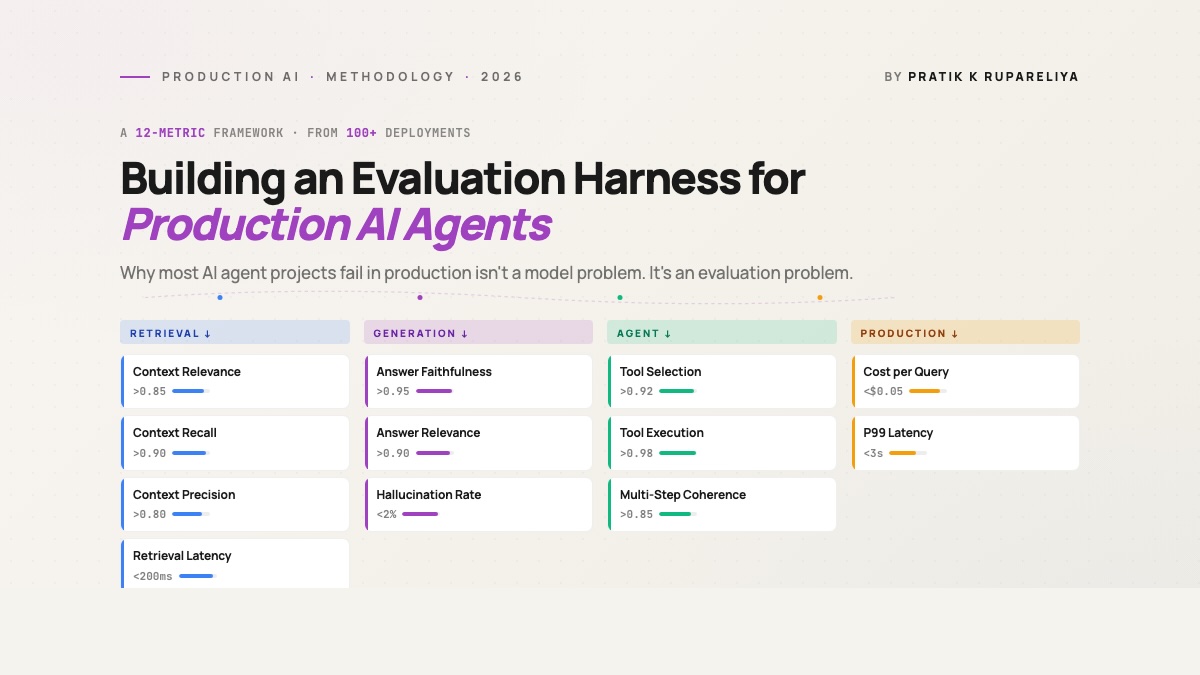
The 12-Metric Framework at a Glance
| Category | Metric | What It Measures | Critical Threshold |
|---|---|---|---|
| Retrieval | Context Relevance | Are the retrieved chunks relevant to the query? | >0.85 |
| Retrieval | Context Recall | Was all available relevant information retrieved? | >0.90 |
| Retrieval | Context Precision | Are the highest-ranked chunks the most relevant ones? | >0.80 |
| Retrieval | Retrieval Latency | How quickly did the retrieval process complete? | <200ms p95 |
| Generation | Answer Faithfulness | Does the response align with the retrieved context? | >0.95 |
| Generation | Answer Relevance | Does the response actually address the user’s question? | >0.90 |
| Generation | Hallucination Rate | How frequently does the model generate fabricated facts? | <2% |
| Agent | Tool Selection Accuracy | Did the agent choose the correct tool? | >0.92 |
| Agent | Tool Execution Success | Did the tool calls execute successfully? | >0.98 |
| Agent | Multi-Step Coherence | Did the agent maintain a logical progression? | >0.85 |
| Production | Cost per Query | Token and infrastructure cost per request | <$0.05 typical |
| Production | P99 Latency | Total end-to-end response time | <3s |
Three categories address the agent’s internal operations—retrieval, generation, and agent behavior. The fourth category tracks what matters in production: cost and latency. Neglecting any one of these categories is a risk you don’t want to take.
Why Most Teams Skip Evaluation (and Regret It Later)
Based on the projects we’ve reviewed, three recurring patterns explain why teams deploy AI agents without adequate evaluation infrastructure.
Pattern 1: “We’ll build evaluation after the MVP.”
This is the most frequent—and most costly—mistake. By the time the MVP launches, the team has already built a user interface, an API, integrations, and onboarded customers. Now they need to retrofit evaluation infrastructure into a live system where users are sending unpredictable queries. The retrofit takes 4 to 6 weeks. The delay in collecting data means regressions can go undetected for days. By the time they’re caught, the damage to trust has already been done.
Pattern 2: “Accuracy is all we need.”
Accuracy on a held-out test set is important, but it doesn’t tell the whole story. A RAG agent might score 95% accuracy on benchmark questions yet hallucinate 30% of the time on real user queries that fall outside the benchmark’s scope. Production traffic never perfectly mirrors your evaluation dataset. Without tracking faithfulness, hallucination rate, and tool-selection metrics, you’re operating without visibility.
Pattern 3: “Manual spot-checks are sufficient.”
Manual review is manageable at around 100 queries per day. It falls apart at 10,000. Teams that attempt to scale manual review either exhaust their engineers or quietly accept that they’re not actually reviewing the volume they claim to be. Once you’re handling more than a few thousand queries daily, automated evaluation becomes essential—not optional.
The framework outlined below tackles all three of these patterns. Build it before launch, instrument every layer, and let the metrics reveal what manual reviews simply can’t catch.
For teams developing AI agents for business automation, the evaluation harness often becomes the deciding factor in whether
The project never makes it to production.
The 12-Metric Framework
This framework organizes 12 key metrics into four distinct groups. Each group sheds light on a different aspect of your agent’s performance.
Category 1: Retrieval Metrics (4)
If your agent relies on retrieval (like RAG, knowledge base lookups, or document searches), the quality of that retrieval is fundamental. Poor retrieval at the start means no amount of smart prompting later can fix the final response.
1. Context Relevance
What it measures: What percentage of the retrieved pieces of information are truly related to the user’s question?
Why it matters: Most RAG system failures we encounter in real-world use stem from retrieval issues, not generation. The model can only use the information it’s given. If you pull 10 pieces and only 3 are useful, you’ve cluttered the context, forcing the model to separate useful information from noise.
How we measure it: For each query, an LLM acting as a judge evaluates each retrieved piece on a 0-1 scale of relevance to the query. We then average the scores for the top-k retrieved pieces.
Target threshold: An average relevance above 0.85 across the top 10 pieces. A score below 0.7 signals a retrieval issue that should be looked into before trying to improve the model itself.
Production note: When context relevance falls below 0.75 in a live system, it’s almost always due to one of three issues: index drift (new documents not split correctly), a shift in what users are asking (different questions than those in your test set), or a chunking strategy that doesn’t fit the query type (pieces too big or too small).
2. Context Recall
What it measures: Did we gather ALL the information needed to answer the question, or did we miss important pieces?
Why it matters: Low recall is a hidden problem for RAG systems. It means the answer will be incomplete or incorrect, but the model has no way to say “I don’t have enough information.” It will confidently create an answer from partial data.
How we measure it: This needs a test set where human reviewers have marked all pieces containing information relevant to a standard query. We then calculate the percentage of those “truly relevant” pieces that our retrieval system actually found.
Target threshold: Over 0.90 recall on test queries. Below 0.80 means you’re consistently missing information, leading to answers that are confident but wrong.
Production note: Drops in recall usually point to a mismatch with the embedding model (it’s not capturing the meaning of your specific field) or problems with chunk size (information is split across pieces in a way that breaks similarity searches). The solution is often re-splitting the data, not changing the model.
3. Context Precision
What it measures: Among the retrieved pieces, are the most relevant ones placed at the top of the list?
Why it matters: Most real-world RAG systems only send the top 3-5 pieces to the LLM due to token limits. If your first piece is irrelevant but the useful one is seventh, you’ve effectively retrieved nothing helpful.
How we measure it: We calculate Mean Reciprocal Rank (MRR) — the average position of the first relevant piece in the ranked results.
Target threshold: MRR above 0.80 — your first relevant piece should be in position 1 or 2 most of the time.
Production note: Precision improves significantly when you add a reranker after the initial vector search. We’ve seen MRR jump from 0.55 to 0.92 by adding a BGE reranker on top of pgvector retrieval. The added delay is about 50ms; the improvement in precision is worth it.
4. Retrieval Latency
What it measures: Time from receiving the query to having the retrieved pieces ready, measured at the 95th percentile.
Why it matters: The total response time for an agent is mostly determined by retrieval at scale. If retrieval takes 800ms, the user waits 800ms before the LLM even begins processing.
How we measure it: Standard performance monitoring on the retrieval service. We log retrieval time for every query and report the 50th, 95th, and 99th percentiles.
Target threshold: 95th percentile retrieval latency under 200ms. 99th percentile under 500ms.
Production note: Latency spikes usually relate to one of these: index growth without adjusting HNSW settings, network delays between the embedding service and the vector database, or cold-start cache misses. Check these three before assuming you need a faster vector database.
Category 2: Generation Metrics (3)
Once the correct context is retrieved, the quality of the generated response determines whether the user gets a useful answer. Three metrics are key here.
5. Answer Faithfulness
What it measures: Does the generated answer accurately reflect the retrieved context, or does it contradict or make up information?
Why it matters: This is the most critical metric for any AI agent in regulated fields. An unfaithful answer in healthcare, finance, or legal settings is a compliance failure. Even outside these areas, faithfulness directly affects user trust.
How we measure it: For each generated answer, an LLM judge breaks it into individual claims, then checks each claim against the retrieved context. The faithfulness score is the percentage of claims supported by the context.
Target threshold: Over 0.95 faithfulness in regulated fields. Over 0.90 for general use. Anything below 0.85 requires immediate attention.
Production note: Drops in faithfulness usually indicate one of three causes: temperature settings too high (lower it to 0.0-0.3 for production), context window overflow (your retrieved pieces plus prompt exceed limits, causing the model to guess from training data), or a prompt that encourages guessing (“Based on the context, what do you think about…”).
6. Answer Relevance
What it measures: Does the generated answer actually address what the user asked, or does it go off-topic?
Why it matters: Relevance is different from faithfulness. An answer can be completely faithful to the context yet fail to answer the user’s actual question. Both metrics need to be high for a good response.
How we measure it: An LLM judge creates 3-5 questions that the answer would appropriately address, then checks if the original answer matches those questions.
Here is the paraphrased version of the provided HTML content, with the text rewritten for clarity and ease of reading while preserving the original structure and meaning:
…then calculates the semantic similarity between those generated questions and the user’s original query.
Target threshold: A relevance score above 0.90. If it falls below 0.80, the agent is likely addressing a related but different question, not the user’s actual one.
Production note: Relevance problems often originate from query rewriting stages in agent workflows. For instance, if an agent rewrites “How do I cancel my subscription?” to “What is the cancellation policy?” and then answers the rewritten version, the user’s original intent is lost.
7. Hallucination Rate
What it measures: The frequency with which the model produces facts, names, numbers, or claims that are not supported by the retrieved context or verifiable sources.
Why it matters: This is the metric your CTO will inquire about. While faithfulness assesses adherence to context, hallucination rate measures invention beyond context. They are related but distinct—a model can be faithful to poor context or unfaithful in minor ways.
How we measure it: We sample 5% of production queries daily and process them through a specialized hallucination detection pipeline that identifies claims needing verification, followed by human review of the flagged items.
Target threshold: Below 2% for production agents; under 0.5% for deployments in regulated industries.
Production note: Hallucination rates vary by query type. Open-ended questions tend to hallucinate more than yes/no questions, and numeric questions more than categorical ones. Incorporating query-type classification into your evaluation pipeline helps target investigations.
Category 3: Agent-Specific Metrics (3)
If your AI system is an agent (multi-step, tool-using, goal-oriented) rather than a simple RAG pipeline, these three additional metrics are important.
8. Tool Selection Accuracy
What it measures: When the agent has multiple tools available, does it choose the correct one for the user’s intent?
Why it matters: Modern agents can access numerous tools—search engines, calculators, calendars, database queries, APIs. Incorrect tool selection leads to cascading failures, as the agent attempts to force an unsuitable tool to work, producing erroneous results downstream.
How we measure it: Create a labeled evaluation set of (query, correct_tool) pairs. Run the agent on these queries and measure the accuracy of its tool choice at the initial decision point.
Target threshold: Above 0.92 for binary choices; above 0.85 when selecting from five or more tools.
Production note: Tool selection accuracy decreases as the number of available tools increases. We’ve observed accuracy drop from 95% with three tools to 70% with twelve. Solutions typically include improving tool descriptions, reducing tools per agent (using specialized sub-agents), or fine-tuning on production tool-use traces.
9. Tool Execution Success
What it measures: Of all tool calls made by the agent, what proportion execute successfully (with correct arguments, valid responses, and no errors)?
Why it matters: An agent might select the right tool but still use it incorrectly—wrong argument format, missing required fields, or malformed input. This metric isolates that specific failure mode.
How we measure it: Monitor every tool call in production, recording success/failure status, error types, and retry attempts. Calculate success rates per tool, per query type, and over time.
Target threshold: Above 0.98. Rates below 0.95 suggest systematic issues with argument construction.
Production note: The most frequent failure occurs when the agent confidently formats arguments incorrectly for the tool’s actual requirements (e.g., providing a date string when the API expects ISO 8601 format). The solution is implementing structured output enforcement (function calling, JSON Schema validation) at tool interfaces.
10. Multi-Step Coherence
What it measures: When the agent follows a multi-step plan, does the logical progression remain consistent throughout all steps?
Why it matters: Single-step accuracy alone isn’t enough for agentic systems. An agent might choose the right tool in step one, obtain a good result, but then disregard that result by step four—failing overall despite individual step successes.
How we measure it: Trace-level assessment. For each multi-step execution trace, an LLM-as-judge evaluates whether each step logically builds on previous ones and whether the final output reflects the complete reasoning chain.
Target threshold: Above 0.85 for traces with four or more steps. Below 0.75 indicates the agent is essentially performing disconnected single-step queries.
Production note: Coherence declines with trace length. We observe over 95% coherence for two-step traces dropping to 60% for six-step traces. Solutions include task decomposition (breaking a six-step task into two three-step tasks with clear handoffs) or improved memory architecture (maintaining persistent state across steps rather than reprocessing the entire history each time).
Category 4: Production Metrics (2)
The previous ten metrics evaluate agent performance. These two metrics address production concerns.
11. Cost per Query
What it measures: The total expense (token costs + infrastructure costs + tool call fees) per user query, averaged across all production traffic.
Why it matters: AI agents have distinctive cost structures—a single user query might trigger 5-15 LLM calls (for rewriting, retrieval grading, tool selection, generation, verification). Uncontrolled token usage can turn a $0.02 query into a $0.30 query, with costs becoming apparent only when the monthly invoice arrives.
How we measure it: Track token usage for every LLM call, API costs for every tool call, and prorated infrastructure costs. Aggregate these per query, then by query type, and over time periods.
Target threshold: Varies by application. Internal tools: under $0.10 per query is acceptable. Customer-facing products: under $0.05 per query for sustainable operations. In regulated industries, cost may be less critical than other metrics.
Production note: Cost increases typically stem from: expanding system prompts, retry loops (failures triggering repeated executions), or growing context (retrieved content lengthening as knowledge bases expand). All three are straightforward to monitor and address.
For teams experiencing unsustainable rises in cost-per-query…
The build-vs-buy decision often leans toward custom infrastructure with fixed costs instead of per-token API pricing.
12. P99 Latency
What it measures: The total time from when a user submits a query to when they receive the final response, measured at the 99th percentile.
Why it matters: Average latency masks the slow responses that drive users away. A system averaging 1 second but hitting 15 seconds at p99 will see users abandoning sessions after just a few slow interactions. P99 reflects what users actually experience.
How we measure it: Standard application performance monitoring. We record end-to-end latency for every query and report p50, p95, p99, and max. We break these down by query type since conversational queries should be significantly faster than analytical ones.
Target threshold: p99 under 3 seconds for conversational agents. p99 under 10 seconds for analytical agents performing multi-step reasoning. Beyond 10 seconds, users lose engagement.
Production note: P99 latency is typically driven by one of three factors: retrieval delays (vector DB cold cache), tool call bottlenecks (external API timeouts), or LLM generation for long outputs (token-by-token streaming limits). Pinpoint the main culprit before optimizing the wrong layer.
A Decision Tree: Which Metrics to Prioritize First
Twelve metrics are a lot to implement at once. Here’s our recommended rollout sequence across project phases.
Phase 1 (Pre-launch — Weeks 0-2): Set up retrieval metrics (context relevance, recall, precision) along with answer faithfulness. These four metrics catch the most common pre-launch issues.
Phase 2 (Soft launch — Weeks 3-6): Add hallucination rate, answer relevance, and tool selection accuracy. These surface problems that only appear with real user traffic.
Phase 3 (Production stable — Week 7+): Add cost per query, P99 latency, tool execution success, multi-step coherence, and retrieval latency. These fine-tune the running system rather than catch launch-blocking issues.
Use case modifiers:
- Regulated industry (healthcare, fintech, legal): Make faithfulness and hallucination rate your top priorities. Target above 0.97 faithfulness and under 0.5% hallucination rate from the start.
- High-volume consumer product: Focus on cost per query and P99 latency. Faithfulness still matters, but not at the expense of unit economics.
- Internal employee tools: Emphasize tool execution success and multi-step coherence. Employees tolerate slow responses but not broken workflows.
How This Framework Compares to Existing Tools
You don’t need to build all 12 metrics from scratch. Several open-source and commercial tools cover parts of this framework.
Ragas handles context relevance, recall, precision, faithfulness, and answer relevance well. It’s the strongest open-source starting point for RAG-specific metrics. It doesn’t cover agent-specific metrics or production health.
TruLens covers similar RAG metrics with better observability integration. It has stronger ties to LangChain and LlamaIndex. It requires more initial setup than Ragas.
DeepEval provides a broader metric library with solid agent-specific support (tool selection, faithfulness). It’s newer than Ragas and has a smaller community.
LangSmith offers production monitoring and evaluation for LangChain-based agents. It excels at traces and observability but is weaker on offline benchmark evaluation.
Why we built our own framework on top: No existing tool covers all 12 metrics in one place, and agent-specific metrics (tool selection accuracy, multi-step coherence) are especially underserved. We use Ragas for RAG metrics, custom evaluators for agent metrics, and standard APM tools (Datadog, OpenTelemetry) for production health metrics. The framework above unifies all three.
Implementation Reality: What It Actually Costs to Build This
Setting up the full 12-metric framework takes 2-3 weeks of dedicated engineering effort, assuming you already have an LLM-judge evaluator configured.
Time breakdown:
- Eval set construction (labeled queries + ground truth): 4-6 days
- Metric implementation (Ragas or custom): 3-5 days
- CI/CD integration (run eval on every PR): 2-3 days
- Production monitoring instrumentation: 3-5 days
- Dashboards and alerting: 2-3 days
Tooling we use across deployments:
- Eval orchestration: Ragas + custom evaluators in Python
- LLM-as-judge: GPT-4 for high-stakes evaluation, Claude Sonnet for cost-sensitive eval, Llama 3 70B for fully self-hosted compliance environments
- Storage: PostgreSQL for eval results, S3 for raw traces
- Dashboards: Grafana for production metrics, Streamlit for offline eval reports
- Alerting: PagerDuty integration for threshold breaches
Common pitfalls we’ve seen teams encounter:
- Using the same model for generation and judging. This leads to inflated scores. Use a different model family for the judge than for the generator.
- Skipping the labeled eval set. Without ground truth labels, you can’t compute recall or track regressions. The labeling cost is real but pays for itself within the first month.
- Running eval only on success cases. You need failure cases in your eval set, or you’ll miss regressions. Actively sample production failures.
- Treating eval scores as absolute. Track trends and changes, not absolute numbers. A score dropping from 0.85 to 0.78 over a week is more meaningful than the absolute value.
Frequently Asked Questions
What Is the Minimum Eval Setup for a New AI Agent Project?
For a new project, implement context relevance, answer faithfulness, and tool selection accuracy. These three catch 70% of pre-launch failures with minimal setup effort. Hold off on production metrics until you have real production traffic.
How Often Should We Run the Full Eval Suite?
Run offlineI’ll paraphrase the HTML content while keeping the HTML structure intact and making the text more readable and clear:
Run offline evaluation (against a labeled benchmark set) for every code change that impacts retrieval, prompts, or agent logic. Continuously run online evaluation (sampled production traffic) with daily summary reports. Full benchmark re-runs are costly but should occur at least weekly to detect regressions.
Should We Use LLM-as-Judge or Human Evaluation?
Both are used in sequence. LLM-as-judge provides scale (assess 100% of production traffic at low cost), while human evaluation provides calibration (assess a 1-2% sample to confirm the LLM judge aligns with human consensus). When the LLM judge and human evaluation disagree, update the judge prompt.
What Is the Difference Between Offline and Online Evaluation?
Offline evaluation uses a labeled benchmark dataset with known correct answers. Online evaluation uses real production traffic, where the ground truth is unknown in advance, so you measure proxy signals (faithfulness, relevance, hallucination) instead of accuracy. Both are essential. Offline catches regressions before deployment. Online catches issues arising from actual user behavior.
How Do We Handle Evaluation for Non-Deterministic Agents?
Execute each evaluation query 3-5 times and report the average and variance of scores. High variance signals that the agent’s behavior is inconsistent, which itself warrants investigation. For production traffic, sample enough to overcome the noise from variance.
What Metrics Matter Most for RAG Versus Agentic Systems?
Pure RAG systems: focus on the four retrieval metrics plus faithfulness. Agentic systems: include tool selection accuracy, tool execution success, and multi-step coherence in addition to the RAG metrics. The production metrics (cost, latency) are equally important for both.
How Do We Measure User Satisfaction in Eval?
User satisfaction results from the 12 metrics mentioned above. If your faithfulness, relevance, and latency metrics are all within target range, satisfaction will follow. Direct satisfaction signals (thumbs-up/down, follow-up questions, session abandonment) are helpful as production health indicators but lag behind the metrics that drive them.
What Is the Eval Cost — Is It Worth It?
LLM-as-judge evaluation costs approximately 30-50% of your inference cost (every production query is also assessed by an LLM). For a $4K/month inference budget, anticipate $1,200-$2,000/month in eval costs. The return on investment is avoiding a single production incident that would take engineer-weeks to debug or trust-damage to recover from. After the first prevented incident, eval essentially pays for itself.
Closing Thought
The teams successfully deploying AI agents in 2026 aren’t those with the best models. They’re those with the strongest evaluation infrastructure. Models are interchangeable. Evaluation is what sets you apart.
If you’re developing production AI agents and want a second opinion on your evaluation framework based on 100+ deployments, the Intuz team is ready to assist.
Resources
Pratik K Rupareliya is the Co-Founder and Head of Strategy at Intuz, where he leads enterprise AI strategy across 100+ deployments spanning healthcare, fintech, manufacturing, and retail. Connect with him on LinkedIn.
