



Design and architecture of the SAMJ plugin
It’s worth emphasizing that SAMJ doesn’t propose a new model for bioimage segmentation. Rather, it delivers a software solution that streamlines the use of an established foundational model (SAM), which we consider highly beneficial for bioimage annotation—particularly within Fiji, where its environment, ease of use, and macro language make it perfectly suited for high-throughput annotation and automation.
SAMJ builds on SAM’s core framework, which consists of three essential components: an image encoder, a prompt encoder, and a mask decoder. The image encoder relies on a Visual Transformer (ViT)11 to process the input image, delivering strong representational capability at the cost of considerable computational demand. The prompt encoder is a separate transformer that encodes user-provided prompts—such as clicks or hints—to indicate the location of the target object. Lastly, the mask decoder, which blends transformer and Convolutional Neural Network elements, uses both the encoded image and prompt to produce the desired segmentation mask.
Accessibility and usability
The SAMJ plugin is set up just like any regular Fiji extension, removing the technical IT hurdles commonly linked to Python packages and making sophisticated image segmentation available to a broader community. In contrast to most Python-based libraries that depend on command-line interfaces for environment setup and dependency handling, SAMJ streamlines the entire process with a smooth, one-click installation for effortless deployment.
Furthermore, SAMJ offers access to five SAM variants: SAM-212 (Tiny, Small, and Large), EfficientSAM13, and EfficientViTSAM-L214. All variants carry out the same segmentation task and are trained on similar general-purpose datasets, yet they vary significantly in computational demands and performance traits (refer to Supplementary Information section 1). This range allows users to pick a model that aligns with both their hardware capabilities and application requirements, guaranteeing that at least one option remains feasible on any virtual machine, workstation, or mid-range laptop. For example, users might favor speed and efficiency on less capable hardware or opt for greater annotation accuracy on intricate images.
Integration with the Fiji ecosystem and Java–Python interoperability
Beyond its straightforward usability, SAMJ is built for flexibility and smooth integration. Driven by SAM, it can elevate annotation workflows across various Java-based platforms—for instance, alongside Labkit, we have also incorporated it into BigDataViewer15. Additionally, to encourage wider adoption, SAMJ supplies a thoroughly documented API, allowing developers to effortlessly embed SAM functionality into their preferred Java applications. It also features a platform-independent Java GUI, enabling simple integration into any Java-based environment.
A standout feature of SAMJ is its ability to bridge Python methods into Java environments. This is accomplished through Appose16 (see section 16), a Java package that lets Java and Python operate as separate processes while exchanging information in real time. By leveraging Micromamba17, Appose also handles Python environment configuration automatically, completely removing the need for manual command-line setup. As a result, SAMJ is exceptionally user-friendly, providing seamless access to advanced methods.
Interactive annotation workflow in Fiji
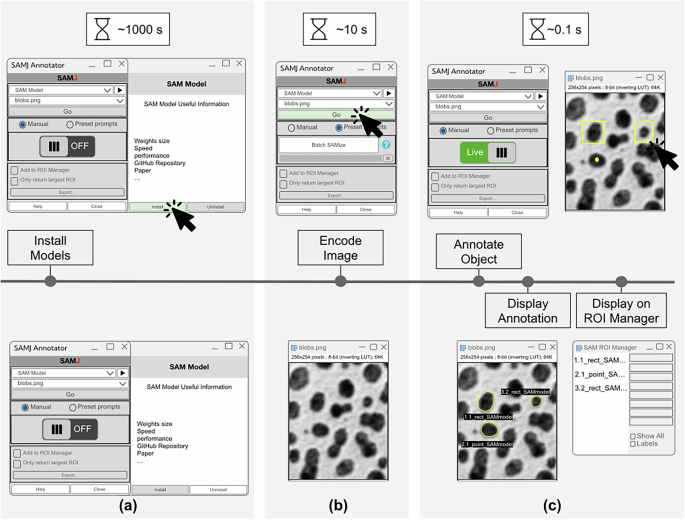
The annotation workflow within the SAMJ plugin follows SAM’s established process (Fig. 1). Each image is encoded a single time by the image encoder—the most computationally demanding step. Afterward, prompts are handled and masks are produced almost instantaneously, enabling users to interactively generate multiple annotations with real-time feedback. SAMJ integrates smoothly with Fiji’s built-in tools, letting users create prompts like points and rectangles directly through Fiji’s familiar toolbar, thereby reducing the learning curve for newcomers.
This figure depicts the typical SAMJ workflow for annotating objects in an image, along with the estimated time for each step on standard workstations. a Model Installation: The most time-intensive step, where SAMJ installs the chosen model and, if needed, configures the environment, taking roughly 1000 s. b Image Encoding: When the user clicks “Go” in the plugin, the image is processed to create an embedding, which takes about 10 s. c Object Annotation: Since re-embedding isn’t required, this step is nearly instantaneous, with each annotation produced in approximately 0.1 s per user click. The annotation process can be repeated as many times as needed for different objects, offering fast and interactive segmentation.
The SAMJ plugin provides two annotation modes: Live and Batch mode (referred to as BatchSAMize). In Live mode, prompts are drawn directly onto the encoded image, and annotations are generated interactively, one at a time. In Batch mode, users can specify multiple seed points to serve as prompts for segmenting numerous objects in a raw image. These seeds can be created automatically using conventional Fiji commands (e.g., Find Maxima, Watershed) within an ImageJ macro, followed by invoking SAMJ’s Batch mode to segment the entire image. Additionally, users can improve annotations by supplying seeds from other segmentation methods as prompts, enabling iterative refinement. Prompts for BatchSAMize can be provided either manually or automatically. Thanks to SAMJ’s integration with Fiji, users can combine bounding boxes or point prompts generated by deep learning models, macros, or files imported through the ROI Manager. Users can even leverage macros to annotate batches of images with SAMJ, as demonstrated in the Supplementary Materials. This versatility strengthens both the reproducibility and automation of image annotation.
Representative use cases
To demonstrate the capabilities of SAMJ and its smooth integration with the Fiji ecosystem, we present four representative use cases showcasing its strengths (Fig. 2). These examples highlight SAMJ’s adaptability to diverse image annotation tasks while capitalizing on Fiji’s robust image processing tools. In all cases, the targets are compact and well-defined—conditions under which SAMJ excels. Elongated or branched structures may present more of a challenge; however, users can refine prompts, adjust scale settings, or pair SAMJ with complementary approaches. Experimentation is encouraged, as SAMJ often proves effective even under less-than-ideal imaging conditions (see section 16).

a Nuclei Segmentation using Fiji’s capabilities and BatchSAMize: An image from the CellPose dataset21 is used to demonstrate the segmentation of nuclei in the red channel. Pixel intensity maxima are identified in Fiji to generate single-point prompts for each nucleus. These prompts are processed in batch mode using SAMJ, resulting in semantic segmentation of individual nuclei. b Tumor Area Quantification and Nuclei Analysis with SAMJ and StarDist plugins for Fiji: Breast cancer TMA (Tissue Microarray) images, stained with H& E (Hematoxylin and Eosin) provided by the British Columbia Cancer Agency (BCCA)28, are used to quantify tumoral regions and their nuclei. Tumoral areas are annotated with SAMJ’s rectangle prompt, generating masks that are combined with the original image in Fiji using an AND operation to obtain the intersection. StarDist is then applied through deepImageJ to segment individual nuclei in the tumoral areas. c Accelerating annotation of Bacterial Motility: SAMJ is applied to annotate motile bacteria using a single rectangle annotation. When compared to Ground Truth, SAMJ’s annotations achieve comparable or superior precision, showcasing its efficiency in handling complex shapes and streamlining high-throughput workflows. Each use case highlights SAMJ’s integration with Fiji, combining SAM’s advanced annotation capabilities with Fiji’s extensive image processing tools. d Efficient annotation of 3D Electron Microscopy images of mitochondria29 using SAMJ and Labkit: SAMJ is integrated into Labkit to support 3D and multi-label annotation. Users can annotate structures on arbitrarily oriented and scaled slices, improving visibility and accuracy of objects with complex spatial orientation. The multi-class labeling capability of Labkit allows the annotation of several distinct structures within the same volume. This workflow reduces annotation effort and ensures spatial consistency across slices.
In the first example, we show how nuclei in a fluorescence image can be segmented using SAMJ’s BatchSAMize feature. Standard Fiji tools are used to locate nuclei, which then act as individual point prompts for SAMJ’s batch processing. This approach demonstrates how Fiji’s preprocessing strengths work hand-in-hand with SAMJ’s segmentation abilities, making large-scale annotation tasks much more manageable.
The second example focuses on measuring tumor areas in breast cancer tissue microarray images stained with H&E. The goal was to measure both the tumor regions and count the nuclei within them. SAMJ’s rectangle tool was used to outline tumor areas, creating masks for these regions. After that, individual nuclei were identified using StarDist18 through the deepImageJ7,19 plugin. This process shows how SAMJ works smoothly with Fiji as a flexible annotation tool, enabling precise measurements and efficient analysis of tumor samples.
The third example demonstrates how SAMJ handles complex shapes efficiently20. Bacteria from movement studies were annotated using just one rectangle per image, greatly cutting down on manual work. When compared to hand-drawn reference labels, SAMJ’s results match closely with the originals, as shown by the IoU scores in Table 4. This example illustrates how SAMJ speeds up annotation of detailed biological structures, making it ideal for large-scale studies.
The last example shows how SAMJ efficiently annotates mitochondria in 3D electron microscopy images when used with Labkit. Working with 3D images is naturally difficult because keeping annotations consistent across slices takes considerable effort. SAMJ simplifies this process, and its integration with Labkit–built for interactive 3D viewing–lets users annotate structures on slices at any angle, providing the best possible view of the target object. Additionally, Labkit’s multi-class labeling feature allows different structures within the same volume to be labeled separately. This combination greatly reduces annotation time while boosting both precision and consistency, showing how powerful it is to combine SAMJ with other Fiji tools for challenging 3D bioimage tasks. In this case, every slice in the volume was annotated using SAMJ, following a practical 2.5D approach. Thanks to SAMJ’s quick interactive prompting, this method still offered a major speed advantage over fully manual slice-by-slice annotation.
Altogether, these examples showcase the flexibility and power of SAMJ within the Fiji environment. By merging SAM’s advanced segmentation features with Fiji’s comprehensive image processing toolkit, SAMJ enables faster, more accurate, and more scalable annotation workflows for a broad range of biological imaging applications. This integration reduces technical hurdles and supports diverse applications, from 2D fluorescence images to intricate 3D volumes. As a result, it gives the wider life science community–especially biologists who mainly use GUI-based software–access to powerful deep-learning tools that would otherwise be available only to specialists, speeding up and enhancing their bioimage analysis work.
Annotating complex objects with multi-step prompting
The Segment Anything Model was initially trained using a one-prompt-per-object approach on a broad range of objects, mostly from everyday images. Because of this, biological structures with complex shapes, like neurons, are often hard to annotate with just one prompt, no matter where it’s placed.
However, SAMJ’s interactive nature allows users to get around this limitation through a multi-step, building-block annotation process. While SAM may have trouble segmenting an entire branched structure at once, it excels at identifying local edges. SAMJ takes advantage of this by letting users segment separate parts of a structure (such as the cell body, axons, and dendrites) one at a time. These individual masks can then be combined into one complete object. This step-by-step method produces much more accurate annotations for elongated or heavily branched structures than trying to annotate everything in a single step (see Fig. 3).

SAMJ’s interactive workflow lets users segment different parts of an object that the model recognizes and then merge them together. The figure shows a fluorescent neuron30 with two branches. Using a single box prompt (middle image), the model only captures one branch. By adding extra point prompts for the second branch (purple dots on the right image), the user creates two separate labels that, when combined, produce the final mask of the complete neuron.
