



# Introduction
Running agentic coding sessions can get pricey. A single Claude Code session — involving file reading, code writing, test execution, and repeated iterations — can consume 10 to 50 times more tokens than a standard chat exchange. When you scale this up, costs accumulate quickly. Factor in rate limits that might halt a lengthy workflow midway, plus reliance on a third-party API that could alter pricing, tighten restrictions, or experience downtime at any moment, and the argument for running models locally becomes clear.
By 2026, local models have reached a solid level of quality. For the everyday tasks Claude Code manages — completing code, refactoring, debugging, and explaining codebases — a carefully selected quantized model running on your own hardware handles the overwhelming majority of real-world scenarios at no per-token expense and without any rate limits. This guide walks through three inference backends (Ollama, LM Studio, and llama.cpp), the precise environment variables and configuration files needed to connect each one to Claude Code, a handpicked table of models worth trying, and practical troubleshooting solutions for the problems you’re most likely to encounter.
# How Claude Code Connects to Any Local Model
The process is more straightforward than most tutorials suggest. Claude Code sends requests using the Anthropic Messages API format. By default, those requests are routed to Anthropic’s servers. By setting ANTHROPIC_BASE_URL, you redirect them to any server that understands the same format — which now includes Ollama, LM Studio, and llama.cpp out of the box.
According to the official Claude Code environment variables documentation, the key variables for this configuration are:
ANTHROPIC_BASE_URL: reroutes all API calls from Anthropic’s servers to whatever URL you specify. Point this to your local inference server address.ANTHROPIC_API_KEY: the API key included in the request header. Local servers generally don’t enforce authentication, so this is typically set to a placeholder like “local” or “ollama.”ANTHROPIC_AUTH_TOKEN: an alternative authentication header. Some local servers look for this instead of the API key. Set it to the same placeholder value.
ANTHROPIC_DEFAULT_SONNET_MODEL, ANTHROPIC_DEFAULT_HAIKU_MODEL, and ANTHROPIC_DEFAULT_OPUS_MODEL: Claude Code internally requests different model tiers based on the task at hand. These three variables map each tier to the name of your local model. Without them, Claude Code sends requests for claude-sonnet-4-20250514 to your local server, which will reject the request since no such model exists on your machine.
In January 2026, Ollama introduced native support for the Anthropic Messages API — the key technical improvement that made this workflow viable without needing translation proxies. LM Studio added a native /v1/messages endpoint in version 0.4.1. llama.cpp has supported the Anthropic API directly for a longer time. All three now communicate using Claude Code’s native protocol.
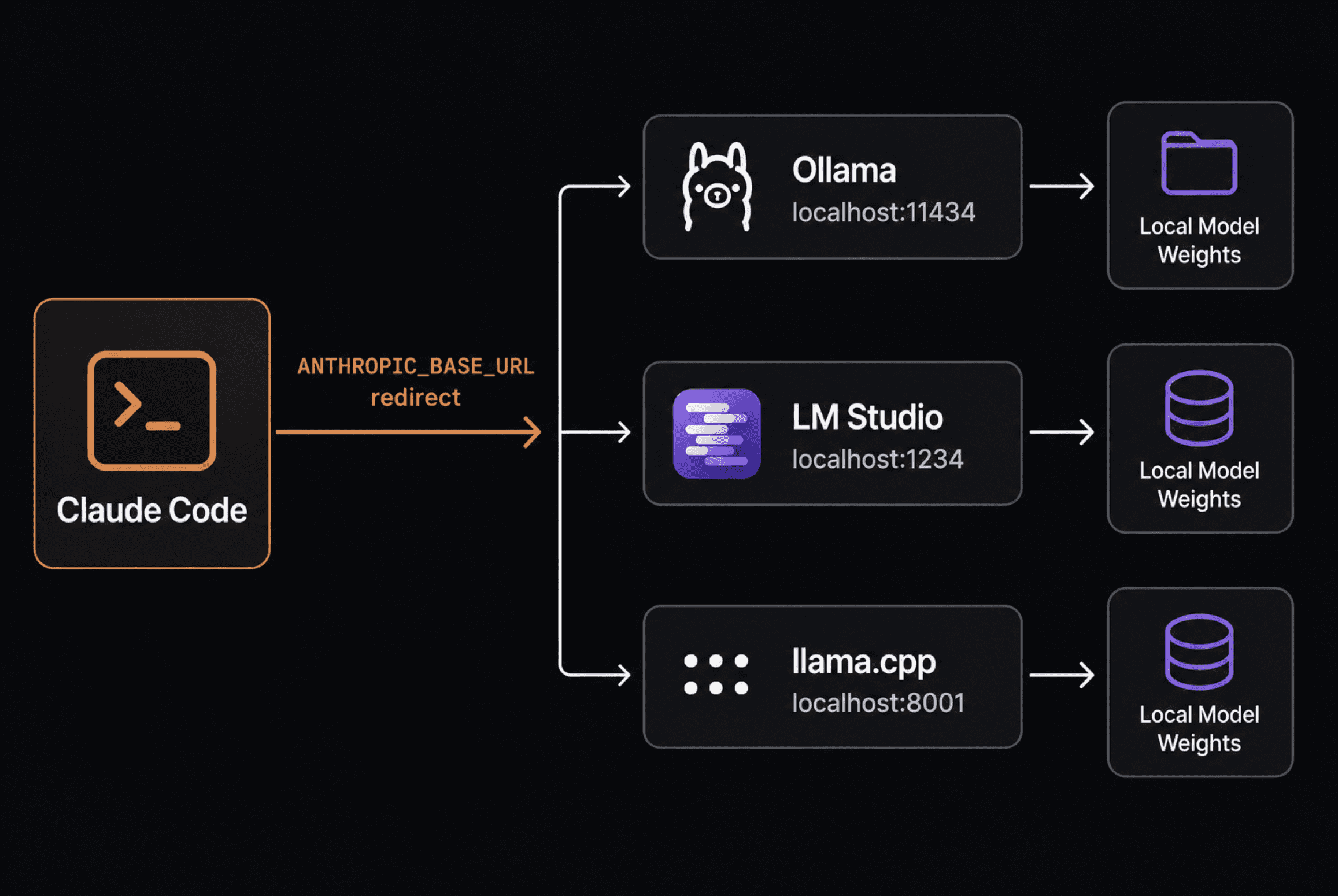
A clean architecture diagram showing Claude Code, Ollama, LM Studio, and llama.cpp | Image by Author
# Backend 1: Ollama
Ollama is the ideal place to start. It abstracts away all the complexity of model management — downloading weights, quantization, GPU and CPU allocation, and serving — behind a clean command-line interface (CLI). One command to install, one command to pull a model, and a few environment variables to set up. It runs as a background service after installation, so there’s no need to manually start a server.
Prerequisites
- macOS, Linux, or Windows (WSL2 recommended on Windows)
- At least 16 GB of RAM for practical use (32 GB recommended)
- A GPU with 8+ GB VRAM for GPU-accelerated inference, or CPU-only mode with sufficient RAM
- Ollama v0.14.0 or later is required for Anthropic Messages API support
Install Ollama:
# macOS and Linux -- single command installation
curl -fsSL  | sh

# Check the version -- must be 0.14.0+ for Claude Code compatibility
ollama version
# Expected: ollama version is 0.14.x or higher

# Windows: download the installer from
# Native Windows support has improved significantly in recent releases
Once installed, Ollama launches automatically as a background service on port 11434. You can confirm it’s running:
# Verify the Ollama server is active
curl

# Expected response:
# Ollama is running
Download a coding model:
# GLM-4.7-Flash -- recommended starting point
# Strong tool calling, 128K context window, fits in 8 GB VRAM
# Apache 2.0 license
ollama pull glm-4.7-flash:latest

# Qwen3-Coder -- excellent code generation and instruction following
# Requires 20+ GB VRAM for the full model
ollama pull qwen3-coder

# Devstral-Small -- purpose-built for agentic coding workflows
# Community-tested for Claude Code compatibility
# 24B parameters, requires 16+ GB VRAM
ollama pull devstral-small-2:24b

# Confirm the model is downloaded and ready to use
ollama list
# Displays all pulled models with their sizes and last modified dates
// Configuring Claude Code to Use Ollama
Option 1: Shell export (applies to the current terminal session only)
# Point Claude Code to your local Ollama server
export ANTHROPIC_BASE_URL="

# Local servers don't require real authentication
# Set these to any non-empty string -- Ollama ignores the actual value
export ANTHROPIC_API_KEY="ollama"
export ANTHROPIC_AUTH_TOKEN="ollama"

# Map Claude Code's model tier requests to your local model name
# Claude Code internally requests sonnet/haiku/opus -- these variables
# translate those tier names to whichever model you've pulled locally
export ANTHROPIC_DEFAULT_SONNET_MODEL="glm-4.7-flash:latest"
export ANTHROPIC_DEFAULT_HAIKU_MODEL="glm-4.7-flash:latest"
export ANTHROPIC_DEFAULT_OPUS_MODEL="glm-4.7-flash:latest"

# Launch Claude Code -- it will now route through Ollama instead of the Anthropic API
claude
Option 2: ~/.claude/settings.json (permanent, applies to all sessions)
This method persists across terminal restarts and takes effect every time you launch Claude Code. Claude Code reads environment variables from
Add these environment variables to your ~/.profile, shell rc file, or settings.json during startup so they apply regardless of how claude is started.
Create or modify ~/.claude/settings.json:
{
  "env": {
    "ANTHROPIC_BASE_URL": "
    "ANTHROPIC_API_KEY": "ollama",
    "ANTHROPIC_AUTH_TOKEN": "ollama",
    "ANTHROPIC_DEFAULT_SONNET_MODEL": "glm-4.7-flash:latest",
    "ANTHROPIC_DEFAULT_HAIKU_MODEL": "glm-4.7-flash:latest",
    "ANTHROPIC_DEFAULT_OPUS_MODEL": "glm-4.7-flash:latest"
  }
}
Option 3: .env file in project directory (per-project override)
If you’d like a particular project to use a different model without changing your global settings for the Anthropic API:
# .env in your project root -- automatically picked up by Claude Code
ANTHROPIC_BASE_URL=
ANTHROPIC_API_KEY=ollama
ANTHROPIC_AUTH_TOKEN=ollama
ANTHROPIC_DEFAULT_SONNET_MODEL=qwen3-coder
ANTHROPIC_DEFAULT_HAIKU_MODEL=qwen3-coder
ANTHROPIC_DEFAULT_OPUS_MODEL=qwen3-coder
Confirm the connection:
# Launch Claude Code with a simple test
claude

# Inside Claude Code, enter a basic prompt:
# > What model are you running?
# The local model should respond without hitting any Anthropic API endpoints.

# To make sure no external requests are sent, enable verbose logging:
claude --verbose

# Watch for lines indicating requests going to localhost:11434
# instead of api.anthropic.com
Complete working sequence from a fresh setup:
curl -fsSL https://ollama.com/install.sh | sh          # 1. Install Ollama
ollama pull glm-4.7-flash:latest                       # 2. Pull the model (~4 GB)
export ANTHROPIC_BASE_URL="http://localhost:11434"     # 3. Redirect Claude Code
export ANTHROPIC_API_KEY="ollama"                      # 4. Set placeholder auth
export ANTHROPIC_AUTH_TOKEN="ollama"
export ANTHROPIC_DEFAULT_SONNET_MODEL="glm-4.7-flash:latest"
export ANTHROPIC_DEFAULT_HAIKU_MODEL="glm-4.7-flash:latest"
export ANTHROPIC_DEFAULT_OPUS_MODEL="glm-4.7-flash:latest"
claude                                                  # 5. Launch
# Backend 2: LM Studio
LM Studio is ideal if you’d rather use a graphical interface to browse and manage models instead of working entirely from the terminal. Starting with version 0.4.1, it provides a native Anthropic-compatible /v1/messages endpoint — the exact path Claude Code expects — so there’s no need for a translation layer or proxy.
Requirements:
- macOS, Windows, or Linux
- A GPU with 6+ GB VRAM is recommended (CPU-only is possible but sluggish)
- Download from lmstudio.ai or use the CLI installer for headless server setups
Install and configure LM Studio:
# For a server or VM without a GUI — use the CLI installer
curl -fsSL https://install.lmstudio.ai/linux/installer.sh | bash

# Or grab the desktop app from https://lmstudio.ai for GUI-based use
GUI setup walkthrough:
- Launch LM Studio and search for a coding model (try searching “qwen coder” or “devstral”).
- Download the model. LM Studio takes care of quantization selection for you.
- Navigate to the Local Server tab (the
<>icon in the left sidebar). - Set the context size. LM Studio suggests starting with at least 25,000 tokens and increasing for improved results.
- Click Start Server.
- Take note of the port (default: 1234) and copy the model name exactly as it appears.
Tip: Copy the model identifier precisely. LM Studio displays the exact string you’ll need to use in
ANTHROPIC_DEFAULT_SONNET_MODEL. A mismatch here is the most frequent cause of setup failures.
Set up Claude Code:
# Point the base URL to LM Studio's local server
export ANTHROPIC_BASE_URL="http://localhost:1234"
export ANTHROPIC_API_KEY="lm-studio"
export ANTHROPIC_AUTH_TOKEN="lm-studio"

# Use the exact model name as shown by LM Studio
# Copy it carefully -- including any version suffix or quantization tag
export ANTHROPIC_DEFAULT_SONNET_MODEL="qwen2.5-coder-32b-instruct"
export ANTHROPIC_DEFAULT_HAIKU_MODEL="qwen2.5-coder-32b-instruct"
export ANTHROPIC_DEFAULT_OPUS_MODEL="qwen2.5-coder-32b-instruct"
Or save those settings permanently in ~/.claude/settings.json:
{
  "env": {
    "ANTHROPIC_BASE_URL": "http://localhost:1234",
    "ANTHROPIC_API_KEY": "lm-studio",
    "ANTHROPIC_AUTH_TOKEN": "lm-studio",
    "ANTHROPIC_DEFAULT_SONNET_MODEL": "qwen2.5-coder-32b-instruct",
    "ANTHROPIC_DEFAULT_HAIKU_MODEL": "qwen2.5-coder-32b-instruct",
    "ANTHROPIC_DEFAULT_OPUS_MODEL": "qwen2.5-coder-32b-instruct"
  }
}
How to get everything running:
# 1. Start the LM Studio server from the GUI (Local Server tab > Start Server)
# 2. Set environment variables
export ANTHROPIC_BASE_URL="http://localhost:1234"
export ANTHROPIC_API_KEY="lm-studio"
export ANTHROPIC_AUTH_TOKEN="lm-studio"
export ANTHROPIC_DEFAULT_SONNET_MODEL="your-model-name-here"
export ANTHROPIC_DEFAULT_HAIKU_MODEL="your-model-name-here"
export ANTHROPIC_DEFAULT_OPUS_MODEL="your-model-name-here"
# 3. Launch
claude
# Backend 3: llama.cpp
llama.cpp is the best option when you want direct control over inference parameters — quantization type, KV cache settings, batch size, thread count — or when you’re running on a server and need minimal overhead. It natively supports the Anthropic Messages API, so no proxy or translation layer is required.
Requirements:
- A GGUF-format model file (find one on Hugging Face; search for “GGUF” variants of any model)
- A CUDA-capable GPU for accelerated inference, or plain CPU for slower inference
- CMake and a C++ compiler when building from source (source builds are recommended for Linux/CUDA setups)
Install llama.cpp:
# macOS -- Homebrew is the easiest path
brew install llama.cpp

# Linux with CUDA -- building from source gives the best GPU performance
git clone https://github.com/ggerganov/llama.cpp
cd llama.cpp
cmake -B build -DGGML_CUDA=ON          # Turn on CUDA support
cmake --build build --config Release   # Compile
# Binaries end up in ./build/bin/

# Linux CPU-only build
cmake -B build
cmake --build build --config Release
Windows — pre-built binaries available at:
#
# Download the CUDA or CPU variant matching your hardware
Download a GGUF model:
# Install the Hugging Face CLI if you do not have it
pip install huggingface-hub

# Download GLM-4.7-Flash in Q4_K_XL quantization (~4.5 GB)
# This quantization offers a good size/quality balance for coding
huggingface-cli download unsloth/GLM-4.7-Flash-GGUF
  GLM-4.7-Flash-UD-Q4_K_XL.gguf
  --local-dir ./models/

# Or download Qwen3-Coder in Q4 quantization (~15 GB for 32B)
huggingface-cli download Qwen/Qwen3-Coder-32B-Instruct-GGUF
  qwen3-coder-32b-instruct-q4_k_m.gguf
  --local-dir ./models/
Start the llama.cpp server:
# Start llama-server with Anthropic API support and a 128K context window
llama-server
  --model ./models/GLM-4.7-Flash-UD-Q4_K_XL.gguf
  --alias "glm-4.7-flash"           # This name goes in ANTHROPIC_DEFAULT_SONNET_MODEL
  --port 8001
  --ctx-size 131072                 # 128K context -- important for large codebases
  --flash-attn                      # Memory-efficient attention, improves speed
  --n-gpu-layers 99                  # Offload all layers to GPU; remove for CPU-only

# For CPU-only inference (no GPU):
llama-server
  --model ./models/GLM-4.7-Flash-UD-Q4_K_XL.gguf
  --alias "glm-4.7-flash"
  --port 8001
  --ctx-size 32768                  # Reduce context size on CPU to keep memory manageable
  --threads 8                        # Match your CPU core count
Key flags explained:
--alias: the model name string Claude Code will send in requests. SetANTHROPIC_DEFAULT_SONNET_MODELto match this exactly.--ctx-size: context window in tokens. 131072 = 128K. Larger is better for codebase analysis but uses more VRAM. Reduce if you get out-of-memory errors.--flash-attn: Flash Attention reduces peak VRAM by processing attention in smaller blocks. Enable it whenever your build supports it.--n-gpu-layers 99: offloads all transformer layers to the GPU. The server automatically uses fewer layers if VRAM is tight.
Configure Claude Code:
export ANTHROPIC_BASE_URL="
export ANTHROPIC_API_KEY="llama-cpp"
export ANTHROPIC_AUTH_TOKEN="llama-cpp"

# Must match the --alias you passed to llama-server exactly
export ANTHROPIC_DEFAULT_SONNET_MODEL="glm-4.7-flash"
export ANTHROPIC_DEFAULT_HAIKU_MODEL="glm-4.7-flash"
export ANTHROPIC_DEFAULT_OPUS_MODEL="glm-4.7-flash"
How to run:
# Terminal 1: start the llama.cpp server
llama-server
  --model ./models/GLM-4.7-Flash-UD-Q4_K_XL.gguf
  --alias "glm-4.7-flash"
  --port 8001
  --ctx-size 131072
  --flash-attn
  --n-gpu-layers 99

# Terminal 2: configure and launch Claude Code
export ANTHROPIC_BASE_URL="
export ANTHROPIC_API_KEY="llama-cpp"
export ANTHROPIC_AUTH_TOKEN="llama-cpp"
export ANTHROPIC_DEFAULT_SONNET_MODEL="glm-4.7-flash"
export ANTHROPIC_DEFAULT_HAIKU_MODEL="glm-4.7-flash"
export ANTHROPIC_DEFAULT_OPUS_MODEL="glm-4.7-flash"
claude
# The Complete settings.json
Environment variable exports last only as long as the terminal session. For a durable configuration, use ~/.claude/settings.json. Claude Code reads variables from this file at startup so they apply no matter how Claude was launched — from the terminal, from a VS Code task, or from a script.
Here is a production-ready settings.json with all variables explained:
{
  "env": {
    "ANTHROPIC_BASE_URL": "

    "ANTHROPIC_API_KEY": "ollama",
    "ANTHROPIC_AUTH_TOKEN": "ollama",

    "ANTHROPIC_DEFAULT_SONNET_MODEL": "glm-4.7-flash:latest",
    "ANTHROPIC_DEFAULT_HAIKU_MODEL": "glm-4.7-flash:latest",
    "ANTHROPIC_DEFAULT_OPUS_MODEL": "glm-4.7-flash:latest",

    "CLAUDE_CODE_DISABLE_EXPERIMENTAL_BETAS": "1"
  }
}
Why CLAUDE_CODE_DISABLE_EXPERIMENTAL_BETAS: "1" matters:
When using Claude Code through non-Anthropic backends, Claude Code adds Anthropic-specific experimental beta flags to request headers — flags that third-party and local servers do not recognize. This causes Error: Unexpected value(s) for the anthropic-beta header on most local inference servers. Setting this variable to "1" strips those headers before the request goes out, which eliminates the error without affecting any core Claude Code functionality.
Switching between backends:
If you work with multiple backends — Ollama for daily use, the Anthropic API for complex tasks — the cleanest approach is maintaining separate shell scripts rather than editing settings.json back and forth:
# use-local.sh -- switch to Ollama
export ANTHROPIC_BASE_URL="
export ANTHROPIC_API_KEY="ollama"
export ANTHROPIC_AUTH_TOKEN="ollama"
export ANTHROPIC_DEFAULT_SONNET_MODEL="glm-4.7-flash:latest"
export ANTHROPIC_DEFAULT_HAIKU_MODEL="glm-4.7-flash:latest"
export ANTHROPIC_DEFAULT_OPUS_MODEL="glm-4.7-flash:latest"
echo "Claude Code → local Ollama (glm-4.7-flash)"
# use-anthropic.sh -- switch back to the Anthropic API
unset ANTHROPIC_BASE_URL
unset ANTHROPIC_AUTH_TOKEN
unset ANTHROPIC_DEFAULT_SONNET_MODEL
unset ANTHROPIC_DEFAULT_HAIKU_MODEL
unset ANTHROPIC_DEFAULT_OPUS_MODEL
# ANTHROPIC_API_KEY should already be set to your real key in your rc file
echo "Claude Code → Anthropic API"
Source either script in your current session:
source ./use-local.sh
claude

# When you need the real API for a complex task:
source ./use-anthropic.sh
claude
# Best Local Models for Claude Code in 2026
Hardware is the main constraint. For Claude Code with local models to be genuinely usable for coding tasks rather than just a demo, aim for 32 GB of RAM — Apple Silicon unified memory or PC RAM. 16 GB is viable with smaller quantized models andCPU offloading is supported, but you’ll experience a significant drop in generation speed on multi-step agentic workflows.
| Model | VRAM Required | Context Length | Key Advantages | License | Pull Command |
|---|---|---|---|---|---|
| glm-4.7-flash | 8 GB | 128K | Tool invocation support, fast performance, minimal VRAM usage | Apache 2.0 | ollama pull glm-4.7-flash |
| devstral-small-2:24b | 16 GB | 32K | Agent-driven coding workflows | Apache 2.0 | ollama pull devstral-small-2:24b |
| qwen3-coder | 20 GB | 128K | Code generation, instruction following | Apache 2.0 | ollama pull qwen3-coder |
| qwen3.5:27b | 20 GB | 256K | Excellent all-around performance, massive context window | Apache 2.0 | ollama pull qwen3.5:27b |
| gemma4:26b | 20 GB | 256K | Logical reasoning, 77% on coding benchmarks | Gemma License | ollama pull gemma4:26b |
# Resolving Frequent Issues
- Connection refused when starting Claude Code: The inference server isn’t active. This is the most frequently encountered problem and the simplest to identify.
# Verify whether Ollama is active curl # Expected response: "Ollama is running" # Verify whether LM Studio server is active curl # Should return a JSON list of loaded models # Verify whether llama-server is active curl # Should return {"status":"ok"} # If the server isn't running -- start it first, then open Claude Code ollama serve # For Ollama # For LM Studio: use the GUI's Local Server tab # For llama.cpp: run the llama-server command from the Backend 3 section - Model not found or unrecognized model error: The model name specified in your
ANTHROPIC_DEFAULT_SONNET_MODELdoesn’t match any model the server recognizes.# Display all models available in Ollama ollama list # The model name in ANTHROPIC_DEFAULT_SONNET_MODEL must be an EXACT match # including the tag -- use "glm-4.7-flash:latest" not "glm-4.7-flash" # Confirm by making a direct API call to see what the server recognizes curl - Tool calls failing or producing errors: Streaming tool calls — which Claude Code relies on when running functions or scripts — require Ollama version 0.14.3-rc1 or newer. Earlier 0.14.x releases had incomplete support for streaming tool calls.
# Check your current Ollama version ollama version # If the version is below 0.14.3, update Ollama curl -fsSL | sh anthropic-betaheader error:You’ll encounter:
Error: Unexpected value(s) for the anthropic-beta header. This occurs because Claude Code injects Anthropic-specific experimental beta flags that local servers don’t recognize. Resolve it by adding this line to theenvblock in yoursettings.json:"CLAUDE_CODE_DISABLE_EXPERIMENTAL_BETAS": "1"- Switching back to the Anthropic API:
# In your shell session -- clear the redirect environment variables unset ANTHROPIC_BASE_URL unset ANTHROPIC_AUTH_TOKEN unset ANTHROPIC_DEFAULT_SONNET_MODEL unset ANTHROPIC_DEFAULT_HAIKU_MODEL unset ANTHROPIC_DEFAULT_OPUS_MODEL # Then verify your real API key is configured echo $ANTHROPIC_API_KEY # Should display your sk-ant-... key, not a placeholder value # If you configured settings.json -- remove or comment out the env block # and restart Claude Code - Slow generation speed: For agentic Claude Code tasks, generation speed is critical because each tool call involves a round trip. If performance is lacking:
- Switch to a smaller or more aggressively quantized model (e.g., Q4_K_M instead of Q8).
- Enable
--flash-attnin llama.cpp if it isn’t already enabled. - Shrink the context window (
--ctx-size); larger contexts result in slower prefill times. - In Ollama, set
OLLAMA_NUM_GPU_LAYERS=99in your environment to force maximum GPU offloading.
# Wrapping Up
What once demanded fragile workarounds and clever hacks is now a straightforward five-step process. Set up the inference backend, download a model, configure three environment variables, and Claude Code directs traffic to your local machine instead of Anthropic’s API. The entire setup takes under five minutes once the model is downloaded.
The real-world outcome is a coding assistant that costs nothing to operate after initial setup, imposes no rate limits, keeps all your code on your local device, and handles the vast majority of everyday coding scenarios at quality levels that local models simply couldn’t achieve a year ago. Begin with Ollama and glm-4.7-flash — it demands the least hardware, offers the most reliable tool-calling support, and provides the quickest route to a working configuration. Once that’s up and running, scale up the model based on your available hardware and the quality level you actually require.
Shittu Olumide is a software engineer and technical writer passionate about leveraging cutting-edge technologies to craft compelling narratives, with a keen eye for detail and a knack for simplifying complex concepts. You can also find Shittu on Twitter.
