



# ## Introduction
Many teams only realize they need a **feature store** after running into trouble. For example, a fraud detection model works perfectly in a notebook but silently fails once deployed. A customer support agent gives a vague response because it lacks any information about the user. Or a recommendation pipeline calculates the “30-day spend” metric in three different ways across separate jobs — and two of them produce different answers.
A feature store is the **infrastructure** designed to solve exactly these kinds of issues. It lets you define each feature a single time, store it in two formats (one optimized for training, another for real-time serving), and keep both versions in agreement. In this guide, we’ll build a minimal feature store from the ground up using **Python**, **DuckDB**, **Parquet**, **Redis**, and **FastAPI**. Afterward, we’ll explore how AI-driven applications shift the ways we actually put a feature store to work.
The complete codebase is compact enough that we’ll walk through each piece step by step.
# ## What a Feature Store Actually Fixes
The traditional motivation is **training-serving skew**: the SQL used to construct your training data doesn’t match the code path that executes at inference time, so values gradually drift apart. This is a genuine problem, and the standard solution is maintaining both offline and online feature copies.
The modern motivation goes further. LLM-powered agents and RAG pipelines require structured user context available at inference time — with every request, in under 10 milliseconds. An LLM doesn’t inherently remember anything about the user. If we want the responses to feel personal, we need to pass in details like the user’s subscription tier, recent activity history, and account status directly into the prompt. And we need a system capable of retrieving those values quickly and reliably. That’s precisely the role of a feature store’s online store and its retrieval API.
So we’ll design for both scenarios. The same five core components serve the classic predictive ML workload as well as the LLM context-retrieval use case.
# ## The Five Core Components
– A **feature registry**, where features are declared as code.
– An **offline store** built on Parquet, queried through DuckDB, used for training and historical backfills.
– An **online store** backed by Redis for fast lookups at inference time.
– A **materialization pipeline** that syncs the latest feature values from offline to online storage.
– A **FastAPI service** that provides a typed retrieval API.
# ## Running Example: A Personalized LLM Recommender
Imagine we operate a streaming platform. Each time a user opens the app, an LLM generates a brief, personalized “what to watch next” suggestion. To do that, the LLM needs three pieces of information about the user:
| Feature | Type | Freshness |
|—|—|—|
| user_segment | string | daily |
| watch_count_30d | int | hourly |
| last_genre | string | per-event |
The entity is user_id. We’ll register these three features, materialize them, and serve them to the LLM whenever a request comes in.
// ### 1. Setting Up the Feature Registry
A registry is simply a central place where each feature is declared once — along with its entity, data type, and data source. We implement this using a dataclass:
from dataclasses import dataclass
from typing import Literal

@dataclass(frozen=True)
class Feature:
    name: str
    entity: str
    dtype: Literal["int", "float", "str"]
    source: str  # path to a Parquet file or a SQL view

REGISTRY: dict[str, Feature] = {
    "user_segment": Feature("user_segment", "user_id", "str", "data/user_segment.parquet"),
    "watch_count_30d": Feature("watch_count_30d", "user_id", "int", "data/watch_count_30d.parquet"),
    "last_genre": Feature("last_genre", "user_id", "str", "data/last_genre.parquet"),
}
The complete source code is available here.
Running it produces the following output:
Registered features:
user_segment  entity=user_id  dtype=str  source=data/user_segment.parquet
watch_count_30d  entity=user_id  dtype=int  source=data/watch_count_30d.parquet
last_genre  entity=user_id  dtype=str  source=data/last_genre.parquet
This registry acts as the contract. Every other component reads from REGISTRY, so renaming a feature, changing its data type, or pointing it at a new source only requires an update in one place. In a production environment, this would typically be a **YAML** file or a Python module tracked in a Git repository, with every change going through code review.
// ### 2. Building the Offline Store with DuckDB and Parquet
The offline store holds the complete history of every feature value. We use Parquet files for storage and DuckDB as the query engine. DuckDB can read Parquet files directly, eliminating the need to run a separate database server.
Here’s a sample of the code:
import duckdb
import pandas as pd

def get_historical_features(
    entity_df: pd.DataFrame, features: list[str]
) -> pd.DataFrame:
    con = duckdb.connect()
    con.register("entities", entity_df)
    base = "SELECT * FROM entities"
    for fname in features:
        f = REGISTRY[fname]
        src = f.source.replace("'", "''")
        con.execute(f"CREATE VIEW {fname}_src AS SELECT * FROM '{src}'")
        base = f"""
            SELECT t.*, s.{fname}
            FROM ({base}) t
            ASOF LEFT JOIN {fname}_src s
              ON t.user_id = s.user_id
             AND t.event_timestamp >= s.event_timestamp
        """
    return con.execute(base).df()
The complete source code is available here.
Running it produces the following output:
| | | | |
|—|—|—|—|
The AsOf join is a point-in-time join. For each entity row, it selects the most recent feature value whose timestamp is at or before the event timestamp. This is what prevents data leakage — ensuring a training row is never built with a feature value that did not yet exist at the time we are making a prediction.
Point-in-time joins remain the correct approach for any model we intend to train or fine-tune. For a pure inference-time LLM use case, we may never call this function. However, we still need the offline store, as it is the source for backfills, evaluation datasets, and audits.
// 3. Setting Up the Online Store on Redis
The online store holds only the most recent value per entity. Redis is the standard choice because hash lookups complete in under a millisecond.
import json
import fakeredis  # use redis.Redis() against a real server in production

r = fakeredis.FakeRedis(decode_responses=True)

def write_online(entity: str, entity_id: str, values: dict) -> None:
    r.hset(
        f"{entity}:{entity_id}",
        mapping={k: json.dumps(v) for k, v in values.items()},
    )

def read_online(entity: str, entity_id: str, features: list[str]) -> dict:
    raw = r.hmget(f"{entity}:{entity_id}", features)
    return {f: json.loads(v) if v else None for f, v in zip(features, raw)}
The full code is available here.
When you run it, the output shows:
read_online -> {'user_segment': 'power_user', 'watch_count_30d': 47, 'last_genre': 'documentary'}
missing key -> {'user_segment': None}
The key format is entity:entity_id. The value is a hash with one field per feature. A single HMGET call retrieves all requested features in one round trip. On a local Redis instance with three features, this completes in well under 1ms.
// 4. Running the Materialization Pipeline
Materialization transfers values from the offline store to the online store. In a production system this runs on a schedule (Airflow, cron, or a streaming job). Here it is implemented as a function.
def materialize(features: list[str]) -> None:
    by_entity: dict[str, dict] = {}
    for fname in features:
        f = REGISTRY[fname]
        src = f.source.replace("'", "''")
        df = duckdb.sql(f"""
            SELECT {f.entity}, {fname}
            FROM '{src}'
            QUALIFY ROW_NUMBER() OVER (
                PARTITION BY {f.entity}
                ORDER BY event_timestamp DESC
            ) = 1
        """).df()
        for _, row in df.iterrows():
            by_entity.setdefault(row[f.entity], {})[fname] = row[fname]
    for entity_id, values in by_entity.items():
        write_online("user_id", entity_id, values)
The full code is available here.
When you run it, the output shows:
user_id:8a2f -> {'user_segment': 'power_user', 'watch_count_30d': 47, 'last_genre': 'documentary'}
user_id:b13c -> {'user_segment': 'casual', 'watch_count_30d': 5, 'last_genre': 'thriller'}
The QUALIFY clause retains only the latest row per entity. We group all features for the same user into a single Redis write to minimize round trips. Run this at the cadence each feature requires: hourly for watch_count_30d, near-real-time for last_genre, and daily for user_segment. The feature registry is the right place to encode that cadence in a production implementation.
// 5. Exposing the FastAPI Retrieval Service
The retrieval service is the production interface. It is what the LLM application calls at runtime.
f = resp.json()["features"]
print("nPrompt the LLM would receive:")
print(
    f"  System: You recommend shows for a streaming service.n"
    f"  User context: segment={f['user_segment']}, "
    f"watched {f['watch_count_30d']} titles in last 30 days, "
    f"last genre watched: {f['last_genre']}.n"
    f"  Task: suggest 3 titles in a friendly, short message."
)
The full code is available here.
When you run it, the output shows:
POST /get-online-features -> 200
body: {'user_id': '8a2f', 'features': {'user_segment': 'power_user', 'watch_count_30d': 47, 'last_genre': 'documentary'}}
Prompt the LLM would receive:
  System: You recommend shows for a streaming service.
  User context: segment=power_user, watched 47 titles in last 30 days, last genre watched: documentary.
  Task: suggest 3 titles in a friendly, short message.
The feature store is the component that transforms “user 8a2f” into a structured context the LLM can act on.
# Where the Feature Store Ends and the Vector Database Begins
A vector database (Pinecone, Weaviate, pgvector) is not a feature store, even though both sit in front of a model at inference time. They address different retrieval needs.
A real LLM stack uses both. The vector database returns the three most similar past viewing sessions. The featureThe `store` function retrieves the user’s segment and recent counts, which are then combined in the prompt.
# Frequent Mistakes to Avoid
Here are some recurring patterns that consistently lead to failure:
- Calculating features within the model service. This often results in the same logic being duplicated in both the training notebook and the API, with the two versions diverging within a quarter.
- Relying on the online store as the definitive source. Redis can lose data during an improper restart. The offline store should be considered the authoritative source, while the online store acts as a cache.
- Omitting the registry. When three teams independently define
active_user, dashboards will no longer align with the model. - Confusing a vector database with a feature store. A vector database lacks the capability for entity-keyed structured lookups; a prompt requiring both will inevitably need to be connected to two separate systems.
- Performing backfills without point-in-time joins. While the training set may appear flawless, the production model will seem broken, with the discrepancy being due to data leakage.
# Comparison with Feast, Tecton, and Databricks
Our implementation, consisting of approximately 200 lines, achieves the same goal in a more compact form.
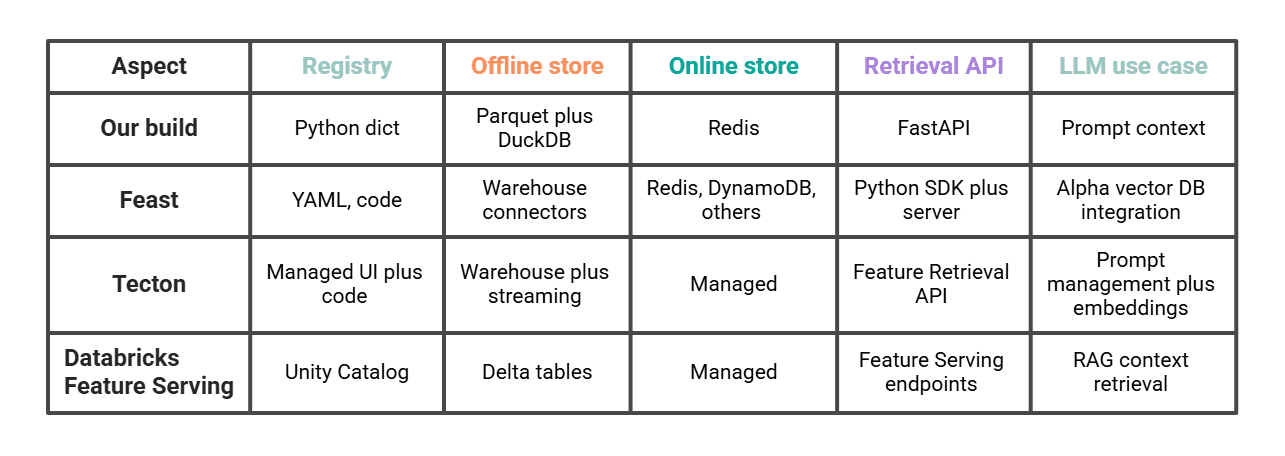
Feast is the most similar option if we wish to expand on the same pattern using a self-hosted solution. Tecton and Databricks are managed solutions that offer specific LLM features (such as Tecton’s Feature Retrieval API for LLMs and Databricks Feature Serving for compound generative AI systems). The choice between them largely depends on how much operational control we desire and whether our existing infrastructure is already built on Databricks.
# Conclusion
A functional feature store comprises five key components: a registry, an offline store, an online store, a materialization step, and a retrieval API. Constructing it once provides insight into the design rationale of production systems. It also highlights the necessary adaptations for AI: the online retrieval path is the interface accessed by the LLM, point-in-time joins are crucial for training or evaluation, and the vector database should be positioned alongside the feature store, rather than integrated within it.
Once these elements are in place, transitioning our minimal version to Feast, Tecton, or Databricks primarily involves migrating the registry. The overall architecture remains consistent.
Nate Rosidi is a data scientist and product strategy expert. He also serves as an adjunct professor of analytics and is the founder of StrataScratch, a platform designed to help data scientists prepare for interviews with real questions from leading companies. Nate covers the latest career trends, offers interview advice, shares data science projects, and provides comprehensive SQL coverage.
