



**OkoBot Malware: The New Threat Targeting Hardware Wallet Users**
In the ever-evolving landscape of cyber threats, attackers are constantly developing new methods to steal sensitive information. A recent discovery by Kaspersky’s GReAT team reveals a sophisticated malware framework called **OkoBot**, which has been actively targeting Windows users since April 2025. This framework includes a specific module designed to steal cryptocurrency recovery phrases from hardware wallet owners, putting their digital assets at risk.
—
### How OkoBot Targets Hardware Wallets
The OkoBot framework operates by infectating Windows PCs and then targeting cryptocurrency wallet software. One of its most dangerous modules, **SeedHunter**, is specifically engineered to steal recovery phrases—the critical backup codes that grant access to cryptocurrency wallets.
Here’s how the attack typically unfolds:
1. **Initial Infection**: The malware is delivered through various means, including malicious downloads disguised as legitimate software (such as fake SQL Server Management Studio installations) and deceptive “ClickFix” lures.
2. **Waiting for the Wallet**: Once inside the system, SeedHunter monitors for legitimate wallet software like **Trezor Suite** and **Ledger Wallet**. It injects itself into these applications and communicates with its command-and-control server.
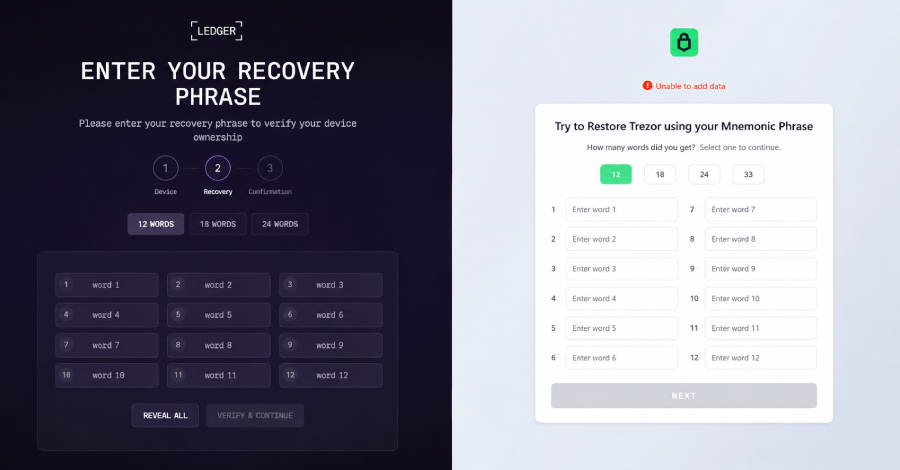
3. **The Phishing Trap**: Depending on the server’s instructions, SeedHunter either immediately displays a fake recovery page or waits for the user to physically connect their hardware wallet via USB. When a wallet is detected, it presents a convincing replica of the official recovery interface.
4. **Harvesting the Phrase**: The user is tricked into entering their 12- or 24-word recovery phrase, which is then captured by the malware and sent to the attackers.
What makes this attack particularly insidious is that the hardware wallet itself remains secure—it never reveals the private keys. Instead, the attack exploits the companion software that asks for the phrase, bypassing the hardware wallet’s security measures.
—
### Additional Attack Vectors
Beyond hardware wallet phishing, OkoBot is part of a broader modular malware framework capable of:
– Establishing persistent access through SSH tunnels and RDP (Remote Desktop Protocol)
– Deploying surveillance modules that monitor keystrokes, browser activity, and clipboard data
– Using sophisticated techniques to evade detection by antivirus software
– Creating hidden browser extensions to steal session cookies and login credentials
The framework has been linked to attacks in multiple countries, with the highest concentration in **Brazil, Vietnam, Canada, Mexico, and Türkiye**.
—
### Defense and Detection
Kaspersky researchers emphasize that there is currently no vulnerability in the hardware wallets themselves. Instead, the risk lies in endpoint security. Users can protect themselves by watching for:
– Unexpected scheduled tasks (such as “Apple Sync”)
– Suspicious system files in ProgramData and user directories
– Unauthorized RDP accounts or altered system files like termsrv.dll
– Unknown browser extensions, particularly those installed without user consent
Hardware wallet users should also remember that **legitimate wallet software will never ask for recovery phrases directly**—especially if a page appears without the device screen reflecting the request.
—
## FAQ
**Q: Can OkoBot steal cryptocurrency directly from hardware wallets?**
A: No. OkoBot cannot bypass the security of hardware wallets themselves. Instead, it steals recovery phrases by tricking users into entering them into fake interfaces displayed by compromised software.
**Q: Which hardware wallets are most at risk?**
A: The malware specifically targets Ledger and Trezor devices, as they are among the most widely used hardware wallets.
**Q: How can I tell if my computer is infected with OkoBot?**
A: Look for suspicious scheduled tasks, unexpected system files, unauthorized remote desktop users, or browser extensions that you did not intentionally install. Monitoring network traffic for connections to known malicious domains can also help detect infection.
**Q: Will my hardware wallet show if something is wrong?**
A: If you are prompted to enter your recovery phrase but the hardware wallet screen does not clearly display what you’re entering, this is a major red flag. Legitimate recovery processes always involve direct confirmation on the device itself.
**Q: Is there any way to remove OkoBot from an infected system?**
A: Complete removal typically requires a full system scan with updated antivirus software, followed by manual inspection for persistence mechanisms. In severe cases, reinstalling the operating system may be necessary.
—
## Conclusion
The emergence of OkoBot represents a significant evolution in malware tactics targeting cryptocurrency holders. By combining sophisticated social engineering with advanced endpoint compromise, attackers have found a way to exploit the human element of even the most secure hardware wallets. As these threats continue to evolve, user education, vigilant security practices, and robust endpoint protection remain the best defenses against this increasingly dangerous form of cybercrime. Hardware wallet users must remain cautious, remember that no legitimate service will ever ask for their recovery phrase, and always verify the authenticity of prompts before entering sensitive information.
