



**Satechi ChargeView 240W Review: The Ultimate High-Power Charging Station**
Chargers are the lifeblood of modern tech, and things have moved along a lot since the days of the small USB-A wall wart that could push out half an amp of power. Nowadays, we want a charger that has multiple ports and can handle hundreds of watts of output. Handling all that power means that there’s a lot of effort put into safety and cooling, so modern chargers have a lot of technology built into them to handle this. Then there’s the issue of keeping the user in the loop. When you’re charging multiple devices, it’s good to keep an eye on whether everything is charging as it should.
After all, you might have used a damaged cable or one that’s not as fast as it should be. You need less of a charger and more of a charging station or, if you want to be fancy, a charging computer. And this is exactly what the **Satechi ChargeView 240W charger** brings to your desk. I’ve had a chance to go hands-on with this charger before its official release date.
—
### The Younger, Bigger Sibling
The ChargeView 240W is a follow-on from the smaller 4-port ChargeView 140W, and it carries forward everything that was good about the 140W version and brings even more to the table. A problem I have with many high-power desktop chargers is that they are big, brick-like lumps that loom over your desk. Take the Ugreen Nexode 500W charger, for example—a huge charger with a colossal power output. It’s a big, heavy, hulking gray brick. While I love it, it’s not the most stylish accessory for a clean desk setup.
Also, while the Nexode 500W is a very capable charger, able to squeeze out more than twice the power of the ChargeView 240W, it has nothing in the way of an interface. There’s a light on it to show that it’s on and a bunch of ports, but that’s it. I’ve plenty of stories of plugging things into this charger only to find that they didn’t charge because I’d done something dumb, like not plugging the cable in right, or I’d charged something at super-slow speeds because I’d used some scabby old cable off my desk.
### A Cool Screen
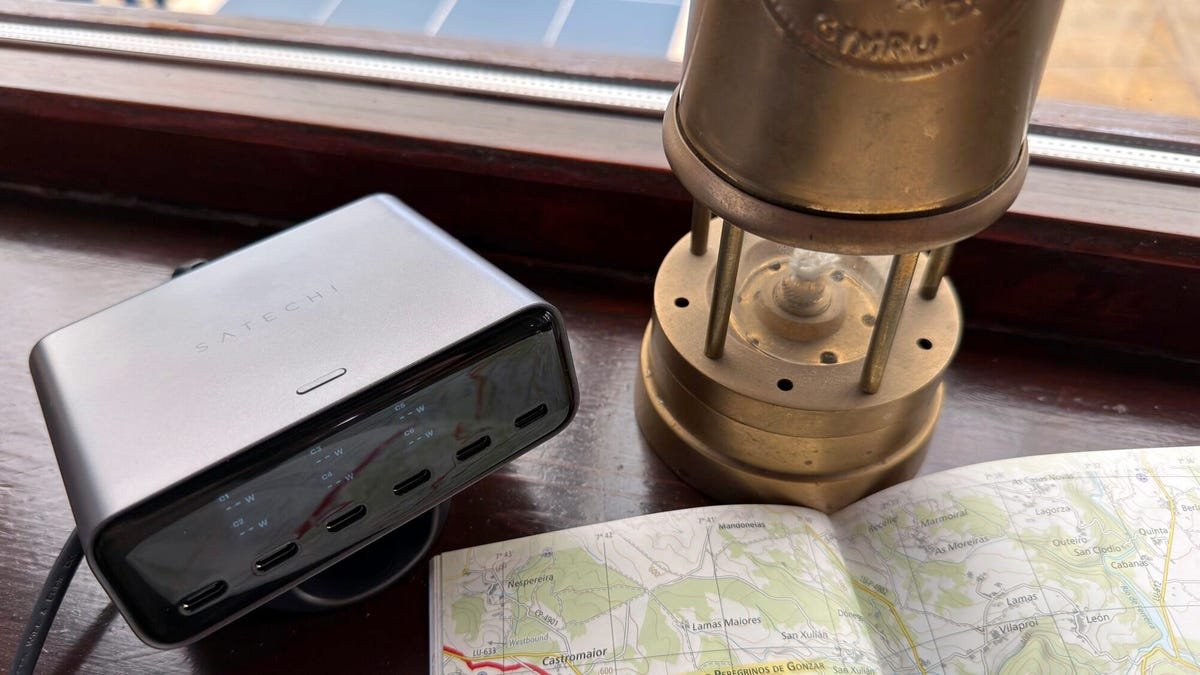
Where the ChargeView 240W excels is that it has a display that shows real-time data for each port. The display can be configured to show the power output for each port separately or the combined power output for all the ports.
But, and this is something some other makers would learn from, the display powers down after a minute of inactivity, only powering up again when you plug something in or press the button. So, you don’t have a screen facing you all the time (I know how my eye is drawn to any screen in the room, no matter how small).
The charger can be used either horizontally or vertically on the desk, and the included stand works great in both orientations. You can switch the orientation of the display using the little button on the top of the unit—yes, a physical button, so you’re not having to mess about with a touchscreen.
There are a lot of companies out there that can make a decent charger, but so many just don’t want to put in the extra effort to make an excellent product.
### USB-C Only
There are six USB ports on the ChargeView 240W, and all of them are USB-C, so this is a charger built for modern workloads. But if you have the odd USB-A charging cable that you still need to use, you can always use an adapter.
The six USB-C ports are arranged into three banks of two. The first two are capable of 140W max, the second pair can deliver up to 100W max, and the final two can deliver up to 30W max. When you use more than one port, the charger will output the maximum power that each device can take, up to the charger’s overall 240W maximum.
So, for example, you can have a MacBook pulling 140W from the first port and another laptop drawing 100W from the second, or you can have six devices all connected at once, with the first two ports handling up to 70W apiece, the next two ports handling 30W each, and the last two handling up to 20W each.
I’ve tested all the outputs, and the charger has no problem at all delivering full power. And since I know that people will ask, yes, 70W is only half of the 140W that a modern laptop can draw, but it’s enough for charging and keeping a laptop topped up during a working day.
### Advanced Charging
Satechi has also packed this charger with the latest charging tech, with the two high-power ports supporting Power Delivery 3.2, a protocol that supports AVS (Adjustable Voltage Supply) alongside PPS (Programmable Power Supply). Without boring you with the technical details, what this means is that no matter what device you plug into the charger, you get the best, fastest, and safest charge possible. It also means that it supports the fastest charging possible for the latest iPhone.
The remaining four ports all support Power Delivery 3.0 PPS, making them ideal for all your other power-hungry devices.
As with all modern chargers that have to negotiate power transfer speeds, when you plug in a new device to charge, it’s normal for charging to be temporarily interrupted for a few seconds. I know this worries a lot of people, but rest assured that everything is working the way it should.
### Does It Get Hot?
The other thing that I get asked about a lot when it comes to chargers is heat. And given that I know just how hot some chargers can get, I understand why people worry about this.
Yes, but it’s nothing to worry about. The charger seems very well engineered to dissipate heat generated by the internal power supply and charging circuitry (as long as you don’t do something dumb like bury it under a pile of papers or throw a duvet over it).
But even if it gets warm, it has three built-in modes that allow it to throttle charging to cool the unit down.
### Nitpicks
I’m very impressed by this charger, but if you allow me to be annoyingly nitpicky for a moment, there are a couple of things that I’d change. I’d love to be able to keep the display on all the time (I know my eyes would be drawn to it, but it’s cool as long as it’s not used on a nightstand), and I’d also like to see real-time internal temperature readings, again, just because that would be cool.
### The Competition
The ChargeView 240W isn’t without competition, but I’ve not reviewed anything that overlaps it completely. Ugreen has the Nexode Pro 300W, an 8-port charger (this has six USB-C ports, one USB-A port, and a DC port that I never hear much call for) for $170, and Anker has the 6-port Prime Charging Station (four USB-C ports and two USB-A ports) for $150.
I find the interfaces for both of these busier, either making use of multiple buttons or a knob, and neither can be set vertically. But these do offer different port layouts, so one might suit you better.
### ZDNET’s Buying Advice
The Satechi ChargeView 240 is currently available for preorder and will be released August 11. It’s priced at $150, which is competitive for a charger of this caliber and with this feature set.
Don’t need six ports? Pick up the baby 4-port version for $100, which gives you a pair of 140W max ports (one supporting PD 3.2 with AVS and the other PD 3.1 with PPS) and another pair of 40W max ports (both supporting PD 3.1 with PPS). For those with a more modest number of gadgets, this will be enough and will save you a good chunk of change (to spend on some decent cables, perhaps?).
—
## FAQ
**Q: How many devices can I charge simultaneously with the Satechi ChargeView 240W?**
A: You can charge up to six devices simultaneously, thanks to its six USB-C ports.
**Q: What is the maximum power output of the charger?**
A: The charger has a maximum output of 240W.
**Q: What types of fast charging protocols does it support?**
A: It supports Power Delivery 3.2 with AVS and PPS on the two high-power ports, and Power Delivery 3.0 PPS on the remaining four ports.
**Q: Can the display be kept on permanently?**
A: No, the display powers down after a minute of inactivity to save energy and reduce screen glare.
**Q: Is the charger suitable for laptops?**
A: Yes, it is capable of charging laptops, including MacBook models, by delivering up to 140W from the first two ports.
**Q: Does the charger get hot during use?**
A: It may get warm, but it is engineered to dissipate heat effectively and includes three built-in modes to throttle charging and cool the unit down if needed.
**Q: Does the charger come with a warranty?**
A: (Not specified in the article, but typically Satechi offers a 2-year warranty on their products.)
—
## Conclusion
The Satechi ChargeView 240W is a powerful, feature-rich charging station that brings a lot of value to those looking to declutter their workspace. With its six USB-C ports, intuitive display, and support for the latest fast-charging protocols, it stands out as a top-tier option for professionals and tech enthusiasts alike. While it has a few minor drawbacks—such as the lack of USB-A ports and the inability to keep the display on permanently—its strengths far outweigh its weaknesses. If you’re in the market for a high-performance charger that combines functionality and design, the ChargeView 240W is definitely worth considering.
