



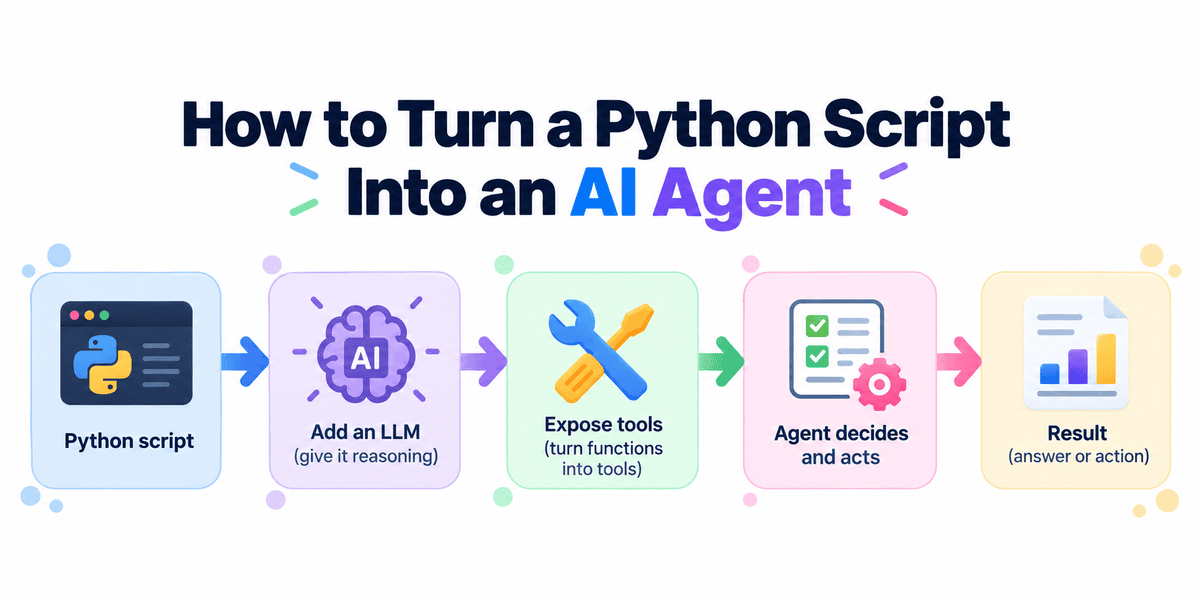
# Transforming Static Python Scripts into Dynamic AI Agents
Traditional programming dictates a rigid sequence of commands, but what if your existing code could adapt to natural language instructions? You no longer need to rebuild your Python applications to harness the power of modern artificial intelligence. By simply exposing your existing functions as tools, you can let a large language model (LLM) determine the best way to execute your logic.
This guide explores how to transform a standard website-monitoring script into an intelligent agent. We will cover the fundamental steps of wrapping your code, assigning it to an agent, and letting the model take over the decision-making process.
## The Starting Point: A Fixed Workflow
Imagine a straightforward Python script designed to ping a URL and report its HTTP status alongside the response time. While effective, this script operates in a vacuum; it only does exactly what it was programmed to do, in the exact order specified.
If you wanted this script to evaluate multiple websites, compare their speeds, and identify which one appears unhealthy, you would have to manually write the orchestration logic—loops, comparisons, and error handling. This is where the agentic approach changes the workflow entirely.
## Step 1: Preparing the Environment
Before building the agent, you need a clean workspace. Initialize a new Python project and install the necessary libraries, including the agent framework and standard HTTP request packages. You will also need to securely configure your API key to authenticate with the model provider.
Modern agent frameworks provide a lightweight runtime designed specifically for agents, tools, and tracing, making the setup process remarkably straightforward.
## Step 2: Wrapping Functions as Tools
Take your existing monitoring function and add a specific decorator to it. This single modification signals to the framework that the function is now accessible to the AI.
The beauty of this approach is that the framework automatically translates your function signature and documentation into a format the model understands, meaning you don’t have to manually write complex JSON schemas. Your Python code still performs the actual network requests and latency calculations, but now it is primed for AI consumption.
## Step 3: Defining the Agent
An agent is defined by its identity, the model it uses, a set of behavioral instructions, and the tools it has access to. You provide clear instructions telling the agent to use the available tools to complete its task.
For example, you might configure an agent named “Website Monitor” with a directive to check multiple sites, compare their response times, and clearly explain any performance problems. Once configured, the agent is ready to receive natural language prompts.
## The Agentic Loop: How It Works
When you execute the agent, a controller manages the interaction loop behind the scenes. The agent receives the user’s prompt, evaluates it, and realizes it needs specific data. It then calls the appropriate tool with the correct parameters, receives the result, and uses that context to make the next decision.
This loop continues iteratively. If the model needs to check a second URL or retry a failed request, it does so autonomously. It only produces a final answer when it has gathered enough information to satisfy the original request.
## Broader Applications
This pattern is not limited to website monitoring. Any existing Python automation can be agentified.
* **Data Analysis:** Functions that filter rows and calculate metrics can be handed to an agent that answers natural-language questions about a dataset.
* **Server Management:** Functions that check CPU, memory, and disk usage can be combined so an agent autonomously investigates why a server looks unhealthy.
* **Log Processing:** Functions that search and count errors can allow an agent to trace incidents and summarize what happened.
The Python code still performs the heavy lifting, but the agent adds natural-language understanding, tool selection, and intelligent orchestration.
## Frequently Asked Questions (FAQ)
**Q: Do I need to rewrite my existing Python functions to make them work as tools?**
A: No. You can keep your existing logic completely intact. The only required modification is adding a decorator to the specific function you want the AI to use. The framework handles the translation of your function into a machine-readable tool schema automatically.
**Q: What happens if the AI model calls a tool with the wrong arguments?**
A: Modern agent frameworks are built to handle this gracefully. If the model makes a mistake and passes invalid arguments, it will typically receive an error message from the tool execution, which it can then use to correct its approach and try again in the next step of the loop.
**Q: Why use an AI agent instead of just writing a Python loop to process multiple items?**
A: A traditional loop requires you to predict every possible scenario and hardcode the logic. An agent introduces flexibility. If the goal changes—say, you want to ignore URLs that return a specific status code or retry failed ones—you can simply update the agent’s instructions in plain English, rather than rewriting and debugging Python code.
## Conclusion
The shift from static scripts to agentic applications represents a new frontier in Python automation. By providing an LLM with a clear objective and a set of well-defined tools, you transfer the burden of workflow orchestration from your codebase to the model. The core principle is simple: define the work, set the goal, and let the agent figure out the path. This approach makes your applications more flexible, scalable, and intelligent. Thank you for reading
