



pros and cons
- Affordable price point
- Exceptional battery longevity
- Crisp 2K OLED display
- Dull-sounding speakers
- Dim screen brightness
more buying choices
Follow ZDNET: Add us as a preferred source on Google.
The 2026 HP OmniBook 3 is a no-frills laptop. It may not take home any awards for groundbreaking design or top-tier performance, but what it brings to the table is sheer value. So much so, that it has earned a spot among my top laptops of the year — simply because HP nailed the fundamentals to confidently deliver on that promise.
Also: The best HP laptops of 2026: Expert tested and reviewed
It’s a budget-friendly machine that packs everything everyday users need in a daily driver. It’s a solid pick for students, a great fit for office and remote work, and it’s effortlessly portable thanks to its slim build. More importantly, it demonstrates just how significant Qualcomm’s push into the laptop space has been — delivering affordable, power-efficient devices that neither look nor feel like budget machines.
Best laptop deals of the week
Deals are selected by the CNET Group commerce team, and may be unrelated to this article.
If it’s not broken…
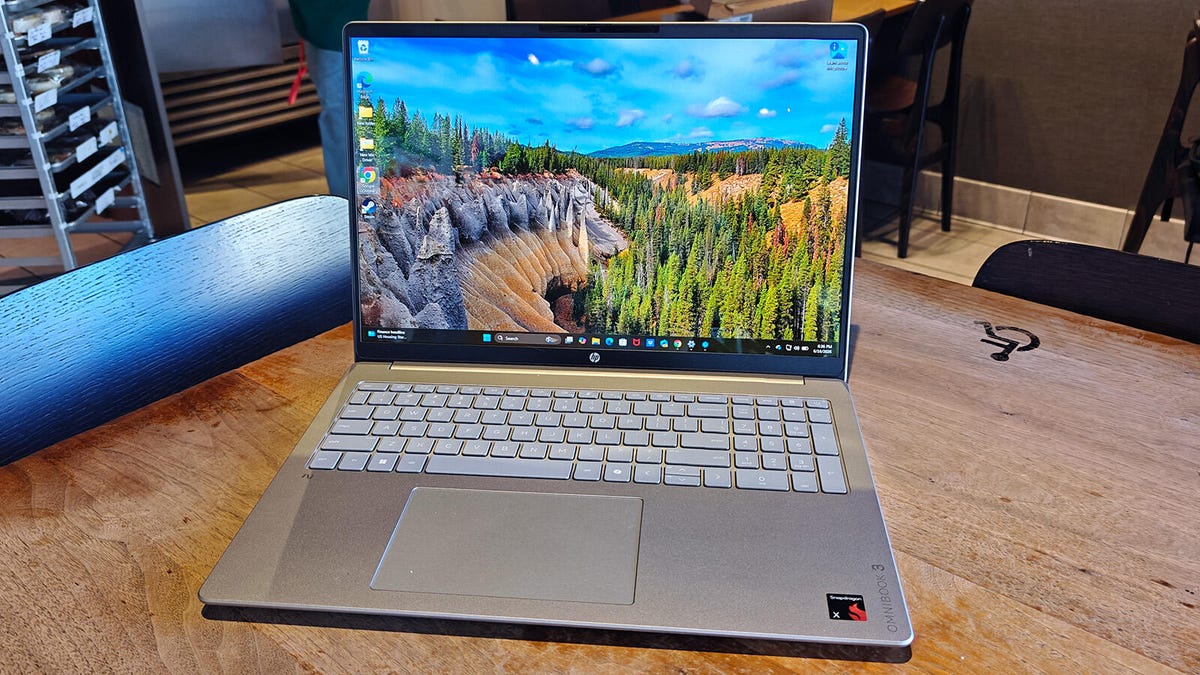
From a design standpoint, the HP OmniBook 3 keeps things simple and prioritizes practicality. It measures 14.12 x 9.91 x 0.58 inches and comes in at just under four pounds. Its slim form factor makes it a breeze to slip into a backpack or messenger bag, making it an ideal travel companion. As a final bonus, it easily passes the one-finger lid-lift test.
My review unit arrived in Glacial Silver with a subtly darker gray keyboard. I’m not typically a fan of rubber-dome keys like those on the OmniBook — they tend to feel mushy — but that’s not the issue here. The keys offer a satisfying amount of travel, ensuring a comfortable typing experience even during marathon work sessions.
HP also expanded the trackpad over the previous generation, giving users more surface area for multi-finger gestures and more precise cursor movement. Interestingly, the trackpad sits slightly off-center, which actually promotes a more natural hand posture since more of your right hand can rest comfortably on the palm rest. The company also softened the edges of the wrist rest, so you won’t feel sharp corners digging into your wrists.
Vibrant display, underwhelming audio
The vivid 2K OLED panel comes backed by a host of visual-enhancing technologies. Rather than listing every single one, I’ll highlight the standout features.
- The display covers the full DCI-P3 color gamut, allowing it to faithfully reproduce a broad spectrum of colors.
- It delivers a contrast ratio of 1,000,000:1, producing images with inky blacks alongside vibrant reds, blues, greens, and everything in between.
- The panel supports 10-bit color depth, resulting in smoother gradients and more natural color transitions.
- It even features Eye Ease technology to cut down on harmful blue light emissions.
Also: How much RAM does your PC need in 2026? My advice after using Windows and Mac for years
On top of all that, HP shifted the aspect ratio from the 16:9 found in older models to 16:10. The additional vertical space gives users more room to work while also slimming down the bezels for a cleaner aesthetic. One thing worth noting is the absence of a touchscreen option.
Many business laptops include touch input as an alternative way to interact. In this case, that’s actually a plus. Touchscreens on traditional clamshell laptops often feel more like a gimmick than a genuinely useful feature. My biggest gripe with the display is the brightness — the panel maxes out at just 300 nits, which I find underwhelming. Indoors, the screen looks perfectly fine, but under harsh lighting or outdoors, visibility drops off significantly.
The webcam holds up reasonably well. Color balance appeared natural, with no odd tinting or blown-out highlights. The Full HD IR lens doesn’t match the sharpness of what you’d find on higher-end laptops, but it handles video calls just fine.
Unfortunately, the speakers were one of the weakest links. HP positioned them on the bottom of the chassis, which leads to a muffled sound output. Some brands offset bottom-firing speakers with audio-enhancing software or advanced tuning. HP, however, didn’t take that approach here. As a result, multimedia audio sounds flat and lacks any real depth. Like the webcam, the OmniBook’s speaker system gets the job done but won’t leave much of an impression.
Performance
My review configuration came with a Qualcomm Snapdragon X X1-26-100 processor, 16GB of DDR5 RAM, and a 512GB SSD — a modest setup. The Snapdragon X isn’t a powerhouse chip, which firmly places the OmniBook 3 in the midrange tier. Below is a table comparing benchmark scores of HP’s latest offering against other models in its class. As you’ll notice, the 2026 OmniBook 3 doesn’t represent a major leap over older laptops; instead, it stays competitive with the pack.
In everyday use, the OmniBook 3 performs admirably. Most applications ran without hiccups. Office tasks felt quick, web browsing was responsive, and multimedia streaming worked flawlessly. Day-to-day performance felt consistently smooth.
That said, the Snapdragon X is a (relatively) new Windows on Arm processor, which means certain applications may not function properly due to compatibility limitations. This isn’t a novel issue. I attempted to run the Google Play Games beta app to test select mobile games as well as other benchmarks like 3DMark. Neither of them worked.
This compatibility hiccup is a minor inconvenience. Sure,
There’s a small chance some apps might not work, but most popular applications function perfectly. Unless you deliberately search for unsupported software or sign up for experimental beta programs, you likely won’t encounter any compatibility issues on the OmniBook 3. Most app developers do a solid job keeping their programs current.
Also: Buying a laptop for school? Here are 4 key factors to weigh first (plus my 10 favorite picks)
Battery performance is where the OmniBook 3 really stands out from competing laptops. It delivered one of the strongest battery results I’ve ever measured on a notebook. During my hands-on testing, the machine ran for a remarkable 28 hours before needing a recharge. That’s an extraordinary runtime, even outpacing the already impressive battery life of the 2025 HP OmniBook 5, which I had previously held in highest regard among the laptops I’ve tested.
ZDNET’s buying recommendation
The 2026 HP OmniBook 3 can currently be purchased on Amazon for approximately $539, with Walmart offering it at a slightly lower price of around $505. In a market where even entry-level laptops carry hefty price tags, it’s genuinely impressive to find a device that delivers this level of quality for so little. You’re getting a portable, well-built laptop with smooth day-to-day performance, a vivid 2K OLED screen, and the longest battery life I’ve ever seen on any notebook.
HP offers the OmniBook 3 in a selection of five colors. My review model arrived in Glacier Silver, while Amazon and Walmart appear to be listing the Mica Silver variant at the moment—a deeper shade of gray that’s close to black.
