



# Evaluating Plugins for Claude Code: A Complete Guide to Plugin Evals
## Introduction
Building a plugin for Claude Code is only half the work. The harder question is whether it actually works — does the model reach for it when it should, does it hold up under editing pressure, and does it outperform a model running without it? Until recently, plugin developers had no standardized way to answer these questions with empirical data.
Anthropic has introduced a formal eval workflow that lets developers measure plugin behavior against realistic prompts, grade outputs automatically, and isolate the plugin’s actual contribution from the baseline model capability. This system is designed to run locally during development and integrate seamlessly into continuous integration pipelines.
## How the Eval Workflow Operates
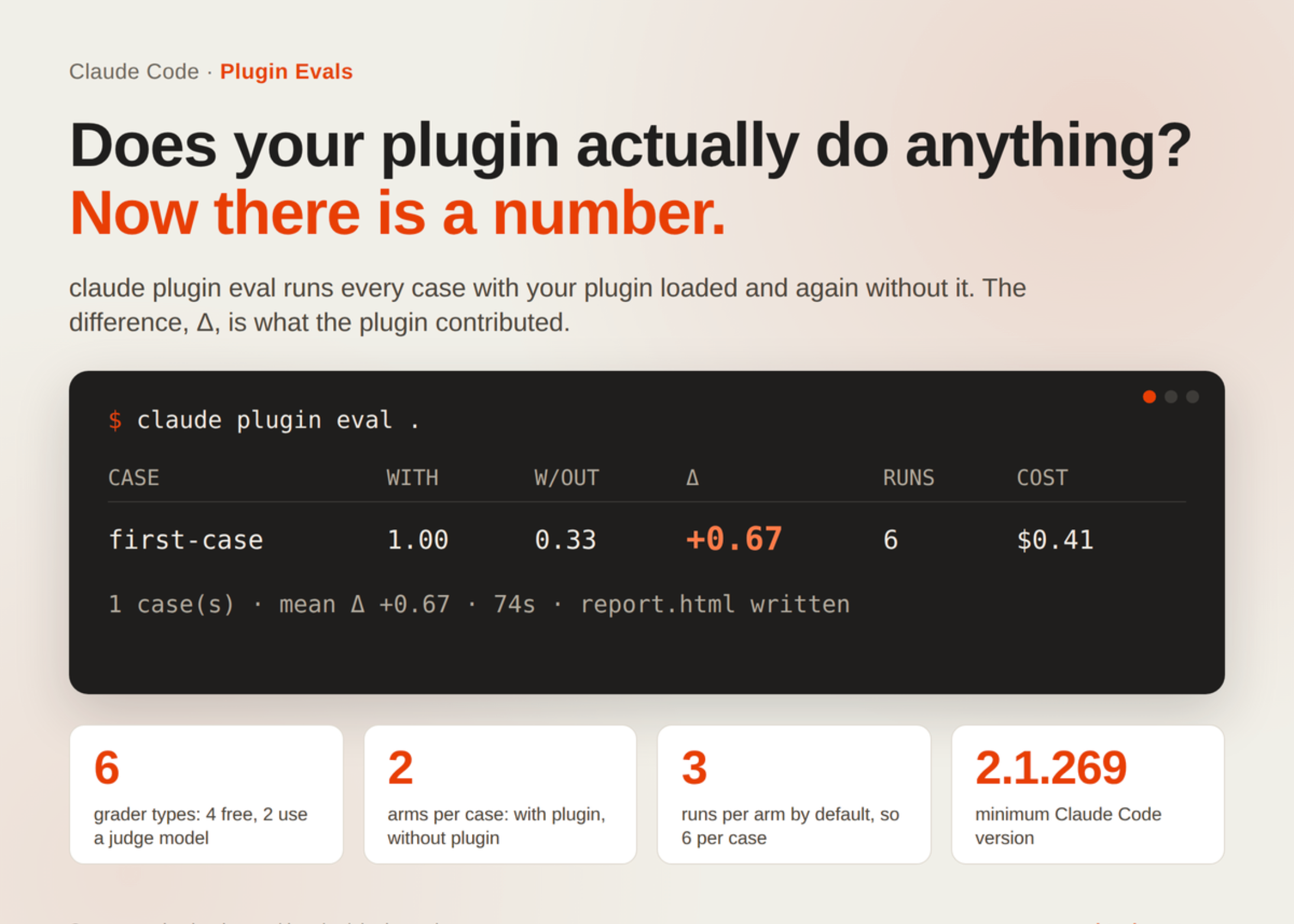
The eval command, invoked through Claude Code, executes a plugin against a curated set of test cases. Each test sends a prompt to the model with the plugin loaded, then sends the same prompt without the plugin. The difference in scores — referred to as Delta — quantifies the plugin’s contribution.
### Setting Up Your Eval Suite
An eval suite is organized as a folder inside the plugin itself, typically named `evals/`. Inside this folder, each test case gets its own subdirectory containing two essential components: a `prompt.md` file and a `graders/` folder.
The prompt file is written in markdown and sent to the model exactly as written, with no template expansion or path resolution. Frontmatter at the top of the file lets developers configure execution parameters such as maximum turns, timeout duration, the model to use, tags for filtering, and which tools are permitted during the test.
Graders live in the `graders/` subfolder and are themselves markdown files with a frontmatter header. Each grader declares its type and optionally accepts a weight and an arm specification. The system supports six distinct grader types, split into two categories: those that cost nothing to execute and those that invoke a separate judge model.
### Understanding the Grader Types
The zero-cost graders work entirely from the conversation transcript and files already present on disk. The `regex` grader checks whether a specified pattern appears (or does not appear) in the model’s response. The `tool_used` grader verifies whether a particular tool was invoked during the run. The `tool_order` grader validates the sequence in which tools were called. The `file_exists` grader simply checks whether the plugin created a file at the expected path.
The two paid graders involve a judge model call. The `llm` grader takes a prose description of ideal output and asks the judge to score the actual response against those criteria. The `baseline` grader compares the output against a reference answer, essentially asking the judge whether the response matches a gold standard. Each paid grader runs three short judge calls per execution, and these are billed to the developer’s API account.
### The Delta Metric
Every test case runs in two configurations by default: the with-arm (plugin loaded) and the without-arm (plugin absent). A case that earns a score of 1.0 in both configurations did not actually require the plugin to pass. The Delta — the difference between the two scores — is the true measure of plugin value.
The system also tracks a special indicator: a `tool_used` grader marked with `arm: with-only` is reported separately and excluded from the scored Delta. This captures whether the plugin was even triggered, independent of how well it performed once triggered. The most common first discovery for new plugin developers is a Delta near zero paired with a failing `tool_used` indicator, which reveals that the model simply does not reach for the skill when given natural language prompts.
### Initialization and Templates
Developers can bootstrap an eval suite using the `claude plugin eval init` command, which inspects the plugin, asks what good output looks like, proposes cases and graders, tests them, and writes all the necessary files. For automated pipelines, a blank template can be generated with the `–bare` flag, which is useful in CI environments where human guidance is not available.
## Cost Considerations and CI Integration
The total number of model calls in a full eval run follows a predictable formula: cases multiplied by runs multiplied by arms gives the agent execution count, plus three judge calls for each paid grader per run. This means costs scale quickly, especially when running multiple cases across several arms with multiple paid graders.
A representative invocation in a CI environment might look like this:
“`
claude plugin eval .
–trust-plugin
–json results.json
–threshold 0.8
–model claude-sonnet-5
–judge-model claude-haiku-4-5
–no-publish
–max-cost-usd 20
“`
This configuration sets a spending ceiling of twenty dollars per run, uses a specific model for the main execution and a lighter model for judging, suppresses progress output in favor of JSON results, and disables the default publishing behavior. The runner requires a functioning Claude Code installation and appropriate credentials, typically an API key passed through environment variables.
Important to note: an untrusted checkout without a terminal attached will be refused with a non-zero exit code. Report-level issues do not alter the exit status, allowing CI pipelines to distinguish between fatal errors and benign warnings. When JSON output mode is enabled, the runner suppresses all progress text and produces machine-readable results exclusively.
### Where Results Land
Once a run completes, results are stored locally under `evals/results/
## Common Findings and Troubleshooting
The first diagnostic pattern that most developers encounter is a Delta close to zero with the `tool_used: Skill` grader reporting a failure. This means the plugin is technically correct from a manifest perspective — `claude plugin validate` confirms that — but the model simply does not choose to invoke the skill when presented with a natural prompt. The fix typically involves adjusting the skill’s description, its name, or the way it is registered, rather than changing the prompt itself.
Another frequent observation is that a case passes in the without-arm just as well as in the with-arm, yielding a Delta of zero despite the plugin doing something useful. This signals that the prompt is too easy or too closely resembles a task the base model handles natively. In such cases, developers should either increase the complexity of the prompt or choose a task that genuinely requires the plugin’s specialized knowledge.
## Frequently Asked Questions
**Q: What version of Claude Code is required to run plugin evals?**
The eval workflow requires Claude Code version 2.1.269 or later. Earlier versions do not support the `claude plugin eval` command or its subcommands.
**Q: Can I run evals against a plugin that uses a skills directory instead of a plugin.json manifest?**
Yes. The system supports three types of plugin structures: a directory containing a `plugin.json` manifest, a directory containing a `.claude-plugin/plugin.json` manifest, or a skills-directory plugin. The init command will detect and work with all three formats.
**Q: Are the @path mentions in prompts expanded or resolved during a test run?**
No. Any `@path` references in the prompt body are passed to the model exactly as written. They are not expanded, resolved, or modified by the eval runner.
**Q: What happens if my CI budget runs out mid-run?**
The `–max-cost-usd` flag caps spending. Once the limit is reached, the run stops and reports whatever results have been generated so far. The exit code in this case reflects whether the results collected so far meet the threshold, so it is best practice to set the cap generously for the first run to understand actual costs.
**Q: Can I override the default number of runs per case?**
Yes. The default is three runs per arm, but this can be adjusted with the `–runs` flag. Increasing the number of runs improves statistical reliability at the cost of additional API calls.
**Q: Do paid graders count the same way as agent runs toward my billing?**
No, they are billed separately. Agent runs consume the main model’s context window and output tokens, while judge calls are short invocations of the judge model. Both are charged to your API account or plan, but the cost structures differ.
**Q: Is there a way to see which specific cases failed without opening the HTML report?**
Yes. Using the `–json` flag produces a JSON results file with per-case, per-grader verdicts. This file can be parsed by other tools or displayed in CI logs for quick inspection.
**Q: Can I tag my cases and run only a subset?**
Frontmatter in `prompt.md` supports a `tags` field. While the specific CLI filtering syntax is documented in the reference materials, tags allow developers to group cases and selectively run only relevant ones during development iterations.
## Conclusion
The plugin eval workflow fills a significant gap in the Claude Code development ecosystem. By enabling developers to measure whether a plugin actually gets used, whether it produces better results than the model alone, and whether those results are consistent across multiple runs, it transforms plugin development from a guessing game into an evidence-driven discipline.
The system’s design reflects careful attention to cost control and CI practicality. With configurable thresholds, spending caps, JSON output for automation, and a clear formula for predicting run costs, developers can integrate evals into their daily workflow without fear of runaway charges.
The most actionable insight the tool provides is its ability to surface the gap between a syntactically valid plugin and a plugin that the model actually reaches for naturally. Fixing that gap — through better naming, clearer descriptions, or prompt engineering — is where most real improvement happens, and the eval suite is purpose-built to highlight exactly where that gap exists.
Thank you for reading
