



Sponsored Content
The artificial intelligence landscape is now packed with numerous options, ranging from chatbots and writing helpers to image makers, coding assistants, automation tools, and agent-building platforms. While most of these solutions address only a single need, Abacus AI aims to tackle a more significant challenge: providing individuals and teams with a comprehensive AI system capable of performing a wide array of tasks. This system can engage in conversation, conduct research, automate workflows, produce media, create applications, and operate continuously active agents.
Abacus AI stands out as one of the most ambitious AI platforms currently accessible.
It’s also not the simplest tool available for every user.
This assessment will cover Abacus AI’s functionalities, explore how core components such as ChatLLM, Abacus AI Agent, and Abacus Claw integrate, and identify the ideal users for this platform. We will also examine its strengths and complexities, as well as whether it’s a worthwhile choice in 2026.
TL;DR:
- Abacus AI serves as a comprehensive AI platform, consolidating multiple capabilities into a single environment. You can access chat, in-depth research, coding, app development, and video creation from one unified system, eliminating the need to switch between various AI interfaces.
- Abacus AI features ChatLLM, acting as a central AI brain. It offers access to top-tier models such as GPT-5.5, Claude 4.6, and Gemini 3.1, so you don’t need to commit to using just one model.
- The Abacus AI Agent functions like a dedicated individual completing tasks on your behalf. It can browse the internet, perform market research, develop presentations, and even code and launch applications from the ground up. This agent goes beyond providing advice; it genuinely executes tasks.
- Abacus AI also provides Abacus Claw, an agent that remains active within your communication channels like Slack and WhatsApp. It possesses memory capabilities and operates continuously, without requiring you to initiate new sessions each time.
- For founders and developers, there’s a feature called Vibe Coding. You simply describe a website or tool in plain English, and Abacus AI will construct, host, and deploy it for your convenience.
- Pricing for Abacus AI typically ranges from $10 to $20 per month per user. However, a credit system is in place for specific actions like video creation or handling complex agent functions.
- Abacus AI is designed for advanced users, including founders, analysts, and developers, who require the platform to deliver complete work rather than just text generation.
- It’s important to note that Abacus AI offers a vast array of features, which means it may require some time to fully grasp its usage. It’s a robust tool, not merely something for casual experimentation.
- Ultimately, if you’re seeking a platform that can consolidate various AI tools into a single, powerful system that genuinely performs tasks, Abacus AI is an excellent option. It’s arguably the most comprehensive platform available today.
Quick Verdict: Is Abacus AI Worth It or Just Hype?
Yes, Abacus AI is a strong contender if you’re looking for a single AI platform that handles a multitude of tasks.
It integrates chat, automation, research, app development, image and video creation, coding support, and AI agents.
Abacus AI is particularly beneficial for:
- Founders
- Developers
- Analysts
- Growth teams
- Operators
- Content teams
- Businesses
- Technical power users
It’s not the best fit for those who only need a basic chatbot for infrequent use.
The platform is powerful, requires a learning curve, and operates on a credit system.
If you’re prepared to invest time in learning, Abacus AI can replace several separate AI tools.
If you simply need AI chat, it might be more than you require.
Why Abacus AI Is Getting So Much Attention
People are increasingly searching for Abacus AI because the challenges of managing multiple AI workflows have become apparent.
Many users now find themselves needing more than one AI product:
- A chatbot for writing
- A coding tool for development
- An automation tool for workflows
- An image generator for visuals
- A video tool for short-form content
- A research assistant for reports
- A data tool for spreadsheets and analysis
- An agent platform for recurring tasks
This approach quickly becomes expensive and fragmented.
Abacus AI adopts a different strategy. Rather than providing a single, isolated AI feature, it integrates multiple AI capabilities within a broader platform.
The fundamental concept is straightforward:
Abacus AI is not merely a chatbot; it’s an AI work system.
The platform brings together:
- ChatLLM for everyday AI interaction
- Abacus AI Agent for complex task execution
- Abacus Claw for persistent, always-on agents
- Abacus Studio for short video generation
- Coding and app-building tools for product creation
- Integrations for business workflows
This combination is why Abacus AI frequently appears in searches for AI agents, AI automation tools, ChatGPT alternatives, app-building AI platforms, and business AI systems.
What Is Abacus AI?
Abacus AI is a platform that leverages intelligence to connect users with the best AI models. It also assists in automating work, building applications, generating media, analyzing documents, conducting research, and creating AI agents.
The simplest way to grasp its functionality is by examining its primary layers.
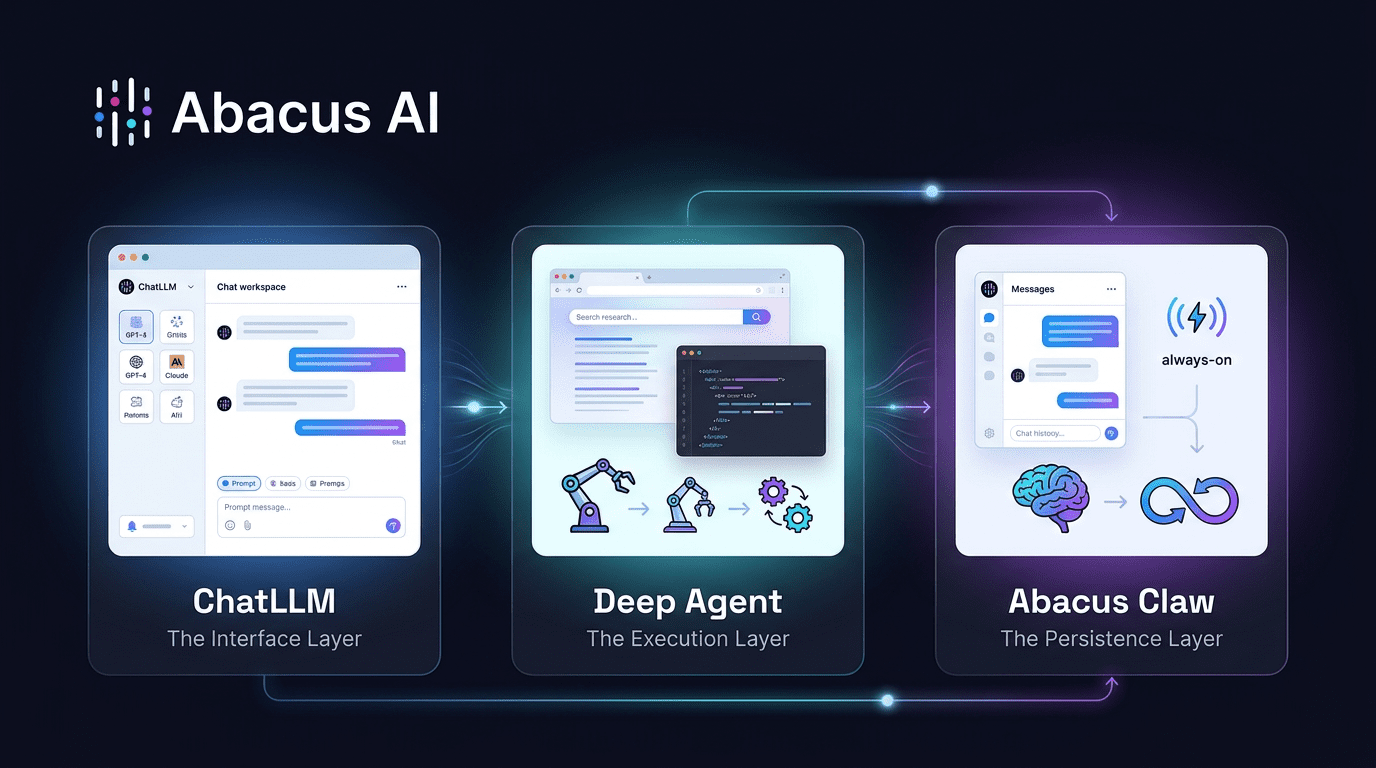
ChatLLM: The Interface Layer
ChatLLM serves as the AI super-assistant interface, providing users with access to numerous leading AI models and tools within a single chat-based workspace.
Abacus AI Deep Agent: The Execution Layer
The Abacus AI Deep Agent functions as the general-purpose agent layer, capable of handling complex tasks such as deep research, presentation creation, browser-based work, app building, Google Workspace automation, and more.
This component was previously known to many users as DeepAgent, and it is still commonly referred to in that way.
Abacus Claw: The Persistence Layer
Abacus Claw is the always-on AI agent layer, operating across messaging platforms like WhatsApp, Telegram, Slack, and others. It can retain past conversations, run continuously, and support recurring tasks.
Collectively, these tools elevate Abacus AI beyond typical chatbot capabilities.
ChatLLM enables interaction.
Abacus AI Agent facilitates execution.
Claw ensures your AI continues working persistently.
ChatLLM: The AI Super-Assistant Most People Underestimate
Most users initially encounter Abacus AI through ChatLLM.
At first glance, ChatLLM might appear to be a standard AI chat interface. However, it offers much more than a typical chatbot.
ChatLLM provides users with access to a wide range of advanced AI models from a single location, including those for reasoning, coding, writing, image generation, research, and analysis.
According to Abacus AI, ChatLLM includes access to frontier and open-source models such as GPT-5.5, GPT-5.5 Thinking, Codex 5.3, GPT-5.5 Pro, o3, GPT-Image, Sonnet 4.6, Opus 4.7, Gemini 3.1 Pro, Grok 4.2, Qwen 3.6, DeepSeek v4, Kimi 2.6 Thinking, GLM 5.1, and many other closed and open-source models.
The value isn’t solely in the availability of these models.
The greater value lies in ChatLLM’s ability to reduce the need to switch between various AI subscriptions and
ChatLLM’s Capabilities
ChatLLM handles a broad variety of tasks, such as:
- Drafting and refining lengthy written pieces
- Condensing documents into key points
- Examining PDFs, Word files, presentations, and pictures
- Managing CSV and Excel spreadsheets
- Turning data into visual graphs
- Creating images using various AI image generators
- Conducting online searches for current information
- Assisting with programming tasks
- Building standalone interactive coding environments
- Enabling team-based collaboration
- Integrating with professional tools
- Helping design tailored chatbots and AI solutions
- Providing access on iPhone and Android devices
- Offering mobile voice interaction
- Applying personalized guidelines across conversations
- Adjusting writing style and tone to sound natural
For many, this transforms ChatLLM from a simple assistant into a unified AI-powered workspace.
The Importance of Access to Multiple Models
A key challenge with current AI tools is that no single model excels at every task.
Some models outperform others at programming.
Some are stronger at creative writing.
Some manage extended context windows more effectively.
Some are superior at logical reasoning.
Some specialize in generating images.
ChatLLM solves this by offering access to numerous models within a unified platform, complete with built-in routing and supporting tools. Rather than worrying about which specific model to choose, users can concentrate on the task at hand.
This is particularly valuable for business professionals who don’t want to juggle multiple subscriptions or continuously benchmark different models.
Abacus AI Agent: Turning the Platform Into a Performer
For advanced users, the core strength of Abacus AI lies in Abacus AI Agent.
This component is engineered to carry out intricate, multi-phase tasks—not merely outline how they should be done.
A typical chatbot might reply with a set of instructions.
Abacus AI Agent is built to take direct action.
For instance, rather than asking:
“How should I study competitors and compile the results?”
You can instruct the agent to investigate competitors, gather pricing data, evaluate market positioning, and produce a well-organized report.
This emphasis on execution sets Abacus AI Agent apart from most AI helper tools.
Abacus AI Agent’s Capabilities
Abacus AI Agent supports a wide range of sophisticated workflows, such as:
- Designing and launching websites
- Creating shareable applications
- Conducting thorough research
- Building presentations
- Navigating multiple websites via an operator agent
- Integrating with Google Workspace
- Linking to Gmail, Jira, and other business platforms
- Streamlining operational processes
- Handling invoices and pulling out key data
- Running software quality assurance processes
- Carrying out market analysis
- Supporting equity research
- Producing organized reports
- Assisting with outreach initiatives
- Downloading images
- Reserving tickets
- Managing browser-based activities
- Constructing internal dashboards
- Building CRM platforms
- Developing AI-driven tools
The essential takeaway is that Abacus AI Agent goes beyond text creation. It can leverage tools, interface with external systems, navigate websites, pose clarifying questions, and deliver finished results.
How Abacus AI Agent Operates
The process is deliberately straightforward from the user’s standpoint.
You assign a task.
The agent determines which tools, models, and systems are required.
Then it carries out the task one step at a time.
For more involved projects, it may ask follow-up questions. Upon completion, it can deliver structured outputs such as reports, apps, presentations, files, research summaries, or deployment outcomes.
This makes it especially valuable for users who want tangible results rather than suggestions.
Vibe Coding Using Abacus AI
One of Abacus AI’s most compelling applications is vibe coding.
Vibe coding involves describing the app, website, dashboard, or tool you envision in everyday language and having the AI construct it for you.
Through Abacus AI Agent, users can build websites and applications without facing an empty code editor.
Examples include:
- Marketing landing pages
- Internal business tools
- Customer relationship management systems
- Websites integrated with Stripe
- Document assistants powered by RAG
- Data dashboards
- AI utilities
- Workflow automation apps
- Business portals
- Early-stage SaaS prototypes
For entrepreneurs, this can significantly shorten the gap between concept and functional product.
Rather than drafting an extensive brief for a developer, an entrepreneur can describe the vision and let Abacus AI Agent build, deploy, and refine it.
This doesn’t eliminate the need for human oversight. You still need to evaluate the output, verify the logic, improve the user experience, and validate the business assumptions.
But it fundamentally changes what a single individual can accomplish.
Abacus Claw: The Always-Available AI Agent Layer
Abacus Claw stands out as one of the most intriguing elements of the Abacus AI ecosystem because it tackles a significant shortcoming of most AI tools: they operate on a session-by-session basis.
Most chatbots function like this:
You start a session.
You pose a question.
The model replies.
Eventually, the conversation ends.
Claw takes a different approach.
Abacus Claw is a cloud-hosted implementation of OpenClaw, an open-source AI agent framework. It provides users with a continuously running AI assistant that works across messaging platforms like WhatsApp, Telegram, Slack, and others.
Rather than opening a separate AI interface each time, you can communicate with your agent directly through the messaging apps you already rely on.
What Sets Claw Apart
Claw is designed around the concept of persistence.
This means your agent can:
- Operate around the clock
- Reply through messaging platforms
- Retain memory of prior conversations
- Preserve context over extended periods
- Adopt a customized personality and communication style
- Function across multiple messaging services
- Handle recurring and scheduled workflows
- Keep running even when you’re not online
This represents a significant shift from reactive AI to proactive AI.
Why Persistent Memory Is Important
Persistent memory matters because genuine work rarely occurs within a single, isolated exchange.
A truly helpful assistant should recall:
- Your personal preferences
- Your business environment
- Earlier instructions
- Active projects
- Key contacts
- Recurring processes
- Previous decisions
Claw is built to make AI feel more seamless and ongoing. Rather than resetting each time, your agent can accumulate context progressively.
This is beneficial for personal productivity, team operations, sales pipelines, content creation workflows, and routine business activities.
Abacus Claw vs. Self-Hosting OpenClaw
Technically skilled users can self-host OpenClaw, though this demands setup effort and ongoing maintenance.
Self-hosting typically involves managing:
- Server infrastructure
- Node.js configuration
- API key management
- Security protocols
- Hosting reliability
- Infrastructure monitoring
- Deployment challenges
Abacus Claw eliminates that operational overhead.
With Abacus Claw, the infrastructure is handled on your behalf. You receive cloud hosting, preconfigured model selections, secure deployment, and round-the-clock availability—all without needing to operate your own server.
That
This makes it more practical for users who want an always-on agent without needing to manage infrastructure themselves.
Real-World Applications of Abacus AI
While Abacus AI offers a wide range of capabilities, its most impactful applications fall into several key areas.
1. Research and Report Generation
The Abacus AI Agent can conduct thorough research, collect data from multiple sources, cross-reference information, and produce well-organized reports.
Common applications include:
- Analyzing competitors
- Mapping market landscapes
- Conducting industry evaluations
- Researching products
- Performing equity analysis
- Comparing vendors
- Developing customer profiles
- Creating trend analyses
This capability is particularly valuable for analysts, entrepreneurs, consultants, and strategic planning teams.
2. Application and Website Development
The Abacus AI Agent can construct and launch applications and websites.
This serves well for:
- Early-stage startup prototypes
- Internal company tools
- Marketing landing pages
- Client-facing portals
- AI-powered tools
- Data dashboards
- Workflow management apps
For individual founders and compact teams, this capability can shrink weeks of initial development into a significantly shorter timeframe.
3. Presentations and Business Documents
Abacus AI can assist in crafting professional presentations, reports, and corporate documents.
This is beneficial for:
- Investor pitch decks
- Market analysis presentations
- Sales pitches
- Strategic planning documents
- Client deliverables
- Employee training resources
- Executive briefings
The key benefit is that the platform merges research, writing, formatting, and file creation into a single streamlined process.
4. Business Process Automation
Abacus AI can handle repetitive operational tasks, particularly when integrated with workplace applications.
Typical examples include:
- Prospect research
- Processing invoices
- Updating CRM records
- Managing Gmail workflows
- Generating Slack summaries
- Updating Jira tickets
- Handling Google Workspace tasks
- Distributing content
- Running QA testing processes
This is where Abacus AI begins to compete with dedicated automation platforms, though with a more intuitive natural-language interface.
5. Content Creation
For content-focused teams, Abacus AI can facilitate:
- Writing blog articles
- Creating social media posts
- Repurposing existing content
- Writing scripts
- Generating images
- Planning short-form videos
- Producing daily briefings
- Drafting newsletters
- Creating variations for LinkedIn and X posts
With Claw, certain recurring content processes can run continuously, such as daily digests or scheduled content repurposing.
6. Image and Short-Form Video Creation
ChatLLM provides access to leading image generation models, including GPT Image, Nano Banana Pro, FLUX models, Seedream, Recraft, Ideogram, and additional options.
Video generation is accessible through Abacus Studio, featuring models like Sora 2, Veo 3.1, Kling AI v3, Seedance 2.0, and others.
This makes Abacus AI valuable not only for text-based and research tasks but also for visual content production.
Users can produce platform-ready short videos such as:
- Reels
- Shorts
- Explainer videos
- Product showcases
- Social media clips
- Lip-sync content
- Scripted video scenes
For teams that regularly create content, this can eliminate the need for multiple separate creative tools.
Abacus AI for Team Collaboration
Abacus AI is designed to serve more than just individual users.
ChatLLM Teams enables team collaboration, shared projects, custom chatbots, connected systems, and internal knowledge management workflows.
Teams can integrate tools such as:
- Google Drive
- Slack
- Confluence
- Gmail
- Google Calendar
- Microsoft Teams
- Other enterprise platforms
This empowers teams to build custom assistants and agents tailored to their own data and processes.
For organizations, this is significant because AI delivers greater value when it understands internal context. A generic chatbot can respond to general inquiries. A connected AI system can interact with company documents, team procedures, internal platforms, and recurring workflows.
Pricing: Feature-Rich, but Credit Management Matters
Abacus AI operates on a subscription and credit-based pricing structure.
For ChatLLM Teams, the available tiers are:
- Basic: $10 per user per month
- Pro: $20 per user per month
Usage may consume credits, particularly for more demanding tasks such as agent operations, video generation, image creation, automation, and complex workflows.
This pricing approach comes with both benefits and drawbacks.
Advantages
The credit system enables users to access numerous powerful tools without subscribing to each AI product individually.
This can make Abacus AI economical if it replaces:
- A chatbot subscription
- An image generation tool
- A coding assistant
- A research platform
- An automation solution
- A video generation platform
- An agent development environment
For users who frequently leverage multiple AI capabilities, the value proposition can be compelling.
Considerations
Credit-based pricing can be less predictable than a fixed subscription.
Expenses may fluctuate based on:
- The models you select
- Whether you create images
- Whether you produce videos
- Whether you execute agent workflows
- The complexity of the task
- The amount of browsing, processing, or file generation required
This means users should keep track of credit consumption, especially when running large-scale tasks.
Additionally, ChatLLM Teams does not provide refunds or a free trial. Users should carefully review pricing and billing information before committing. Official billing details can be found in the ChatLLM Teams billing FAQs and the ChatLLM help center.
Abacus AI Strengths and Weaknesses
Where Abacus AI Excels
Abacus AI distinguishes itself by integrating multiple AI capabilities within a single platform.
Its greatest strengths include:
- Access to numerous leading AI models
- Robust AI agent execution
- Comprehensive research workflows
- Application and website development
- Vibe coding capabilities
- Image generation
- Short-form video generation via Abacus Studio
- Document and data analysis
- Team collaboration features
- Workplace tool integrations
- Persistent agents through Abacus Claw
- Custom chatbot and agent development
- Strong value for users consolidating multiple tools
The platform is especially appealing for those who want AI to complete tasks, not merely explain them.
Where Abacus AI Presents Challenges
The primary limitations are:
- Credit consumption can be hard to estimate initially
- The platform requires some learning
- Newcomers may feel overwhelmed
- Complex workflows may need multiple iterations
- Automation still requires oversight
- It is not a straightforward plug-and-play chatbot for every user
Abacus AI is powerful because of its breadth. However, this also means users need to learn how to match the right tool to the right task.
Abacus AI vs ChatGPT
A frequent question is whether Abacus AI outperforms ChatGPT.
The answer depends on your specific needs.
ChatGPT excels at general conversation, writing, brainstorming, coding assistance, and logical reasoning.
Abacus AI is more expansive as a work platform.
The
The biggest difference lies in execution.
ChatGPT is typically used as a conversational assistant.
Abacus AI is designed more like an AI operating system built for tasks.
With Abacus AI, users can access multiple AI models, leverage the Abacus AI Agent, build applications, generate presentations, create videos, analyze documents, connect workplace tools, and run persistent agents through Claw.
So the more accurate comparison isn’t just Abacus AI versus ChatGPT.
It’s Abacus AI versus a collection of separate AI tools.
If you only need simple conversation, ChatGPT might be sufficient.
If you want chat, automation, app building, agent workflows, team collaboration, research, image generation, video generation, and persistent agents all within one ecosystem, Abacus AI is far more comprehensive.
Abacus AI vs Traditional Automation Tools
| Feature | Traditional Tools | Abacus AI |
|---|---|---|
| Chat | Yes | Yes |
| Automation | Limited | Strong |
| Multi-model | No | Yes |
| App building | No | Yes |
| Data analysis | Basic | Advanced |
Who Should Use Abacus AI?
Abacus AI is best suited for users who want more than a basic chatbot.
Best Fit Users
Abacus AI is a strong fit for:
- Founders building products quickly
- Developers seeking AI coding support
- Analysts conducting research and reporting
- Growth teams automating outreach and content
- Operators managing repetitive workflows
- Consultants creating research-backed deliverables
- Content teams producing multi-format content
- Small businesses wanting one AI system instead of many tools
- Teams wanting custom chatbots and AI agents on internal data
Not the Best Fit
Abacus AI may not be ideal for:
- Casual users who only ask occasional questions
- People who want the simplest possible chatbot
- Users who dislike credit-based pricing
- Beginners unwilling to learn a broader platform
- Teams needing fully custom enterprise AI infrastructure from day one
The platform rewards users willing to explore and build workflows.
Is Abacus AI Good for Beginners?
Abacus AI can be used by beginners, but it isn’t beginner-simple in the same way as a basic chatbot.
A beginner can start with ChatLLM for writing, summarizing, searching, image generation, or document analysis.
But the deeper value comes from learning:
- When to use ChatLLM
- When to use Abacus AI Agent
- When to use Claw
- How credits work
- How integrations work
- How to prompt agents effectively
- How to review outputs
- How to automate safely
So the honest answer is this:
Abacus AI is accessible, but it becomes most valuable once you move beyond basic prompts.
Is Abacus AI Good for Businesses?
Yes, Abacus AI is especially useful for business teams because it combines productivity, automation, collaboration, and integration features.
Business use cases include:
- Internal knowledge assistants
- Sales research
- Lead qualification
- Market research
- Competitive intelligence
- Proposal writing
- Presentation generation
- Data analysis
- Invoice processing
- Support workflows
- Product prototyping
- Engineering support
- Content operations
- Executive briefings
The strongest business value comes from reducing tool sprawl.
Instead of using separate platforms for chat, image generation, video generation, automation, coding, and research, teams can centralize much of that work inside Abacus AI.
The Biggest Reason Abacus AI Matters
The most important thing about Abacus AI isn’t any single feature.
It’s the combination.
ChatLLM gives you access to many models and tools.
Abacus AI Agent executes complex tasks.
Claw keeps agents available and persistent.
Abacus Studio adds short video generation.
The coding and app-building tools help users create real software.
Together, these pieces make Abacus AI feel less like a chatbot and more like an AI productivity system.
That’s the category shift.
AI is moving from answering questions to completing workflows.
Abacus AI is built for that shift.
Final Verdict: Abacus AI Is for People Who Want AI to Actually Do Work
Abacus AI isn’t the simplest AI tool.
It’s not trying to be.
It’s built for users who want AI to help them produce real outputs: apps, reports, presentations, automations, videos, images, workflows, and persistent agents.
If you want a lightweight chatbot for occasional questions, Abacus AI may feel like too much.
But if you want one platform that brings together advanced AI chat, top models, app building, automation, deep research, team collaboration, media generation, and always-on agents, Abacus AI is one of the most complete AI systems available in 2026.
The best way to summarize it is this:
Most AI tools help you work faster.
Abacus AI tries to help you stop doing parts of the work entirely.
Frequently Asked Questions About Abacus AI
What is Abacus AI used for?
Abacus AI is used for AI chat, deep research, document analysis, data analysis, image generation, short video generation, app building, automation, custom chatbots, AI agents, coding assistance, and business workflow execution.
What is ChatLLM?
ChatLLM is Abacus AI’s AI super-assistant interface. It gives users access to many leading AI models and tools in one place, including writing, coding, image generation, data analysis, web search, document analysis, and team collaboration features.
What is Abacus AI Deep Agent?
Abacus AI Deep Agent is a general-purpose AI agent that can execute complex tasks. It can perform deep research, create presentations, build and deploy apps, browse websites, connect to tools like Google Workspace, and automate multi-step workflows.
What is Abacus Claw?
Abacus Claw is an always-on AI agent based on OpenClaw. It works across messaging platforms such as WhatsApp, Telegram, Slack, and more. It can run 24/7, remember past conversations, and support persistent workflows.
Can Abacus AI build apps?
Yes. Abacus AI Agent can build and deploy websites and apps. Users can describe what they want in natural language, and the agent can help create working applications that can be shared with others.
Is Abacus AI better than ChatGPT?
Abacus AI is broader than a standard chatbot because it combines multiple models, agents, app building, automation, image generation, video generation, document analysis, and persistent agents. ChatGPT may be simpler for general chat, while Abacus AI is stronger for users who want an all-in-one AI work platform.
Is Abacus AI free?
ChatLLM Teams does not offer a free trial. Pricing includes paid tiers, and some usage depends on credits. Users should review the official billing FAQs for the most accurate details.
How much does ChatLLM Teams cost?
ChatLLM Teams has two listed tiers: Basic at $10 per user per month and Pro at $20 per user per month. Credit usage may apply depending on the tools and workflows used.
Who should use Abacus AI?
Abacus AI is best for founders, developers, analysts, growth teams, operators, consultants, content teams, and businesses that want AI to execute work across research, automation, coding, media generation, and app building.
What is the main downside of Abacus AI?
Abacus AI is powerful, but new users may need time to understand the platform, credits, agents, integrations, and best workflows. Credit usage can also be harder to predict for complex tasks.
