



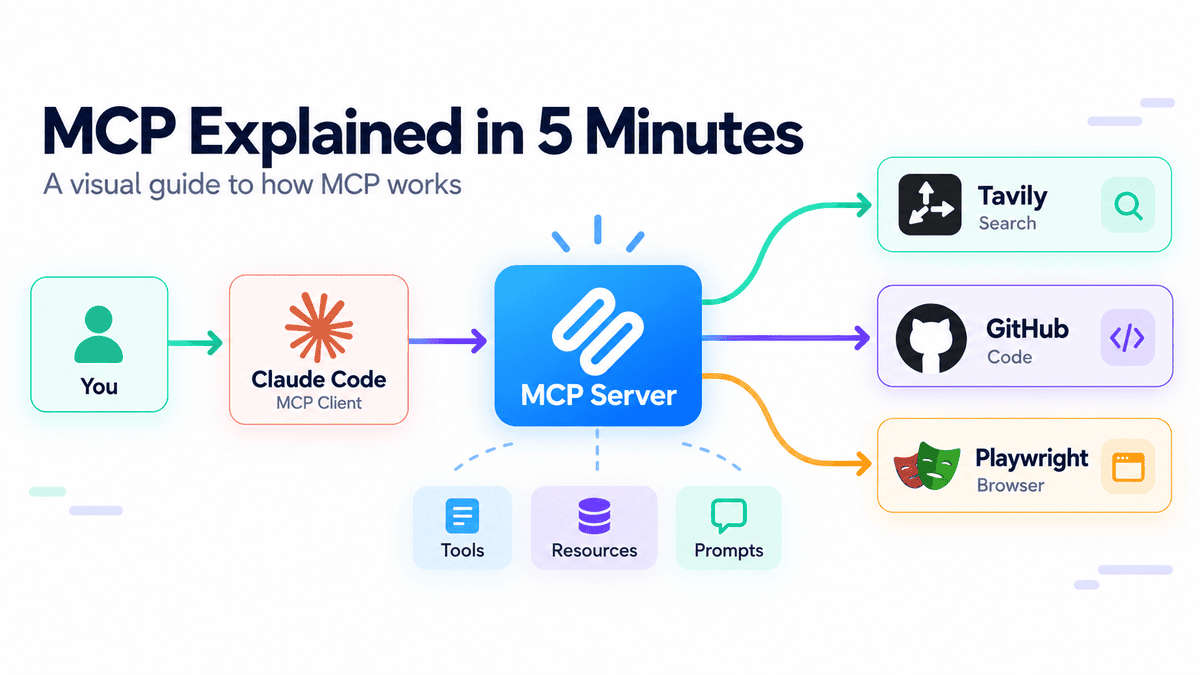
# Understanding MCP: The Standard Protocol Connecting AI to External Tools
## Why MCP Matters in Modern AI Development
The AI landscape is evolving rapidly, and one of the most significant developments has been the emergence of a unified protocol that allows AI applications to interact with external services seamlessly. This protocol—commonly referred to as MCP—is rapidly becoming a foundational piece of infrastructure for anyone building or using AI agents, coding assistants, and automated workflows.
While many users have encountered MCP in passing, the inner workings of the system often remain unclear. Understanding the architecture behind it unlocks the ability to build far more powerful AI-driven applications without reinventing the wheel each time a new external service needs to be integrated.
—
## What Exactly Is MCP?
At its core, MCP serves as a universal connector between AI applications and the tools or data sources they need to function effectively. Think of it as a translator that allows two very different systems to communicate using a shared vocabulary.
Before MCP existed, developers had to construct bespoke connections for every external API, database, file system, or web service their AI application needed to reach. Each integration was a unique engineering effort. MCP changes this paradigm entirely by providing a single, standardized interface through which an AI application can discover and use capabilities offered by any MCP-compatible server.
MCP does not eliminate the need for underlying APIs. Rather, it sits on top of them as an intermediary layer. An MCP server typically communicates with the original service’s API or database behind the scenes, but it presents those capabilities in a consistent, protocol-driven format that any MCP client can consume.
The three primary capabilities that an MCP server can expose are:
– **Tools** — These represent executable actions, such as performing a web search, creating a task in a project tracker, or querying a database.
– **Resources** — These are pieces of information the application can read, including documents, files, configuration records, or knowledge bases.
– **Prompts** — These are reusable templates or structured workflows that the server makes available to streamline common interaction patterns.
For most practical AI agent use cases, tools are the star of the show. They empower models to go beyond text generation and actually take action in the real world—searching, creating, updating, or testing things across external systems.
—
## The Architecture Behind MCP
MCP operates on a client-server model that is straightforward once you map out the components.
The **host** is the AI application itself—think of something like a coding assistant or an agent interface. Within the host, an **MCP client** acts as the bridge, establishing connections to one or more **MCP servers**. Each server, in turn, is linked to an external service or data source and translates its capabilities into the MCP protocol.
Here is how a typical interaction unfolds. Suppose a user asks the AI to find the most recent release notes for a popular open-source library and summarize the key updates. The host’s AI model first assesses the request and recognizes that it needs live, up-to-date information that its training data does not contain. It then queries the available MCP tools, identifies a web-search capability, sends the appropriate request through the connected MCP server, and receives the results back. The model processes those results and formulates a response.
The critical insight here is that MCP itself does not perform any reasoning. The AI model is responsible for deciding when a tool is necessary and determining what to do with the returned data. MCP simply provides the plumbing—a reliable, standardized channel through which the tool becomes accessible.
—
## Setting Up MCP for Practical Use
Getting started with MCP is remarkably accessible, especially in environments that offer native support. For instance, in a coding assistant that includes built-in MCP management, you can view all currently configured servers with a single command or access an interactive management interface directly within the application.
Here is a practical walkthrough of connecting three widely useful MCP servers that cover a broad range of agent workflows: web search, repository management, and browser automation.
### Web Search With Tavily
Language models inherently lack awareness of real-time events, which is a significant limitation for many tasks. A web-search-focused MCP server addresses this by providing tools for live searching, content extraction, web crawling, site mapping, and deeper research capabilities.
Configuration typically involves adding a remote MCP server with an HTTP transport. After connecting, the user may need to complete an authentication flow or supply an API key. Once set up, the AI can be asked to search for current information, and it will automatically route the request through the connected server without needing to understand the server’s internal API structure.
### Repository Management With GitHub
An MCP server for a popular code-hosting platform transforms repository operations into tools that the AI can invoke directly. Depending on the permissions granted, the AI can read repositories, search through codebases, examine commit histories, manage issues and pull requests, analyze CI/CD workflows, and perform a variety of other repository-level operations.
Setup generally requires providing an access token with appropriately scoped permissions. This token should follow the principle of least privilege—granting only the specific permissions needed for the intended tasks. Once configured, users can ask the AI to review pull requests, investigate bugs, or summarize open issues without manually copying and pasting content into the conversation.
### Browser Automation With Playwright
Some tasks go beyond what APIs can handle. When an agent needs to open a website, click buttons, fill out forms, navigate between pages, or test a user interface, a browser automation MCP server becomes invaluable.
This type of server works by capturing structured snapshots of web pages based on accessibility data. These snapshots give the AI model a clear, structured representation of the page’s elements, enabling it to interact with the browser in a meaningful and reliable way.
—
## Recent Developments in MCP
The protocol has matured significantly since its initial release. A recent update to the specification introduced a fundamental architectural shift: the protocol core is now stateless.
This change has profound implications. Previously, MCP interactions relied on maintaining an ongoing session with a specific server. The stateless approach means each request carries all the information needed to process it independently. This makes it far easier to deploy MCP servers across standard cloud infrastructure, scale them horizontally, and integrate them into distributed systems.
Additional improvements in the updated specification include:
– **Stateless request handling** — No need to maintain a persistent protocol session between the client and server.
– **Enhanced routing** — Servers and gateways can identify and direct requests more efficiently.
– **Caching mechanisms** — Lists of available tools, resources, and prompts can be stored and reused rather than fetched fresh with every interaction.
– **Multi-step interactions** — A tool can request additional information from the user and continue the same task seamlessly.
– **Task management** — Improved support for operations that take longer to complete.
– **Strengthened authentication** — More robust security features for remote MCP server connections.
– **Extension support** — New capabilities can be layered onto the protocol without modifying its core.
The net effect is that MCP is becoming more scalable, more secure, and increasingly ready for production-grade AI agent deployments.
—
## Frequently Asked Questions
**Do I need to be a software engineer to use MCP?**
Not necessarily. Many AI-assisted coding environments provide simple commands and interfaces for adding and managing MCP servers. However, a basic understanding of how the components relate to each other helps tremendously when troubleshooting or building custom integrations.
**Does MCP replace existing APIs?**
No. MCP acts as a standardized layer on top of existing APIs. The underlying services still operate as they always did; MCP simply provides a consistent way for AI applications to discover and use their capabilities.
**Can I connect multiple MCP servers at once?**
Yes. A single AI application can maintain connections to multiple MCP servers simultaneously, each exposing different tools, resources, or prompts. The AI model can then decide which server and which tool to use based on the current task.
**Is MCP only useful for coding assistants?**
Not at all. While coding assistants like Claude Code are prominent examples of MCP hosts, any AI application that benefits from connecting to external tools or data sources can use MCP. This includes research agents, automation workflows, data analysis pipelines, and more.
**What security considerations should I keep in mind?**
When connecting MCP servers, especially remote ones, always use tokens or credentials with the minimum necessary permissions. Keep API keys secure and never expose them in shared code or public repositories. The latest MCP specification also includes improved authentication features specifically designed for remote deployments.
**How does the stateless design improve scalability?**
Because each request is self-contained and does not depend on a persistent session, servers can be load-balanced more easily, scaled horizontally across multiple instances, and recovered from failures without losing session state.
—
## Conclusion
MCP represents a significant step forward in making AI applications more interconnected and capable. By providing a standard protocol for connecting to external tools and data sources, it removes the need for custom integrations and allows developers to focus on building smarter, more autonomous agents.
Whether you are searching the live web for current information, interacting with code repositories, or automating browser-based tasks, MCP provides the consistent, reliable foundation that makes these workflows possible. The recent advances toward statelessness and improved scalability position the protocol well for broader adoption in production environments.
Once you grasp the basic flow—model identifying a need, MCP providing the connection, the tool executing the action, and the result flowing back—you can begin to envision and build increasingly sophisticated AI-powered workflows with confidence.
Thank you for reading
