



## Understanding the Security Risks of AI-Assisted Development Tools: A Deep Dive into Cursor’s Git.exe Vulnerability
In the rapidly evolving landscape of AI-assisted development tools, security researchers have uncovered a significant vulnerability that highlights the potential risks of integrating AI agents into the software development workflow. The recent discovery involving Cursor, a popular AI coding assistant, demonstrates how seemingly benign features can be exploited to execute arbitrary code on developers’ machines.
### The Discovery: How a Simple Binary Can Compromise Security
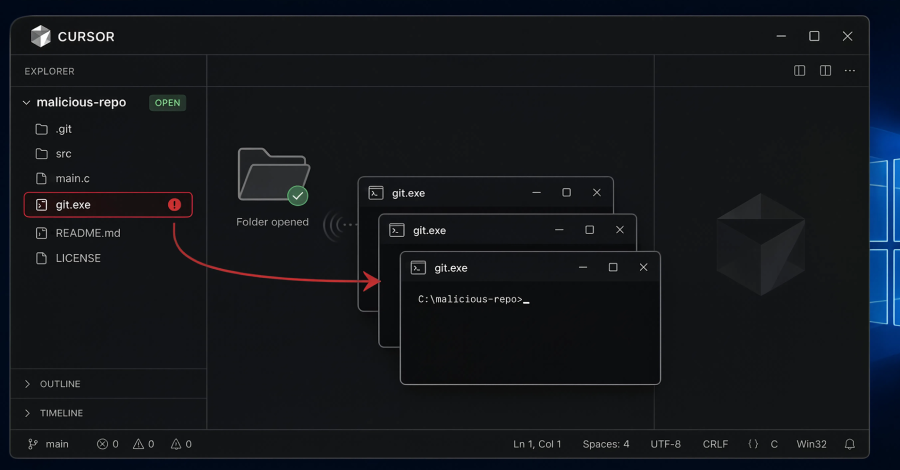
The vulnerability, reported by AI security firm Mindgard to Cursor in December 2025 but only publicly disclosed seven months later, stems from how the application handles Git binaries. When a developer opens a repository in Cursor on Windows, the application automatically searches for a Git executable to perform version control operations. The problem lies in Cursor’s search methodology—it examines multiple locations for the Git binary, including the project’s root directory itself.
When Cursor launches, it executes a simple command: `git rev-parse –show-toplevel`. This command is commonly used to determine the root directory of a Git repository. Microsoft’s Visual Studio Code documentation describes this as a standard repository probe mechanism. However, in Cursor’s implementation, this creates a serious security vulnerability.
The attack vector is remarkably straightforward:
1. An attacker creates a malicious executable and names it `git.exe`
2. The attacker commits this file to the root directory of a repository
3. When a developer clones and opens this repository in Cursor
4. Cursor automatically executes the malicious `git.exe` as the logged-in user
5. The attacker gains arbitrary code execution with the developer’s permissions
### Real-World Implications: From Calculator to Compromise
Mindgard’s proof-of-concept demonstration used a simple but effective approach—they renamed Windows Calculator to `git.exe` and committed it to a repository root. When developers opened this repository in Cursor, multiple Calculator instances would spawn automatically, demonstrating how arbitrary code could execute without any user interaction or confirmation prompts.
What makes this vulnerability particularly dangerous is its prerequisites:
– **No initial foothold required**: Attackers don’t need to exploit other vulnerabilities or compromise developer accounts first
– **Standard developer behavior**: Cloning repositories is a routine part of development workflow
– **Automatic execution**: The malicious code runs simply by opening the project in Cursor
– **Persistence**: The vulnerability remains effective as long as the project stays open, with Cursor continuously re-executing the binary
### Timeline of Disclosure and Response
The disclosure timeline reveals significant challenges in addressing this security concern:
– **December 15, 2025**: Mindgard initially reported the vulnerability to Cursor
– **April 30, 2026**: Most recent documented confirmation against Cursor 3.2.16
– **July 10, 2026**: Current Cursor release (version 3.11)
– **July 15, 2026**: Hacker News review found no security advisory covering this issue
– **Multiple follow-up requests**: Subsequent update requests in February, March, and April went unanswered
This slow response contrasts with Cursor’s handling of other vulnerabilities. For instance, GitHub Security Advisory GHSA-8pcm-8jpx-hv8r for a Git-hook sandbox escape (CVE-2026-26268) was fixed in Cursor 2.5 after coordinated disclosure.
### Industry-Wide Concerns: Similar Vulnerabilities Across Multiple Tools
Mindgard’s research suggests this is part of a broader class of vulnerabilities affecting multiple AI-assisted development tools:
**GitHub Copilot CLI**: Started running workspace `git.exe` at startup before even displaying the folder-trust prompt.
**Gemini CLI**: Executed the same workspace search pattern when launched from a workspace directory.
**Codex Desktop App**: Performed the repository probe on folder open, similar to Cursor’s implementation.
As of Cymulate’s June 2026 report, none of these vendors had shipped fixes for the binary planting vulnerability, though GitHub did pay a bug bounty for a related issue.
### Mitigation Strategies and Best Practices
Without an available patch, security experts recommend several workaround strategies:
1. **Application Whitelisting**: On managed Windows environments, implement AppLocker or Windows Application Control policies that deny execution of `git.exe` (and other executables) from within workspace root directories.
2. **Sandboxed Environments**: Open untrusted repositories in disposable virtual machines or Windows Sandbox environments to contain potential malicious execution.
3. **Pre-Opening Inspection**: Use tools like Cymulate’s recommendations to inspect cloned repositories or extracted archives before opening them in development tools.
4. **File System Hygiene**: Ensure that `git.exe`, `npx.exe`, `node.exe`, and similar executables don’t reside in project root directories where they could be accidentally executed.
### Conclusion: Balancing Innovation with Security Awareness
The Cursor `git.exe` vulnerability serves as a critical reminder that AI-assisted development tools introduce new attack surfaces that require careful consideration. While these tools significantly enhance developer productivity, they also operate with elevated privileges and automate processes that can be exploited when security isn’t prioritized.
The class of vulnerabilities related to untrusted search paths and binary planting is well-established, with fixes dating back to Git Credential Manager Core in 2020 (CVE-2020-26233). However, AI development tools appear particularly susceptible due to their aggressive automation and deep integration with development workflows.
For developers and organizations using AI coding assistants, the safest approach is to treat cloned repositories as potentially executable content. Implementing appropriate security controls, following responsible disclosure procedures, and maintaining awareness of the tools’ security implications are essential steps in maintaining a secure development environment.
As AI-assisted development continues to evolve, both tool creators and users must remain vigilant about security implications, ensuring that innovation doesn’t come at the cost of compromised systems and data.
—
### FAQ Section
**Q: What is the specific vulnerability discovered in Cursor?**
A: Cursor automatically searches for Git executables in the project root directory and runs `git rev-parse –show-toplevel` when opening repositories. This allows attackers to place a malicious `git.exe` in any repository root to achieve arbitrary code execution as the logged-in user.
**Q: Has Cursor released a patch for this vulnerability?**
A: No, as of July 2026, there is still no official patch for this vulnerability despite it being reported in December 2025.
**Q: How difficult is it for attackers to exploit this vulnerability?**
A: The attack is relatively easy to execute. Attackers simply need to create a repository with a malicious `git.exe` file and have developers clone and open it in Cursor. No initial foothold or authentication is required.
**Q: Which other AI development tools are affected by similar vulnerabilities?**
A: GitHub Copilot CLI, Gemini CLI, and Codex Desktop App have all demonstrated similar vulnerabilities where they automatically execute Git binaries from repository roots without proper security checks.
**Q: What can developers do to protect themselves?**
A: Developers should avoid opening untrusted repositories in Cursor, use sandboxed environments for unknown repositories, and ensure no executable Git binaries exist in project root directories. Organizations should implement application whitelisting controls on managed systems.
**Q: Why was this vulnerability disclosed publicly after seven months?**
A: The full disclosure was published after multiple unsuccessful attempts to get Cursor to acknowledge and fix the vulnerability through normal security reporting channels.
**Q: Is this considered a high-severity vulnerability?**
A: Yes, this is considered a high-severity vulnerability as it allows complete compromise of the user’s system with no user interaction required beyond opening a repository in the vulnerable application.
