



**Entra Passkey Phishing: How Attackers Are Abusing Microsoft’s New Security Feature**
A threat actor has been actively targeting organizations across multiple sectors—food and beverage, technology, healthcare, automotive, construction, and aviation—with a sophisticated voice-based phishing campaign. The goal: trick Microsoft 365 users into enrolling a malicious Entra passkey, enabling data extortion and account compromise.
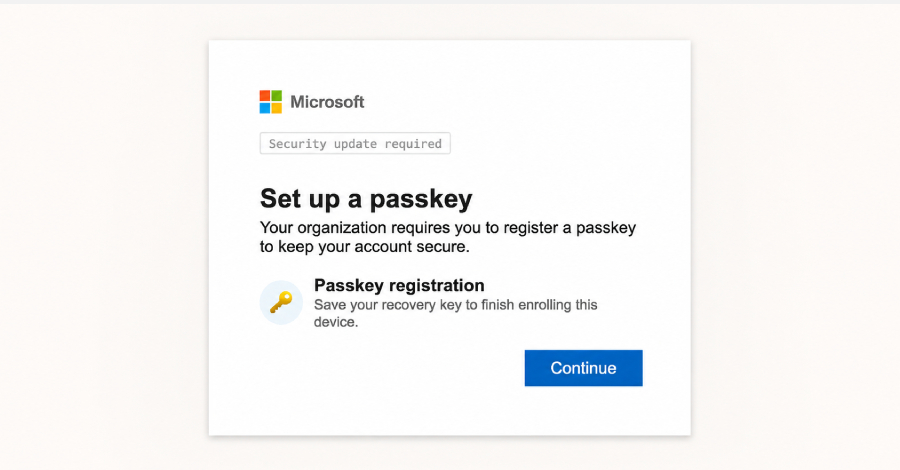
The campaign, tracked by Okta under the designation **O-UNC-066**, leverages a custom phishing kit that mimics Microsoft’s legitimate passkey enrollment process. Security firm Okta’s researcher Houssem Eddine Bordjiba revealed that the attacker registers domains containing the word “passkey” and uses vishing (voice phishing) to persuade targets to enroll a fraudulent passkey into their Microsoft accounts.
Unlike traditional phishing methods that steal credentials or MFA tokens, this attack uses an operator-controlled PHP panel that guides victims in real time. The caller can adjust the phishing flow based on the victim’s multi-factor authentication (MFA) setup, whether that’s TOTP, push notifications, SMS OTPs, or biometric approvals.
Once the victim’s credentials are harvested, the attacker signs into Microsoft’s legitimate login page and proceeds with passkey enrollment. The victim is then redirected through a fake registration flow, shown fabricated success pages, and tricked into saving a recovery key—all while believing they are enhancing their security.
The recovery key—comprising 12 words—serves as both a distraction and a potential backup access vector for the attacker. “The phishing kit preys on users’ lack of familiarity with passkey authentication,” Okta explained. “Real passkey registration involves device-bound prompts, but this kit only mimics that experience.”
This abuse is timely given Microsoft’s recent push to make passkeys a core part of identity security. Administrators can now roll out registration campaigns to encourage mass adoption, inadvertently giving attackers a credible pretext for social engineering.
—
### FAQ
**Q: What is a passkey, and is it safe?**
A: Passkeys are phishing-resistant credentials that replace passwords using public-key cryptography and biometrics or PINs. They are generally more secure than passwords but can be misused if enrolled without user control.
**Q: How can I tell if a passkey request is legitimate?**
A: Legitimate passkey enrollment occurs through system prompts from your device (Windows, macOS, iOS, or Android). Be cautious of unsolicited phone calls directing you to enroll one.
**Q: What should I do if I receive a call asking me to enroll a passkey?**
A: Do not follow instructions from unknown callers. Verify the request through official IT channels or your organization’s security team before taking any action.
**Q: Which industries are most at risk?**
A: The campaign has targeted food and beverage, technology, healthcare, automotive, construction, and aviation sectors, suggesting broad interest in high-value or regulated industries.
**Q: Does this affect identity providers like Okta?**
A: No. The phishing kit mimics Microsoft’s login flow but does not redirect users to third-party identity providers. It directly registers the attacker’s passkey with the victim’s Microsoft account.
—
### Conclusion
As organizations embrace modern phishing-resistant authentication like passkeys, attackers are adapting by weaponizing the very tools designed to improve security. The O-UNC-066 campaign highlights the importance of user education, strict access policies, and vigilant monitoring—especially around identity infrastructure changes. While passkeys significantly raise the bar for attackers, their effectiveness depends on proper implementation and user awareness. Security teams must align technical controls with continuous training to ensure that security upgrades don’t become the very vectors adversaries exploit.
