



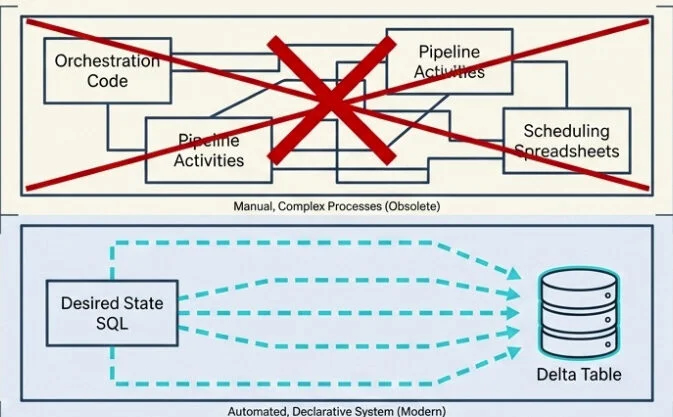
For a long time, building a medallion architecture in Microsoft Fabric meant connecting a range of separate components: notebooks to handle transformations, pipelines to orchestrate workflows, schedules to manage refreshes, custom code for data-quality checks, and the Monitor Hub to verify that everything ran successfully. Each layer functioned well enough, but when one failed, you had to identify which layer broke, understand why, and determine which downstream layers were impacted.
If you’ve ever troubleshot a silver layer that didn’t update because the bronze notebook had failed hours earlier, you know the frustration firsthand.
Then, at FabCon Atlanta in March 2026, materialized lake views (MLVs) reached general availability. Their core message is straightforward: what if your entire medallion pipeline could be expressed through just a handful of SELECT statements?
Let me take you through everything — what MLVs are, how they work, what changed between preview and GA, and where they belong (and where they don’t) in your architecture.
Materialized Lake View – What Is It?
A materialized lake view is a persisted, automatically refreshed view defined using Spark SQL or PySpark. You write a SELECT query describing the transformation you need, and Fabric handles execution, storage, refresh scheduling, dependency tracking, and data quality enforcement.
The output is stored as a Delta table inside your lakehouse. Downstream consumers — Power BI Direct Lake, Spark notebooks, SQL endpoints — can query it like any other Delta table. There’s no special syntax or handling required.
Simply put: an MLV is a SELECT statement that materializes itself, tracks its own dependencies, schedules its own refreshes, and performs its own data quality checks.
That sounds appealing. But what does it actually replace?
A fair question. Before MLVs existed, building a bronze-to-silver-to-gold flow typically looked like this: write a notebook for each transformation, create a Data Factory pipeline to call them in sequence, configure schedules, build custom validation logic, and connect Monitor Hub to catch failures. Five separate layers, each a potential point of failure and each requiring its own debugging effort.
With MLVs, all of that is condensed into declarative SQL. You specify the desired result. Fabric handles the details.
The Four Stages of an MLV’s Lifecycle
Every MLV progresses through four stages, as outlined in the Microsoft documentation. Understanding these stages is essential before diving deeper:
- Create — You write the Spark SQL (or PySpark) that defines the transformation. Fabric stores the definition and materializes the initial output as a Delta table.
- Refresh — When source data changes, Fabric selects the optimal strategy: incremental (process only the changes), full (rebuild), or skip (no changes detected).
- Query — Any application or tool queries the materialized result. It doesn’t need to know that the data comes from an MLV.
- Monitor — Refresh history, execution status, data quality metrics, and lineage are all tracked and displayed natively within Fabric.
Now let’s explore each stage in detail.
Create: The Syntax
Here is the complete Spark SQL pseudo-code syntax for creating an MLV, taken directly from the Microsoft Learn reference:
CREATE [OR REPLACE] MATERIALIZED LAKE VIEW [IF NOT EXISTS]

[workspace.lakehouse.schema].MLV_Identifier

[(CONSTRAINT constraint_name CHECK (condition) [ON MISMATCH DROP | FAIL], ...)]

[PARTITIONED BY (col1, col2, ...)]

[COMMENT "description"]

[TBLPROPERTIES ("key1"="val1", ...)]

AS select_statement
A practical example — cleaning order data by joining products and orders, with a data quality constraint and partitioning:
CREATE OR REPLACE MATERIALIZED LAKE VIEW silver.cleaned_order_data

(

CONSTRAINT valid_quantity CHECK (quantity > 0) ON MISMATCH DROP

)

PARTITIONED BY (category)

COMMENT "Cleaned order data joined from products and orders"

AS

SELECT

p.productID, p.productName, p.category,

o.orderDate, o.quantity, o.totalAmount

FROM bronze.products p

INNER JOIN bronze.orders o ON p.productID = o.productID
Two important points to note upfront. First, MLV names are case-insensitive (MyView becomes myview). Second, all-uppercase schema names (like MYSCHEMA) are not supported, so stick with mixed or lowercase.
You also need a schema-enabled lakehouse and Fabric Runtime 1.3 or higher. If schemas aren’t enabled on your lakehouse, MLVs are unavailable — this is the very first prerequisite.
Refresh: How MLVs Make Smart Decisions
This is where MLVs move from being clever to genuinely smart.
When source data changes, Fabric’s optimal refresh engine evaluates every MLV in the lineage and asks a series of questions: Has anything actually changed? Can I process just those changes? Or is a full rebuild necessary?
Three possible outcomes:
- Skip refresh — Source data hasn’t changed. Don’t waste compute cycles. Move on.
- Incremental refresh — Process only the new or modified rows. Fast, efficient, and ideal.
- Full refresh — Rebuild the entire MLV. The slowest option, used when incremental refresh isn’t safe or possible.

However — and this is important — incremental refresh isn’t automatic. It has specific requirements:
- The Delta change data feed (CDF) must be enabled on every source table referenced by the MLV (
delta.enableChangeDataFeed=true). - The source must be a Delta table. Non-Delta sources always trigger a full refresh.
- The data must be append-only. If the source includes updates or deletions, Fabric falls back to a full refresh.
- The query must use supported SQL constructs (more on this shortly).
Without CDF enabled, optimal refresh is limited to skip or full. With CDF active, the full incremental path becomes available. Make sure you enable CDF on your source tables.
It has virtually zero impact on storage or read/write speed for append-only tasks, so there’s almost no reason not to enable it:
ALTER TABLE bronze.orders SET TBLPROPERTIES (delta.enableChangeDataFeed = true);

ALTER TABLE bronze.products SET TBLPROPERTIES (delta.enableChangeDataFeed = true);
Can things get even better? In fact, yes — and this marks the true start of the General Availability (GA) journey.
What changes in the General Availability phase?
MLVs first appeared in preview at Build 2025. Between that release and GA in March 2026, Microsoft addressed the most critical limitations. Five key improvements transformed MLVs from “promising” to “ready for production”:
- Support for multiple refresh schedules
- Expanded support for incremental refreshes
- PySpark authoring (preview)
- In-place updates using Replace
- Improved data quality enforcement
Let’s go through each one step by step.
1. Support for multiple refresh schedules
During preview, you could only set one refresh schedule for all MLVs within a lakehouse. If you needed finance data to refresh hourly and analytics data every six hours, you had to build workarounds with notebooks — which broke dependency tracking, error reporting, and automatic retries. Refreshes triggered via notebooks don’t expose MLV-level error details. Failures only show up in notebook cell outputs, and any views depending on them have no visibility into those issues. Problems can linger for weeks without the team even realizing something is broken.
Now, you can define named schedules inside a single lakehouse, each targeting a specific group of views. Finance runs hourly. Analytics runs every six hours. Marketing runs every 15 minutes — all within the same lakehouse, without writing custom orchestration code.

When a named schedule executes, Fabric still refreshes all upstream dependencies in the correct sequence, processes independent views in parallel, and surfaces errors in one unified place. If a previous run is still in progress when a new schedule triggers, the new run is skipped and the next scheduled window continues as planned — so there’s no risk of overlapping executions interfering with each other.
2. Expanded incremental refresh support
Previously, incremental refresh often fell back to a full refresh because the range of supported SQL patterns was limited. At GA, that list grew substantially. MLVs now handle incremental refreshes when the query includes:
- Aggregations such as
COUNTandSUMused withGROUP BY - Left outer joins and left semi joins
- Common table expressions (CTEs)
This is a significant improvement. Most real-world medallion-architecture pipelines rely on exactly these patterns, and now they qualify for incremental processing without any rewrites. With optimal refresh, a built-in decision engine analyzes each refresh cycle, compares the volume of changed data against the cost of recomputing everything, and automatically picks the faster method.
I know what you’re thinking — Nikola, what if my query includes something the engine can’t process incrementally? Don’t worry, it’s simpler than you might expect! Using unsupported constructs doesn’t stop you from creating the MLV. It just means Fabric will use a full refresh rather than an incremental one. Optimal refresh silently falls back to full when necessary, so you typically don’t need to force it. If you do want to force one — for instance, to reprocess data after a correction — there’s a simple command for that:
REFRESH MATERIALIZED LAKE VIEW silver.cleaned_order_data FULL;3. PySpark authoring (preview)
This is a game-changer! SQL works well until your transformation logic needs a custom Python library, a machine learning inference call, or a user-defined function that encapsulates complex business rules. Before this, you’d hit a wall since MLVs only supported SQL.
With PySpark authoring, you can now create, refresh, and replace MLVs from Fabric notebooks using PySpark and the familiar DataFrameWriter API. The fmlv module provides a decorator-based approach, as described in the official PySpark MLV documentation:
import fmlv

from pyspark.sql import functions as F

@fmlv.materialized_lake_view(

name="LH1.silver.customer_silver",

comment="Cleaned & enriched customer silver MLV",

partition_cols=["year", "city"],

table_properties={"delta.enableChangeDataFeed": "true"},

replace=True

)

@fmlv.check(name="non_null_sales", condition="sales IS NOT NULL", action="DROP")

def customer_silver():

df = spark.read.table("bronze.customer_bronze")

cleaned_df = df.filter(F.col("sales").isNotNull())

enriched_df = cleaned_df.withColumn("sales_in_usd", F.col("sales") * 1.0)

return enriched_df
A few important PySpark caveats to keep in mind:
- PySpark MLVs are still in preview at the time of writing.
- Currently, PySpark-authored MLVs always default to a full refresh. Optimal refresh for PySpark is planned but not yet available.
- The
@fmlvdecorator doesn’t accept dynamic parameters or variables — all values must be hardcoded directly. - You can’t build an MLV from a PySpark temporary view (
createOrReplaceTempView) because the engine can’t access session-scoped views. Instead, use physical Delta tables or other MLVs as sources. - Don’t delete the notebook where the MLV is defined — scheduled refreshes will fail without it.
So if your logic can be clearly expressed in SQL, sticking with SQL is still the better option for performance. PySpark MLVs open the door for scenarios where SQL alone isn’t enough.
4. In-place updates using Replace
Business requirements evolve. A filter condition changes. A join picks up a new column. An aggregation adds another metric. During preview, updating an MLV’s definition meant dropping and recreating it — which wiped out refresh history and forced downstream consumers to reconnect.
Now, with the Replace capability, you can update an MLV’s definition without dropping it. Fabric validates the new logic, swaps it in, and preserves the view’s identity, metadata, and data lineage. Downstream dependencies stay connected and fully functional. This works for both SQL (CREATE OR REPLACE) and PySpark (replace=True).
This is one of those quiet GA features that won’t make headlines but makes a real difference in daily work. If you’ve ever had to orchestrate dropping and recreating a heavily used table while production is live, you know how painful that is. With Replace, that headache disappears.
5. Improved data quality
Data
While materialized lake views have always supported quality constraints, GA brings a significant enhancement. You can now do the following:
- Leverage expression-based logic that draws from multiple columns
- Incorporate arithmetic and built-in functions within a single rule
- Call upon session-scoped, user-defined functions to handle validation logic in Python instead of SQL
Pair these capabilities with automatically generated data quality reports, and you end up with something resembling a native data observability layer. It becomes straightforward to identify the most frequently failing rules, pinpoint the affected views, and track how trends evolve—all without constructing a separate monitoring workflow.
The lineage view – Dependencies at no extra effort
Whenever one MLV references another view (or a table), Fabric detects the relationship on its own. There’s no manual setup required and no need for an outside orchestration tool. These dependencies are extracted directly from your SQL.
That dependency graph then becomes a visible lineage map within your lakehouse. Every node stands for a transformation, and the arrows indicate execution order. Fabric ensures that once bronze data arrives, the bronze-to-silver MLV executes first, followed by the silver-to-gold MLV operating on the freshly refreshed silver layer.

This is where the declarative model truly proves its worth. You aren’t authoring pipelines. You aren’t configuring orchestration. You simply describe what each layer should contain, and Fabric determines the proper sequence. That’s the real elegance of a declarative approach.
A handful of practical behaviors worth noting:
- Unrelated views execute concurrently
- Errors appear in a central location rather than vanishing inside notebook cell outputs
- The lineage view refreshes automatically every two minutes during an active run
- Shortcuts are all recognized as source entities within the lineage view
- You can link a custom Spark environment to materialized lake views lineage to boost performance and manage resource consumption during refreshes
Data quality – Stated upfront!
I mentioned this briefly earlier, but it warrants a dedicated section since it’s one of the aspects that sets MLVs apart from a manually constructed pipeline.
Each MLV can carry one or more data quality constraints:
CREATE OR REPLACE MATERIALIZED LAKE VIEW silver.valid_orders
(
CONSTRAINT positive_quantity CHECK (quantity > 0) ON MISMATCH DROP,
CONSTRAINT valid_date CHECK (orderDate >= '2020-01-01') ON MISMATCH FAIL
)
AS
SELECT * FROM bronze.orders
There are two action types:
- DROP – non-conforming rows are filtered out, the count is recorded in the lineage view, and processing continues
- FAIL – the refresh halts at the first violation. This is also the default behavior if none is specified
When multiple constraints coexist and both behaviors are configured, FAIL overrides DROP.
Violations show up in the lineage view and run details. But what does that look like in practice? Within the data quality report, you’ll find counts broken down by constraint, by view, and across time periods. So if a constraint that typically drops 0.1% of rows suddenly drops 15%, you’ll catch the spike immediately and know precisely which rule failed and which view is affected. That’s a quality signal you’d otherwise need to engineer yourself.
The Microsoft documentation also points out that the new expression-based constraints support built-in Spark/SQL functions such as UPPER(), LOWER(), TRIM(), COALESCE(), INITCAP(), and DATE_FORMAT(), so your CHECK conditions can go well beyond basic comparisons.
When MLVs excel and when they fall short
MLVs aren’t a universal solution. The Microsoft documentation is refreshingly candid about where they belong and where they don’t.

MLVs are a strong fit when you need:
- Frequently queried aggregations (daily totals, monthly metrics) where precomputed results avoid rerunning costly queries
- Complex joins across multiple large tables that must stay consistent for every consumer
- Data quality rules you want to enforce uniformly through declarations
- Reporting datasets pulling from multiple sources that benefit from automatic refresh
- Medallion architecture – bronze to silver to gold defined as SQL transformations
MLVs are not ideal when:
- The query executes only once or infrequently – precomputing offers no advantage
- Transformations are already simple and fast
- You require non-SQL logic such as ML inference, API calls, or intricate Python processing – notebooks remain the better choice (though PySpark MLVs are beginning to narrow this gap)
- Sub-second latency for streaming is needed – that falls under Real-Time Intelligence
I’ll share a personal observation here. I’m currently deep into a Microsoft Fabric project where the silver layer design decision – Warehouse versus Lakehouse with MLVs – is actively being debated. And what keeps standing out to me is this: MLVs aren’t really competing with the Warehouse the way some people frame it. They’re competing with the tangled mess of notebooks-and-pipelines you’d otherwise have to build inside the Lakehouse. If your team is already comfortable with SQL and your transformations fit naturally into SELECT statements, the argument for MLVs as the silver layer in a Lakehouse-based architecture is genuinely compelling.
The caveats – What to understand before diving in
VERSION AS OF and TIMESTAMP AS OF are not permitted.createOrReplaceTempView() are not accessible to the MLV engine.None of these limitations are dealbreakers for most data pipelines. However, it’s important to be aware of them before committing to an MLV-based architecture and encountering these constraints midway through implementation.
Wrapping up
If you’ve been implementing medallion architecture patterns in Fabric using notebooks and pipelines, MLVs deserve serious consideration. They consolidate five separate surfaces into a single declarative layer. Dependency management is handled automatically. Data quality checks are built in. Lineage tracking is visible. And as of FabCon Atlanta, they’re production-ready.
Microsoft’s roadmap is clear: optimized refresh for PySpark-authored MLVs is on the horizon, more SQL operators will support incremental refresh, and deeper integration with other Fabric workloads is planned. This represents a significant milestone, not the final destination – and I’m eager to see how MLVs develop over the coming quarters, particularly regarding PySpark incremental refresh and any potential cross-lakehouse capabilities Microsoft may introduce.
Two key points to remember:
- The “T” in your ELT process has become significantly easier to write, schedule, and rely on – provided that “T” is implemented in SQL.
- MLVs don’t replace every notebook, pipeline, or Warehouse. But for declarative transformations requiring built-in lineage, refresh capabilities, and data quality enforcement, they’ve become a legitimate default choice in Microsoft Fabric.
Thanks for reading!
