



AWS WAF now offers an AI-driven traffic monetization feature that lets digital content creators and publishers charge AI bots and agents for accessing protected web-based material right at the network edge. This solution enables content owners and publishers to establish per-request fees based on content path, bot type, or verification level—all without altering their backend systems or developing custom code. Content holders can create detailed access rules tailored by AI agent category, receive payments in stablecoins to their chosen wallet, and track bot activity and earnings from one unified dashboard.
AI bot activity now makes up over half of total web traffic for many content companies, with AI-specific crawlers rising by more than 300% year over year. Unlike conventional search engine crawlers that index pages and send referrer traffic back to publishers, AI bots use that same content to produce summaries and answers inside AI applications, while sending little or no traffic back to the original owners. Publishers are left covering the infrastructure expenses of handling that traffic but don’t benefit from page views, ad impressions, or subscription upgrades that usually balance those costs. AWS WAF Bot Control already gives customers transparency into bot behavior and options to block or limit traffic volumes—but until now, setting prices and receiving payments from AI agents wasn’t an option. This AI traffic monetization feature fills that void, allowing publishers to set pricing rules effortlessly through the AWS WAF console and receive payments from AI agents using integrated third-party payment systems—no need for custom payment setup or one-off licensing deals. Payment processing and verification is powered by Coinbase’s x402 Facilitator, with Stripe integration for direct account payments and support for Machine Payments Protocol (MPP) planned soon.
How to Get Started with AI Traffic Monetization
Before turning on monetization, confirm that AWS WAF Bot Control is active at either Common or Targeted level within the web ACL connected to your CloudFront distribution. Bot Control supplies the agent classification data that monetization rules rely on. If this isn’t configured yet, check out the guide on Adding the AWS WAF Bot Control managed rule group to your web ACL. From the AWS Management Console, head to WAF & Shield and select Protection packs (web ACLs) in the sidebar to begin.
Protection packs serve as the foundation for AI traffic monetization. They specify which content paths are monetized, the charges applied per agent verification tier, the payment options you accept, and the relevant licensing terms. To create one, click Create protection pack (web ACL).
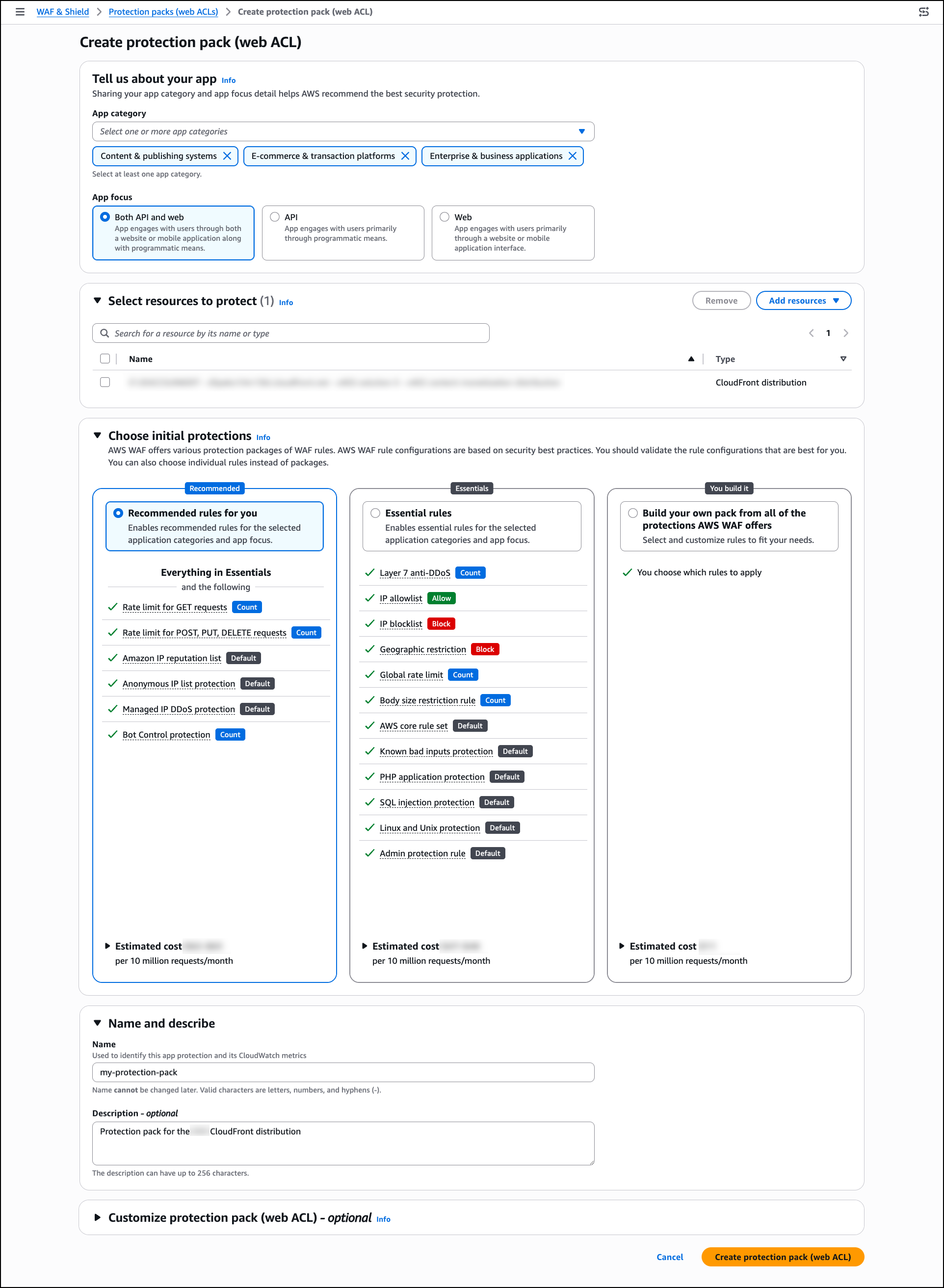
Under Tell us about your app, pick one or more app categories that reflect your content (such as Content & publishing platforms, E-commerce & transaction services, or Enterprise & business tools), and choose an App focus. AWS WAF leverages these choices to suggest appropriate security protections for your setup.
Under Select resources to protect, choose Add resources to link regional or global resources—such as CloudFront distributions—with this protection pack. You may skip this and add resources afterwards if preferred.
Under Choose initial protections, pick from AWS WAF managed rule packages based on your app category and selected resources. Alternatively, you can select individual rules instead of entire packages.
Under Name and describe, enter a name and optional description for the protection pack.
Optionally, expand Customize protection pack (web ACL) to adjust additional settings such as pricing tiers, payment methods, content scope, and license terms.
Once done, click Create protection pack (web ACL).
After your protection pack is set up, take a look at the AI traffic analysis dashboard to understand how AI bot traffic is affecting your content before finalizing your pricing strategy. In the WAF & Shield console, navigate to AI traffic analysis in the sidebar. Pick your protection pack (web ACL) from the dropdown to load the dashboard.
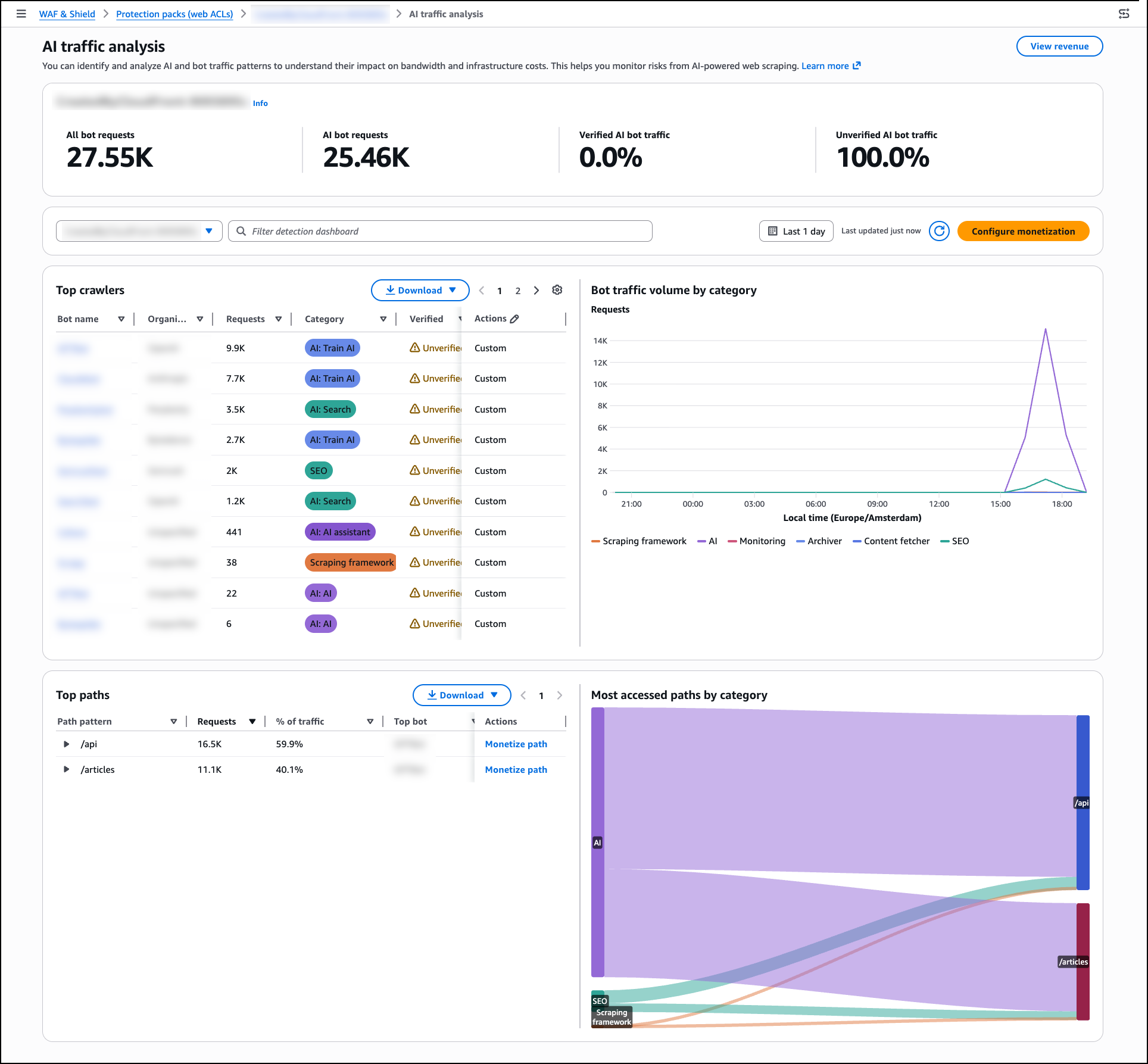
The AI traffic analysis dashboard organizes traffic into four groups shown in the bot traffic overview panel: All bot requests, AI bot requests, Verified AI bot traffic, and Unverified AI bot traffic. The dashboard highlights infrastructure impact metrics like bandwidth usage, estimated monthly costs, and peak request rates. A per-path heatmap displays which content paths see the most AI bot activity by hour, giving you the insights needed to set informed pricing.
AWS WAF Bot Control identifies more than 650 distinct AI bot and agent types—including GPTBot, Claude-Web, and Perplexity-Bot—and assigns each one a verification tier:
- Verified — Agent identity validated through Web Bot Auth (WBA) Ed25519 cryptographic signature, or identified from a documented IP range with a recognized set of user-agents and domain names.
- Unverified — Agent detected through user-agent matching, behavioral fingerprinting, and IP reputation, but identity not cryptographically verified.
Once you’ve reviewed your traffic data, go back to Protection packs (web ACLs), pick your protection pack from the list, and select Configure AI monetization from the right panel to set pricing and access policies. Each protection pack defines the pricing, agent policies, accepted payment methods, and license terms for a specific set of content paths. You can create multiple protection packs and apply different pricing to different content zones within the same distribution. Once created, link the protection pack to your web ACL by opening the web ACL and selecting Add protection pack.
For each agent verification tier within the pack, you can assign one of six actions: Monetize (return a 402 with pricing), Allow (grant free access), Block (deny access entirely), Count (log without charging), CAPTCHA (present a puzzle to verify a human sender), or Challenge (run a silent check to verify the client is a browser, not a bot).
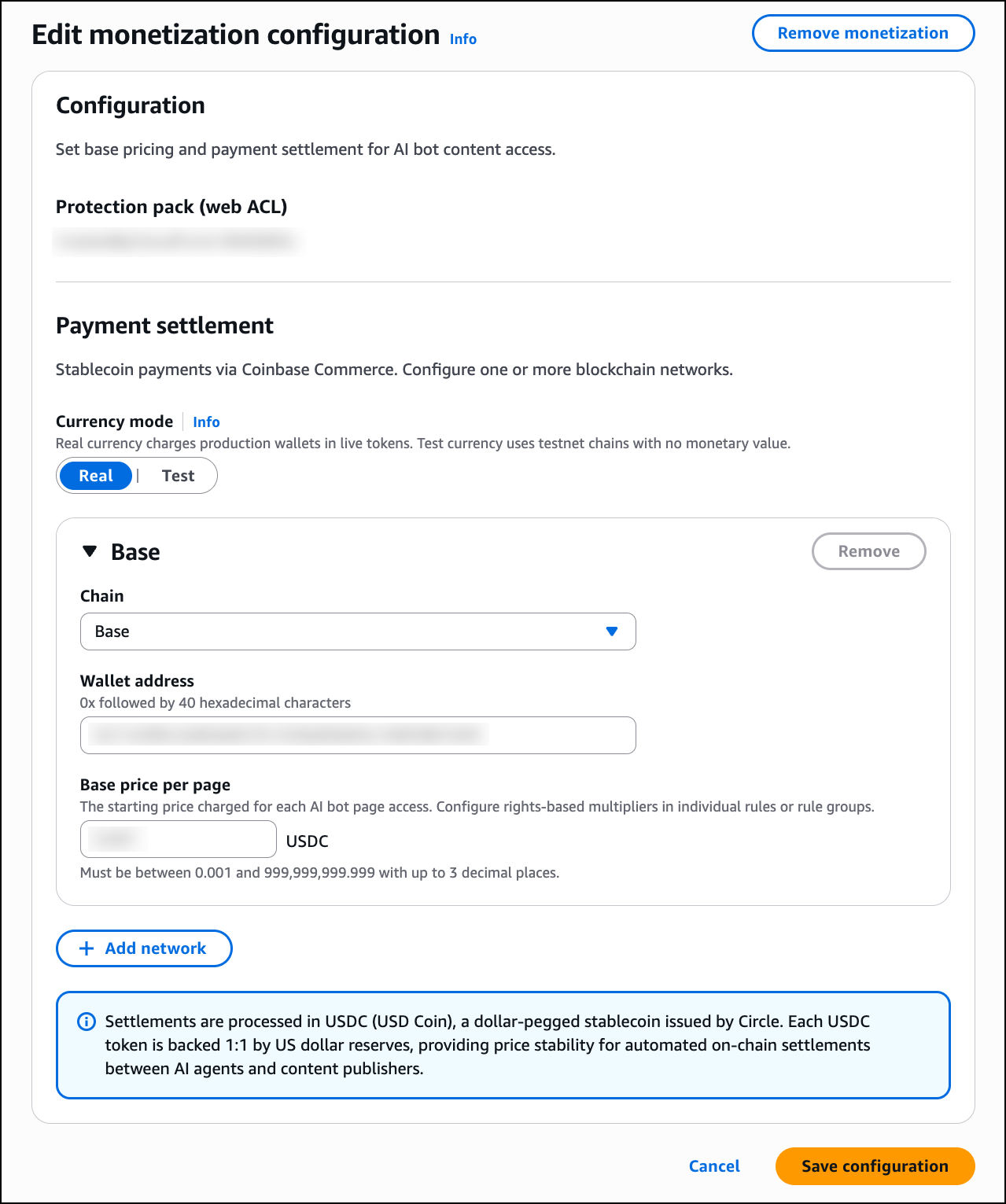
On the Edit monetization configuration page, set up the following:
Under Payment settlement, choose one or more blockchain networks for receiving stablecoin payments. Any wallet address on the supported networks is accepted — whether it’s a self-custody wallet or one managed by a provider like Coinbase. For each network, enter your wallet address and define a Base price per page in USDC. You can include additional networks by clicking Add network. AWS does not handle payments or deduct any fees from your content revenue; settlement is managed by you or your wallet provider.
When a Monetize rule matches an incoming request, AWS WAF responds with an HTTP 402 Payment Required status. The response body includes a machine-readable price manifest in JSON format, following the x402 open protocol for automated payments. This manifest specifies the content price in USDC, the accepted blockchain networks (such as Base and Solana), the destination wallet address, the maximum payment timeout, and the payment scheme.
Any x402-compatible agent runtime can handle this process automatically. The client sends a signed payment authorization on their chosen blockchain network. AWS WAF validates it, retrieves the requested content, works with third-party facilitator services to settle the payment on-chain, and delivers the response.
Keep in mind that the Monetize action is only supported for web ACLs linked to Amazon CloudFront distributions. You cannot add a Monetize rule to a regional web ACL.
Because the Currency mode toggle is built directly into the monetization configuration page, you can switch between Real and Test mode whenever needed. Before launching to production, use test mode on non-production traffic to verify your pricing, wallet settings, and x402 payment flows. In test mode, x402 payments are still enforced, but they can be made on testnets like Base Sepolia or Solana Devnet using test funds from faucets such as faucet.circle.com. To enable test mode, switch the Currency mode toggle to Test in your protection pack configuration. AWS WAF returns real price manifests and executes the full payment flow exactly as it would in production, but on the designated test chain. All events are recorded with CurrencyMode: TEST. Once you’re confident in your setup, toggle Currency mode back to Real to start accepting live payments.
After switching Currency mode to Real, go to AI access monetization in the left navigation pane to monitor monetization results in real time. Note that the AI access monetization dashboard only displays activity from real currency mode — test transactions are not shown.
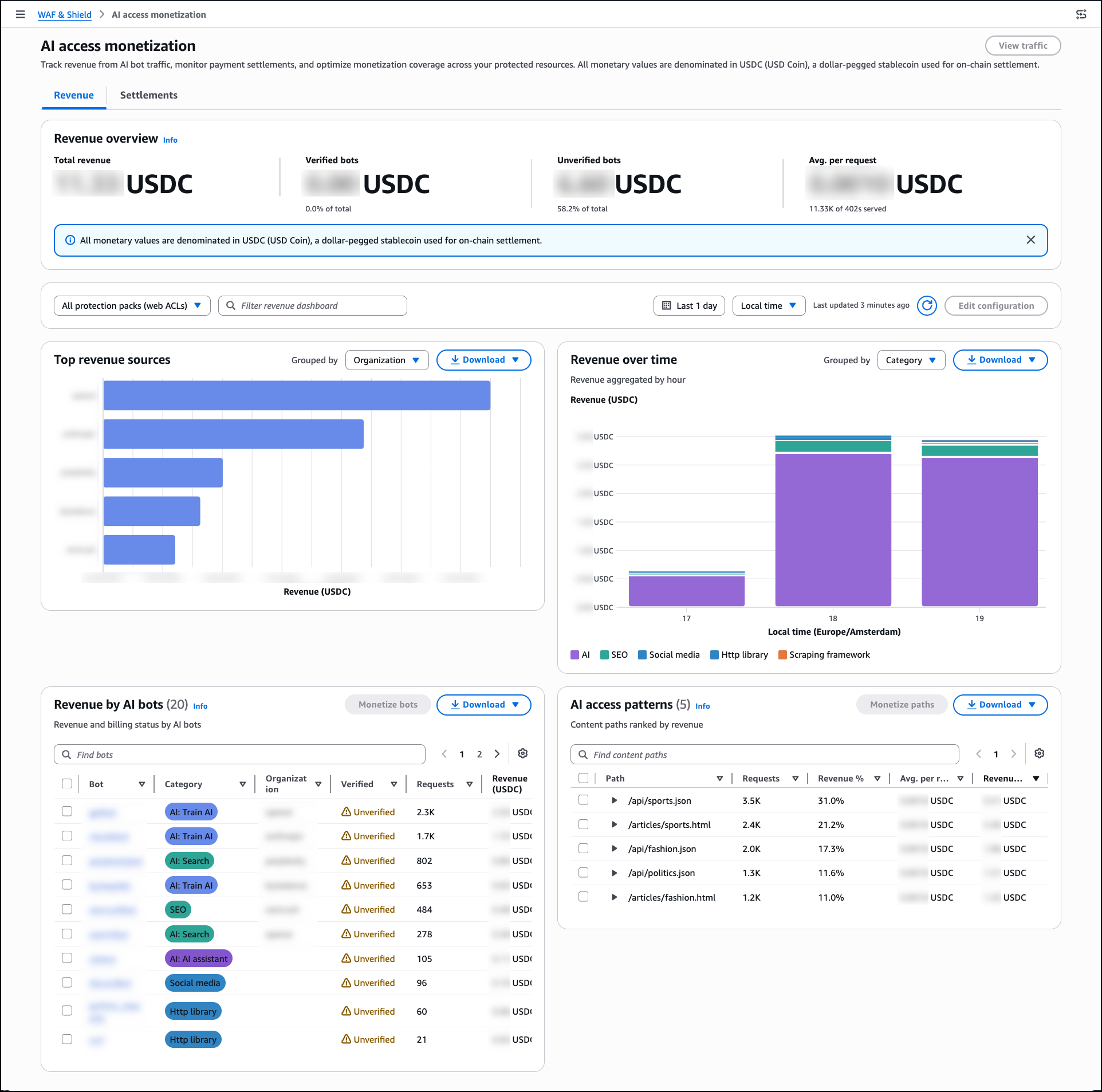
The Revenue dashboard displays Total revenue, a breakdown by Verified bots and Unverified bots, and the Avg. per request. The Top revenue sources panel organizes earnings by bot category, while the AI access patterns panel ranks content paths by the revenue they generate. Use the Settlements tab to reconcile payments by provider and review payment method distribution along with any failed payment attempts.
Now Available
AI traffic monetization is available now for Amazon CloudFront customers at no extra cost beyond standard AWS WAF pricing. The feature is available in all edge locations where AWS WAF web ACLs are associated with Amazon CloudFront distributions.
To learn more about AI traffic monetization, see the AWS WAF Developer Guide.
— Esra
