



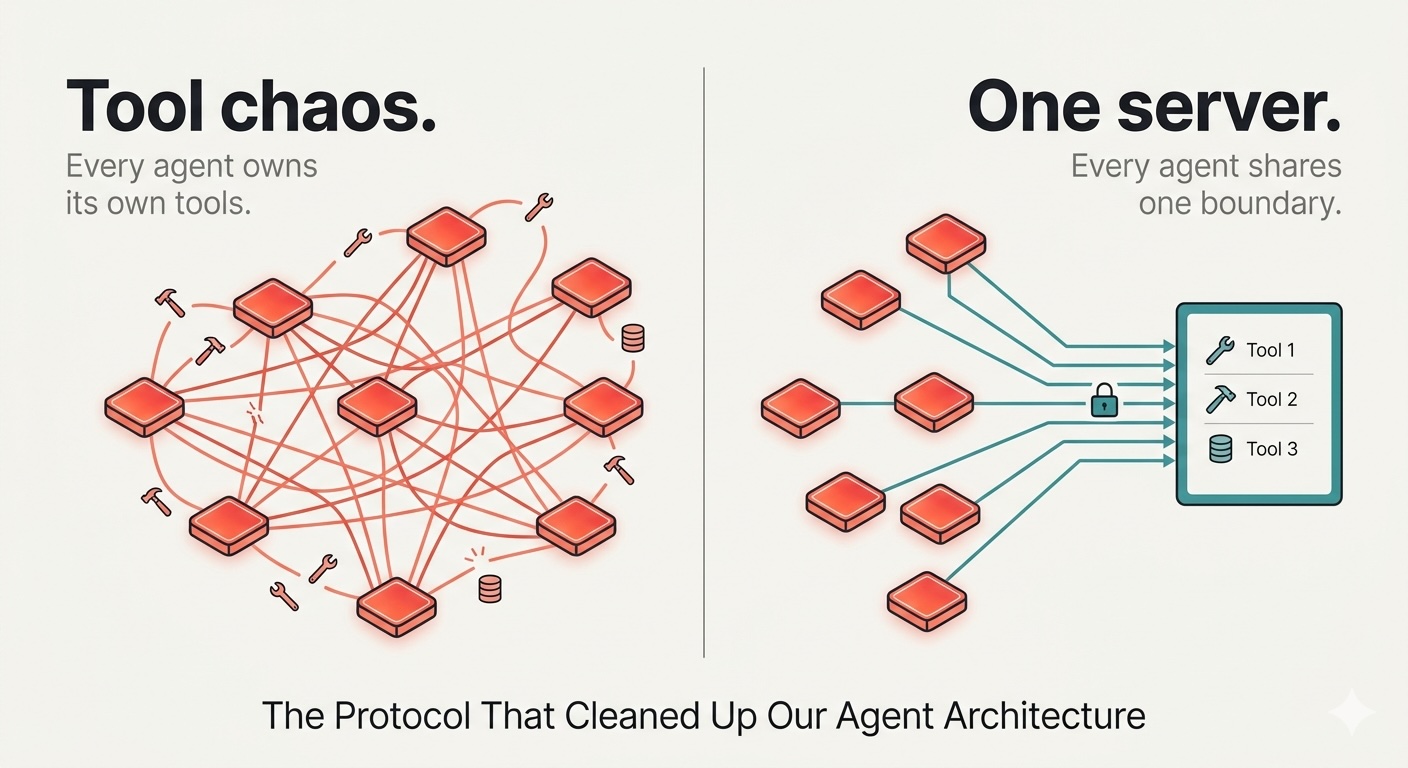
A few weeks back, a member of our data team approached us with a request to modify the database schema that one of the tools in our multi-agent system was feeding. The change itself was straightforward: we just needed to add two new columns to an existing table.
The challenge was that the tool’s definition wasn’t in one place. One version existed in the agent orchestrator. A second, nearly identical copy was inside the validation agent. A third, slightly different and already outdated version sat in a utility module that had been written three sprints earlier. On top of that, the human-in-the-loop approval logic was hardcoded directly into the graph edges, with a separate custom implementation for each tool. Updating the schema meant modifying four different files, re-testing every agent on its own, and crossing our fingers that nothing further down the pipeline would fail without us noticing.
We got it working, but the experience left us with a critical question: why was the system structured this way in the first place?
The truthful answer is that we didn’t have a better option at the time. In LangGraph, tool calling is handled as a local concern by design. You define your tools wherever you need them, invoke them where you invoke them, and manage all the wiring yourself. This approach is perfectly fine when you’re dealing with a couple of agents, but it quickly becomes unmanageable when seven agents are sharing overlapping tools that also require human approval gates.
After looking into the problem, we concluded that rather than defining tools locally for each agent, we needed a centralized resource that could host all our tools and make them available to any agent that needed them.
In This Article
- What is MCP?
- Building the MCP server
- Stdio vs HTTP
- Connecting it to LangGraph
- Human-in-the-loop at the protocol boundary
- What can break in production and why?
- Impact of MCP on our Agentic System
- Conclusion
What is MCP?
The Model Context Protocol is an open standard that Anthropic released in late 2024. It establishes a uniform way for an AI agent to discover and invoke tools. Rather than embedding tool definitions inside your orchestrator, you run them on a dedicated server. The agent connects to that server during execution, queries what tools are available, and receives a list in response.
Any experienced engineer reading this will likely wonder: why not just create a centralized tool registry and pass it into each agent when it starts up? I had the same thought and actually went with a custom tool registry in a different project.
Sure, you could do that, and if you already have something like that in place, switching to MCP isn’t urgent. What a custom registry can’t offer, though, is the interoperability boundary. MCP is a protocol, not a library. Any client that supports MCP can connect to your server, whether it’s LangGraph today or a completely different framework a year from now. A TypeScript client can talk to your Python server without any additional integration effort. A tool registry simply doesn’t give you that capability.
There’s also the question of team ownership. In our setup, the ML team was responsible for the tools while the application team managed the graph. MCP gave both teams a clean interface to work against without needing to share a single codebase.
Building the MCP Server
An MCP server can expose three types of capabilities: Tools (actions that can be invoked), Resources (read-only data), and Prompts (reusable templates). For an agentic system that needs to perform operations, tools are the main focus.
The Python SDK includes FastMCP, which automatically generates schemas from your type hints and takes care of the protocol lifecycle. All you need to do is write a function and apply the tool decorator, and the server handles everything else.
One gotcha that trips people up with stdio transport: never write anything to stdout. The MCP protocol relies on stdout as its communication channel. Even a single stray print() statement will corrupt the message stream, leading to errors that are extremely difficult to trace.
import sys
import logging
from mcp.server.fastmcp import FastMCP

logging.basicConfig(level=logging.INFO, stream=sys.stderr)
logger = logging.getLogger("analyst-tools")

mcp = FastMCP("analyst-tools")

@mcp.tool()
async def run_analysis(code: str, dataset: str) -> dict:
    """
    Runs a Python snippet against live data and returns the result.
    Use this when the user needs to compute aggregates, filter records,
    or extract insights. The code should store its final result in a
    variable called 'output'.

    Args:
        code: Python code to execute.
        dataset: One of 'sales', 'inventory', 'pipeline'.
    """
    logger.info(f"run_analysis | dataset={dataset}")
    return await execute_in_sandbox(code, dataset)


@mcp.tool()
async def write_to_db(table: str, payload: dict) -> dict:
    """
    Saves a result record to the analyst results table.
    Only invoke this after run_analysis has returned a verified output.

    Args:
        table: Target table name.
        payload: Key-value pairs to insert as a new record.
    """
    logger.info(f"write_to_db | table={table}")
    return await persist_result(table, payload)


if __name__ == "__main__":
    mcp.run(transport="stdio")
The docstrings are what the LLM reads to figure out which tool to call, so writing clear, descriptive docstrings is essential.
Stdio vs HTTP
This is a decision that comes up in every production deployment, yet most articles gloss over it entirely.
Stdio launches the server as a subprocess of the client. All communication flows through standard input and output. Latency stays in the single-digit millisecond range since there’s no network overhead, and getting started is simple. This is the right fit for local development, single-machine setups, or any scenario where the server and client run within the same process tree.
Streamable HTTP runs the server as a standalone service. Go with this option when the server needs to be shared across multiple clients or machines, when you plan to deploy it as a container, or when you need horizontal scaling. Serverless platforms like Cloud Run are a natural fit here. Stdio doesn’t work in a serverless context at all because it depends on a long-lived parent process.
Switching between the two in FastMCP takes just a single line change:
mcp.run(transport="streamable-http", host="0.0.0.0", port=8080)All we have to do is update the transport parameter in mcp.run(), and everything else stays exactly the same.
For organizations with data residency requirements, running an MCP server on-premise with tools that never call external APIs gives you a straightforward story to tell your compliance team. The protocol itself is agnostic to where the server is hosted.
Connecting it to LangGraph
The langchain-mcp-adapters library handles the subprocess lifecycle, carries out the tool discovery handshake, and converts MCP tool schemas into LangChain-compatible tool objects.
from langchain_mcp_adapters.client import MultiServerMCPClient
from langgraph.graph import StateGraph, MessagesState, START
from langgraph.prebuilt import ToolNode, tools_condition
from langchain_google_vertexai import ChatVertexAI

llm = ChatVertexAI(
    model="gemini-2.5-flash",
    temperature=0,
    max_tokens=None
)

async def run(query: str):
    async with MultiServerMCPClient({
        "analyst-tools": {
            "command": "python",
            "args": ["./mcp_server.py"],
            "transport": "stdio",
        }
    }) as client:

        tools = await client.get_tools()
        llm_with_tools = llm.bind_tools(tools)

        def agent_node(state: MessagesState):
            return {"messages": [llm_with_tools.invoke(state["messages"])]}

        graph = StateGraph(MessagesState)
        graph.add_node("agent", agent_node)
        graph.add_node("tools", ToolNode(tools))
        graph.add_edge(START, "agent")
        graph.add_conditional_edges("agent", tools_condition)
        graph.add_edge("tools", "agent")

        app = graph.compile()
        result = await app.ainvoke({
            "messages": [{"role": "user", "content": query}]
        })

        print(result["messages"][-1].content)
tools_condition is a built-in LangGraph helper that checks whether the latest message includes tool calls. If it does, execution is routed to the tool executor; if not, the process is complete. Relying on this built-in rather than writing custom routing logic is important because it accounts for edge cases and avoids common implementation mistakes.
One detail worth noting: MultiServerMCPClient opens a fresh MCP session for each tool call by default. For a single request that triggers five sequential tool calls, that means five separate handshakes. This is fine for stdio on the same machine, but it can add noticeable latency over HTTP transport to a remote server. For production workloads involving chained tool calls, wrap your calls in async with client.session("analyst-tools") to keep multiple calls within a single session.
Human-in-the-Loop at the Protocol Boundary
Before MCP, our approval gate was embedded inside the graph. We used interrupt_before on specific nodes, wired custom confirmation logic into graph edges, and updated the UI every time a new sensitive tool was introduced. It worked, but adding a tool that required approval became a three-team coordination effort.
After adopting MCP, the gate shifted to a single layer between the LangGraph executor and the MCP client. Any tool matching the sensitivity policy is intercepted before it reaches the server. The graph itself remains unaware of this.
SENSITIVE_TOOLS = frozenset({"write_to_db", "send_notification", "trigger_webhook"})

async def gated_call(tool_name: str, arguments: dict, execute) -> dict:
    if tool_name in SENSITIVE_TOOLS:
        # In production: push to Slack / internal UI / audit queue
        print(f"nAPPROVAL REQUIRED {tool_name}")
        print(f"Arguments: {arguments}")
        decision = input("Approve? (y/n): ").strip().lower()

        if decision != "y":
            return {
                "status": "rejected",
                "reason": f"Operator declined '{tool_name}'."
            }

    return await execute(tool_name, arguments)
SENSITIVE_TOOLS is a single set that is checked for every tool call, regardless of which agent initiated it. Adding a new sensitive tool to the server? Just add its name to this set. The graph stays the same. The approval UI stays the same. In our internal system, we loaded this set from a config file at startup, allowing the product and compliance teams to update it without a code deployment.
What can break in Production and Why?
Server crashes mid-execution. The client will encounter an error on the next tool call. LangGraph’s ToolNode passes this back to the LLM as a tool error message. Whether the model recovers or spirals into a loop of confusion depends on your system prompt. At a minimum, log the subprocess stderr separately so you can identify what caused the crash — without that, debugging is pure guesswork.
The LLM calls the wrong tool. MCP doesn’t prevent this. If your tool descriptions are vague or semantically overlapping, the model will route incorrectly. We invested significant time refining the docstrings in our server after discovering that a poorly-worded description was causing write_to_db to be called before run_analysis had completed. Treat tool descriptions as a prompt engineering challenge.
Approval gate on long-running workflows. If a human needs to approve a tool call and takes five minutes to respond, the agent graph is suspended in the meantime. LangGraph supports persisting graph state through checkpointing, allowing the process to exit and resume once the decision arrives. This is more complex than what’s shown here, but it’s the right architecture for workflows that can’t afford to block a thread indefinitely.
Impact of MCP on our Agentic System
We migrated seven tools to the server, three of which are approval-gated. The orchestrator that invokes them has no awareness of what any of them actually do.
We completely eliminated tool duplication. Now, run_analysis is defined in exactly one place and serves seven workflows simultaneously. To update the output schema, we only need to modify the server — every consumer picks up the change automatically.
Adding new capabilities became fast. For example, we added a generate_visualisation tool the following week, and the agent was using it the very next day. No orchestrator changes were required.
We ended up with one team owning the tools, another owning the graph, and a clear contract between them. When the analyst team wants a new capability, they coordinate with the ML team about the server — not the application team or the graph team.
One thing MCP doesn’t fix: It won’t make unreliable tools reliable. It won’t help the LLM make better routing decisions if your descriptions are poor. And it doesn’t replace observability — you still need to log tool calls and trace execution paths. The structure makes these easier to instrument, but the effort is still yours.
Conclusion
By transitioning to MCP and moving tools out of our local agent orchestrator into a dedicated server, we cleaned up our codebase, decoupled our engineering constraints, and made the entire agentic system easier to deploy.
As a result of this transition, our ML team can now deploy and version tools independently without touching the application graph.
If you enjoyed this MCP deep dive, I’d encourage you to check out my ongoing series: The RAG for Enterprise Knowledge Base at Hybrid Search and Re-ranking in production RAG.
