




Teams running Ingress NGINX in production are increasingly looking at migration paths as Kubernetes networking moves toward Gateway API.
For many organizations, the challenge isn’t just choosing a Gateway API implementation — it’s designing a migration strategy that keeps operational risk low during the switchover.
Most engineering teams understand they need to migrate, but they lack the bandwidth for a thorough evaluation, aren’t sure which Gateway API controller is the right long-term choice, and know that a rushed cutover will drop production traffic the moment DNS TTLs don’t match reality.
This article is a case study of an Ingress NGINX migration we recently completed for a customer on AWS. It covers how we chose Envoy Gateway, how we tested the migration on our own infrastructure first, why our initial successful cutover still wasn’t good enough, and the weighted DNS approach that ultimately delivered a clean zero-downtime result. A short FAQ at the end addresses the questions we keep hearing about this transition.
If you’re tackling this migration yourself, the goal here is to save you the discovery work we’ve already done.
Why migrate from Ingress NGINX to Gateway API
Ingress NGINX controller is one of the most widely deployed controllers in the Kubernetes ecosystem, and plenty of production clusters are running it today.
With no security patches, no new features, and an Ingress API that’s frozen in place, Gateway API is the natural next step. It’s a more expressive specification that replaces annotations with dedicated resources for the same concerns.
In a recent customer engagement on AWS, we evaluated several Gateway API implementations and migration approaches before choosing Envoy Gateway.
Because we use Ingress NGINX in Foundation — our opinionated GitOps Kubernetes platform — this migration was just as relevant to us as it was to our customer.
Nearly every migration guide we read during our research stops at “traffic moved.” That’s a fine outcome for a demo. In production, moving traffic without dropping in-flight requests is a separate challenge, and it’s the one the rest of this article focuses on.
Migrating a customer from Ingress NGINX to Envoy Gateway
Choosing the right Gateway API controller
The first step was getting hands-on in a low-risk environment. We used Kind — Kubernetes IN Docker — which lets you spin up a local Kubernetes cluster inside Docker containers. It’s a great way to prototype and experiment without touching real infrastructure, and we relied on it throughout the evaluation.
We began by evaluating options using a project called ing-switch. It’s a migration tool that scans a cluster for Ingress resources across all major controllers, maps annotations with impact ratings, and generates migration manifests through either a CLI or a visual UI. It gave us a solid starting point for understanding what we were dealing with and what a migration would actually involve.
One thing we wanted to explore was whether a single controller could handle both Ingress and Gateway API at the same time. The idea was that a dual-mode controller could serve as a bridge, letting us run both in parallel during a transition instead of doing a hard cutover.
We cast a wide net initially, including projects outside the CNCF ecosystem. As the evaluation progressed, CNCF alignment became an important filter. The Cloud Native Computing Foundation hosts the most critical projects in the Kubernetes ecosystem — including ArgoCD, cert-manager, ExternalDNS, and many others that form the backbone of Foundation.
When making a long-term infrastructure decision for a customer, we focus on projects that have earned community consensus and meet CNCF’s bar for production readiness.
Beyond CNCF status, we cared about a few specific things:
- Annotation parity with what we were already using
- Support for real production requirements like mTLS and request buffering
- A controller that embraced Gateway API’s model of dedicated resources rather than relying on a sprawl of annotations
Here’s a comparison of the different Gateway API controllers we considered against those criteria:
| Controller | CNCF status | Notes from our evaluation |
|---|---|---|
| Envoy Gateway | CNCF project | Run by the CNCF on its own infrastructure. Met our requirements for mTLS and request buffering. Selected. |
| Traefik | Outside CNCF | Did not align as strongly with our long-term direction. |
| NGINX Gateway Fabric | Outside CNCF | Outside the CNCF filter we settled on. |
| Istio | CNCF project | Comprehensive feature set. |
| Higress | CNCF project | Not listed in the official Kubernetes Gateway API conformance results. |
Note on Envoy Gateway contributor data: the broader Envoy project has a wide contribution base; Envoy Gateway itself currently has 4 contributors with one organization at 51% or more.
Envoy Gateway came out on top. It’s a CNCF project, the spec is solid, and the CNCF runs it on its own infrastructure. Meeting CNCF graduation criteria gives us confidence in tooling decisions, and knowing the people behind those criteria made the same selection internally is an even stronger signal.
Testing Envoy Gateway on our own infrastructure first
With Envoy Gateway selected, the next question was where to test it.
Before taking anything to our customer, we wanted to validate it on our own infrastructure first. We built an Envoy Gateway component connected to an AWS Network Load Balancer and leaned on two other Foundation components we already trusted: ExternalDNS for automatic DNS record management and cert-manager for TLS. The integration points were familiar, which let us focus on the migration itself.
For a proving ground, we chose an internal Goldilocks instance. Goldilocks is a tool for generating resource request and limit recommendations for Kubernetes workloads. Its Helm chart supports both Ingress and Gateway API, which meant we could run both simultaneously without any application-level changes. It’s also a fairly simple application to deploy, making it an ideal candidate for working through the mechanics of a migration without unnecessary variables.
To monitor the cutover, we wrote a simple shell script that polled our endpoint
and piped the output to both the terminal and a log file using tee. This gave us a clear, reviewable record of HTTP status codes throughout the process.
A Successful Gateway API Migration, but Not Good Enough
The initial cutover went smoothly. We deployed the Envoy Gateway HTTPRoute alongside the existing Ingress, monitored our polling script, and made the switch. One manual step is worth calling out: because we manage our clusters with ArgoCD and don’t use the prune option, the old Ingress resource wasn’t cleaned up automatically. We had to remove it manually through Argo. It’s a small thing, but it’s worth factoring into any real migration plan.
The migration technically worked. But when we reviewed the log file, we found a window of downtime during the cutover. The root cause was DNS. When you swap an A record, you’re at the mercy of the TTL set on the old record. Until that TTL expires, clients are still resolving to the old address. If the old Ingress is already gone, those requests hit nothing. We had completed the migration, but we hadn’t done it cleanly.
That wasn’t acceptable to us. Most migration guides stop here. Ours didn’t, because moving traffic is one thing, but moving it without dropping a single request is another. We went back to the drawing board.
Achieving Zero Downtime with Weighted DNS
The problem with our first attempt was the order of operations. We removed the old Ingress before DNS had time to catch up. Traffic needed a stable destination throughout the transition.
We settled on weighted DNS records using ExternalDNS and AWS Route 53. Instead of a hard cutover, we ran the Ingress and the HTTPRoute side by side, each registered with the same hostname but assigned different weights. By setting the Ingress weight high and the HTTPRoute weight to zero, the HTTPRoute was live but received no traffic, essentially sitting idle. Once we were confident everything was standing up correctly, we swapped the weights to shift traffic over without creating or deleting any DNS records.
ExternalDNS watches for an annotation on both Ingress and HTTPRoute resources and manages the weighted Route 53 records automatically. The Ingress annotation looked like this:
external-dns.alpha.kubernetes.io/aws-weight: "100"And the HTTPRoute started at:
external-dns.alpha.kubernetes.io/aws-weight: "0"Both resources pointed at the same hostname, both registered in Route 53, with all traffic flowing through the Ingress. When we were ready to cut over, we swapped the weights:
# Ingress
external-dns.alpha.kubernetes.io/aws-weight: "0"
# HTTPRoute
external-dns.alpha.kubernetes.io/aws-weight: "100"
The polling script continued running throughout the cutover and confirmed the result: zero failed requests. We also verified that requests were now passing through the new AWS load balancer and being routed through the HTTPRoute as expected.
Worth noting: this approach also makes rollback straightforward. If anything looks off after the cutover, swap the weights back. There’s no DNS record to recreate, no resource to redeploy, and the rollback propagates the same way the cutover did. The weighted DNS pattern is also controller-agnostic. We used it for Envoy Gateway, but the same approach works with any Gateway API implementation that ExternalDNS supports.
What Production Actually Surfaced
The Goldilocks test gave us confidence in the mechanics. Production then introduced requirements that hadn’t come up during our internal testing.
Some of those requirements we had already addressed in principle. Our customer needed mTLS with certificate forwarding, as well as request buffer limiting. We solved both cleanly during our evaluation phase, which gave us real confidence heading into the customer engagement. Having worked through them beforehand meant we didn’t discover them mid-migration.
What we didn’t fully anticipate was the multi-namespace model. Our customer runs multiple namespaces per cluster to represent different environments, which is a common and sensible pattern. The challenge is that prior to Gateway API 1.5, hostnames must be defined at both the Gateway level and the HTTPRoute level.
The Gateway is a cluster-level resource, typically owned by a platform or infrastructure team. The HTTPRoute is an application-level resource, owned by developers.
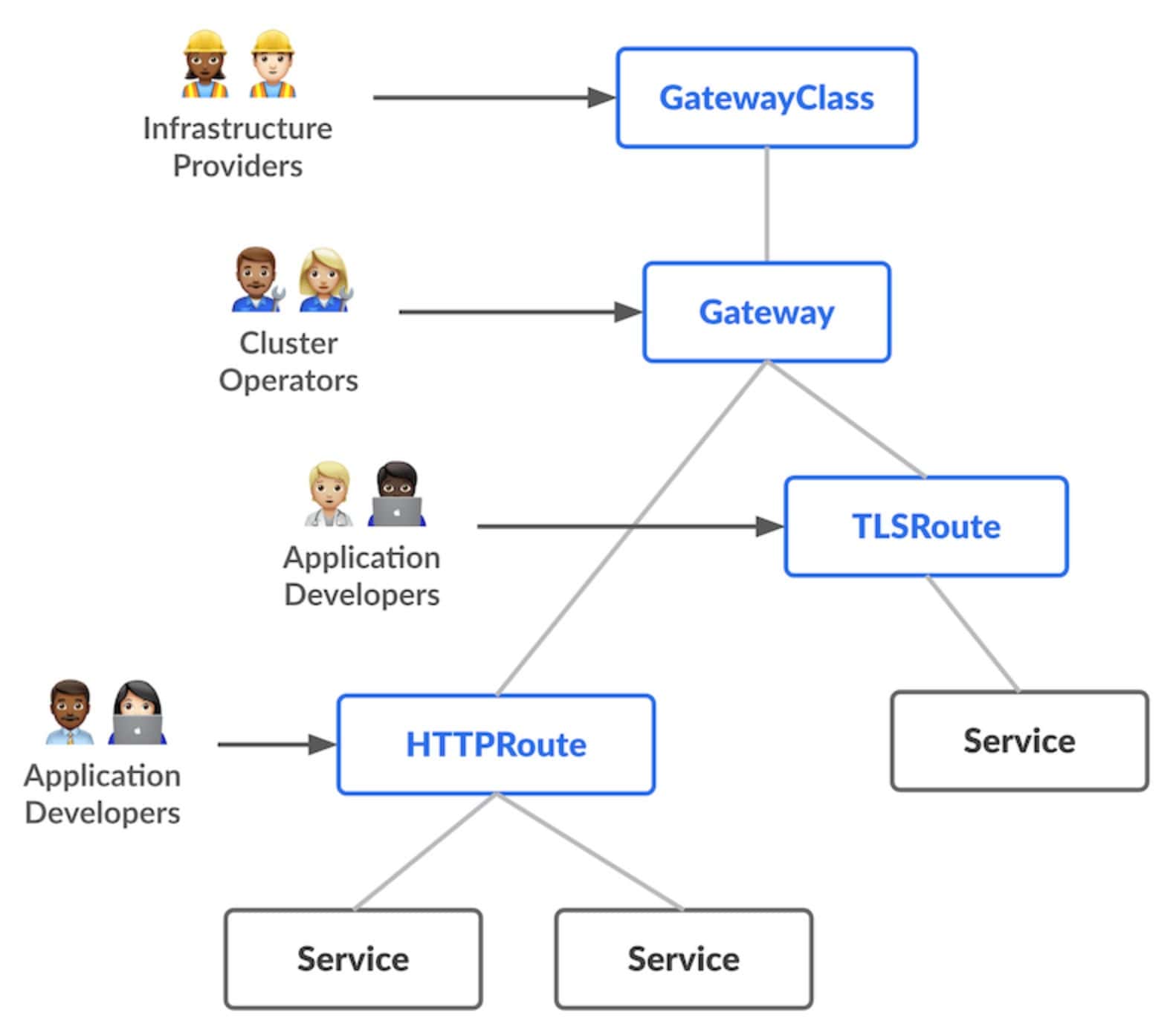
Source: Gateway API
When hostname configuration lives at the Gateway level, you’re pulling an application concern up into infrastructure. That breaks exactly the separation of concerns that Gateway API is designed to provide.
At single-namespace scale, it’s manageable. Across multiple namespaces representing distinct environments, it becomes a real problem. Gateway API 1.5 is a stable release and addresses this directly. The issue is that controllers haven’t caught up to the spec yet.
Where Gateway API Goes from Here
Gateway API 1.5 shipped with ListenerSet, a new resource type designed to enable this separation of concerns. ListenerSet allows application teams to define their own listeners without modifying the Gateway resource itself. Infrastructure concerns stay at the infrastructure level, and application concerns stay at the application level.
Envoy Gateway has implemented ListenerSet, currently in a release candidate, with the stable release expected within days. We’re already testing the RC behind a feature flag and are ready to move quickly once it lands. We have confidence in the Envoy Gateway team and look forward to implementing this once the stable release is out, as it will meaningfully improve how we separate infrastructure and application concerns across namespaces.
Recap: Doing Your Ingress NGINX Migration Right
The pressure to migrate off Ingress NGINX is real, and every month a team stays on an EOL controller built on a feature-frozen API is a month further from where Kubernetes is heading. The urgency is valid, but it can’t be an excuse to cut corners or settle for a suboptimal solution.
What we set out to do was migrate a customer with zero downtime, on a solid long-term foundation, without shortcuts. The weighted DNS approach gave us the clean cutover we wanted. Envoy Gateway gave us a controller we can stand behind. The harder lesson is that the difference between a migration that moves traffic and one that drops zero requests comes down to the steps most guides skip.
If Ingress NGINX is in your stack, now is a good time to start planning. The infrastructure decisions you make today shape how cleanly you can adopt what comes next.
If your team is working through this migration or trying to decide whether now is the right time to start, we’ve done the hard work of evaluating, testing, and proving this out, and we’re happy to talk through the specifics. Reach out to us today.
