



pros and cons
- High-contrast monochrome display
- Fantastic writing experience
- Acceptable trade-offs for the price
- Bundled with folio and Marker Plus for $50 more
- Some flex and wobble
- No backlight
- Occasional lag
- No black folio
Follow ZDNET: Add us as a preferred source on Google.
ReMarkable has carved out a niche for itself with its premium digital paper tablets, a distraction-free ethos, and a devoted following. Devices like the Paper Pro offer a polished experience but command a high price: as much as $800 when bundled with accessories.
Sensing a shift in the wind, the brand has just (wisely) announced a new, accessible product to its lineup: the ReMarkable Paper Pure — a simplified tablet that clones the brand’s luxe digital paper display technology but strips away some of the high-end features to keep the price down to an accessible $399.
Also: I tested the ReMarkable Paper Pro, and can’t go back to ‘real’ paper
For that price, you get the tablet and the Marker Basic (ReMarkable’s entry-level stylus). For $449, you get the tablet, Marker Plus, and the folio carrying case — a step up in hardware and features for around $50 more. Either way, you’re looking at a premium digital paper tablet for a competitive price.
Best tablet deals of the week
Deals are selected by the CNET Group commerce team, and may be unrelated to this article.
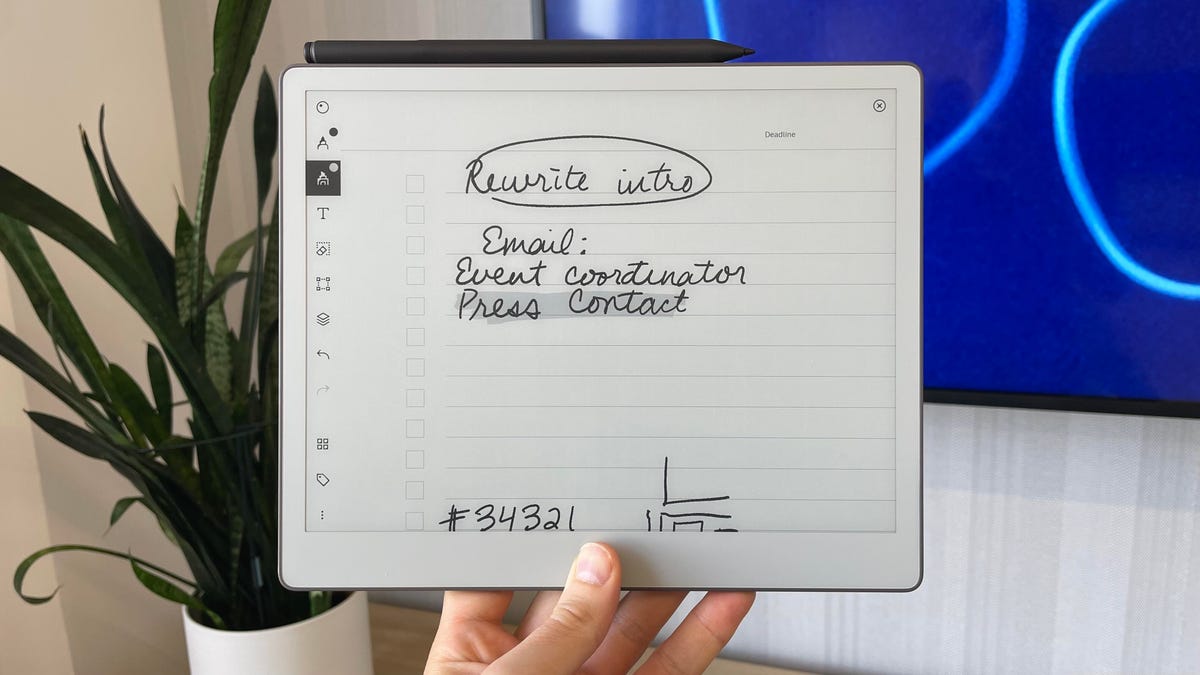
The ReMarkable Paper Pure measures 7.4 x 8.9 inches and weighs 0.79 pounds, with a 10.3-inch display (compared to 11.8 inches on the Paper Pro and 7.3 on the Paper Move). It ditches the color E ink display for black and white and does away with backlight. The result is a digital paper tablet that looks a lot like an Amazon Kindle Scribe or a Boox Note Max (but cheaper than both).
The physical design similarities here are no coincidence. Where ReMarkable’s other tablets have unique forms, the Paper Pure speaks a more generalist language that’s instantly recognizable to a broader consumer base.
Also: My favorite E Ink tablet has a worthy successor – with upgrades in creative ways
Despite this new physical approach, however, the Paper Pure is still very much a Remarkable product with a focus on distraction-free work, ideation untethered from notifications, and a streamlined set of features. Most crucially, this means being locked into ReMarkable’s ecosystem, with no access to Google’s Play Store or third-party apps. However, if you’re a fan, you’ll know that’s precisely the point.
All about the experience
Like the other ReMarkable tablets, the Paper Pure is a note-taking, idea-sketching, writer’s dream come true. All other features come second to the Paper Pure’s focus on putting pen to “paper”, and its smooth, natural writing experience is still one of the best you can get.
The black-and-white display on the Paper Pure is high-contrast, with a whiter, smoother glass screen rather than the rough-textured beige on the Paper Pro. The black E ink is rich and deep black, with silky-smooth lines and zero pixelation. Even zooming into your handwriting to the max reveals smooth lines and crisp edges.
For sketching, taking notes, and organizing content, the Paper Pure offers a simplified — but no less enjoyable experience. The display is certainly on par with the Paper Pro and may even be preferred by some users for its higher contrast. No backlight obviously means you won’t be able to use this device in the dark, but on the flip side, it looks great in bright light.
Also: I tested the Kindle Scribe 2 for months, and it beat my ReMarkable in several ways
The grippable margin on the left side makes it easy to hold, and the pen firmly snaps to the right side with strong magnets that automatically charge it when connected. On the back, the gray textured plastic doesn’t feel cheap per se, but it’s certainly a departure from the Pro.
A quieter ecosystem
ReMarkable’s ecosystem is limited to its own UI and no third-party apps. I’m a big fan of its intuitive browser-based portal that bridges the gap between the tablet and the outside world. It’s very limited, however, and doesn’t have the app selection of the Google Play Store or the vast EBook library of the Kindle. Yeah. And it’s refreshing.
There is an optional Connect subscription, which, all things considered, is affordable. It costs $3.99 a month or $39 a year, opening up a handful of smart integrations and unlimited cloud storage.
You certainly don’t have to subscribe, as the device’s core functionalities aren’t locked behind a paywall, but the integrations are convenient. For example, the Send to Slack and Send to Miro features allow for one-tap shares to connected accounts — a must for anyone using those platforms.
One of the best new features, however, is not tied to the subscription. You can now screen-share your ReMarkable to any computer by simply opening a browser window — allowing for a universal, no-fuss way to present what’s on the tablet and sketch or draw in real time. It’s impressive how seamless this works after just a few taps.
Also: This Kindle nearly replaced my Remarkable tablet with just the display itself – but there’s more
Similarly, you can share sketches or notes from your ReMarkable with others in multiple formats. You’ve got the integrations I just mentioned, alongside Dropbox, Google Drive, Microsoft OneDrive, or the option to simply generate a unique URL that navigates to the sketch. You can even set permissions to the URL, or delete it when you’re done sharing.
The trade-offs
ReMarkable succeeded in porting the best features of its premium tablets to a more accessible device, but after spending more time with the Pure, its modest hardware became apparent in certain situations.
It’s
It runs on a 1.7 GHz dual-core ARM Cortex-A55 chip, whereas the Pro model features a 1.8 GHz quad-core Cortex-A53. The Pure also offers 32GB of internal storage—half the 64GB found in both the Move and Pro versions. While all three devices include 2GB of RAM, the Pure utilizes LPDDR3 memory, resulting in slower data transfer speeds.
Writing on the Pure feels almost perfect, though there’s a slight delay—particularly during fast handwriting. However, this lag is minor and never disrupted my overall experience. Physically, the tablet is noticeably slimmer and lighter than the Paper Pro or Move, with a bit of flexibility in its build. On some surfaces, it doesn’t sit completely flat, showing a wobble of about one to two millimeters.
Beyond hardware differences, the main compromises relate to what users might expect. The Paper Pure’s instantly familiar design appeals to a broader audience beyond dedicated e-ink enthusiasts. Still, many potential buyers should know this isn’t a typical e-reader with instant access to thousands of books or a built-in browser and app store.
Also: I found an E Ink tablet worthy of replacing my Remarkable, and it’s on sale
You can import EPUB e-book files using the mobile or desktop app, or through your Connect account on the website. The process is straightforward but requires manual effort. The Pure is clearly optimized for productivity, offering seamless integration with your personal accounts and a rich collection of templates and forms. In short, it’s built for doing, not just reading.
ZDNET’s buying advice
The ReMarkable Paper Pure delivers a high-end digital paper experience at a lower price point. Its monochrome display holds up well—even without a backlight—and the pen-on-screen writing sensation remains exceptional. While the slightly less powerful hardware shows at times, the device still feels solid despite its lightweight frame.
Also: Kindle Scribe vs. ReMarkable Paper Pro: I’ve used both E Ink tablets, and this one wins
Some may still find the price steep, which is fair. But within the digital paper tablet market, it’s competitively priced. For comparison, Amazon’s Kindle Scribe also starts at $399 but comes with only 16GB of storage and relies on a $12/month Kindle Unlimited subscription for content.
The ReMarkable Paper Pure is available for order now, with shipping beginning in early June.
