



# Introduction
The true value of AI projects emerges when they tackle genuine workflow challenges rather than simply showcasing the latest model or tool.
This article highlights practical automation scenarios, such as job hunting, conducting research, processing invoices, analyzing markets, digitizing charts, and creating personalized assistants. Rather than spending your time manually hunting through information, reading documents, making comparisons, and drafting summaries, you’ll discover how AI can take over many of these tedious tasks. Every project includes detailed guides, source code, and step-by-step breakdowns, empowering you to construct each solution from the ground up and customize it to fit your specific needs.
# 1. Create an AI-Powered Job Search Helper
Hunting for employment opportunities is a monotonous task. Browsing job boards, reviewing listings, measuring them against your qualifications, and deciding which positions deserve your application can consume hours.
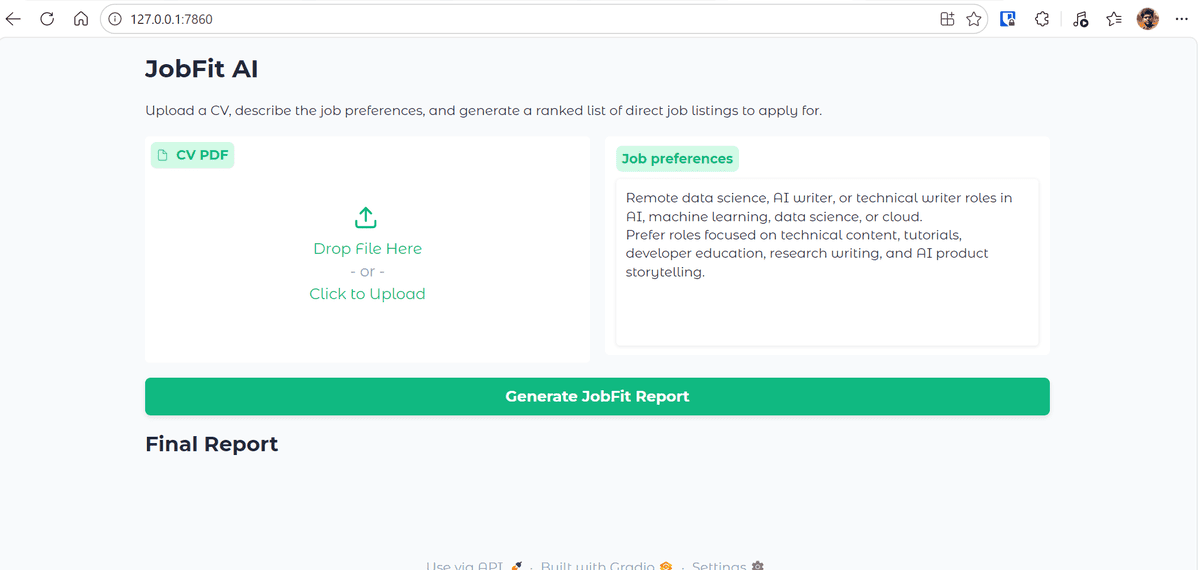
This project streamlines that entire process. You’ll develop JobFit AI, a smart assistant that scans a candidate’s resume, pulls up current job openings, evaluates specific listings, and produces a prioritized compatibility report. The guide leverages Kimi K2.6, Olostep, OpenAI Agents SDK, and Gradio.
What you’ll discover:
- How to construct an intelligent job search agent
- How to merge real-time web searches with resume evaluation
- How to sort job listings by candidate compatibility
- How to develop an intuitive Gradio-based interface
Guide: Kimi K2.6 API Tutorial: Building an AI Job Search Assistant.
GitHub Repo: kingabzpro/JobFit-AI
# 2. Develop a Multi-Agent Research Assistant
Traditional research workflows typically involve multiple phases: performing web searches, curating relevant sources, pulling out critical details, and drafting a summary report. While a single prompt can assist, deploying a multi-agent architecture offers far greater precision and control.
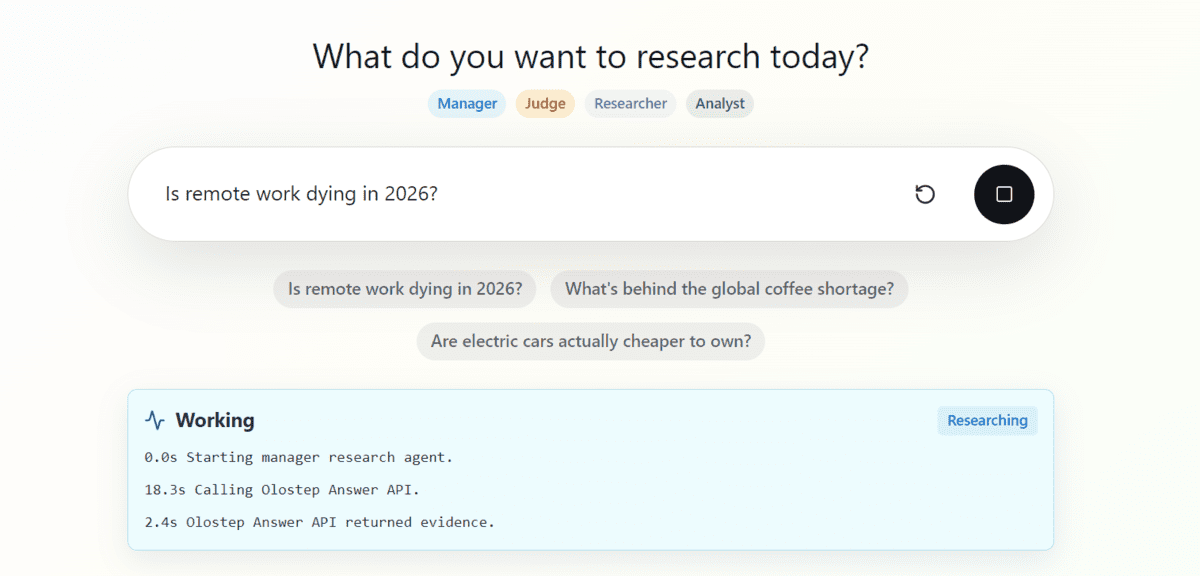
This project demonstrates how to create a multi-agent research assistant utilizing the OpenAI Agents SDK and Olostep. The assistant generates fully sourced Markdown research reports and is published as an open-source GitHub project.
What you’ll discover:
- How to architect a multi-agent workflow
- How to deploy agents for conducting web-based research
- How to produce properly cited research reports
- How to structure an AI research assistant project
Guide: How to Build a Multi-Agent Research Assistant in Python.
GitHub: Multi-Agent-Research-Assistant
# 3. Streamline Investment Research Using Olostep and n8n
Analyzing investment opportunities typically requires monitoring corporate news, financial reports, market commentaries, and public data sources. This project converts that manual effort into a fully automated pipeline.
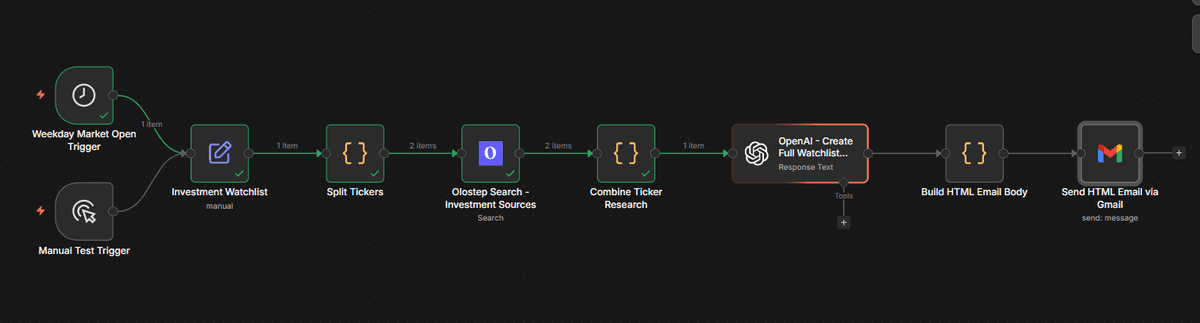
The guide illustrates how to combine Olostep with n8n to aggregate public data, evaluate stock tickers, and distribute AI-generated analysis reports. It serves as a great learning experience for understanding how AI can drive research automation, though it should be viewed purely as an educational exercise rather than actual financial guidance.
What you’ll discover:
- How to design an n8n automation pipeline
- How to gather publicly available financial data
- How to condense investment-related materials into summaries
- How to distribute automated research reports
Guide: How to Automate Investment Research Using Olostep and n8n.
GitHub: kingabzpro/olostep-n8n-investment-agent
# 4. Construct an Agentic Market Research and Trend Analysis Application
Market research is yet another area ripe for automation. Rather than painstakingly gathering competitor intelligence, industry developments, and trend analysis reports on your own, you can create an agent-driven workflow that handles the bulk of the effort.
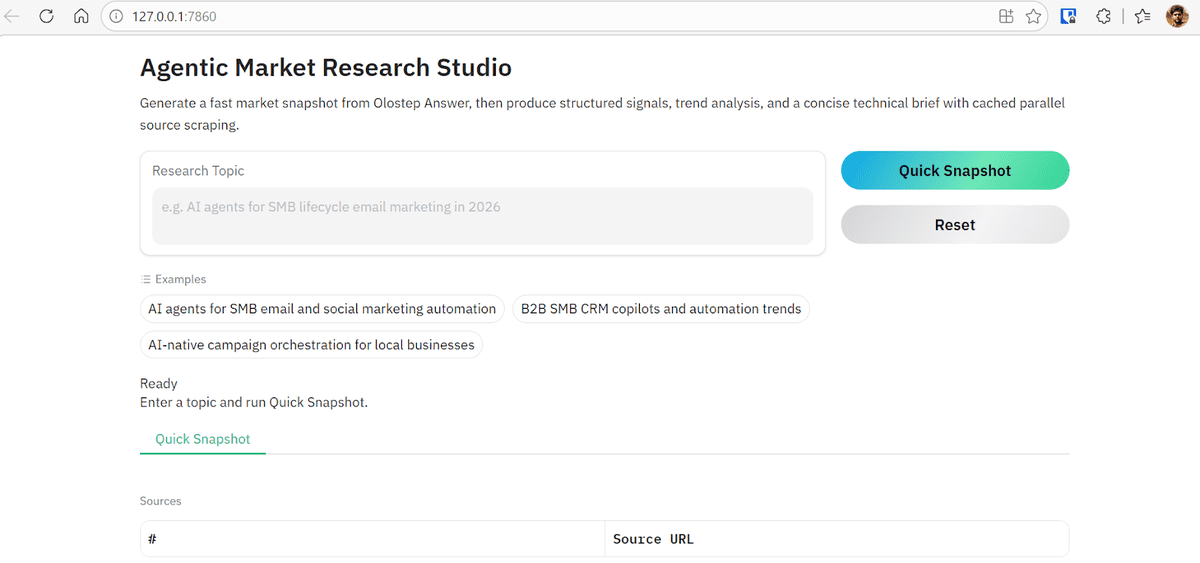
This project leverages the OpenAI Agents SDK and Olostep to create a comprehensive market research system. The pipeline incorporates specialized agents dedicated to research, data extraction, trend evaluation, and report composition.
What you’ll discover:
- How to design an agent-driven research pipeline
- How to distribute tasks among specialized agents
- How to pull actionable insights from web sources
- How to compose structured market analysis briefs
Guide: Agentic Market Research & Trend Analysis with Olostep.
GitHub: kingabzpro/agentic-market-research-olostep
# 5. Build an AI Invoice Processing Pipeline
Processing invoices is an excellent real-world AI application since it blends document comprehension, structured data extraction, and business process automation.
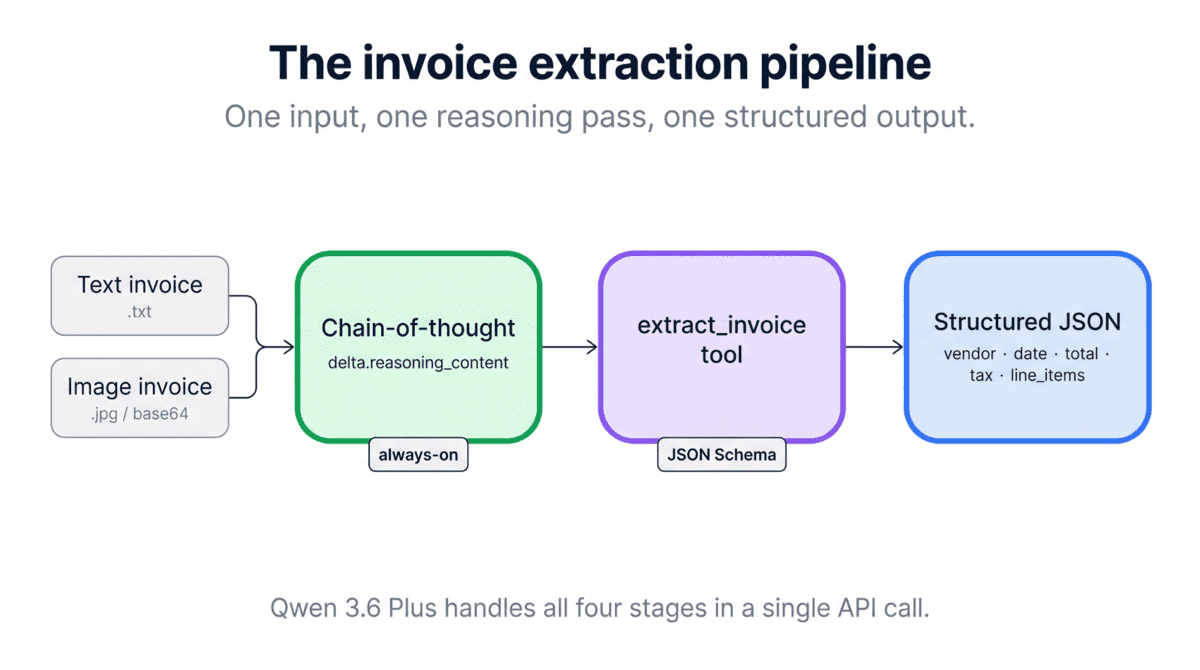
This tutorial employs Qwen 3.6 Plus, Python, and the OpenAI SDK to construct an automated invoice processing pipeline with built-in vision and tool-calling capabilities. The objective is to pull key fields from invoice documents and convert them into organized outputs.
What you’ll discover:
- How to work with a vision-powered AI model
- How to handle invoice documents programmatically
- How to extract structured data from documents
- How to construct a practical business automation workflow
Guide: Qwen 3.6 Plus API Tutorial: Building an Invoice Processing Pipeline in Python.
GitHub: BexTuychiev/qwen-invoice-pipeline-tutorial
# 6. Construct a Chart Digitizer Using Claude Opus 4.7
Valuable visual data is frequently locked away inside static charts, screenshots, and PDF files. This project demonstrates how Claude Opus 4.7‘s advanced high-resolution vision can transform chart images into structured, usable data.

In this DataCamp tutorial, you’ll create a Python-based chart digitizer that analyzes a chart image, detects the axes, captures data points, and exports the organized results into a clean Pandas DataFrame or CSV file. The guide also walks you through Claude Opus 4.7’s adaptive reasoning, high-effort processing mode, and structured tool-based outputs.
What you’ll discover:
- How
- How to leverage the Claude Opus 4.7 API
- How to process high-resolution multimodal inputs
- How to pull data from chart images
- How to organize model outputs using tools
- How to save extracted data with Pandas
Guide: Claude Opus 4.7 API Tutorial: Creating a Chart Digitizer.
# 7. Create an Exercise Trainer with Persistent Memory
The majority of AI agents lose all information once the session is over. Persistent memory addresses this by enabling agents to retain user preferences, history, and past interactions.
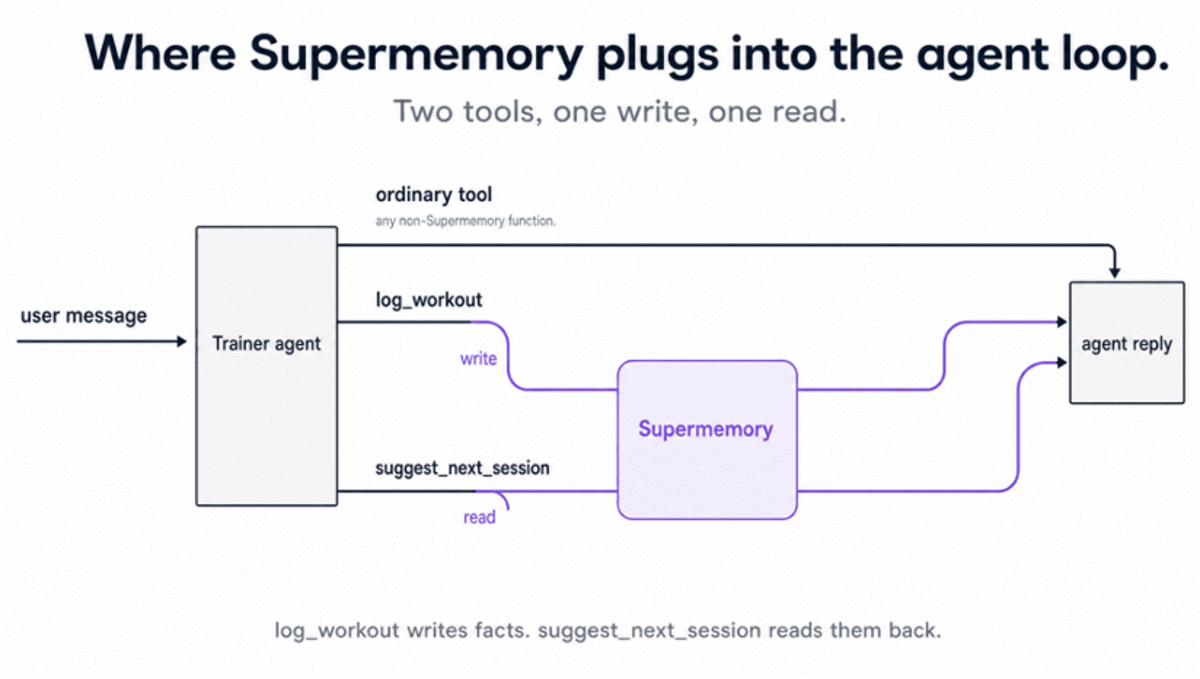
This project leverages Supermemory to develop a Python exercise trainer that tracks workouts, recalls user history, and recommends personalized sessions across separate runs of the script.
What you will learn:
- How persistent memory functions in AI agents
- How to store and retrieve user-specific facts
- How to build agents that improve across sessions
- How to personalize outputs without re-entering context each time
Guide: Supermemory Tutorial: Incorporating Persistent Memory into AI Agents.
# Final Thoughts
The bulk of the projects on this list were developed by me, and I ensured they are reproducible, straightforward to set up, and practical enough to tailor to your own workflow.
The remaining projects I chose were included because they are useful, simple to develop, and tackle real challenges. They are more than just demonstrations. They illustrate how AI can assist with research, document processing, job searching, market analysis, and personal productivity.
With access to new model APIs, memory tools, and web automation APIs, you can develop many of these projects for under $5 and in less than an hour if you follow the guides carefully.
More importantly, these projects teach you how AI agents truly function. Instead of coding every step by hand, you learn how to equip agents with tools, context, and goals so they can determine the best path and make your workflow more intelligent.
Abid Ali Awan (@1abidaliawan) is a certified data science professional who enjoys building machine learning models. Currently, he is focusing on content creation and writing technical blogs on machine learning and data science topics. Abid holds a Master’s degree in Technology Management and a Bachelor’s degree in Telecommunication Engineering. His vision is to develop an AI product using a graph neural network for students dealing with mental illness.
