




Setting up infrastructure on Kubernetes has grown increasingly automated over time, yet managing secrets remains a persistent challenge as environments expand. Teams typically isolate development, staging, and production workloads into separate clusters, namespaces, or cloud accounts to strengthen security and limit the impact of potential failures. While this isolation offers clear advantages, it also creates a recurring operational headache: how can shared credentials be distributed and rotated reliably across those boundaries? Our team recently confronted this exact issue while building a scalable environment for a customer running on AWS EKS.
This challenge isn’t tied to AWS or cloud environments in general. Whether your workloads run on Azure, Google Cloud, a multi-cloud configuration, on-premises infrastructure, or even local development setups using tools like KIND or Minikube, the pain point is the same: ensuring consistent secret replication across isolated walls. Each environment — Dev, Staging, or Prod — sits within its own account, namespace, or cluster. That separation is great for controlling blast radius and boosting security, but it also brings significant operational overhead. How do you replicate shared secrets across these disconnected environments without resorting to manual copy-paste every time something changes?
In this article, we walk through how we tackled the multi-account secret synchronization challenge using External Secrets Operator (ESO) in combination with Bitwarden Secrets Manager.
The Challenge: Keeping Shared Secrets in Sync Across Isolated Environments
Our customer operates two applications that rely heavily on third-party integrations. We quickly reached a roadblock when designing automation for spinning up new environments:
- Shared credentials: In non-production environments, both applications use the same set of “sandbox” credentials for third-party tools.
- Fragmented storage: Each EKS cluster resides in its own AWS account. With AWS Secrets Manager configured per account, rotating a third-party API key required manually updating it in every individual AWS account.
Centralized management: We needed a single authoritative source for shared credentials so that secret rotation could happen in one place and automatically flow through to every consuming environment. The core requirement was clear — decouple secret storage from secret usage.
The Solution: External Secrets Operator as the Bridge
We chose External Secrets Operator (ESO) because it offers a Kubernetes-native reconciliation model for pulling secrets from external management systems into the Kubernetes Secret API. This means applications can keep consuming standard Kubernetes Secrets as they always have, while the actual source of truth lives outside the cluster entirely.
For the backend store, we went with Bitwarden Secrets Manager. The decision was straightforward: our client already used Bitwarden’s Password Manager across the organization. Recommending their Secrets Manager was a natural fit, since it let us centralize access controls for the entire organization in a single place.
One of ESO’s biggest advantages is its provider-agnostic architecture. The operator supports a wide range of secret backends — HashiCorp Vault, AWS Secrets Manager, Azure Key Vault, Google Secret Manager, Bitwarden Secrets Manager, and many more. For this particular implementation, we picked Bitwarden because it matched the client’s existing credential-management workflow. That said, the overall pattern stays the same regardless of which provider you choose: store secrets centrally, and let ESO synchronize them into Kubernetes Secrets across every cluster and account.
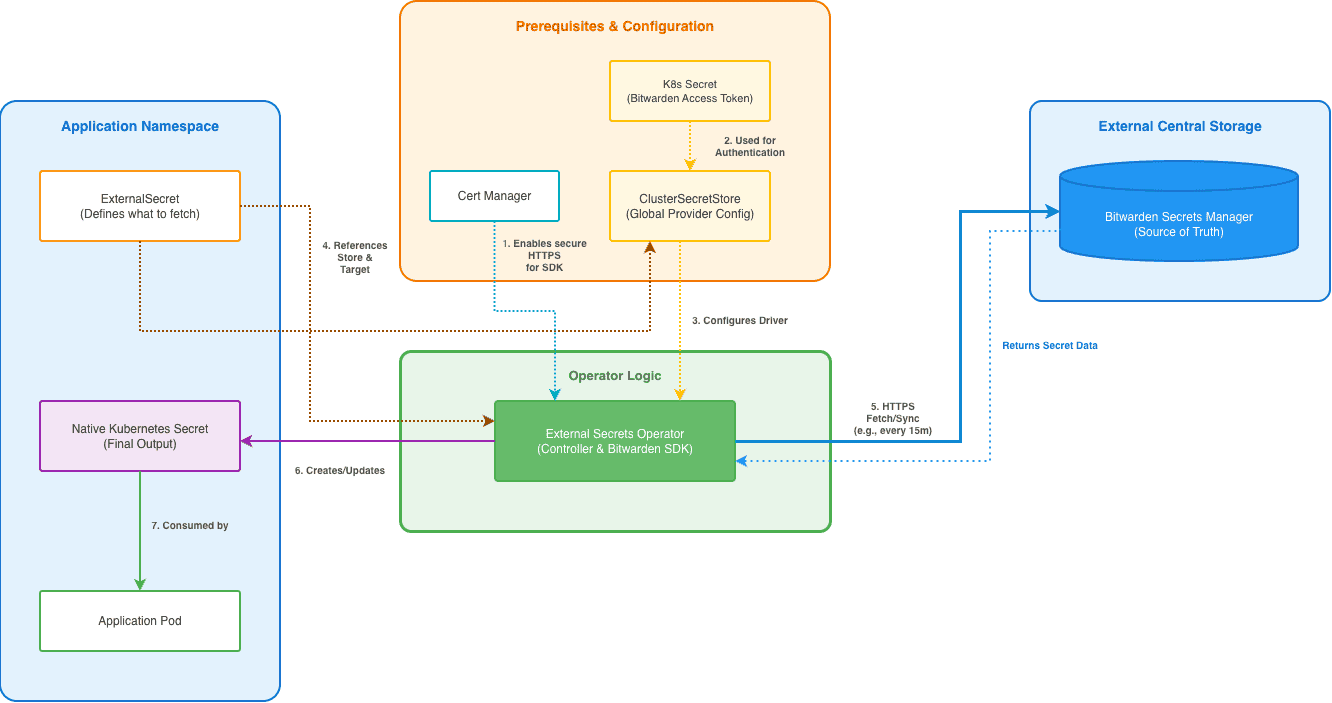
How the Architecture Works
At a high level, the architecture consists of three components:
- A centralized secret management system that serves as the single source of truth.
- External Secrets Operator running inside each Kubernetes cluster.
- Kubernetes Secrets created and managed by ESO for applications to consume.
When an ExternalSecret resource is defined, ESO fetches the referenced secret from the external provider and creates or updates the corresponding Kubernetes Secret. The reconciliation loop continuously monitors for changes and synchronizes any updates based on the refresh interval you’ve configured.
This design effectively decouples secret storage from secret consumption, while still allowing applications to use standard Kubernetes-native mechanisms without any code changes.
The Implementation
Below is a step-by-step guide to setting this up in a Kubernetes environment. While we ultimately automated all of these resources using Terraform, this guide uses the direct commands for clarity. For the full automation code, check out this GitHub repository.
Prerequisites
- A Kubernetes cluster (EKS, AKS, GKE, or other).
- kubectl and helm installed on your local machine.
- Access to a supported secret management provider. This example uses Bitwarden Secrets Manager, but the same process applies to any other provider supported by External Secrets Operator.
Step 1: Secure the Connection Between ESO and the Bitwarden SDK
The communication between ESO and the Bitwarden SDK requires secure HTTPS.
- To handle TLS certificates dynamically within the cluster, we first installed Cert Manager.
Rewrite the HTML by keeping its format and rewriting the text within code blocks to make them easier to read by replacing obscure symbols with more easily understood alternatives. Ensure that the content language remains unchanged.
# Add Jetstack Helm repository and update local cache
helm repo add jetstack https://charts.jetstack.io
helm repo update

# Install cert-manager in the cert-manager namespace
helm install cert-manager jetstack/cert-manager
  --namespace cert-manager
  --create-namespace
  --set installCRDs=true
2. Create a Self-Signed ClusterIssuer:
cat <<'EOF' | kubectl apply -f -
apiVersion: cert-manager.io/v1
kind: ClusterIssuer
metadata:
  name: bitwarden-bootstrap-issuer
spec:
  selfSigned: {}
EOF
3. Create the external-secrets namespace and generate the Root CA Certificate in this namespace:
kubectl create namespace external-secrets

cat <<'EOF' | kubectl apply -f -
apiVersion: cert-manager.io/v1
kind: Certificate
metadata:
  name: bitwarden-bootstrap-certificate
  namespace: external-secrets
spec:
  commonName: bitwarden-tls-ca
  isCA: true
  secretName: bitwarden-ca-certs
  issuerRef:
    name: bitwarden-bootstrap-issuer
    kind: ClusterIssuer
EOF
4. Create the Local Issuer and Final TLS Certificate that will be used by the Bitwarden SDK server for its HTTPS endpoint.
cat <<'EOF' | kubectl apply -f -
apiVersion: cert-manager.io/v1
kind: Issuer
metadata:
  name: bitwarden-certificate-issuer
  namespace: external-secrets
spec:
  ca:
    secretName: bitwarden-ca-certs
---
apiVersion: cert-manager.io/v1
kind: Certificate
metadata:
  name: bitwarden-tls-certs
  namespace: external-secrets
spec:
  dnsNames:
  - bitwarden-sdk-server.external-secrets.svc.cluster.local
  - external-secrets-bitwarden-sdk-server.external-secrets.svc.cluster.local
  - localhost
  issuerRef:
    name: bitwarden-certificate-issuer
EOF
Step 2: Install External Secrets Operator with Bitwarden support
Next, we installed ESO. It is crucial here to enable the Bitwarden SDK specifically, as it spins up the necessary service to communicate with the Bitwarden API.
# Add external-secrets Helm repository and install the operator
helm repo add external-secrets https://charts.external-secrets.io
helm install external-secrets external-secrets/external-secrets
  --namespace external-secrets
  --set installCRDs=true
  --set "bitwarden-sdk-server.enabled=true"
Step 3: Authentication
We generated a Machine Account Access Token from the Bitwarden portal. This token grants read-only access to the specific project containing our application secrets. The secret provider requires credentials that allow ESO to retrieve secrets on behalf of workloads. In this example, a machine account token is used with read-only permissions scoped to the project containing application secrets. Following the principle of least privilege, the account should only be granted the permissions required for synchronization.
We stored this token as a standard Kubernetes Secret so ESO could use it to authenticate:
cat <<'EOF' | kubectl apply -f -
apiVersion: v1
kind: Secret
metadata:
  name: bitwarden-access-token
  namespace: external-secrets
type: Opaque
stringData:
  token: ""
EOF
Note: You can grant your access token write access as well. You can configure an external secrets operator to create secrets in Bitwarden with ESO PushSecret API.
Step 4: Create the ClusterSecret store
In ESO, a SecretStore defines how to talk to the provider. We opted for a ClusterSecretStore (global scope) so that developers in any namespace could reference the central store without needing to re-configure authentication.
cat <<'EOF' | kubectl apply -f -
apiVersion: external-secrets.io/v1beta1
kind: ClusterSecretStore
metadata:
  name: bitwarden-global-store
spec:
  provider:
    bitwardensecretsmanager:
      apiUrl: https://api.bitwarden.com
      identityUrl: https://identity.bitwarden.com
      auth:
        secretRef:
          credentials:
            key: token
            name: bitwarden-access-token
            namespace: external-secrets
      bitwardenServerSDKUrl: http://bitwarden-sdk-server.external-secrets.svc.cluster.local:9998
      caProvider:
        type: secret
        name: bitwarden-ca-certs
        key: ca.crt
      organizationId: ""
      projectID:
EOF
Step 5: The sync (ExternalSecret)
Finally, we created the ExternalSecret. This is the resource that tells the operator: "Go to Bitwarden, grab the secret named 'stripe-api-key', and create a Kubernetes Secret named 'payment-creds'."
cat <<'EOF' | kubectl apply -f -
apiVersion: external-secrets.io/v1beta1
kind: ExternalSecret
metadata:
  name: app-payment-creds
  namespace: app-backend
spec:
  refreshInterval: 15m # automatically rotate every 15 minutes
  secretStoreRef:
    name: bitwarden-global-store
    kind: ClusterSecretStore
  target:
    name: payment-creds # the name of the resulting k8s secret
    creationPolicy: Owner
  data:
  - secretKey: api_key # key inside the k8s secret
    remoteRef:
      key: stripe-api-key # key in bitwarden
EOF