



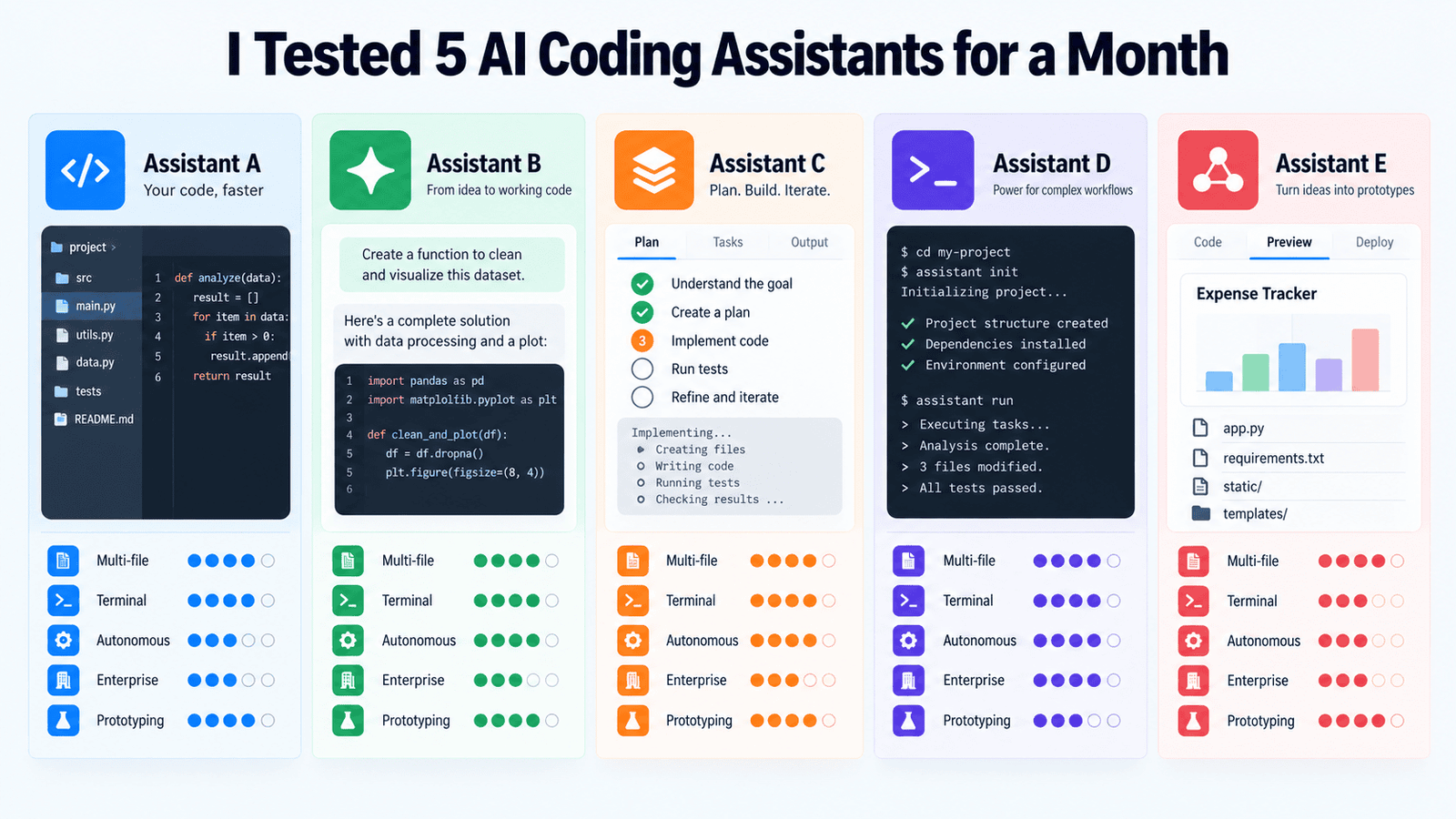
# After 30 Days of Hands-On Testing, Here’s How the Top 5 AI Coding Assistants Actually Perform
When every marketing page promises you’ll “just describe what you need and code magically appears,” it’s tempting to dismiss the whole category as vaporware. But having spent a dedicated month putting five widely discussed AI-powered coding tools through tasks I genuinely encounter as a working developer — legacy system refactors, greenfield API builds, debugging rabbit holes, and rapid prototyping — the results paint a more nuanced picture than any headline captures.
The five tools I evaluated each took a fundamentally different approach to augmenting how developers write software: one wants to become your entire workspace, another enhances the editor you already use, a third lives entirely in the terminal, a fourth aims for autonomous multi-hour sessions, and the fifth promises to take you from a blank browser tab all the way to a live, deployed application. These aren’t incremental differences — they reflect competing visions for the future of software development itself.
Below is what the testing revealed, broken down by each tool, followed by practical guidance for choosing the right fit.
—
## The Workspace Replacement: A Full-Featured AI-Native Editor
The first tool I examined rebuilt itself from the ground up with artificial intelligence as its core architectural principle. Visually, it borrows the familiar layout of a popular open-source code editor, but the moment you engage its built-in orchestration and autonomous modes, the experience becomes noticeably different from anything traditional.
Its standout capability is handling changes that span multiple files in a single coordinated operation. I tested this by asking it to restructure a data model within a medium-sized Django application, requiring updates to views, serializers, test files, and database migration scripts. The tool tracked all of those dependencies and applied consistent changes across the entire codebase without losing context. That kind of multi-file coherence is what distinguishes it from simpler autocomplete engines that only understand the file currently open.
It also offers an autonomous mode that can create files, execute shell commands, and refine its own output iteratively. On clearly defined, well-scoped tasks, this mode worked efficiently. On more open-ended or ambiguous requests within a large codebase, it occasionally produced changes that were technically correct in isolation but introduced subtle inconsistencies elsewhere — adjusting things I hadn’t explicitly asked it to touch.
Pricing is roughly $20 per month for the full feature tier, with additional costs tied to heavier autonomous usage. For developers doing significant refactoring work, that cost is easy to justify. For someone who mostly needs inline suggestions, the value case is less obvious given the range of lower-priced alternatives.
**Strongest for:** Complex multi-file restructuring, large codebases where maintaining contextual awareness is critical, developers who want an opinionated AI-first environment and are willing to invest time mastering it.
**Where it falls short:** The very autonomy that makes it effective on well-defined tasks also makes it risky when instructions are vague. Writing clear prompts and carefully reviewing every generated change becomes essential.
—
## The Enterprise Workhorse: Deep Editor Integration
This tool is the one that popularized the concept of AI-generated code in professional environments. It has been deployed in production settings at scale for longer than most of its competitors have existed, and that extensive track record shows in the quality of its integration and the reliability of its suggestions.
The inline suggestion experience — the one you get as you type — remains excellent: low latency, contextually aware completions, and seamless integration with mainstream code editors like Visual Studio Code and JetBrains family products.
More recently, the tool added conversational querying of your codebase, the ability to outline a multi-step plan before executing it, and a mode that lets the AI take action across multiple files. In my testing, these newer features performed well for clearly bounded tasks. However, they felt like thoughtful additions layered onto an existing product rather than features that grew organically from the ground up as a core philosophy.
Where this tool genuinely shines is in teams already embedded in a specific ecosystem. For organizations using platform-native CI/CD pipelines, cloud-hosted development environments, and centralized issue tracking, the AI assistant draws context from repository history, pull request records, and project management artifacts in ways that no standalone tool can replicate. That integration depth reduces friction meaningfully.
Individual plans start at $10 per month, making it the most affordable paid option among the tools I evaluated. Enterprise tiers add security controls and policy enforcement features that larger engineering teams require.
**Strongest for:** Developers who want to remain in their existing editor, teams with an established ecosystem around a specific platform, organizations that require enterprise-grade compliance and audit capabilities.
**Where it falls short:** If your primary need is deeply autonomous, multi-step coding that runs independently for extended periods, tools purpose-built for that workflow have a meaningful advantage here.
—
## The Terminal-First Reasoning Agent
This tool operates on a radically different premise. There is no graphical user interface. It runs entirely in a command-line environment, reading source files, executing commands, running your test suite, parsing the results, and iterating on its own output. The workflow it follows mirrors how a meticulous developer naturally works: write code, run it, observe the results, and adjust accordingly.
What distinguishes this tool is the reasoning quality. Its underlying model was developed with an emphasis on logical step-by-step thinking, and that design decision is clearly visible when it handles tasks requiring multiple interlocking constraints. In one test, I asked it to extend an existing REST API with a new resource type, write corresponding test cases, and verify that all previously passing tests continued to work. It executed through the problem methodically, identified a dependency issue it introduced in an earlier pass, and corrected it without any human intervention.
The lack of a visual interface is both a strength and a limitation. It integrates naturally into workflows already centered around the terminal, and it can operate over remote SSH connections on machines without a graphical desktop environment. However, there is less visual guidance to help you stay oriented — you need to be comfortable reading raw output and steering the agent when it veers off track.
Costs are based on consumption through the provider’s API rather than a fixed monthly subscription, which makes budgeting harder for teams with unpredictable usage patterns. For individual developers doing intensive sessions, costs can accumulate faster than a flat fee would suggest.
**Strongest for:** Tasks requiring careful multi-step logical reasoning, developers who are comfortable working entirely in a terminal, projects where understanding constraints and failure modes matters more than raw generation speed.
**Where it falls short:** The steeper onboarding curve due to the absence of a visual interface. Cost predictability requires active monitoring and attention.
—
## The Persistent Workspace: Long-Running Autonomous Sessions
Originally developed by one company and later acquired by another, this tool is built around a feature that maintains continuous awareness of your entire workspace throughout an extended session. You don’t repeatedly re-establish context or re-explain what the codebase looks like — the AI already understands it, and it retains that understanding across hours of work.
This persistence is where the tool truly distinguishes itself. During sessions where I was building out a feature incrementally over time, it tracked both the changes I made manually and the ones it generated autonomously. When I returned to the session later, it incorporated all of that work into its subsequent suggestions without needing to be reoriented. That continuity is a genuine productivity multiplier for developers who think in terms of extended feature-building sessions rather than discrete, isolated tasks.
The risk inherent in this approach is gradual drift. Over the course of a long session, the tool occasionally made architectural decisions that were reasonable in isolation but clashed with choices made earlier in the same session. The frequency wasn’t alarming enough to derail a project, but it was consistent enough that active review of its output remained a necessary part of the workflow.
The free tier provides enough functionality to thoroughly evaluate the tool before committing financially. Paid plans begin around $15 per month. For developers who value an AI that remembers what it’s doing across long, focused sessions, this is one of the more well-executed implementations of that concept.
**Strongest for:** Extended feature development sessions, developers who want workspace-aware AI without needing to constantly re-explain context, teams looking for a capable alternative to the full workspace replacement at a lower price point.
**Where it falls short:** Extended autonomous operation demands vigilant review. Architectural drift over long sessions is a real consideration that cannot be ignored.
—
## The End-to-End Prototyping Environment
This is arguably the most ambitious tool in the group, targeting a scope that goes well beyond code generation. The promise is complete: describe an application concept, watch the entire thing get built, and see it deployed to a live URL — all within a single browser-based environment. The editor, runtime, AI engine, and hosting infrastructure are unified into one seamless workspace.
For prototyping purposes, it performed impressively. I used it to build a simple expense tracking application from scratch in under an hour. The application ran correctly, data was persisted, and a shareable URL was available immediately. For someone who hasn’t set up a local development environment, or for a founder trying to validate an idea before committing engineering resources, this capability is genuinely valuable.
The limitation becomes apparent when you push past the prototype stage. The applications it generates follow straightforward architectural patterns that work well for the use case but become restrictive as requirements grow in complexity. Customizing the generated code beyond what the agentic workflow supports means working within the tool’s editor on its own terms, and migrating a prototype built this way into a mature production environment typically involves rewriting a significant portion of the generated code.
There is a free tier for basic exploration. Core paid plans start around $25 per month. For education, rapid idea validation, and early-stage product exploration, the tool earns its place in your toolkit. For production engineering, it’s more accurately understood as a powerful starting point than a complete, long-term development workflow.
**Strongest for:** Rapid prototyping, early-stage idea validation, developers who want to go from concept to deployable URL without configuring any local environment, educational and learning contexts.
**Where it falls short:** Production complexity eventually exceeds what the agentic paradigm handles gracefully. Long-term maintainability of generated applications requires substantial additional engineering investment.
—
## The Bigger Picture: What Month of Testing Taught Me
No single tool emerged as the winner across every task I threw at it, and that finding is itself the most valuable takeaway. The differences between these five tools are differences in philosophy — about what the relationship between developer and AI should look like, where the boundary between human direction and machine autonomy should sit, and how much cognitive overhead the developer should carry versus what the tool should handle.
If your daily work revolves around making large, interconnected changes to existing codebases, the multi-file awareness of the workspace replacement and the persistent session continuity of the long-running agent both address that need effectively — with the former being more aggressive and the latter more patient. If you want to stay in your familiar editor while benefiting from AI assistance within an established enterprise toolchain, the platform-integrated option’s depth of integration is unmatched. If you think in terms of terminal commands and value careful reasoning over rapid output, the reasoning agent aligns most naturally with how you work. And if your primary goal is getting from a blank canvas to a functioning prototype in the shortest possible time, the end-to-end builder has no real peer.
The question that matters before committing to any of these tools isn’t which one is objectively best. It’s which underlying philosophy most closely matches the shape of your actual day-to-day work. That answer is different for every developer, every team, and every project.
—
## Frequently Asked Questions (FAQ)
**Q: Are these AI coding assistants capable of replacing human developers entirely?**
A: No. These tools are designed to augment developer productivity, not replace human judgment. They excel at generating boilerplate, handling repetitive patterns, and executing well-defined tasks. However, architectural decisions, code review, edge-case handling, and understanding business context still require human expertise. Every tool tested still required active oversight and direction from a developer.
**Q: Which tool is the easiest to get started with for a beginner?**
A: The end-to-end prototyping environment is likely the most accessible for beginners because it requires no local setup and runs entirely in a browser. The platform-integrated option is also beginner-friendly due to its familiarity and low cost of entry at $10 per month.
**Q: Can these tools work with proprietary or private codebases?**
A: Most of these tools offer options for keeping your code private rather than using it to train public models. However, the specifics vary by tool and plan. Enterprise tiers generally provide stronger guarantees around data privacy and compliance. It’s important to review each provider’s data handling policies before use in a production context with sensitive code.
**Q: How do costs compare across these tools?**
A: Pricing ranges from $10 to $25 per month for standard tiers, with some tools using consumption-based models tied to API usage rather than fixed subscriptions. The most affordable entry point is the platform-integrated option at $10 per month, while the end-to-end builder and the full workspace replacement sit at the higher end. Consumption-based tools like the terminal reasoning agent can become expensive during intensive sessions.
**Q: Which tool is best for large, existing codebases?**
A: The workspace replacement and the persistent session tool both performed well with large codebases due to their strong context retention across multiple files. The workspace replacement is more aggressive in making changes, while the persistent session tool is better suited for gradual, incremental feature development.
**Q: Do I need to change my development workflow to use these tools effectively?**
A: To some degree, yes. Each tool benefits from a workflow that aligns with its design philosophy. The terminal-based agent fits naturally into developers who already work in the terminal. The browser-based prototyping tool replaces local setup entirely. The editor-integrated tools work best when you build them into your existing Git and review workflows rather than treating them as afterthoughts.
**Q: Is it worth trying more than one tool?**
A: Absolutely. The testing revealed that different tools excel at different kinds of tasks. Many developers will find value in using a primary tool for their daily workflow and a secondary tool for specific use cases like rapid prototyping or terminal-based automation. Most of these tools offer free tiers or low-cost entry points that make experimentation feasible.
—
## Conclusion
The AI coding assistant landscape has matured beyond the phase where these tools can be dismissed as experimental demos. They are now real, practical instruments with genuine trade-offs, and the developers who extract the most value from them are the ones who deliberately match the tool to the nature of their work rather than simply adopting whatever is the most talked-about option.
The five tools tested each represent a distinct answer to the question of how AI should fit into the development process. Some prioritize autonomy, others prioritize integration, some prioritize reasoning quality, and others prioritize speed from idea to deployment. Understanding those priorities — and honestly evaluating your own — is the single most important step in choosing wisely.
The best next move is to try the tool whose philosophy resonates most with your workflow, using your own codebase and your own typical tasks as the benchmark. That hands-on experience will teach you far more than any external comparison ever could.
Thank you for reading
