



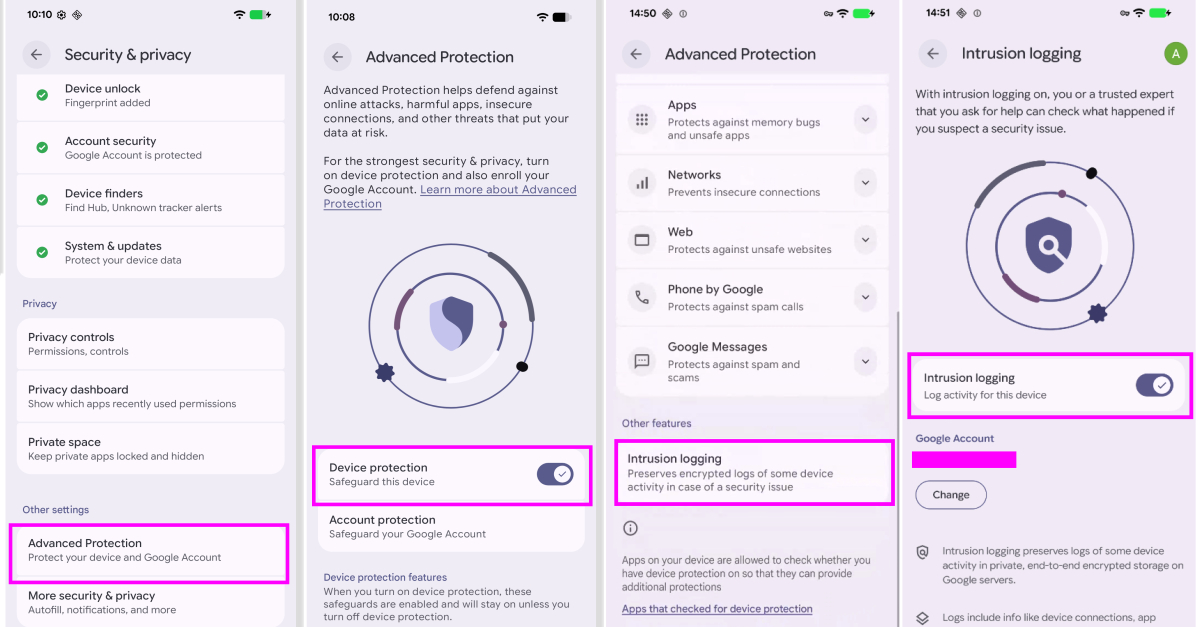
On Tuesday, Google introduced an optional new Android feature called Intrusion Logging, designed to store forensic logs that help investigate complex spyware attacks on devices.
Intrusion Logging is included as part of Advanced Protection Mode. According to Google, it creates continuous forensic logs while maintaining user privacy, allowing devices to be examined if a suspected compromise occurs.
The company shared that this feature was created with input from Amnesty International and Reporters Without Borders. A Google help document explains that it records daily device and network behavior, capturing details about how apps and device functions operate.
Here is a breakdown of the activities that are tracked:
- App usage (for example, when an app starts running)
- Installing, updating, or removing apps
- Network activity such as turning Wi-Fi or Bluetooth on and off, DNS queries, and IP addresses used
- Files sent to or received from the device via USB
- Modifications to system certificates
- Device lock and unlock events
Google also clarified that all log data is encrypted directly on the device before being saved to Google’s servers. The decryption keys are tied to your Google Account password and screen lock credentials, ensuring that no outside party, even Google, can read your logs.
“Because data is stored securely on a remote server, any malware on the smartphone cannot reach, erase, or tamper with it,” explained Reporters Without Borders. “End-to-end encryption prevents Google or government agencies from accessing the logs. This feature specifically makes it possible to detect and investigate even highly advanced and rarely noticed attacks.”
The encrypted records are preserved for 12 months before being automatically deleted. After enabling Intrusion Logging, you cannot delete stored logs before this 12-month period ends, even if you deactivate the feature or close your account. Users who wish to store logs for longer can download them offline.
However, Google warned that once logs are downloaded and decrypted, users must take responsibility for their protection. “Depending on the legal regulations in your location, you may be required to provide access to your decrypted data or security credentials,” it noted.
Another important detail is that this feature also logs DNS queries and IP connections made during Chrome Incognito mode, as it works at the operating system level and treats all browsing modes the same. This means anyone with access to decrypted logs might see which domains were visited, but not the exact web pages accessed.
The main goal of Intrusion Logging is to help high-risk individuals who believe they may have been targeted with advanced surveillance due to their identity or work to share these activity logs with trusted experts for thorough analysis.
You can access your logs by opening the Settings app, then navigating to Security & privacy → Advanced Protection → Intrusion Logging → Access logs. The feature is currently rolling out to all Android devices running the December security update and later versions.
“With Intrusion Logging, Google becomes the first major company to tackle the problem of identifying advanced attacks on mobile devices,” said Donncha Ó Cearbhaill, head of Amnesty International’s Security Lab. “By providing more user-consented forensic data to researchers, we can hinder attackers and assist civil society in seeking justice when spyware or data extraction tools are illegally used against them.”
Additional Privacy and Security Updates for Android
Alongside Intrusion Logging, Google has announced several new security and privacy enhancements. These include verified financial calls—a feature that helps fight phone scams where fraudsters pretend to be banks to steal sensitive information or money.
If you receive a call from a verified banking number, Android will check your installed online banking app to confirm whether the bank is actually trying to reach you. If no contact is expected, the call will be blocked automatically.
“Banks may also mark certain numbers as inbound-only, meaning they only receive calls from those numbers,” Google said. “Any incoming call from such numbers will be blocked right away.” This feature should arrive soon on Android 11+ devices with Revolut, Itaú, and Nubank, with more banks joining later this year.
Here are the other key updates:
- Extending Live Threat Detection to warn about risky app behaviors like SMS forwarding or accessibility overlays—common tactics used by banking trojans to steal login details.
- Checking downloaded APK files through Chrome on Android for malware when Safe Browsing is active before installation.
- Blocking non-accessibility apps from using the accessibility services API.
- Disabling device-to-device unlocking and Chrome GPU rendering support.
- Adding scam alerts for chat notifications.
- Improving Find Hub’s “Mark as lost” tool—allowing you to lock your phone with biometrics and prevent thieves from disabling tracking. Activating “Mark as lost” also hides Quick Settings and stops new Wi-Fi and Bluetooth connections.
- Limiting how often someone with physical access can guess your PIN or password, with increasing delays after each failed attempt.
- Making your device’s IMEI number visible from the lock screen on Android 12+ for easier recovery.
- Stricter privacy controls, such as sharing precise location only while a specific app is open, or giving apps access to selected contacts instead of your whole address book.
- Introducing AISeal with pKVM for hardware-level isolation of AI-related data processing on the device.
- Expanding Binary Transparency in Android to verify official builds and maintain a public record of legitimate Google apps and core GMS APIs.
- Hiding SMS one-time passwords from most apps for three hours to prevent theft by malicious apps with SMS permissions.
- Allowing carriers to disable 2G connections by default to protect against risks from outdated network technology.
- Strengthening data security with post-quantum cryptography to defend against future threats.
- Adding clear user controls for opting in or out of features, safety measures, and transparency when using Gemini on Android.
“By boosting defenses against banking fraud and extending powerful tools like Live Threat Detection and Android Advanced Protection, we’re making sure Android stays the world’s most secure platform,” stated Eugene Liderman, director of Android security and privacy.
