



# Privacy-First AI Assistants: Integrating Confidential Models Directly Into Your Workflow
Data professionals live inside their web browsers. A typical afternoon might involve parsing technical documentation, reviewing unreleased model architectures, analyzing research papers, and synthesizing client reports—often simultaneously. As AI tools have become ubiquitous alongside this work, the trade-off between convenience and data security has grown harder to ignore.
Mainstream browser-based AI tools, while powerful, carry inherent privacy risks. Consumer-tier assistants from major search engines frequently use conversation data to refine their models, and some employ human reviewers to audit selected chats. Research-oriented tools route queries and page content to centralized cloud servers for processing. For casual use, these trade-offs are often acceptable. But when your workflow involves proprietary datasets, sensitive business intelligence, or confidential client research, exposing that data to the cloud is a liability.
This is where a new class of browser-integrated AI assistants changes the game. Rather than operating as a separate cloud service that pulls your data away, these tools are built directly into the browser architecture itself—processing requests without storing, logging, or using your inputs for model training. The result is an AI workflow where sensitive content never persists beyond your active session.
## Why Architecture Matters for Data Privacy
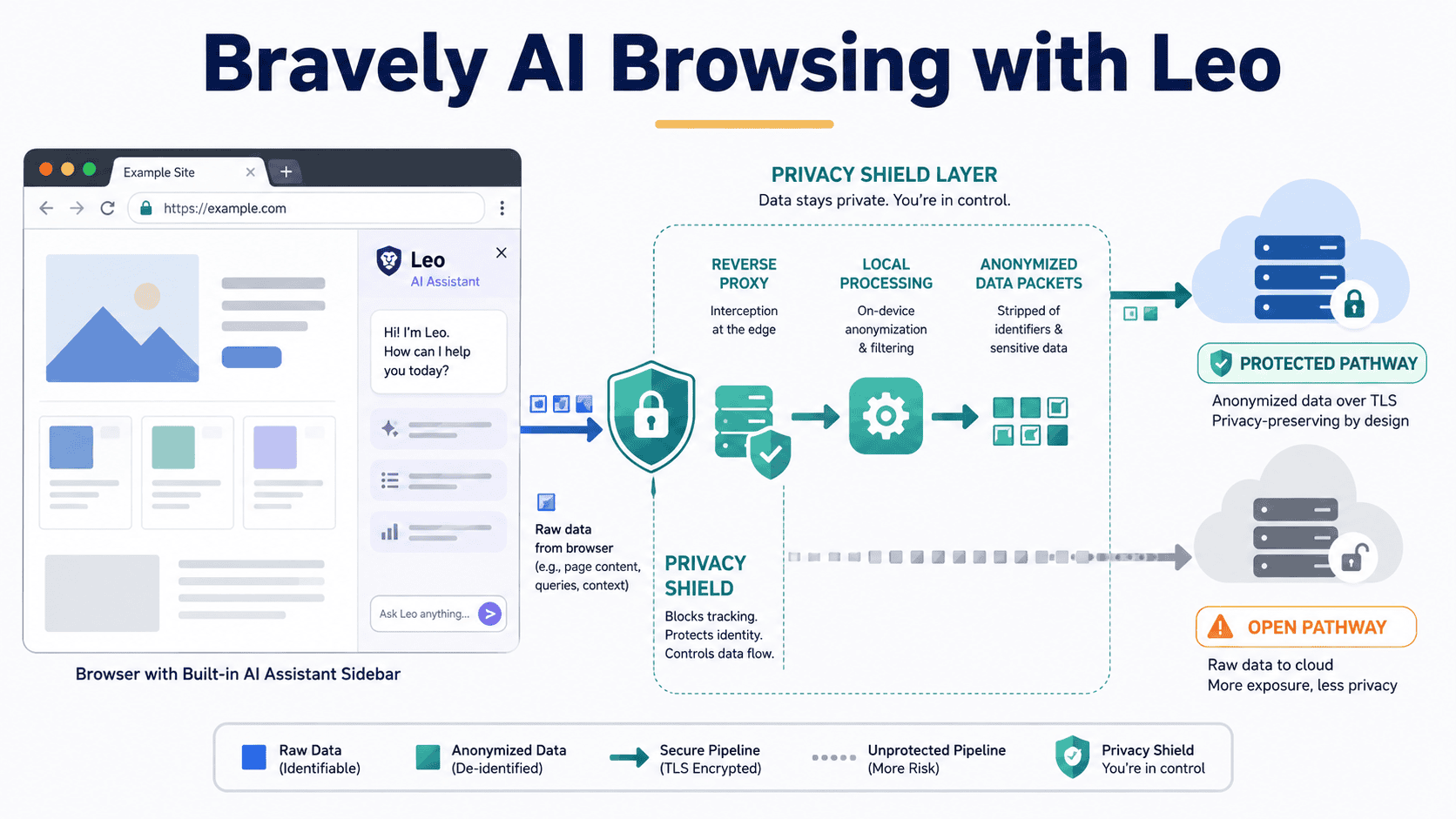
The difference between a standard cloud AI and a browser-native assistant is structural. When using traditional cloud-based tools, your queries and the content of your current webpage travel from your device to remote servers. Even if the provider promises not to store the data, it traverses the public internet and lands on machines outside your control.
A privacy-first browser assistant operates differently by design. Queries pass through a reverse proxy that actively strips your IP address before reaching the underlying language model. Once the assistant generates a response, the conversation is immediately discarded from the server. No account is required to use the base tier, meaning there is no user profile linked to your activity. No inputs are retained or fed back into model training. This architecture ensures that pasting a proprietary dataset schema, asking questions about an internal document, or working through unreleased research leaves no trace on the provider’s infrastructure.
## Getting Started and Model Selection
This type of assistant is available natively on Windows, macOS, Linux, Android, and iOS, built on the same open-source engine as major browsers. Transitioning is frictionless—your existing bookmarks, passwords, and extensions import automatically, and accessing the AI is as simple as clicking a sidebar icon or using a toolbar button. No login is ever required.
The free tier includes a robust lineup of models suitable for daily professional tasks. You get access to Meta’s Llama 3.1 for general reasoning, Alibaba’s Qwen 3 for multilingual and structured tasks, and Anthropic’s fast Haiku model for quick summarization, alongside various open-source options. For most documentation review, paper summarization, and code explanation, this is more than sufficient.
For professionals who need deeper reasoning, a premium tier is available at a modest monthly cost. This unlocks more advanced models like Claude’s Sonnet and DeepSeek’s R1, along with higher rate limits during peak usage. It is worth noting that upgrading to premium does not alter the underlying privacy architecture; payment information is handled via a credential-based token system that keeps financial data entirely separate from chat activity. Persistent chat history is an opt-in feature even for paying users, allowing you to maintain the default behavior of immediate deletion if you prefer.
Additionally, recent developments include a local-first model that runs inference entirely on your hardware, ensuring content never leaves your machine, and a “Bring Your Own Model” feature that allows you to plug in your own API keys for third-party or local models directly within the browser environment.
## Core Workflows for Analysts and Engineers
The standout feature of a browser-native AI is its page awareness. Unlike standalone chatbots that require you to manually copy and paste text, the assistant reads the active tab in real time. This fundamentally changes how you interact with information.
**Summarizing Technical Documents**
Open an academic paper, a model card, or dense API documentation, and ask the assistant to extract specific details. You can prompt it to break down a page into sections—such as training methodology, known limitations, and recommended use cases—without ever leaving the tab or copying a single line of text.
**Interrogating PDFs and Spreadsheets**
The assistant natively processes PDFs, Google Docs, and Google Sheets opened in the browser. When reviewing a third-party data dictionary or a methodology proposal, you can ask targeted questions about data collection methods, sample sizes, or column definitions directly from the document interface.
**Accelerating Video-Based Learning**
For professionals who consume educational content on video platforms, the assistant can read the transcript of a playing video. Instead of watching a lengthy technical talk in its entirety, you can ask for a summary of the core contributions or experimental setup, allowing you to skip to the exact sections that matter.
**Code Generation and Explanation**
You can highlight a complex function within documentation and ask the assistant to explain its logic, then immediately ask for a working implementation in your preferred programming language. Because the assistant is aware of the page you are viewing, it can align the generated code with the patterns described in the documentation.
## Advanced Capabilities
Beyond basic page reading, the assistant offers several features that enhance complex research workflows. Multi-tab context allows the AI to draw information from several open tabs simultaneously, which is invaluable when comparing two papers or cross-referencing an API guide against a tutorial. Tab focus mode lets you anchor the assistant to a specific authoritative source while keeping other tabs open for reference.
Customizable prompt chains, known as skills, allow you to save frequently used workflows—such as “extract evaluation metrics, then list the methodology, then note any biases”—and run them against any open page with a single click. An experimental autonomous browsing feature is also emerging, allowing the assistant to navigate and complete multi-step research tasks within an isolated browser profile, all while keeping the privacy model intact.
## When to Use What: A Practical Framework
Integrating this tool effectively means knowing when it is the right choice and when a different approach is better. Use the browser-native assistant as your default for daily reading, documentation work, and any task involving sensitive or proprietary material. It excels when you need AI assistance without creating accounts, when you want to avoid copying content into external tools, and when you need to process multiple documents in a single session.
For live, citation-heavy research on public topics, a dedicated web-search AI remains superior. These tools crawl the internet autonomously to find current information and provide source attribution, which the browser-based assistant cannot do since it relies solely on the content of your current tabs. For maximally sensitive content that should never touch an external server, running a local model directly on your machine is still the gold standard.
## Limitations to Acknowledge
No tool is without trade-offs. The browser-based assistant does not autonomously search the web; if you ask for the latest updates on a library, it can only respond based on the page currently open or its training data. It cannot generate images, and its voice interaction features are limited to basic text input on mobile devices. By default, it lacks persistent memory across sessions, meaning you must manually provide context for each new conversation. Finally, the assistant is confined to its native browser and cannot be installed as an extension on competing platforms. On the free tier, response quality for highly complex technical tasks can also be inconsistent, which is where the premium models offer a noticeable upgrade.
## Frequently Asked Questions
**Do I need to create an account to use the free tier?**
No. The base functionality is entirely account-free. You can start using the assistant immediately upon installing the browser, with no sign-up or personal data required.
**Does paying for the premium tier compromise my privacy?**
No. The privacy architecture remains identical regardless of your subscription level. Payment credentials are tokenized and kept completely separate from your chat activity. Even premium users remain unlinkable to their AI interactions unless they explicitly opt into persistent chat history.
**Can the assistant process video content?**
Yes. When a YouTube video is open in the browser, the assistant can access its transcript to summarize key points, extract technical details, or outline conclusions without requiring you to watch the entire video.
**What happens if I ask about something the current webpage doesn’t cover?**
The assistant will work only with the content available on the open tab and the knowledge embedded in its underlying model. It will not autonomously search the web for supplementary information. You would need to open a new tab with the relevant information for it to analyze.
**Is it possible to use my own language models with this setup?**
Yes. Through a Bring Your Own Model feature, you can connect local models via Ollama or integrate third-party API keys, allowing you to use models outside the default lineup while remaining within the browser’s secure environment.
## Conclusion
For data professionals, the choice is no longer between convenience and privacy; it is about adopting tools designed to offer both. A browser-native AI assistant eliminates the friction of copying sensitive information into third-party cloud services while still providing the page-awareness and model capabilities needed for daily technical work. By understanding its architecture, leveraging its advanced features, and knowing its limitations, you can build a workflow that keeps proprietary and client data strictly within your control—making AI assistance a safe default rather than a careful exception.
Thank you for reading
