



# Google’s Gemini Notebook Now Lets You Add Books from Google Play as Research Sources
Google has expanded the capabilities of its Gemini Notebook tool by introducing support for books purchased through Google Play. This new feature allows users to enrich their AI-powered research with literary sources, generating reports, slideshows, quizzes, audio podcasts, and more — all grounded in the content of the books they own.
## What’s New with Gemini Notebook and Google Play Books
The integration lets users import ebooks they’ve purchased from Google Play directly into a Gemini Notebook. Once a book is added as a source, you can ask the AI questions about its content and receive answers that are specifically grounded in that book. Beyond Q&A, the tool can generate a variety of creative outputs, including infographics, audio overviews, quizzes, thematic guides, and narrative primers — all derived from the imported text.
The catalog of eligible books is substantial, with over 100,000 titles currently supported from major publishing houses such as Bloomsbury, De Gruyter Brill, Johns Hopkins University Press, Macmillan Publishers, O’Reilly Media, and Penguin Random House. Google has also partnered with more than fifteen bestselling authors to create featured notebooks that supplement supported titles with additional context and insights, available to anyone who signs in to their Gemini Notebook page.
## How the Integration Works
To use the feature, you must first own the book through Google Play. At your Gemini Notebook page, you can create a new notebook or open an existing one and use the sidebar to add a source. Selecting Google Play Books lets you browse eligible titles. Supported books appear at the top of the list, while unsupported titles show below. Once you choose a book, you can add it as a source and begin exploring its content through questions, summaries, or creative outputs.
An important limitation to be aware of is that book access is tied to ownership. When you share a notebook with someone else, the imported book won’t be available to them. The recipient will be prompted to purchase their own copy before they can interact with the book’s content within the notebook.
## Finding Eligible Books
There are several ways to identify which books qualify for the integration before making a purchase. Google’s Expert Intelligence page features a carousel of supported titles at the bottom, and currently offers a limited-time promotion where you can claim one free book to start building your collection. You can also check individual book pages in Google Play Books by clicking the Tools icon — if the book is eligible, Gemini Notebook should appear as an option. Additionally, within Gemini Notebook itself, you can browse the Google Play catalog directly to discover compatible titles.
## Putting Expert Intelligence to Work
The new book integration is the first phase of Google’s broader Expert Intelligence initiative, which aims to help users better understand books, authors, and subjects while incorporating them as sources in larger research projects. In the near future, Google plans to extend support to additional Google products beyond Play Books, as well as third-party subscriptions and textbooks.
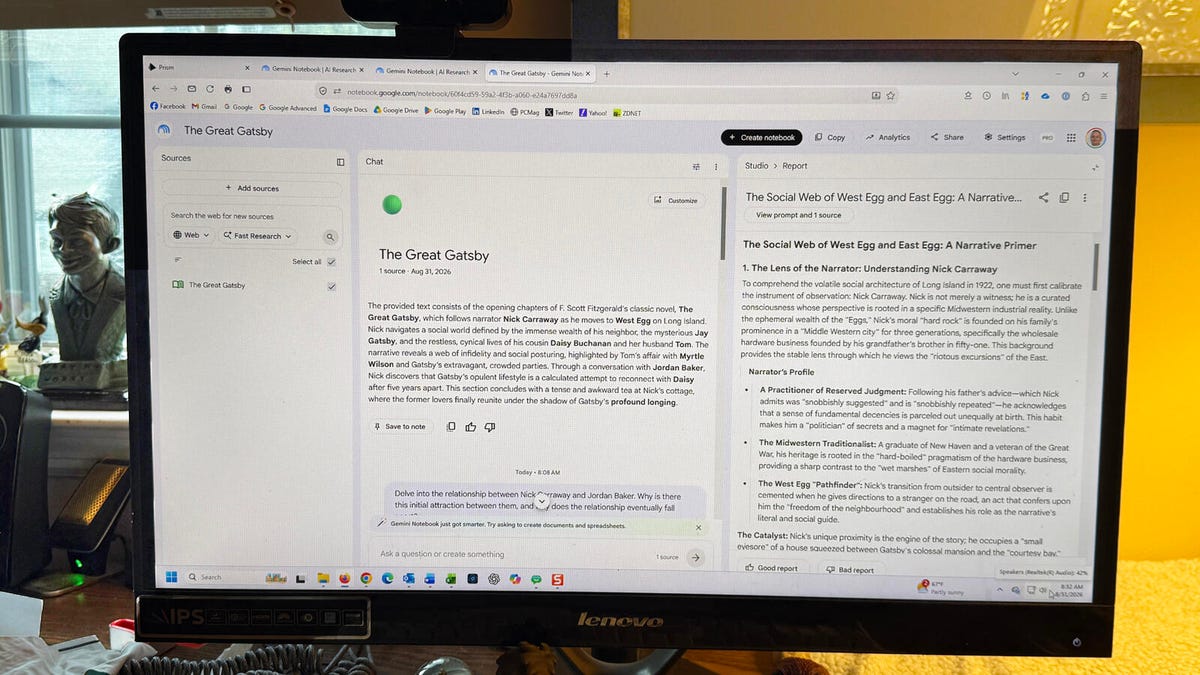
Users can put this feature to work in numerous ways. For example, adding a classic novel like *The Great Gatsby* to a notebook allows the AI to analyze character relationships, motivations, and themes, then generate a formatted report in a style of your choosing — whether a document, study guide, blog post, or thematic guide. Importing multiple novels by the same author, such as Charles Dickens’ *Great Expectations*, *A Tale of Two Cities*, and *Oliver Twist*, enables cross-book analysis of recurring themes like institutional hypocrisy, the resilience of childhood, and the flaws of the legal system. The AI can even produce an audio podcast-style conversation between two hosts discussing these themes across all imported books.
Users can also blend different types of sources. By combining websites, Word documents, and a purchased Google Play book on a single topic — such as the relationship between humans and artificial intelligence — the notebook can draw from all materials to produce cohesive summaries, analyses, and audio overviews that cite specific passages and insights from each source.
## FAQ
**Q: Do I need to pay extra to add books from Google Play to Gemini Notebook?**
A: No. You only need to own the book through Google Play. The integration itself is free, but purchasing a book is required to add it as a source. Google occasionally offers free eligible titles through promotions on the Expert Intelligence page.
**Q: Can I share a notebook that contains a Google Play book with someone who doesn’t own it?**
A: Yes, you can share the notebook, but the recipient will not be able to access the book’s content unless they purchase their own copy. They will be prompted to buy it when they try to interact with the book within the shared notebook.
**Q: Are all books available on Google Play eligible for Gemini Notebook?**
A: No. Only a subset of books from participating publishers and authors are currently supported. Google has been gradually expanding the catalog, which currently includes over 100,000 titles.
**Q: What types of outputs can Gemini Notebook generate from a book?**
A: The tool can generate summaries, infographics, audio overviews (podcast-style conversations), quizzes, study guides, blog posts, narrative primers, thematic guides, and landscape analyses — all based on the content of the imported book.
**Q: Can I mix books with other types of sources in the same notebook?**
A: Absolutely. You can combine Google Play books with websites, documents, images, audio files, and videos within a single notebook for comprehensive research.
**Q: What is Expert Intelligence?**
A: Expert Intelligence is Google’s broader initiative designed to help users understand books, authors, and subjects more deeply, and to incorporate them as sources in larger research projects. The Google Play Books integration in Gemini Notebook is the first step of this initiative.
**Q: How do I know if a specific book is supported?**
A: You can check the Expert Intelligence page on Google, look at the book’s page in Google Play Books under the Tools menu, or browse the Play Books catalog within Gemini Notebook itself. Note that in some cases, the eligibility indicator in Google Play Books may not yet be updated.
## Conclusion
The addition of Google Play Books support to Gemini Notebook represents a significant step forward in AI-powered research and learning. By allowing users to draw directly from their personal ebook libraries, the tool bridges the gap between casual reading and deep, structured analysis. Whether you’re exploring a single classic novel, comparing themes across an author’s body of work, or blending literary sources with web content and documents, the integration opens up new possibilities for how we engage with written material. As Google continues to expand Expert Intelligence with more products and third-party content, this feature points toward a future where AI assistants become indispensable research companions for readers, students, and lifelong learners alike.
Thank you for reading
